ChatGPT
 Perplexity
 Gemini
 Claude
 Grok
Grok
Mi Account Lock is not a small setup error. It is Xiaomi’s way of protecting a phone after reset, theft, or unauthorized use. But for real users, it can become a real problem when the password is forgotten, the linked number is gone, or the seller cannot be reached.
In 2026, finding a Mi account bypass tool is also harder because many old YouTube tricks no longer work well on HyperOS. The safer path is not about chasing the fastest unlock claim. It is about knowing which routes are official, which ones are guided, and which ones may put your phone at risk.
This article reviews safe Mi bypass choices and helps you judge the best Mi unlock tool 2026 with confidence.
In this article
Part 1. Mi Account: The Xiaomi Login That Can Lock or Unlock Your Phone
A Mi Account is the main account used on Xiaomi, Redmi, and POCO phones. It works like a Gmail account on many Android devices. Once you sign in, it connects the phone with Xiaomi’s services and account features.
Through a Mi Account, users can access:
- Mi Cloud data sync
- Phone tracking
- Device lock
- Xiaomi themes
- Games
- Flash sales
- Mi F-codes
- Other Xiaomi services
This makes the Mi Account useful for daily phone use. It helps users sync data, manage services, and use Xiaomi’s built-in features from one account.
The issue begins when the account is no longer accessible. A user may forget the password, lose the linked phone number, or buy a second-hand phone that still has the previous owner’s account attached. After a reset, the phone may ask for the same Mi Account before setup can continue.
That is why many people compare recovery options and search for terms like "Mi account bypass tool" in 2026. But the goal should not be to bypass security blindly. The goal should be safe account access for the rightful owner. In this guide, safe Mi bypass means choosing a route that respects ownership, reduces risk, and avoids unsafe shortcuts.
Part 2. What does “safe Mi bypass” mean?
Create a safety framework before listing tools.
A safe Mi account bypass tool should have:
- clear company identity,
- clear workflow,
- Xiaomi/Redmi/POCO model support,
- no suspicious APK downloads,
- no fake “free unlock code” claims,
- support or refund policy,
- ownership-only use policy,
- lower risk than ROM flashing or sellers with unknown IMEI numbers.
Part 3. Official Xiaomi Fixes to Try Before Any Mi Unlock Route
Users may want to remove a Mi Account for different reasons. Some forget their passwords. Some lose access to the linked phone number or email address. Others face a locked screen after a reset. But removing or unlocking a Mi Account without the password is not always simple. So, it is better to start with Xiaomi’s official support options before looking for any Mi account bypass tool.
Option 1: Visit a Mi Service Center
The first official option is to visit a Mi Service Center. This is useful when you cannot remove the Mi Account yourself or do not remember the password.
Before going there, prepare a few things:
- Take your Xiaomi phone and related accessories.
- Save screenshots of any lock screen or error message.
- Check your device warranty status.
- Confirm the service center timing.
- Find the nearest Mi Service Center location.
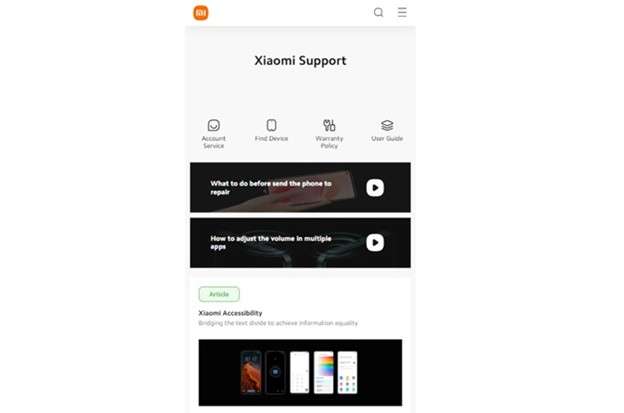
This option is safer because trained support staff can check your device and guide you through the next step. It is also a better choice if you want a safe Mi bypass path instead of using unknown shortcuts.
Option 2: Reset Your Mi Account Password
Forgetting a Mi Account password is common. If you still have access to your email, phone number, or Mi Account username and password, a password reset should be your first try.
Follow these steps:
-
1. Open the Mi Account sign-in page on your computer.
-
2. Click Forgot Password under the sign-in button.
-
3. Enter your email, phone number, or Mi Account username.
-
4. Click Next to continue.
-
5. Add any Mi Account details you remember.
-
6. Choose a verification option and click Send.
-
7. Enter the verification code you received.
-
8. Confirm your account.
-
9. Create a new password.
-
10. Click Submit to finish the reset.
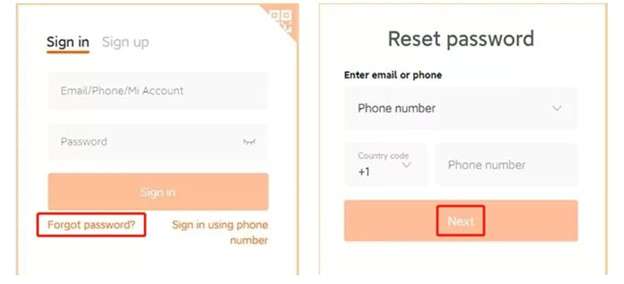
Once the password is changed, use the new details on your Xiaomi phone. This is often the simplest fix before comparing the best Mi unlock tool 2026 options.
Part 4. Top Mi Account Unlock Tools Users Compare in 2026
Not every Mi account bypass tool works the same way. Some are built for simple, guided use. Others are older Windows-based programs that need drivers, recovery mode, Fastboot, or ADB commands.
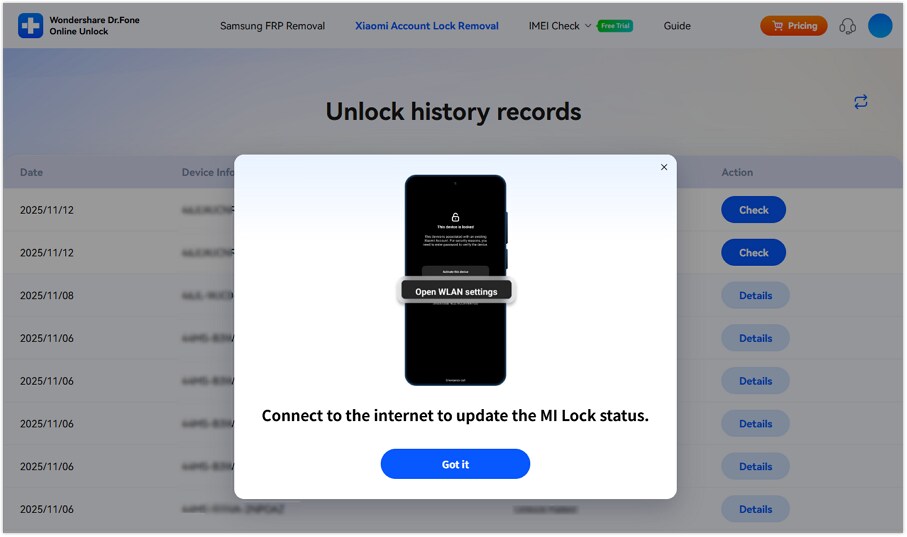
1. Best Tool - Dr.Fone Online Unlock
Through a comparative analysis of popular Mi unlock routes in 2026, they found that the best approach is to try Xiaomi's official recovery first. Go with a guided tool if the recovery does not work. The strongest pick for users who prefer a cleaner browser-based process over flashy tutorials or APKs is Dr.Fone Online Unlock.
Why Dr.Fone Fits the 2026 Use Case
Dr.Fone Online Unlock stands out because it avoids the risky things many users fear. It does not ask beginners to flash ROM files. It does not depend on random APK sideloading. It is browser-based and built around a guided workflow.
It is most suitable for:
- Users who forgot their Mi Account password.
- Users who lost access to the linked phone or email.
- Buyers with second-hand Xiaomi, Redmi, or POCO phones.
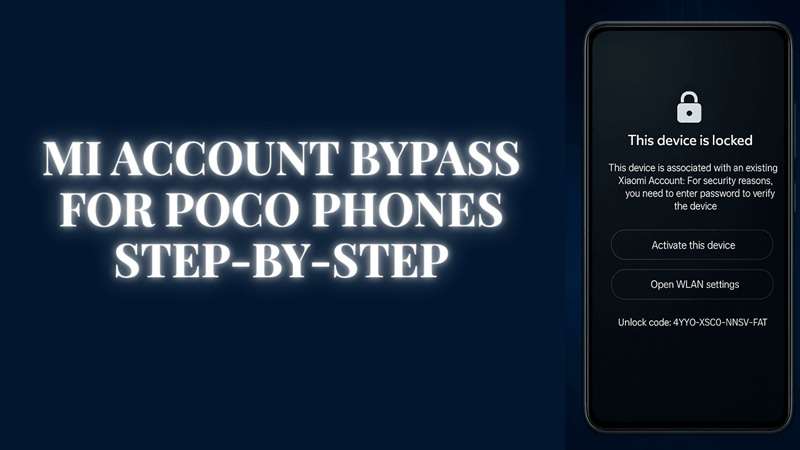
- Users are stuck on “This device is locked.”
- Users who tried the old MIUI APK methods that no longer work.
Dr.Fone Online Unlock Tutorial
Use this only for your own device or a device you legally purchased.
-
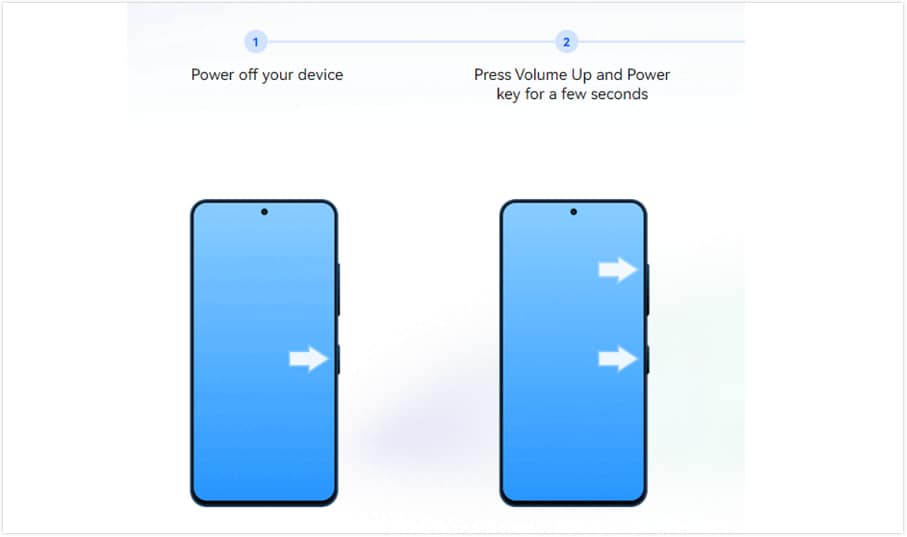
Step 1 First of all, switch off the Xiaomi, Redmi, and POCO phones. First, press and hold Volume Up + Power until the main menu appears. Now select Recovery Mode.
-
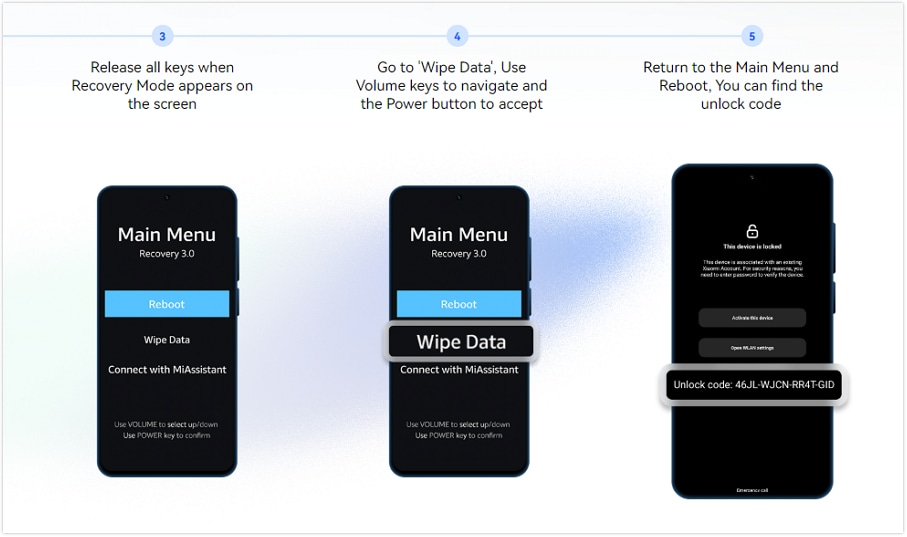
Step 2 Select Wipe Data using the volume keys and note the unlock code shown on the screen. If no code appears, restart the phone and tap the lock icon 10 times on the locked screen.
-
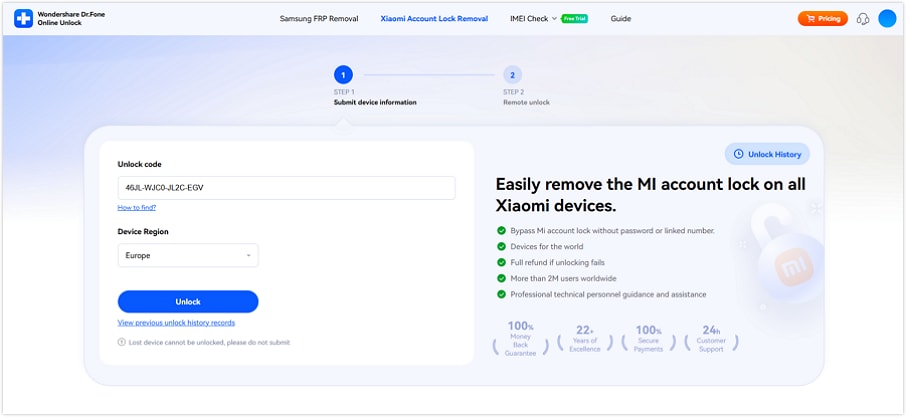
Step 3 To remove the Xiaomi Account Lock, you’ll need to visit the Dr.Fone Online Unlock page. Type the unlock code, select the device region, and click Unlock.
-
Step 4 Once you have successfully uploaded the documents. Look out for the email update, then restart setting up the phone.
2. Mi Account Unlock Tool for Older MIUI Phones
Mi Account Unlock Tool is one of the older names linked with Mi Cloud verification removal. It is made for users who cannot access their Mi Account login and want to disable the account lock on supported Xiaomi devices.
While it may seem basic, the Mi unlock tool 2026 is not always the best tool for newer phones. Unlock tools that were released a long time ago were built for older MIUI builds. So they might not be working well on MIUI 10 or newer versions.
- Helps users regain access when Mi Account login details are forgotten.
- Has a simple interface for basic users.
- Works on different Windows versions.
- It is possible to support some older Xiaomi Redmi and POCO models.
- MIUI 10 or higher may not be supported.
- Get it only from a reputable site.
- Needs updated Mi USB drivers on the PC.
- May fail on newer Xiaomi software and HyperOS.
Basic Use Flow
-
1. Obtain the Mi Account Unlock Tool from a reputable website.
-
2. To install the tool, follow the onscreen setup steps.
-
3. Ensure your PC has the latest Mi USB drivers installed.
-
4. Use your phone’s hardware buttons to enter Recovery Mode on the Xiaomi smartphone.
-
5. Use a USB cable to connect the phone to the computer.
-
6. Launch the tool and see if the device details appear.
-
7. When the device is not detected, make sure to check the USB wire and drivers.
-
8. Start the account unlock option inside the tool.
-
9. Wait for the process to finish.
-
10. The phone may restart once the process is complete.
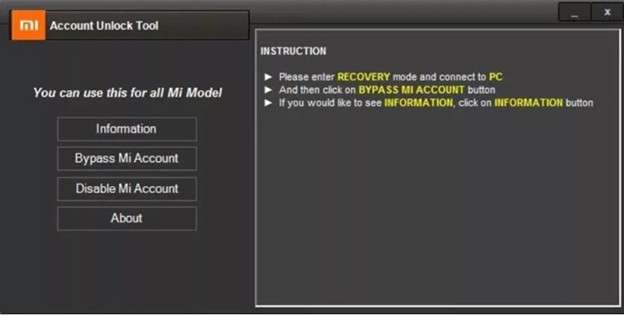
This option is mainly useful for older devices. For a safe Mi bypass in 2026, users should be careful with random download pages and outdated versions.
3. TPS Xiaomi Tool for Advanced Xiaomi Users
The TJ Solutions tool is another we often see mentioned in relation to unlocking Xiaomi devices. The Xiaomi MI Tool facilitates various Xiaomi operations such as FRP lock removal, Mi Account verification, bootloader operations, flashing firmware, and Device Check.
Program-familiarize yourself with the option. It is better suited for users who understand drivers, Fastboot, ADB, firmware, and Xiaomi device modes.
- Can handle Mi Account and FRP-related tasks on supported devices.
- Shows useful details about the connected Xiaomi phone.
- Offers several Xiaomi repair and management features in one place.
- Can help technicians manage Xiaomi troubleshooting tasks.
- Not beginner-friendly.
- Requires drivers and technical setup.
- May behave differently across models, firmware builds, and regions.
- Wrong use can cause errors, failed detection, or device issues.
Basic Use Flow
-
1. Download the TPS Xiaomi Tool on your computer.
-
2. Install the required Xiaomi Qualcomm and MTK USB drivers.
-
3. Extract the tool files on your PC.
-
4. Run the setup file and complete the installation.
-
5. Open TPS Xiaomi Tool.
-
6. Turn off your Xiaomi phone.
-
7. Enter Fastboot mode using the hardware button of the phone.
-
8. Connect the mobile using the USB cable to the PC and info.
-
9. If necessary, install the ADB and Fastboot drivers.
-
10. Enable USB debugging if the phone settings are accessible.
-
11. Check whether the tool detects the device correctly.
-
12. Use the device information option to confirm the connection.
-
13. Select the account lock option inside the tool only if your device is supported.
-
14. Follow the on-screen process and wait for completion.
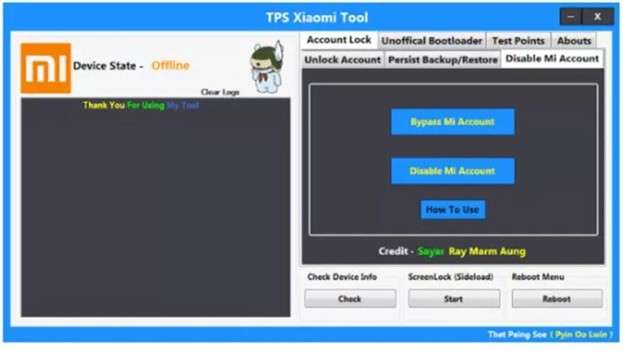
Although the TPS Xiaomi Tool can be beneficial for advanced users, it is not the safest choice for most. You can use the Mi account bypass tool on the latest Xiaomi, Redmi, or POCO devices, depending on compatibility, so check that first. Don’t download untrusted downloads.
Part 5. Comparison Table
Before choosing any route, compare the access level, software fit, setup requirements, and safety risks, as Mi Account Lock cases vary by ownership, model, and system version.
| Method / Option | Best For | Access Needed | Main Risk |
|---|---|---|---|
| Mi Account Password Reset | Users who still have their linked email, phone, or Mi Account details | Recovery phone, email, or account ID | Won’t help if the recovery info is lost |
| Mi Service Center | Owners with proof, invoice, or device documents | Phone, proof, screenshots, warranty details | May take time and may need proof |
| Dr.Fone Online Unlock | Non-technical users stuck on Mi Account Lock after reset | Device unlock code and region details | Paid service; must use only on owned devices |
| Mi Account Unlock Tool | Older Xiaomi / Redmi / POCO models on older MIUI builds | USB connection and drivers | Outdated builds, unsafe download sources, driver failure |
| TPS Xiaomi Tool | Advanced users or technicians handling Xiaomi repair tasks | Drivers, Fastboot / ADB setup, supported model | Wrong command, failed detection, firmware or mode mismatch |
Conclusion
Mi Account Lock needs the right fix, not the loudest unlock claim. Password reset is best when your email or phone still works. A Mi Service Center is better when you have proof of purchase. Older Windows tools may fit old MIUI phones, while the TPS Xiaomi Tool suits skilled users who understand drivers and device modes.
For most locked-out Xiaomi, Redmi, and POCO users, Dr.Fone Online Unlock feels more practical because it avoids APK files, flashing steps, and complex setup. That makes it a stronger Mi account bypass tool when official recovery fails and a cleaner safe Mi bypass choice for rightful owners.
FAQ
-
1. What is the safest Mi account bypass tool in 2026?
Xiaomi’s official unlock appeal is the safest first route. If it fails, Dr.Fone Online Unlock is a cleaner guided option because it uses an online process instead of random APK files. -
2. Is Dr.Fone Online Unlock safe for Mi Account removal?
Yes, for owned or legally purchased devices. Dr.Fone uses a browser-based process and unlock code from Recovery Mode, so it is safer than unknown APKs or Telegram services. -
3. Do free Mi account bypass tools still work?
Mostly on older MIUI phones only. They often fail on newer MIUI or HyperOS and may carry malware or adware risks.