ChatGPT
 Perplexity
 Gemini
 Claude
 Grok
Grok
A Xiaomi phone can look normal after a reset, but the setup screen may stop you with one line: “This device is locked.” This is not a simple screen password issue. It usually means the phone is still linked to a Xiaomi Account. On HyperOS, this lock can feel harder because many old MIUI tricks no longer work. Newer Xiaomi, Redmi, and POCO phones use stronger account checks, updated security patches, and tighter setup protection.
This guide explains what the lock means, why Xiaomi HyperOS lock bypass is different from older methods, and which safe fixes you should try first. It also shows when third-party tools can be useful for genuine owners.

In this article
Part 1. What is HyperOS Mi Account Lock?
HyperOS Mi Account Lock is Xiaomi’s activation protection for newer Xiaomi, Redmi, and POCO phones. It appears when a device is wiped, reset, or flashed while it is still linked to a Xiaomi Account and Find Device is enabled.
After wiping data, Xiaomi may require the password of the Xiaomi Account previously bound to the device. This is done to protect user data and stop unknown users from opening the phone after a reset.
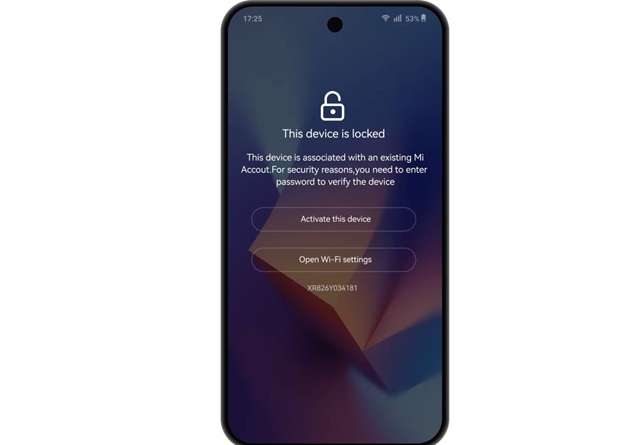
So, the lock is not a software bug. It is a security layer. It can appear after:
- Factory reset from recovery mode
- Wiping data without removing the Xiaomi Account first
- Flashing firmware or ROM
- Buying a second-hand phone is still linked to the seller’s account
- Losing access to the old Xiaomi email or phone number
For real owners, the HyperOS Mi account unlock should start with official recovery methods. Random APK files, fake unlock codes, and old flashing videos can make the issue worse.
Part 2. Why is Xiaomi HyperOS lock bypass different from older MIUI methods?
Older MIUI bypass videos often used shortcuts, hidden menus, browser jumps, or APK files. Some of those methods worked on older builds because the setup screen had weaker restrictions.
HyperOS is different.
Many Android 14, Android 15, and newer Xiaomi builds are compatible. Recent security updates have fixed several outdated loopholes. Setup protection has become more rigid, which means the phone offers fewer ways of opening settings, installing apps, or skipping account checks before activation.
This means an MIUI 12 or MIUI 13 exploit could have no effect or can fail on HyperOS. Even when the phone brand is the same, the result can change by:
- Android version
- HyperOS version
- Security patch date
- Device region
- Model family
- Find Device status
- Xiaomi Account server response
That is why Xiaomi HyperOS lock bypass needs a safer and more current approach. Use the exact device model and software version as your guide, not a random video title.
Part 3. HyperOS Model and Version Quick Reference
Since HyperOS updates vary by model, Android version, region, and security patch, this quick reference helps match common Xiaomi, Redmi, and POCO lock cases with safer recovery routes first.
| Device Family | Example Models | Likely Software Status | Common Lock Scenario | Recommended First Fix |
|---|---|---|---|---|
| Xiaomi Flagship Series | Xiaomi 13, Xiaomi 14, Xiaomi 15 series | HyperOS / HyperOS 2 or newer, depending on model and region | Phone was reset while Find Device was still enabled | Xiaomi password reset or official unlock appeal |
| Xiaomi T Series | Xiaomi 13T, Xiaomi 14T, Xiaomi 15T series | HyperOS builds vary by region; newer T models may receive newer Android-based HyperOS updates first | User forgot the Xiaomi Account password or lost access to the linked recovery details | Xiaomi Account recovery or unlock appeal |
| Redmi Note Series | Redmi Note 12, Redmi Note 13, Redmi Note 14 series | Some models run HyperOS or HyperOS 2, but the update status depends on the variant and market | The used phone asks for the previous Xiaomi Account after reset | Ask the previous owner to remove the device from Xiaomi Cloud |
| Redmi Number Series | Redmi 12, Redmi 13, Redmi 14 series | HyperOS availability depends on the exact model, variant, and region | Factory reset triggers “This device is locked” screen | Password reset, Xiaomi appeal, or service center support |
| POCO F Series | POCO F5, POCO F6, POCO F7 series | HyperOS / HyperOS 2 or newer on supported models; rollout varies by market | Wipe, reset, or ROM flash causes Mi Account Lock | Xiaomi appeals first; Dr.Fone Online Unlock if official access is unavailable |
| POCO X Series | POCO X6, POCO X7 series | Newer POCO X models are commonly listed among HyperOS-supported devices | The owner forgot Xiaomi Account details after resetting | Xiaomi password reset or Dr.Fone Online Unlock |
| POCO M Series | POCO M6, POCO M7 series | HyperOS support depends on the model and the regional rollout | Budget POCO device locked after reset, or seller account not removed | Previous owner removal, Xiaomi appeal, or Dr.Fone Online Unlock |
Technical Note: HyperOS vs MIUI
MIUI guides may not always work on HyperOS. HyperOS has newer setup protection and tighter account checks. Android version, region, security patch date, and model number can affect the unlock result.
Old APK-based tutorials are especially risky. Many ask users to install unknown files, change settings during setup, or flash files without knowing the build. That can lead to boot loops, data loss, or a still-locked phone.
Part 4. Proven Fixes for Xiaomi HyperOS Mi Account Lock
A safe HyperOS Mi account unlock path should follow this order: official recovery, Xiaomi appeal, previous owner removal, service center help, and then a trusted guided tool if official access is no longer possible.
Method 1: Remove the Device from the Xiaomi Web Portal to Unlock Mi Account
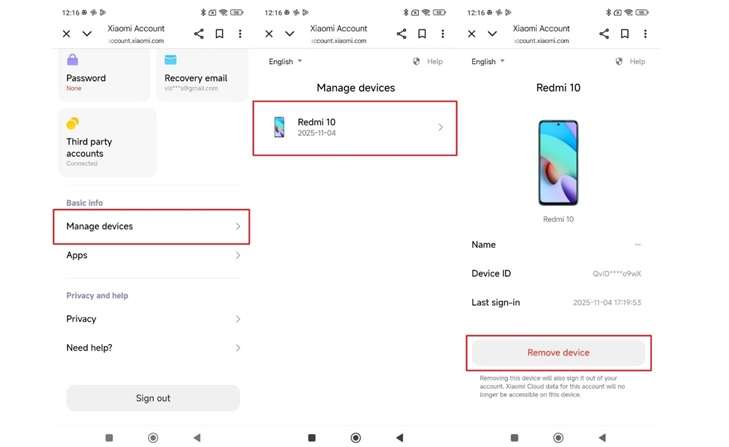
The Xiaomi web portal gives users an official way to remove a linked device online. When you sign in with the same Xiaomi Account, you can see the phones connected to that account. If you remove a device there, it is no longer linked with Xiaomi Cloud and Find Device.
This method is useful before selling a phone. It can also help when the owner wants to remove the device remotely. For a safe HyperOS Mi account unlock, this should be tried only when you can access the same Xiaomi Account already linked to the phone.
-
Step 1 Open the Xiaomi web portal and sign in with your Xiaomi Account.
-
Step 2 Go to the Manage Devices section.
-
Step 3 Find the Xiaomi, Redmi, or POCO phone linked to your account.
-
Step 4 Select the device you want to remove.
-
Step 5 Click Remove Device to unlink it from your Xiaomi Account.
-
Step 6 Restart the locked phone and check whether the setup screen lets you continue.
Cons
- It will not help if the phone is linked to someone else’s Xiaomi Account.
- You must log in to the same Mi Account that is already connected to the device.
Method 2: Unlock Your Mi Account via Forgot Password
The Forgot Password option helps you reset the Xiaomi Account password. After setting a new password, you can use the updated login details on the locked phone. This method is useful for unlocking the HyperOS Mi account when you still have access to the registered email, phone number, or Xiaomi Account ID.
-
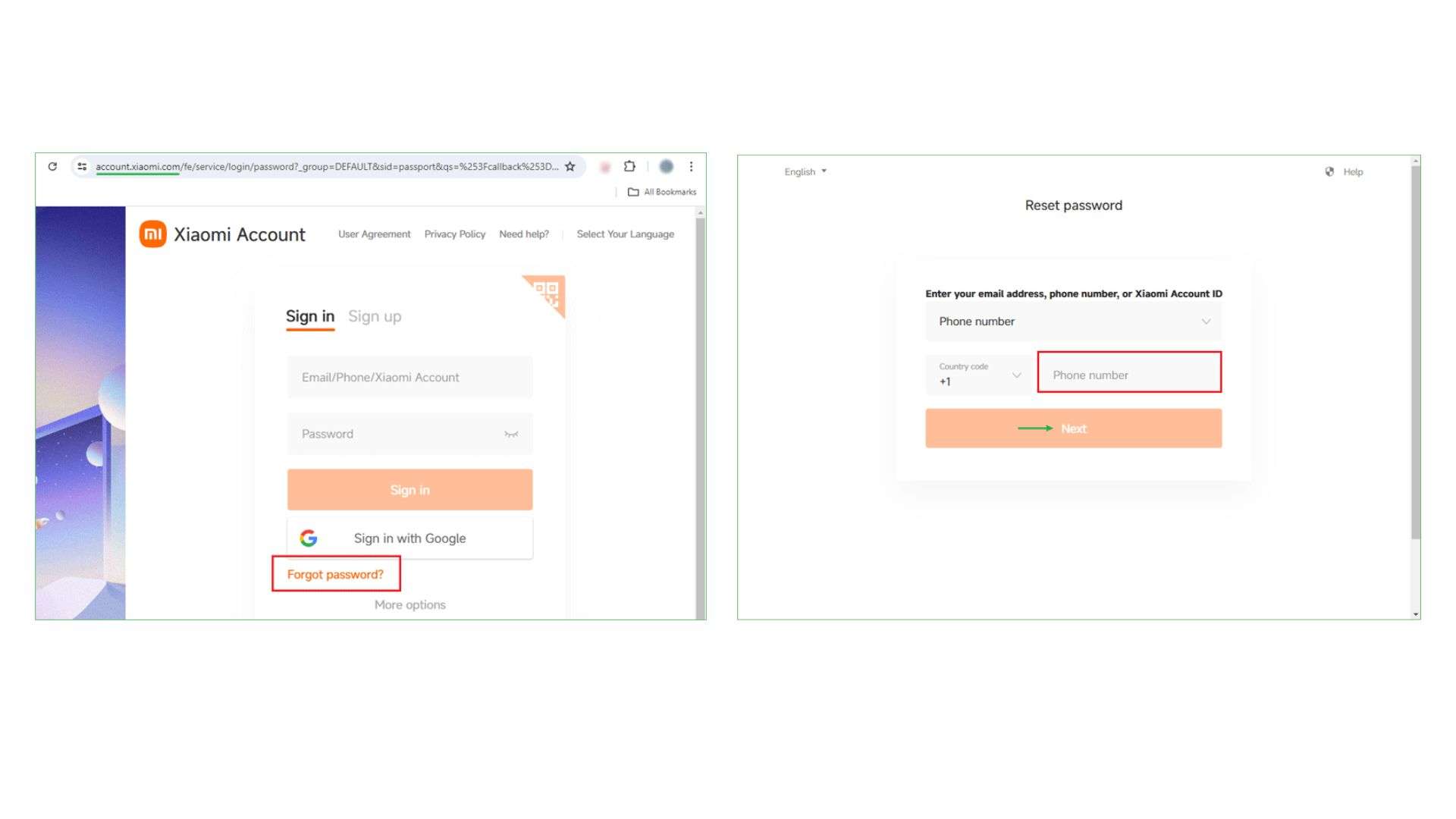
Step 1 Open account.xiaomi.com in your browser and tap Forgot password under the sign-in box.
-
Step 2 Enter the phone number, email, or Xiaomi Account ID linked to the locked phone, then click Next.
-
Step 3 Tap Send, enter the verification code received by SMS or email, and press Submit.
-
Step 4 Create a new password, submit it, then return to the locked Xiaomi, Redmi, or POCO phone and sign in with the new password.
Limitations
- It only works if you can access the linked phone number or email.
- It will not help if the device is linked to another person’s Xiaomi Account.
Method 3: Contact Xiaomi Customer Support to Fix It
If you do not need the phone back right away, Xiaomi Customer Support can be a safe option. You can also visit a nearby Mi Service Center for help. This route is better than trying unsafe shortcuts, especially when your Xiaomi HyperOS lock bypass issue involves account access, lost recovery details, or the “This Device Is Locked” screen.
-
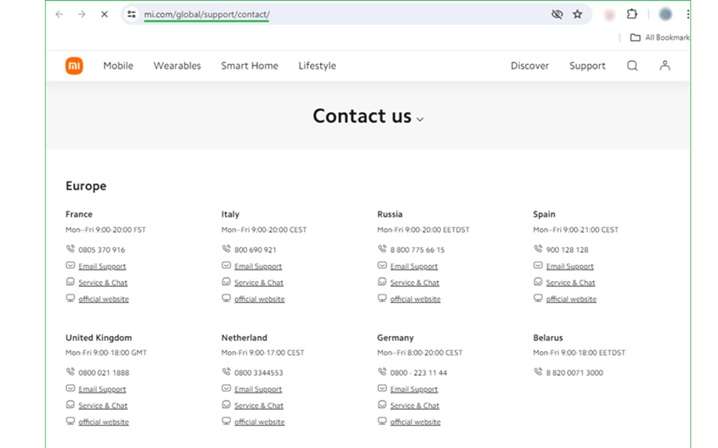
Step 1 Visit the official Xiaomi Support website and choose your country or region.
-
Step 2 Select a support channel like live chat, email, or phone.
-
Step 3 Tell them what Xiaomi wants to know. Tell them your phone says, “This Device Is Locked.”
-
Step 4 Ask them to add a new phone number or email to your Mi Account. If online support cannot help, visit a nearby Mi Service Center.
Limitations
- This method may take time, so it is not the fastest fix.
- It may not help if you cannot prove account or device ownership.
Method 4: Use the TPS Xiaomi Tool
TPS Xiaomi Tool is a PC software used to remove Mi Account limits. It supports Fastboot mode and Qualcomm 9008 COM Port mode for unlocking tasks. Technicians may use it on Redmi phones during repair or reset work. The tool can also help remove FRP locks and restore normal phone controls.
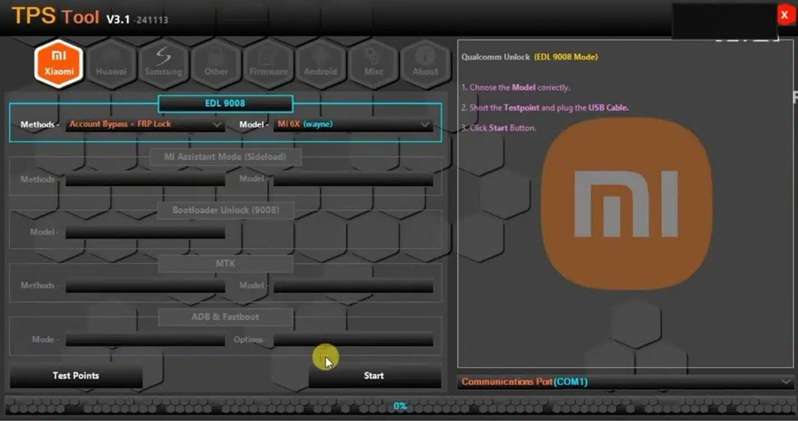
For Xiaomi HyperOS lock bypass, use it only if you understand the risks and the phone is legally yours.
Limitations
- It erases all device data during Mi Account removal.
- Some actions may void the warranty.
- It can affect future service support options.
Method 5: Try the Mi Account Unlock Tool
Mi Account Unlock Tool is used to bypass account locks on many Xiaomi phones. It supports Fastboot and EDL modes for different lock situations. Its interface can also help fix verification errors and restore basic phone functions. The tool may work with several Xiaomi, Redmi, and POCO models.
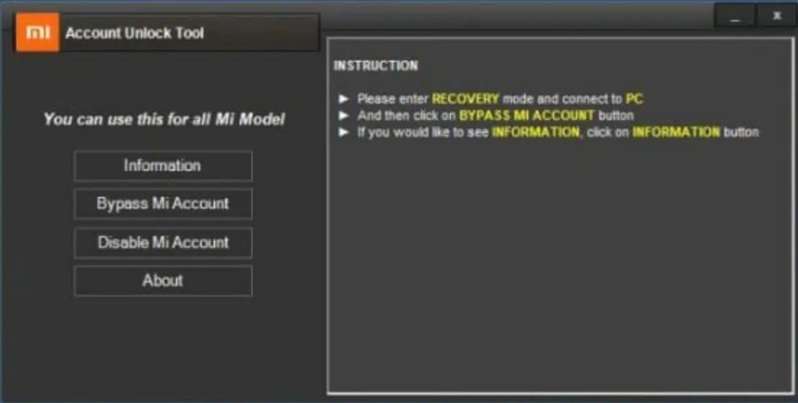
For the HyperOS Mi account unlock, results can depend on the phone model, firmware, and security patch.
Limitations
- It may fail on newer security patches or updated firmware.
- It needs a Windows computer.
- Correct USB drivers are required for proper use.
Recommended Method: Use Dr.Fone Online Unlock After Official Routes
If your HyperOS phone is locked after reset and the old Xiaomi account is no longer accessible, do not jump to risky APK files or random flashing tools. After trying Xiaomi recovery and unlock appeal, Dr.Fone Online Unlock can be a cleaner option for HyperOS Mi account unlock, especially for non-technical users.
Dr.Fone Online Unlock is made for Xiaomi/Mi Account Lock removal. Wondershare says the process works online for many Xiaomi, Redmi, and POCO models. It does not require APK installation, advanced flashing, or bootloader knowledge. The guide says users retrieve the device unlock code from Recovery Mode and submit it to the Online Unlock Workbench.
Why Dr.Fone Online Unlock Is a Practical HyperOS Mi Lock Option
- Online process: Uses the phone’s Recovery Mode unlock code and submits it through Dr.Fone’s online workbench.
- No PC unlock steps: The unlock request is handled online, without flashing, drivers, or Fastboot commands.
- Permanent removal: Designed to remove the Mi Account lock permanently after successful processing.
- Safer route: Avoids unknown APK files, spyware risks, and unstable free unlock tools.
- Broad model support: Works for many Xiaomi, Redmi, and POCO devices, including MIUI and HyperOS models.
- Useful when access is lost: It helps you when you no longer have access to the old Xiaomi account, linked number, email, or seller support.
-
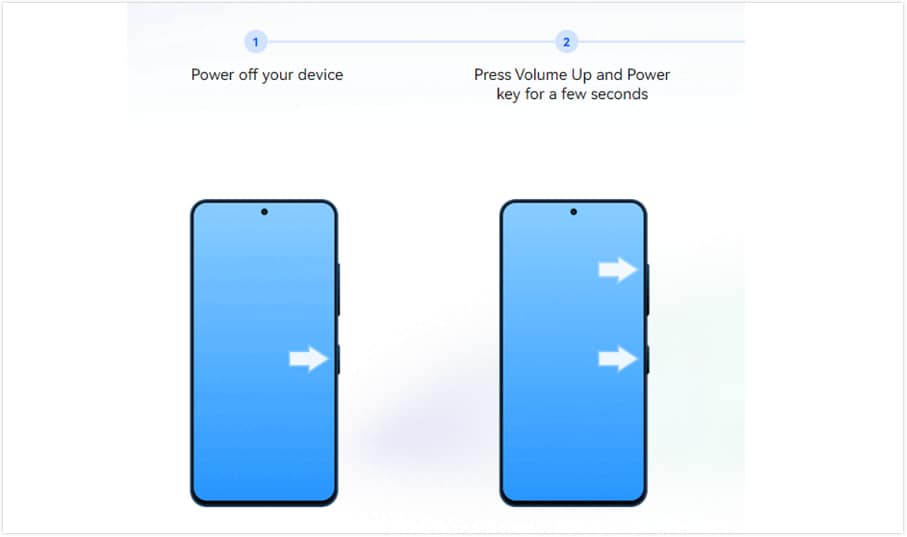
Step 1 First of all, switch off the Xiaomi, Redmi, and POCO phones. First, press and hold Volume Up + Power until the main menu appears. Now select Recovery Mode.
-
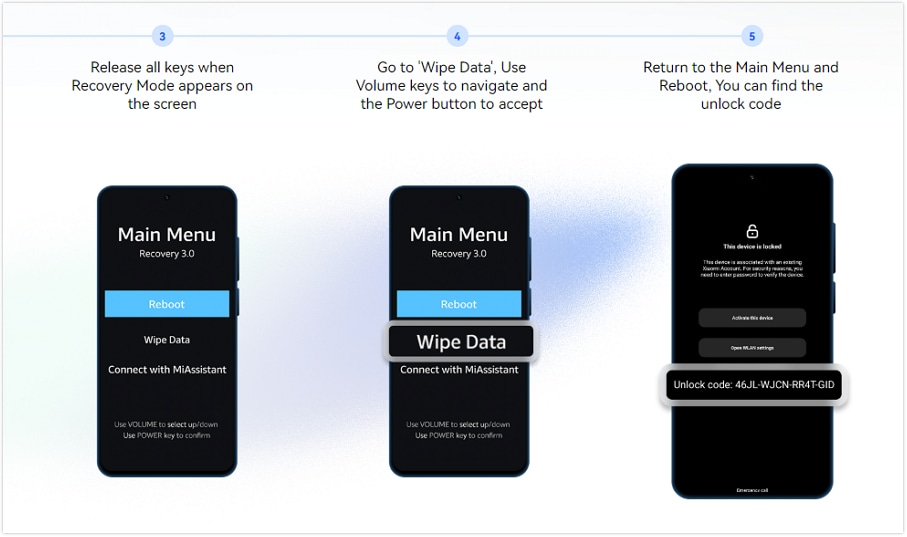
Step 2 Select Wipe Data using the volume keys and note the unlock code shown on the screen. If no code appears, restart the phone and tap the lock icon 10 times on the locked screen.
-
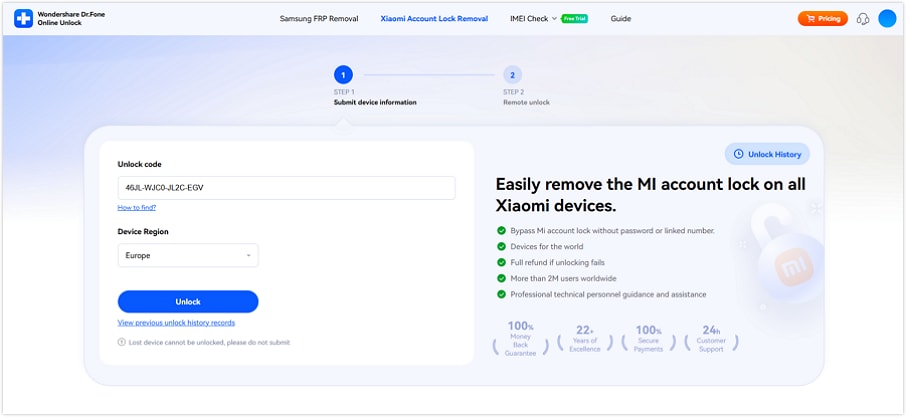
Step 3 To remove the Xiaomi Account Lock you’ll need to visit the Dr.Fone Online Unlock page. Type the unlock code, select the device region and click Unlock.
-
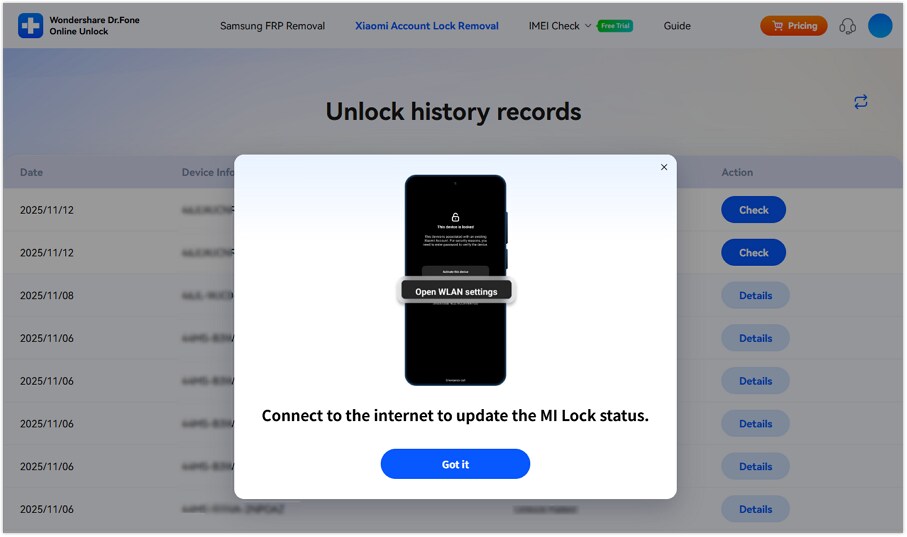
Step 4 Once you have successfully uploaded the documents. Look out for the email update, then restart setting up the phone.
Comparison: Xiaomi HyperOS Mi Account Unlock Methods
Use this technical view to compare each HyperOS Mi account unlock route by access mode, account need, PC need, patch risk, and data impact.
| Method | Access Mode | Account / Proof Needed | PC / Driver Need | HyperOS Patch Sensitivity |
|---|---|---|---|---|
| Xiaomi Web Portal Removal | Xiaomi Cloud/web account access | Same linked Xiaomi Account | No | Low |
| Forgot Password | Xiaomi Account recovery | Linked phone, email, or Xiaomi Account ID | No | Low |
| Xiaomi Support / Service Center | Official support channel | Device/account details; proof may be required | No | Low |
| TPS Xiaomi Tool | Fastboot / Qualcomm 9008 COM Port | Device access; legal ownership | Yes | High |
| Mi Account Unlock Tool | Fastboot / EDL mode | Device access; legal ownership | Yes | High |
| Dr.Fone Online Unlock | Recovery Mode unlock code + online workbench | Unlock code and device region | No PC unlock steps | Medium |
Conclusion
HyperOS Mi Account Lock needs the right fix, not a random shortcut. Web portal removal is best when you can access the linked Xiaomi Account. Forgot Password works for original owners with recovery email or phone access. Xiaomi Support is safer when proof or account help is needed. TPS Xiaomi Tool and Mi Account Unlock Tool fit advanced repair cases, but they need care because patches, drivers, and data loss can affect results.
For genuine owners who cannot reach the old account, Dr.Fone Online Unlock gives a cleaner guided path for HyperOS Mi account unlock and Xiaomi HyperOS lock bypass without APK risks.
FAQ
-
1. Can I unlock Xiaomi HyperOS Mi Account Lock without a password?
Yes, but only through valid recovery routes. Try Xiaomi password reset, Xiaomi activation-lock appeal with unlock number/IMEI, or service-center help first. Dr.Fone Online Unlock can be considered when the old account, linked phone, or email is unavailable. -
2. Does Xiaomi HyperOS lock bypass work on Redmi and POCO phones?
The Xiaomi, Redmi, and POCO Phones may experience Mi Account Lock if any of your devices are linked to Xiaomi Cloud/Find Device. According to Dr.Fone, it also supports many Xiaomi, Redmi, and POCO devices, although whether it actually works may vary based on device, region, lock status, and so on. -
3. Is HyperOS Mi Account Lock the same as Google FRP?
No. HyperOS Mi Account Lock is tied to Xiaomi Account and Find Device. Google FRP is tied to a Google Account after a factory reset. A Xiaomi phone can face one or both checks after a reset. Google says protected Android devices may require the screen lock or Google Account after reset.