ChatGPT
 Perplexity
 Gemini
 Claude
 Grok
Grok
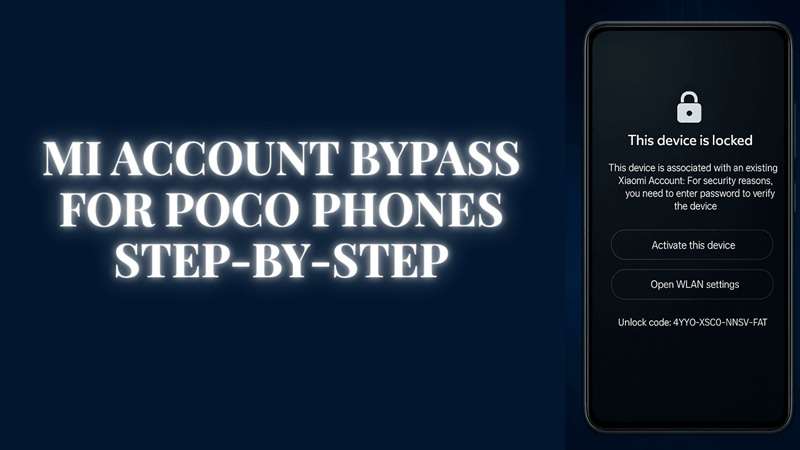
A POCO phone can look normal after a reset, but one screen can stop the whole setup: “This device is locked.” The phone is not damaged. It is still linked to a Xiaomi Account. This happens on many POCO F, X, M, and C series phones when Find Device was active before reset. For a real owner, this can feel like a hard wall, especially when the old number, email, or seller is gone.
This guide keeps POCO Mi account bypass simple, safe, and clear. It explains why the lock appears, what to check first, and how to choose the right POCO account unlock path without risky APK files or fake unlock codes.
In this article
Part 1. Why POCO Phones Get Mi Account Locked So Often
POCO phones use Xiaomi Account and Find Device protection. When Find Device is active, the phone stays linked to the owner’s Xiaomi Account. After a reset, wipe, or ROM flash, the setup screen may still ask for the same account before the phone can open. Xiaomi also guides users to recover the Xiaomi Account password when login access is lost.
Common reasons include:
| Situation | What Usually Happens |
|---|---|
| Used POCO purchase | The seller reset the phone, but did not remove the Xiaomi Account |
| Forgotten password | The owner cannot sign in during setup |
| Old email/number inactive | The verification code cannot be received |
| ROM flash or wipe | Phone asks for the linked account again |
| “This device is locked” screen | Find Device protection is still active |
This is why POCO Mi account bypass is common on POCO F, X, M, and C series phones. But POCO lock removal is not just another reset. The phone needs proof that the real owner is using it.
Part 2. Before You Try Any Tool: Quick Safety Checklist
Before using any POCO Mi account bypass method, check these points:
- Confirm the phone is legally yours.
- Try Xiaomi password reset first.
- Contact the seller or previous owner.
- Ask the seller to remove the POCO phone from Xiaomi Cloud or Find Device.
- Note the IMEI or unlock number.
- Check the purchase region.
- Keep the invoice, box, and ID ready.
- Avoid fake unlock-code generators.
- Do not install random POCO Mi bypass APK files.
This step protects your phone, your money, and your data. It also helps you avoid scam services that promise instant POCO lock removal but only collect payment or install unsafe files.
Part 3. Best Fixes for POCO Account Unlock After Reset
Not every locked POCO needs the same fix. These POCO Mi account bypass methods begin with safer recovery steps, then progress to guided options when official access is unavailable.
Method 1: Reset the Xiaomi Account Password for POCO Account Unlock
Forgot the Xiaomi Account password linked to your POCO phone? Use the “Forgot Password” option first. This is the safest starting point for POCO account unlock when the device belongs to you, and you still have access to the linked phone number, email, or account ID.
Steps to reset your Xiaomi Account password:
-
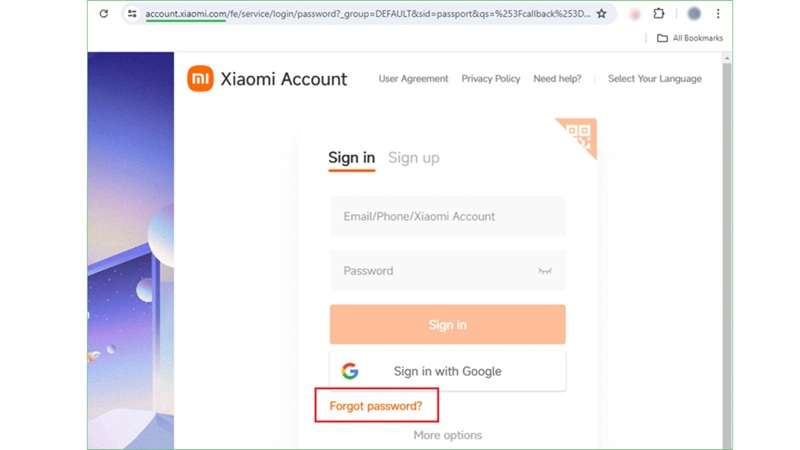
Step 1 On any mobile device or a computer system, open a browser and access account.xiaomi.com .
-
Step 2 Click on the Forgot Password link below the sign-in box.
-
Step 3 Select How do you want to receive the verification code. You have the option of using either SMS or email. Please enter the code you got and click Submit.
-
Step 4 On the following display, enter a new password. Tap Submit again to complete the reset. Then connect your POCO phone to the internet and sign in with the new password.
- It is an official and safe Xiaomi method.
- It does not need any extra tools or software.
- It works well when the POCO phone is linked to your own Xiaomi Account.
- It works only if you remember the linked phone number, email, or account ID.
- It cannot unlock a POCO phone linked to someone else’s Xiaomi Account.
- It needs internet access to receive the verification code.
Method 2: Wipe the POCO Phone Through ADB and Recovery
A computer and ADB can reset a blocked phone POCO. ADB is an acronym for Android Debug Bridge. First, download ADB from the official Android developer site for this method. This technique can assist you when your phone is locked, but it doesn’t complete the POCO Mi account bypass if the device is still attached to a different Xiaomi Account.
Steps to wipe the POCO phone:
-
Step 1 Grab your POCO cellphone and link it to your PC via a USB cable. See if the computer is seeing the device.
-
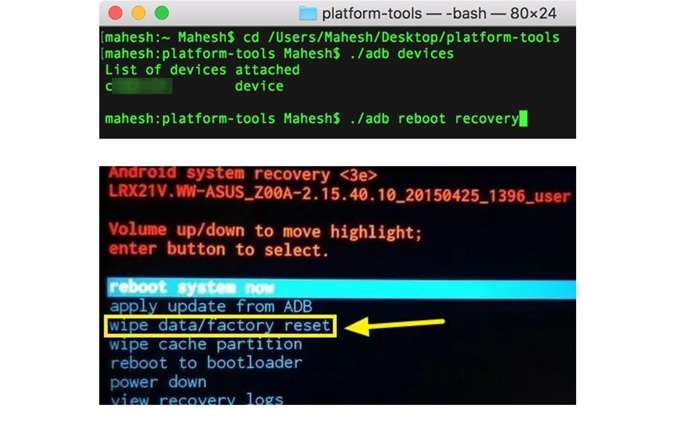
Step 2 Launch Command Prompt on your computer next. Type adb reboot recovery and hit Enter. The mobile device will reboot into Recovery Mode by itself.
-
Step 3 Choose English as the language. Then select Wipe & Reset
-
Step 4 Select Wipe data/factory reset and press Yes to confirm. Your phone data will be deleted with this.
-
Step 5 Once the reset is finished, tap Restart system at this point. The POCO phone will restart with factory settings.
- It can reset the phone even when the screen is locked.
- It gives the device a clean factory start.
- It erases all data from the phone.
- It needs basic computer and ADB knowledge.
- It may not remove a Xiaomi Account linked to another user.
Method 3: Hard Reset the POCO Phone from Recovery Mode
A hard reset can help when your POCO phone cannot connect to Mi PC Suite, or you do not have the screen lock details. It wipes the phone and gives it a fresh start. But it may not complete the POCO Mi account bypass if the device is still linked to the old Xiaomi Account. Back up your files first, if possible.
Steps to hard reset the POCO phone:
-
Step 1 Press and hold the Power button and Volume Up button together. Release them when the Mi logo appears.
-
Step 2 Use the Power button to select your language.
-
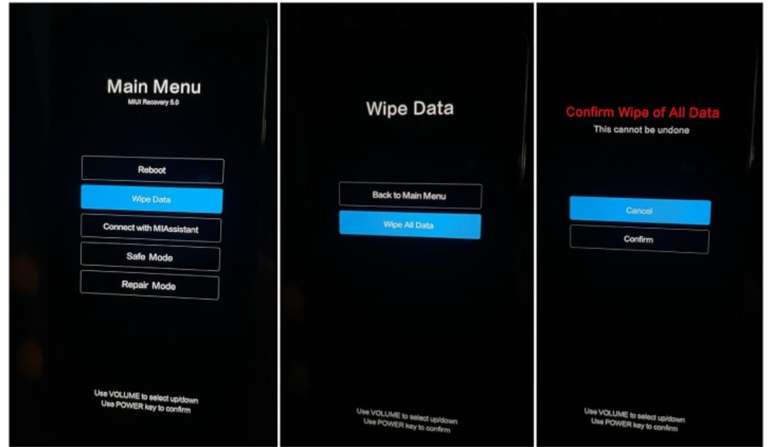
Step 3 Use the Volume buttons to go to Wipe Data. Press the Power button to confirm.
-
Step 4 Select Wipe All Data. Tap Yes and wait until the reset is complete.
-
Step 5 Choose Reboot to System. The phone will restart. The reset may take around 15 to 20 minutes.
- It works without Mi Account login details.
- Numerous cellphones from Xiaomi, Redmi, and POCO are supported.
- It can resolve issues with freezing, app crashes, and bugs.
- It wipes everything, including files and settings.
- It could take a while for it to finish.
- The phone must be charged to 70–80% before commencing.
- Mi Account protection may still ask for the original account after reset.
Method 4: Contact Xiaomi Support for Safe POCO Account Unlock
Xiaomi Support or a Mi Service Center is a safe choice when your POCO phone is locked, and other options do not work. This route is official, so it is better for real owners who can share the needed details.
Steps to contact Xiaomi Support:
-
Step 1 Visit the Xiaomi Support website and pick your country/region.
-
Step 2 Select a mode of contact. Live chat, email, or phone support.
-
Step 3 Inform the Support that Your POCO Phone is Locked. Provide the necessary details they request.
-
Step 4 Follow their instructions. As required, request them to change your Mi Account's phone number or email address.
- It is a safe and official Xiaomi method.
- It gives guidance from trained support staff.
- It does not risk phone damage.
- It may help when other POCO lock removal methods fail.
- Support may take time to reply.
- Proof of ownership or purchase may be required.
- There may be regions not available 24/7
- You might have to go to a service center yourself.
Method 5: Recommended Fallback — Use Dr.Fone Online Unlock
If you're using POCO X6, POCO F5, or POCO M6 and it is stuck on the Mi Account screen, and the seller is no longer replying, start with official Xiaomi recovery first. But when password reset, seller removal, and Xiaomi appeal do not work, Dr.Fone Online Unlock gives a guided route for POCO Mi account bypass without risky APK files.
Dr.Fone’s guide says its online tool supports Xiaomi, Redmi, and POCO devices, works in the browser, and uses an unlock code from Recovery Mode. It also states that the process does not need the original password or linked phone number.
-
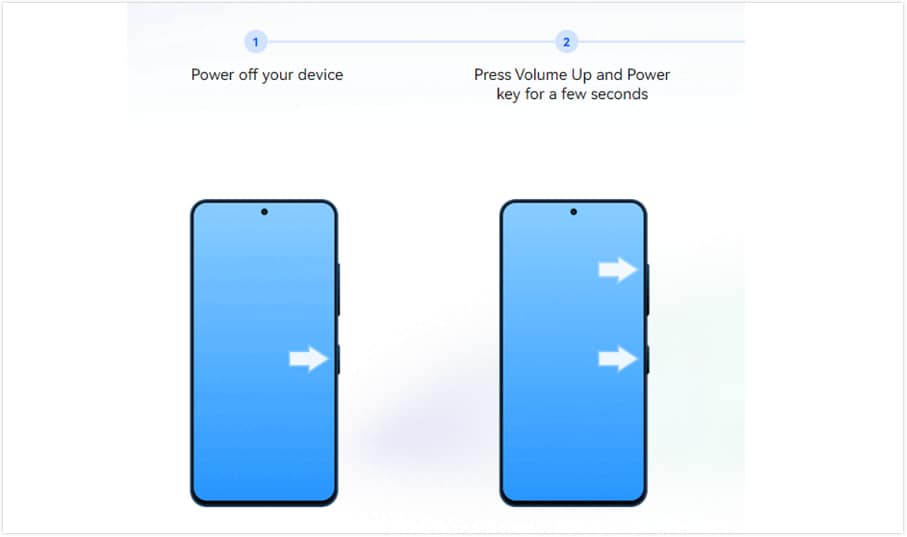
Step 1 First of all, switch off the Xiaomi, Redmi, and POCO phones. First, press and hold Volume Up + Power until the main menu appears. Now select Recovery Mode.
-
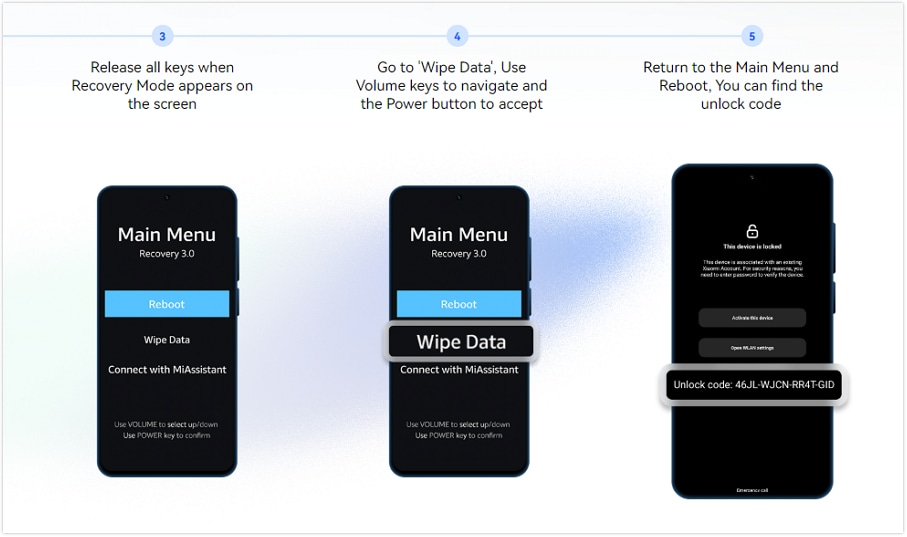
Step 2 Select Wipe Data using the volume keys and note the unlock code shown on the screen. If no code appears, restart the phone and tap the lock icon 10 times on the locked screen.
-
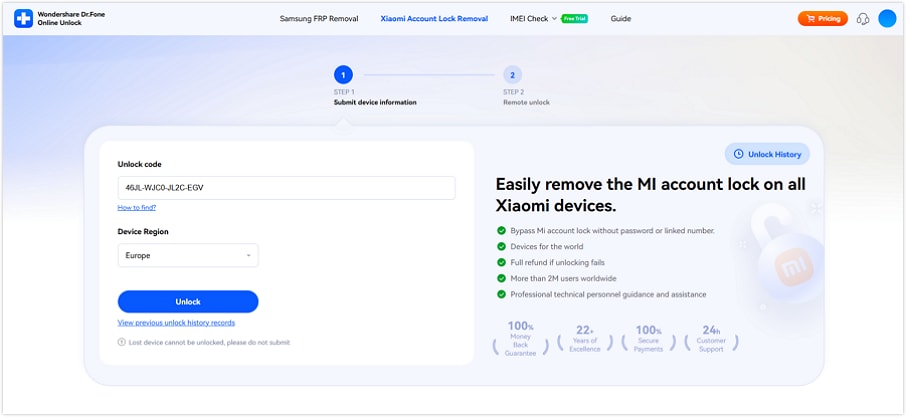
Step 3 To remove the Xiaomi Account Lock, you’ll need to visit the Dr.Fone Online Unlock page. Type the unlock code, select the device region, and click Unlock.
-
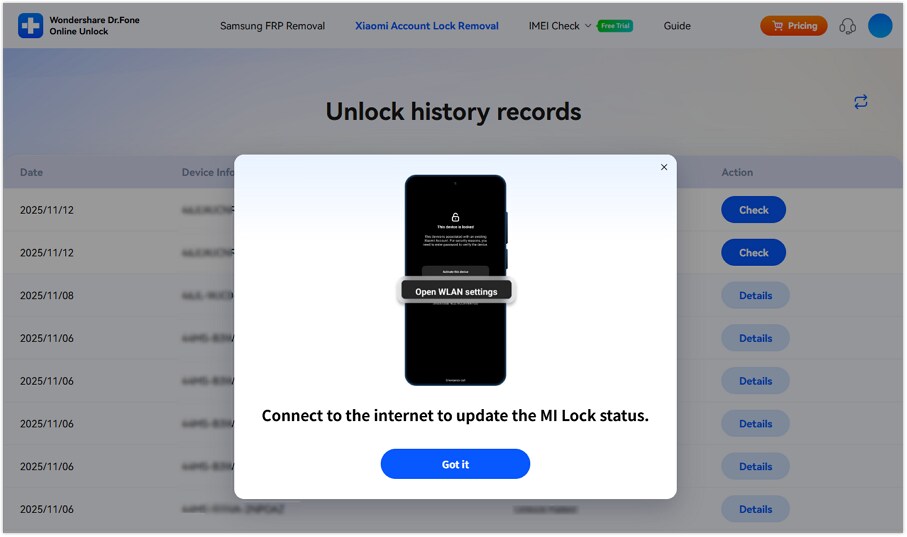
Step 4 Once you have successfully uploaded the documents. Look out for the email update, then restart setting up the phone.
POCO Mi Account Unlock Methods Compared
Before choosing a fix, compare what each method needs, what it can actually solve, and where it may fail.
| Method | Best For | Compatibility | Data Loss Risk | Technical Level | Main Limitation |
|---|---|---|---|---|---|
| Xiaomi Password Reset | Original POCO owner who forgot the password | POCO phones linked to your own Xiaomi Account | Low | Easy | Fails if recovery phone/email is inactive |
| ADB + Recovery Wipe | Locked phone needing a factory reset | Android devices are detectable through ADB; POCO support depends on the connection state | High | Medium | May not remove Mi Account activation lock |
| Hard Reset from Recovery | POCO phone with screen lock, bugs, or a frozen system | Most Xiaomi, Redmi, and POCO phones with Recovery Mode | High | Easy-Medium | Mi Account may still appear after reset |
| Xiaomi Support / Service Center | Genuine owners with proof | Official route for Xiaomi, Redmi, and POCO devices by region | Low | Easy | May need invoice, box, ID, or service visit |
| Dr.Fone Online Unlock | Locked-out POCO user without old password or linked number | Dr.Fone says it supports Xiaomi, Redmi, and POCO models, with wide regional coverage | Medium | Easy | Use only for legally owned devices; result may depend on model/region |

Conclusion
A locked POCO is not the end of the phone. It is a security check asking for the right owner. If you still control the linked email or number, password reset is the cleanest fix. If you bought the phone used, seller removal or Xiaomi Support is the safer path. ADB wipe and hard reset can refresh the device, but they may still leave the account wall standing.
When those doors are closed, Dr.Fone Online Unlock gives POCO Mi account bypass a more guided route. It keeps the process browser-based, avoids random APK files, and makes POCO account unlocking easier for real owners.
FAQ
-
1. Does a factory reset remove Mi Account Lock on POCO phones?
Not always so. Xiaomi states that the device may ask for the Mi Account’s password post-reboot if the phone still has the Mi Account logged in. So a reset can erase data, but it may not remove the Xiaomi Account link. -
2. Can Xiaomi support unlocking my POCO phone with proof of purchase?
Yes, Xiaomi support is the safest route for genuine owners. Keep the IMEI, unlock number, purchase region, invoice, and box ready. Xiaomi’s activation-lock page also asks for IMEI or unlock number and purchase region details. -
3. Will POCO Mi account bypass erase my data?
Often, yes. Wipe, hard reset, and Recovery Mode methods can erase phone data. Dr.Fone’s online guide also uses Recovery Mode and a wipe-data step to get the unlock code, so users should expect data loss. -
4. Is the POCO Mi account bypass different on Snapdragon and MediaTek models?
For flashing or desktop repair methods, yes. Chipset can affect drivers, connection modes, and tool support. Browser-based options, like Dr.Fone Online Unlock, do not tend to be affected by the chipset since the unlocking does not involve flashing but rather submission of the unlock code in Recovery Mode.