ChatGPT
 Perplexity
 Gemini
 Claude
 Grok
Grok
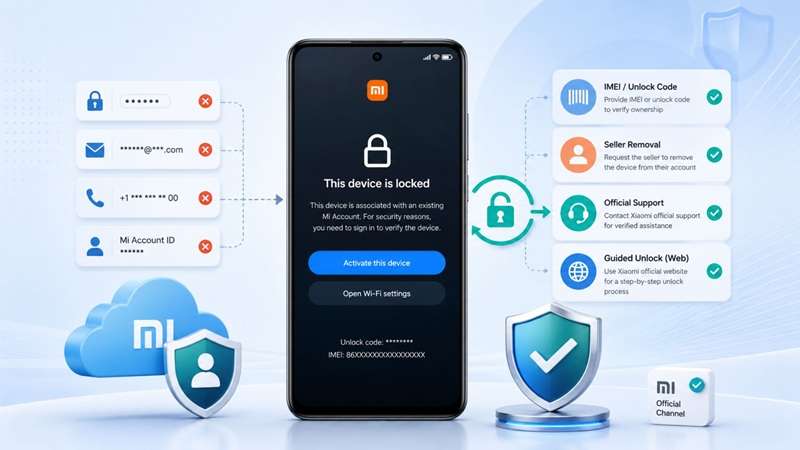
A Xiaomi phone can look fully reset, but still stop at one screen: “This device is locked.” This usually means the old Mi Account is still linked to the phone. It often happens with used Redmi, POCO, and Xiaomi devices when the previous owner did not remove the account first. Now you may not have the password, the old SIM, the email, the account ID, the unlock code, or seller access. That is where unlocking Xiaomi's credentials becomes tricky. A simple Xiaomi no-password unlock may not work in every case.
This guide shows which route fits your missing credential, from Xiaomi reset and appeal to seller removal and guided Mi account bypass options.
In this article
Part 1. What “Mi Account Credentials” Actually Means
Before choosing any unlock method, know what is missing. “No credentials” does not always mean the same thing. Some users lost only the password. Some lost the phone number. Others bought a used phone with no seller support.
| Credential | What It Means | Where It Is Used |
|---|---|---|
| Mi Account password | Password of the linked Xiaomi account | Device activation screen |
| Bound phone number | SIM or number linked to Xiaomi account | Password reset/verification |
| Bound email | Email linked to Xiaomi account | Password reset/verification |
| Xiaomi Account ID | Numeric or account identifier | Password reset |
| IMEI number | Device identity number | Xiaomi unlock application |
| Unlock number/code | Code shown on the lock or activation screen | Xiaomi unlock application / online unlock |
| Purchase region | The country where the phone was bought | Xiaomi appeal / unlock request |
| Proof of purchase | Invoice, box, receipt | Xiaomi support/service center |
| Previous owner access | Seller’s account login | Remote removal from Xiaomi Cloud |
This matters because a method that works with an email may fail if you only have the IMEI. A method that helps the original owner may not help a used-phone buyer.
Part 2. Why Xiaomi Locks the Phone After Reset
Xiaomi locks the phone after reset when Find Device was active before wiping the phone. The reset clears local data, but the device remains tied to the old Mi Account for security.
Quick reasons:
- Find Device was enabled before the reset.
- Xiaomi still detects the old account link.
- The phone asks for the previous Mi Account password.
- This prevents stolen or lost phones from being reused.
- On used phones, it usually means the seller forgot to remove the account.
That is why Xiaomi's no password unlock needs account recovery, appeal, seller removal, or a guided unlock method.
Part 3. Credential-Based Unlock Map: What Works Without What?
Refer to this map to choose the right fix fast. Xiaomi recovery works when proof of account exists. Dr.Fone fits only when key credentials are missing, and the phone is legally yours.
| Your Situation | Best First Route | Why |
|---|---|---|
| Password forgotten, but phone/email works | Xiaomi password reset | Official and fastest |
| Password forgotten, but old phone/email is gone | Xiaomi manual recovery/support | Xiaomi allows recovery info review |
| Phone asks for Mi Account after reset | Enter your old Mi password or reset it | Xiaomi requires the previously bound account after wiping |
| You have the IMEI or unlock number + the purchase region | Xiaomi unlock application/appeal | Official route for locked devices |
| Used phone, seller is reachable | Ask the seller to remove the device | Cleanest fix for second-hand phones |
| Used phone, seller is gone | Xiaomi appeals if proof exists | Works better with invoice/ownership proof |
| No password, no linked number, no seller | Dr.Fone Online Unlock | Wondershare says it can remove Mi Account Lock using unlock code + region |
| HyperOS blocks old APK tricks | Appeal or Dr.Fone Online Unlock | Safer than patched APK shortcuts |
Method 1: Reset Your Mi Account Password First
First attempt Xiaomi’s official password reset before using any other option. This is free, secure, and supported by Xiaomi. When you still have access to the number or email address linked to the Mi Account, this method is best.
This is the easiest Xiaomi no password unlock route if you have only forgotten the password.
-
Step 1 Use a different device and open up a browser.
-
Step 2 Access the official Mi Account website at - account.xiaomi.com
-
Step 3 Tap on the 'forgot password' option. At the login page.
-
Step 4 Input the phone number or email that is associated with the locked Mi account.
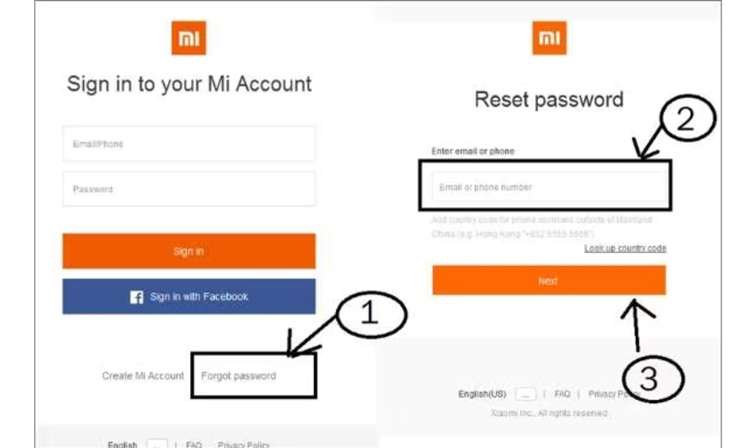
Bypass my account by resetting the password
-
Step 5 Watch out for the instructions on the screen; follow them. Xiaomi will send a verification code to your mobile phone or email.
-
Step 6 Enter the code to continue creating a new password.
-
Step 7 Return to your locked Xiaomi phone. Connect it to Wi-Fi and log in using the newly created Mi Account password.
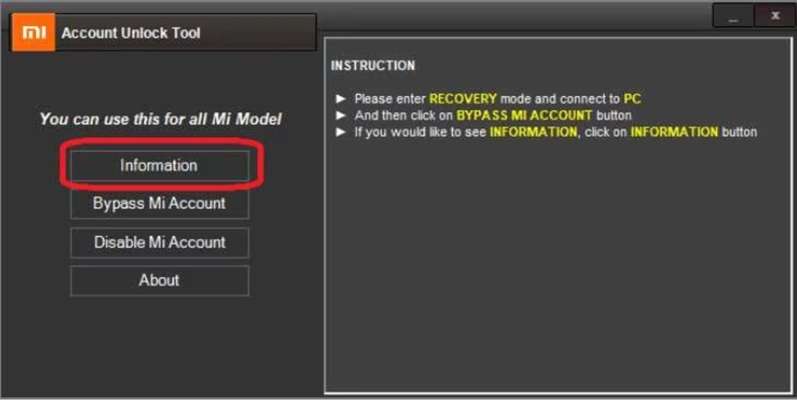
Small tip: If the email does not appear, check the spam or junk folder. Sometimes the reset message lands there.
This method works well when the Mi Account is yours, and the recovery details still work. You won’t be able to get past the previous owner’s account, that is, if their account is still active on the phone.
If so, then a need for another safe way to unlock Xiaomi without credentials, such as Mi support, unlock appeal, previous owner removal, or guided Mi account bypass.
Method 2: Best Way to unlock Xiaomi with no credentials
When a password reset is not possible, Dr.Fone Online Unlock can be used as a guided option. It is made for Xiaomi, Redmi, and POCO phones stuck on the “This device is locked” screen. This method is useful when the Mi password, recovery phone, recovery email, and seller access are missing.
For many unlock Xiaomi no credentials cases, it is safer than free APK files or unknown unlock tools.
Why Dr.Fone Online Unlock Fits This Case
- Permanent unlock: Dr.Fone presents this as a lasting Mi Account removal method. After removal, users do not have to depend on a temporary trick that may fail after a restart, update, or reset.
- Safe process: It comes from Wondershare, so it avoids the common risks linked with unknown free tools, such as malware, spyware, or phone damage.
- No PC unlock flow: The main process is handled online. You only need the locked Xiaomi phone to get the unlock code. The removal request is then processed through the web service.
- Xiaomi, Redmi, and POCO support: It is designed for Mi Account Lock cases on Xiaomi family devices, including Redmi and POCO models. It can also help users facing newer MIUI or HyperOS lock situations.
Step-by-Step: How to Use Dr.Fone Online Unlock
The process is simple. You get a unique code from the locked phone and submit it online.
-
Step 1 Find your unlock code. Power off your Xiaomi phone completely.
-
Step 2 Enter Recovery Mode. Press and hold the Volume Up and Power buttons together until the main menu appears.
-
Step 3 Open the code screen.
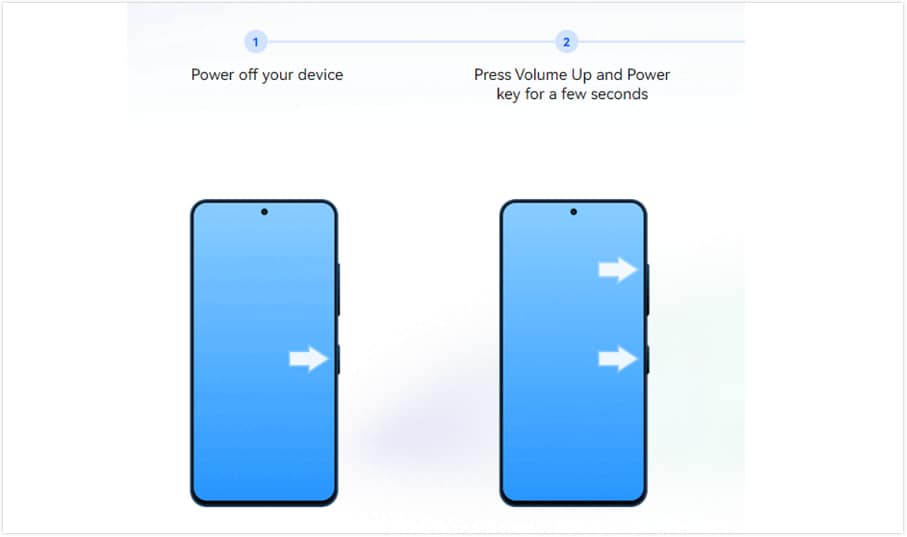
Use the volume keys to move through the menu. Select Wipe Data. A unique unlock code will appear on the screen.
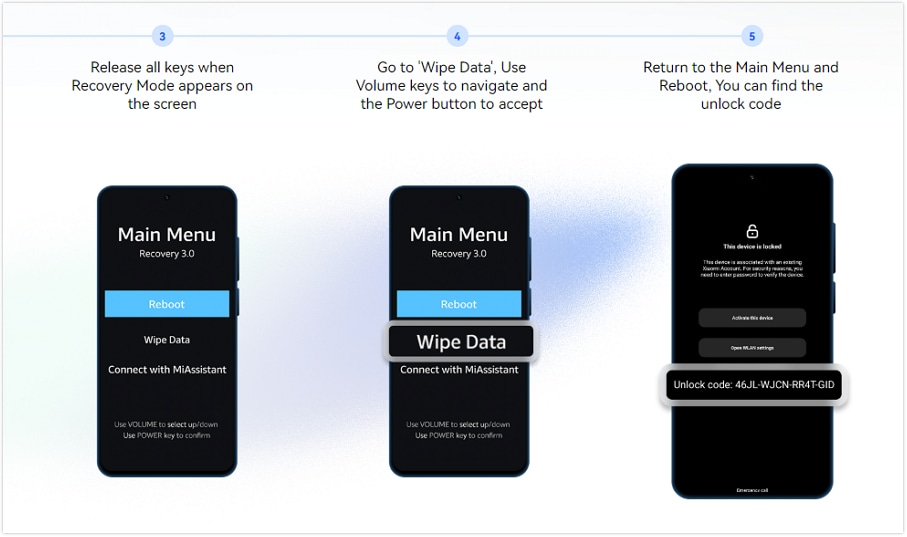
Alternative: If this does not show the code, restart the phone. On the locked screen, tap the padlock icon 10 times to show the code.
-
Step 4 Submit your device details. Go to the Dr.Fone Online Unlock page for Xiaomi Account Lock Removal. Enter the unlock code carefully. Then select your device region and click Unlock.
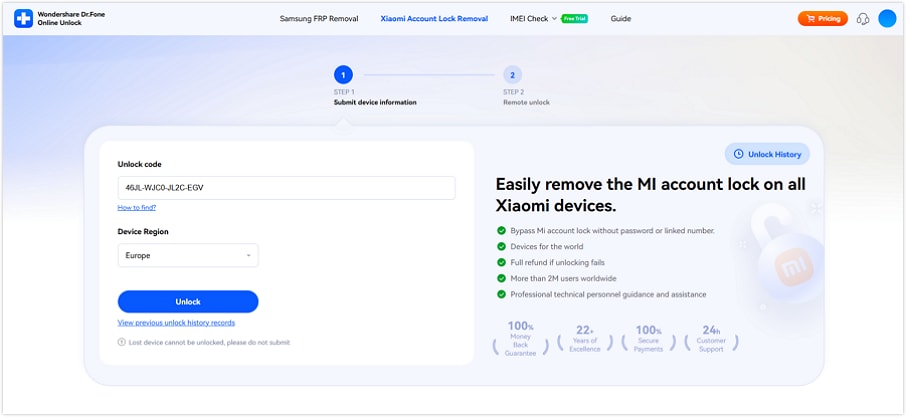
-
Step 5 Complete the unlock request. After submission, the online service will process the request. You will receive an email when the unlock is complete. After that, the phone can be set up again without the previous Mi Account.
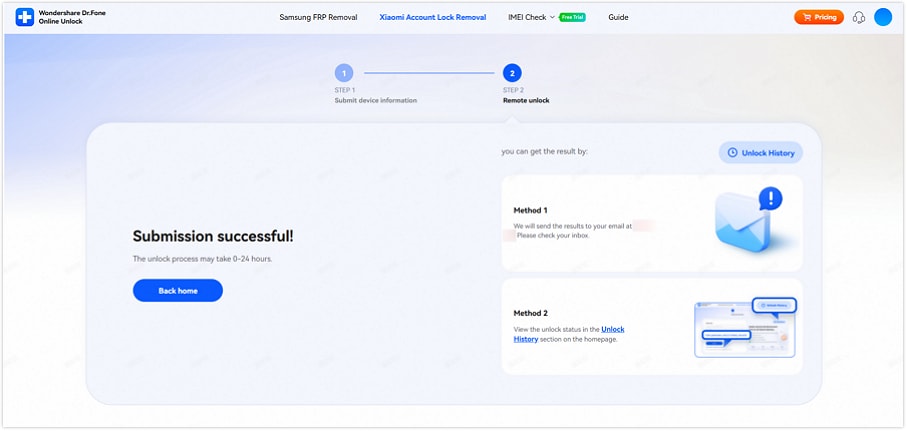
This method is not the first choice when the Xiaomi password reset still works. But when normal recovery is gone, it can be a practical Mi account bypass route for a legally owned device.
Method 3: Restore Mi Account Recovery Info Through id.mi.com
Use this method if you know your Mi Account, but the linked phone number or email no longer works. Xiaomi lets you request a change to your security info, so you can add a new recovery phone number and reset the password later.
This can help with Xiaomi's no password unlock when the account is yours, but the old recovery details are gone.
-
Step 1 Go to https://id.mi.com on another device. You can also tap Forgot password on the locked Xiaomi phone.
-
Step 2 Enter the phone number or email linked to the Mi Account. Then choose Restore security info.
-
Step 3 Tap Get started to begin the recovery phone reset request. This can help when your Xiaomi or Redmi shows the “This device is locked” screen.
-
Step 4 Follow the on-screen instructions and wait for Xiaomi to check your request.
This method is not an instant Mi account bypass. It is an account recovery route. It works best when you can still prove the Mi Account belongs to you.
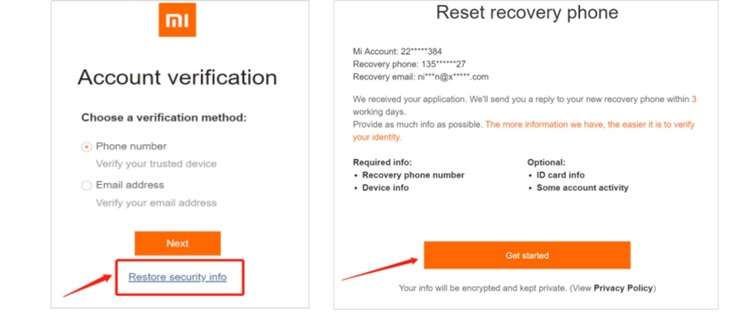
Method 4: Send a Xiaomi Unlock Appeal for a Locked Device
Use this method when you cannot reset the Mi Account password or restore a new recovery number. Xiaomi lets users submit an unlock appeal, but approval is not promised. It may also take days or weeks.
You may need:
- IMEI number or unlock number
- Purchase region
- Proof of ownership, if Xiaomi asks for it
This is an official route for unlock Xiaomi no credentials cases where account recovery has failed.
-
Step 1 Go to the Xiaomi Cloud page.
-
Step 2 Find and click Submit unlock application at the bottom of the screen.
-
Step 3 Now, enter the code or IMEI number. After that, choose the country or region where the device was bought.
Note: IMEI is usually printed on the phone box. After you wipe data and reboot the phone, you can see the unlock number when the phone asks for the Mi Account password.
-
Step 4 Click Report device, then choose Submit application, and tap Start.
-
Step 5 You will see on-screen steps, follow them, and add the details required.
This method is not a quick Mi account bypass. It is Xiaomi’s own review process, so it works best when you can show real ownership details.
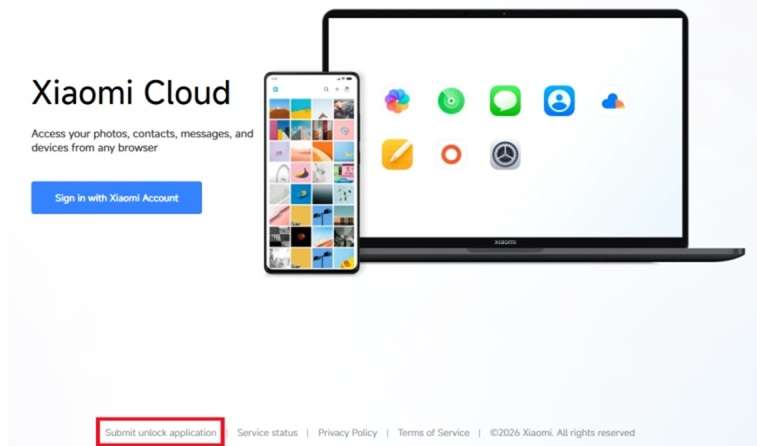
Method 5: Ask the Seller to Remove the Mi Account Remotely
This should be the first choice for a recently bought used Xiaomi phone. It is clean, official, and does not need any risky Mi account bypass trick.
Ask the seller to:
-
Step 1 Sign in to the Xiaomi account linked to the phone.
-
Step 2 Open Xiaomi Cloud or Find Device settings.
-
Step 3 Remove the Xiaomi, Redmi, or POCO phone from their account.
-
Step 4 Restart the locked phone, connect it to Wi-Fi, and try the setup again.
This method works best when the seller is real, helpful, and still has access to the old Mi Account.
Part 4. Device & Version Notes: Where No-Credential Unlock Gets Harder
Not every Xiaomi lock behaves the same. Before choosing a Mi account bypass route, check the device series, software version, ROM type, region, and available unlock details
| Device / Version Factor | What It Means for Unlocking |
|---|---|
| Xiaomi 12 / 13 / 14 / 15 series | Newer Xiaomi flagships often run newer MIUI or HyperOS builds, so old APK or browser tricks are less reliable. |
| Redmi Note 11 / 12 / 13 / 14 series | These models are common in used-phone markets. If Find Device was active, reset may still ask for the old Mi Account. |
| POCO X / F / M series | POCO phones also use Xiaomi Account and Find Device, so the same Mi Account Lock can appear after a reset. |
| MIUI 13 / MIUI 14 | Older online methods may still mention these versions, but success depends on patch level and account lock status. |
| HyperOS | Stricter than older MIUI guides. Avoid random APK tricks and use Xiaomi appeal, seller removal, or guided unlock. |
| Android 14 / Android 15 | Newer Android builds can block old shortcut-based methods more often. |
| Global ROM | Usually tied to global Xiaomi services and region-based account checks. |
| China ROM | May handle account services and region rules differently from Global ROM. |
| Purchase region | Xiaomi may ask for the country or region where the phone was bought during the unlock appeal. |
| Unlock code available | Helpful for Xiaomi unlock application or Dr.Fone Online Unlock. |
| IMEI available | Useful for Xiaomi appeal, especially with proof of ownership. |
| Find Device active | The main reason the phone may ask for the previous Mi Account after a reset. |
Conclusion
A locked Xiaomi phone needs the right fix, not random shortcuts. Password reset is best when your phone, email, or account ID still works. Security info recovery fits users who own the account but lost the old number. Xiaomi appeal is useful when you have IMEI, unlock code, region, or proof. Seller removal is the cleanest path for used phones when the seller replies.
But when recovery details and seller access are both gone, Dr.Fone Online Unlock becomes a more practical Mi account bypass route. It gives a guided online flow for unlocking Xiaomi no credentials cases without risky APK files.
FAQ
-
Q1. Can I unlock Xiaomi without Mi Account credentials?
Yes, but only through the right route. Try Xiaomi password reset first if you have the phone, email, or Account ID. If not, use Xiaomi appeal with IMEI/unlock number and region. If all recovery options are gone, Dr.Fone Online Unlock can help legal owners without the Mi password or linked number. -
Q2. What Xiaomi credentials are needed for password reset?
You need the linked phone number, linked email, or Xiaomi Account ID. Xiaomi uses one of these to verify the account and let you reset the password. -
Q3. Can I unlock Xiaomi if I lost the old phone number?
Yes. Use email or Xiaomi Account ID if available. If no recovery option works, request Xiaomi manual review or submit an unlock appeal with IMEI/unlock number and purchase region.