ChatGPT
 Perplexity
 Gemini
 Claude
 Grok
Grok
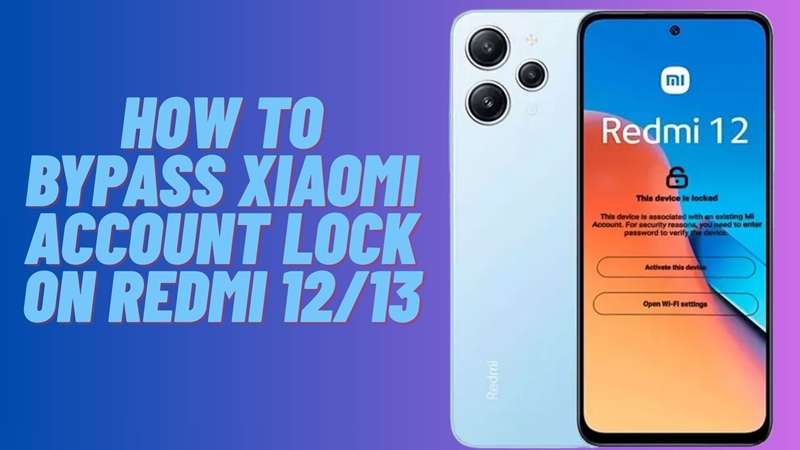
A Redmi phone can look ready after a reset, but one screen can stop everything: “This device is locked.” On Redmi 12 and Redmi 13, this issue is more common after used-phone purchases, password loss, or old SIM changes. The hard part is that many older Mi Account bypass videos no longer work well.
In many regions, the Redmi 12 was typically launched with MIUI 14 and Android 13. Similarly, the Redmi Note 13 is expected to appear with HyperOS and new Android builds. This implies that the lock screen has become more secure, making random APK tricks less effective.
This guide explains the safest ways to handle Redmi 12 Mi account, Redmi 13 Mi unlock, and Redmi 12 bypass cases without risky shortcuts.
In this article
Part 1. What makes Mi Account removal different on Redmi 12 and Redmi 13?
Redmi 12 and Redmi 13 run newer Xiaomi software, so old Mi Account bypass tricks are less reliable. Redmi 12 commonly comes with MIUI 14 / Android 13, while Redmi 13 ships with HyperOS and newer Android builds in many regions.
| Model | Software | Unlock Difficulty | Best Route |
|---|---|---|---|
| Redmi 12 | MIUI 14 / Android 13 | Medium | Password reset / Xiaomi appeal |
| Redmi 13 | HyperOS / newer Android builds | Higher | Xiaomi appeal / guided online unlock |
The main reason is security. Xiaomi has tightened Find Device verification, patched setup-screen loopholes faster, and made APK or browser shortcut methods weaker on HyperOS. So, an old Redmi 12 bypass video may not work for a newer Redmi 13 Mi unlock case.
Redmi 12/13 Variant Snapshot
| Model | Common Software | Chipset | Important Note |
|---|---|---|---|
| Redmi 12 | MIUI 14 / Android 13; may receive HyperOS updates | MediaTek Helio G88 | Many old bypass videos target this generation |
| Redmi 13 | HyperOS / Android 14, depending on region | MediaTek Helio G91-Ultra | HyperOS patches block many older tricks |
Redmi 13 HyperOS builds are generally harder than Redmi 12 MIUI builds. The reason is simple: newer security setups give fewer open doors.
Part 2. Do Xiaomi Account lock methods actually work on Redmi 12 and Redmi 13?
After newer MIUI and HyperOS updates, the safest Redmi 12/13 unlock methods are the ones that verify ownership instead of forcing setup-screen shortcuts.
Method 1: Remove Mi Account in Settings
The simplest way to remove a Mi Account is from the phone settings. This method works best when you still know the Mi Account password. It does not need any extra tools, APK, or unlock services. It is also safer because it signs out the account before the phone is reset. For a clean Redmi 12 Mi account removal or Redmi 13 Mi unlock setup, try this method first.
Using the Settings Method
-
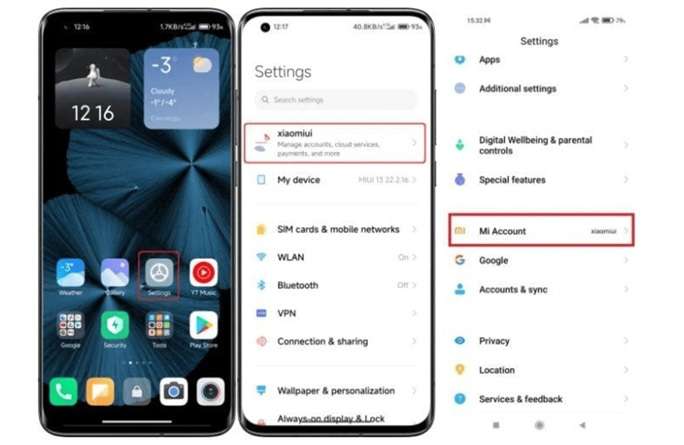
Step 1 Open Settings on your Xiaomi or Redmi phone. Find the Mi Account option. Its place may change by ROM version. On the China ROM, it may appear near the top. On Global ROM, it may appear lower in Settings.
-
Step 2 Tap Mi Account. Scroll down a little and tap Sign Out.
-
Step 3 Enter your Mi Account password if the phone asks for it. This confirms that you want to remove the account from the device.
-
Step 4 Choose what to do with Mi Account data. Tap Keep if you want to keep data like synced photos and emails on the phone. Tap Remove if you want to delete that data from the device.
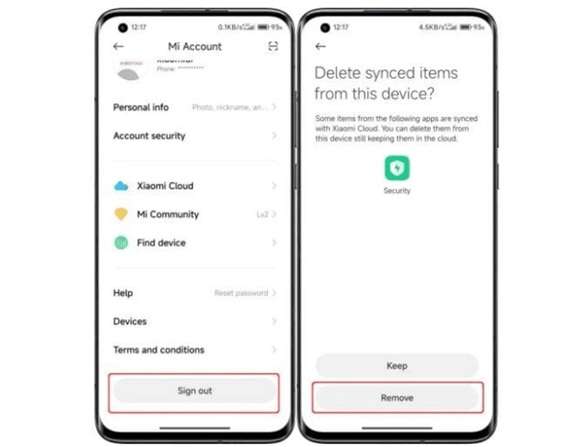
-
Step 5 After sign-out, the Mi Account will disappear from Settings. You will now see the option to Sign in to Mi Account instead.
Using the Xiaomi Official Website
-
Step 1 Open the official Xiaomi Cloud website and sign in with your Mi Account details.
-
Step 2 After logging in, go to Settings.
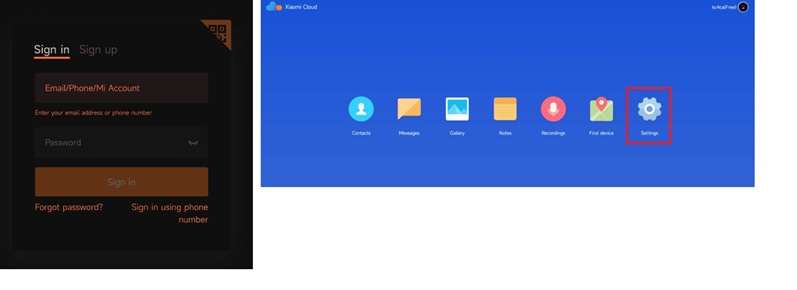
-
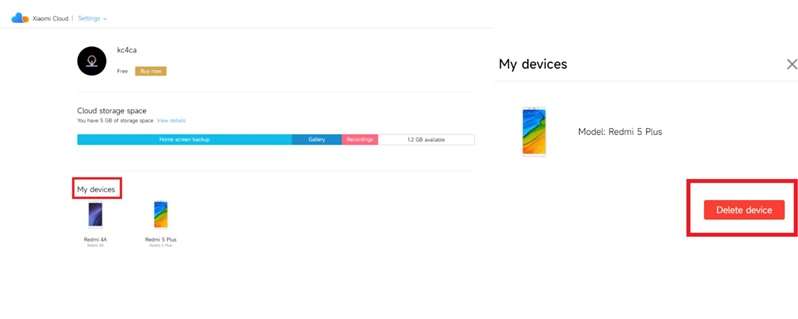
Step 3 Find My Devices and choose the Redmi phone you want to remove from the account.
-
Step 4 Select the device and click Delete Device.
-
Step 5 Confirm the action by clicking Delete. The selected Redmi phone will be removed from your Mi Account.
Method 2: Try a PC-Based Mi Account Unlock Tool
A Mi Account Unlock Tool is made to handle the “This device is locked” screen on Xiaomi and Redmi phones after a reset. It works via a computer and can automatically detect a connected device. This method is often used when users forget their Mi Account login details. However, for Redmi 13 Mi unlock cases on newer HyperOS builds, results may vary by software version and security patch.
Using Mi Account Unlock Tool
-
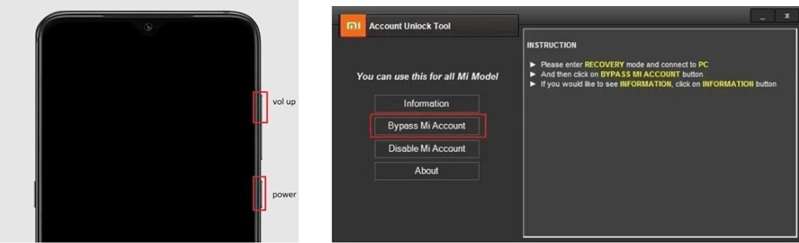
Step 1 Download the Mi Account Unlock Tool on your PC. Then turn off your Xiaomi or Redmi phone. Press and hold the Volume Up and Power buttons to enter Recovery Mode.
-
Step 2 Connect your Xiaomi or Redmi phone to the computer with a USB cable. Open the Mi Account Unlock Tool on your PC.
-
Step 3 Click the Information option to check the connected phone details. Make sure the USB cable is working and the required drivers are installed.
-
Step 4 Select Bypass Mi Account from the tool options. The phone will restart automatically after the process is complete.
Method 3: Remove Redmi Mi Account with TPS Xiaomi Tool
TPS Xiaomi Tool is another PC-based option for Xiaomi and Redmi phones. It can help with Mi Account removal, account disable options, and device connection checks. The tool supports Fastboot and EDL modes, so it gives users more than one way to handle a locked device. For Redmi 12 Mi account or Redmi 13 Mi unlock cases, results may depend on the software version, drivers, and phone mode.
Steps to Install TPS Xiaomi Tool
-
Step 1 First, download and install the Xiaomi Qualcomm USB Driver, MTK USB Driver, and TPS Xiaomi Tool on your PC. Next, unzip the TPS Xiaomi Tool file and look for the folder.
-
Step 2 Run TPS_Tool.exe and follow the screen instructions to install. Once installation is complete, activate the tool and wait for the main screen to open.
Using the TPS Xiaomi Tool to Remove Mi Account
Solution 1: Fastboot Mode
-
Step 1 Switch off your Xiaomi or Redmi phone. To turn off your device, fastboot rescue hold Volume Down and Power button with logo.
-
Step 2 After that, using a USB wire, connect the phone to the computer. Launch Xiaomi Tool of Open TPS to begin unlocking.
Solution 2: EDL Mode
-
Step 1 Click on to install ‘Fastboot’ and the ‘ADB’ drivers on your PC. The user shall ensure that the USB debugging option is enabled on their Xiaomi or Redmi smartphone as well.
-
Step 2 Next, on your computer, open a command prompt and type these codes.
adb devicesadb reboot edl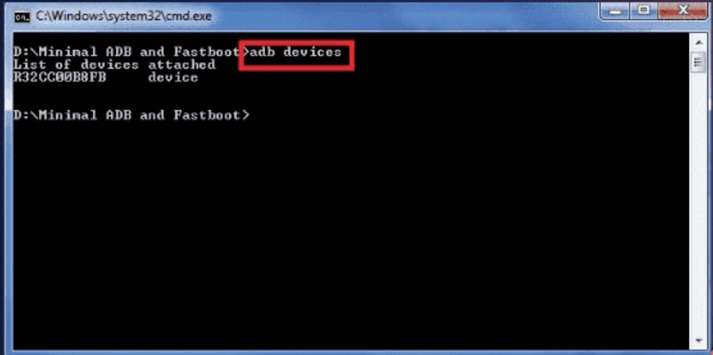
-
Step 3 When your phone asks for USB debugging access, tap OK. Then open TPS Xiaomi Tool and check if your device appears in ADB or Fastboot mode.
-
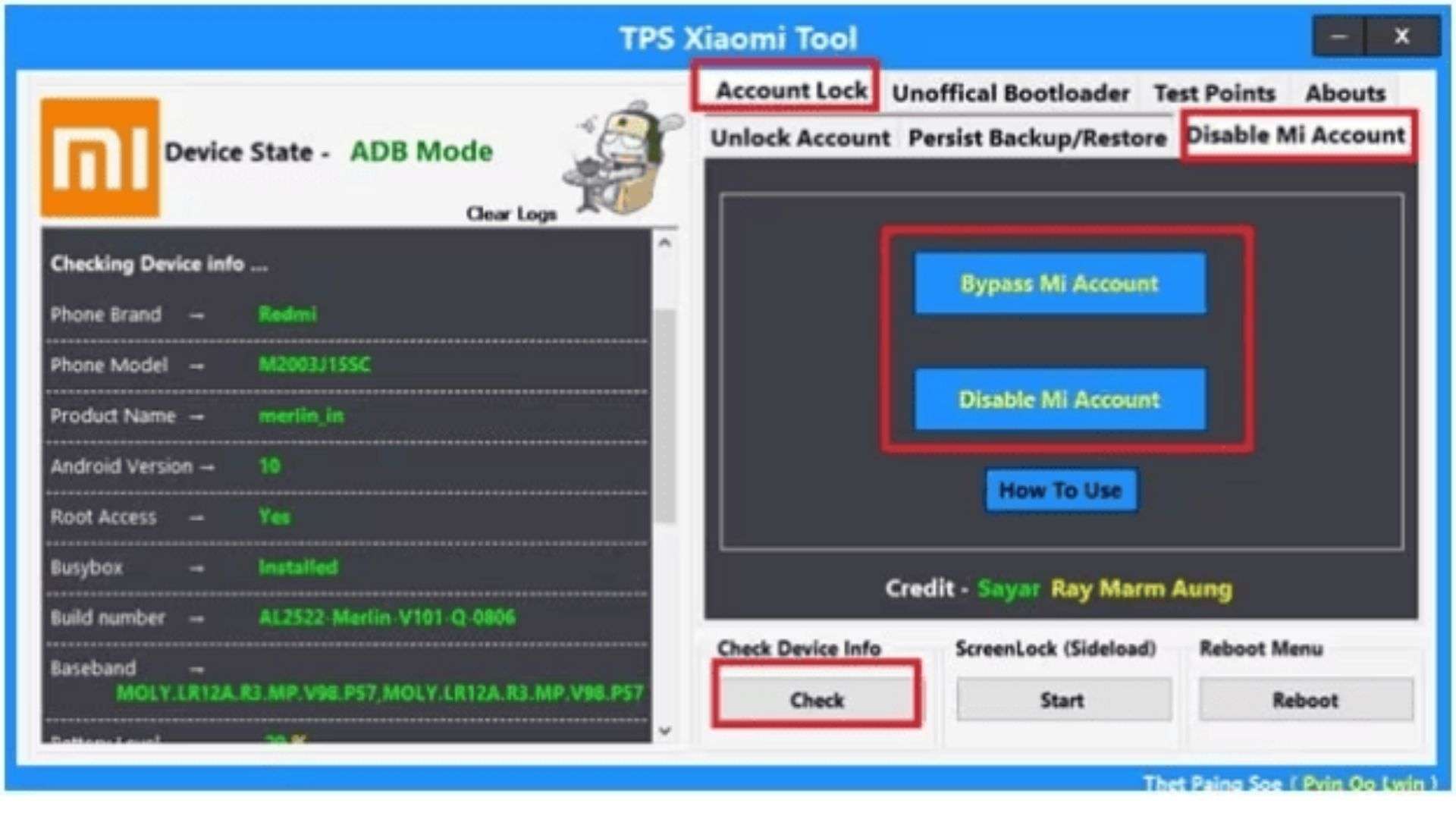
Step 4 Go to Check Device Info and click Check to confirm that the phone is connected.
-
Step 5 Open Account Lock and select Disable Mi Account. Then click Bypass Mi Account to complete the process.
Method 4: Use Dr.Fone Online Unlock for a Cleaner Redmi 12/13 Fix
After the Settings method, Mi Account Unlock Tool, and TPS Xiaomi Tool, some users still need a simpler path. This is more common on newer Redmi 13 HyperOS builds, where old APK tricks, PC tools, and Fastboot-based methods may not work as expected. In that case, Dr.Fone Online Unlock gives a more guided option for Redmi 12 Mi account and Redmi 13 Mi unlock cases.
Dr.Fone Online Unlock is a browser-based service for Mi Account lock removal. It does not ask users to install APK files on the phone. It also avoids complex flashing steps. The tool supports Xiaomi, Redmi, and POCO devices, and the process uses the device unlock code from Recovery Mode.
Using Dr.Fone Online Unlock
-
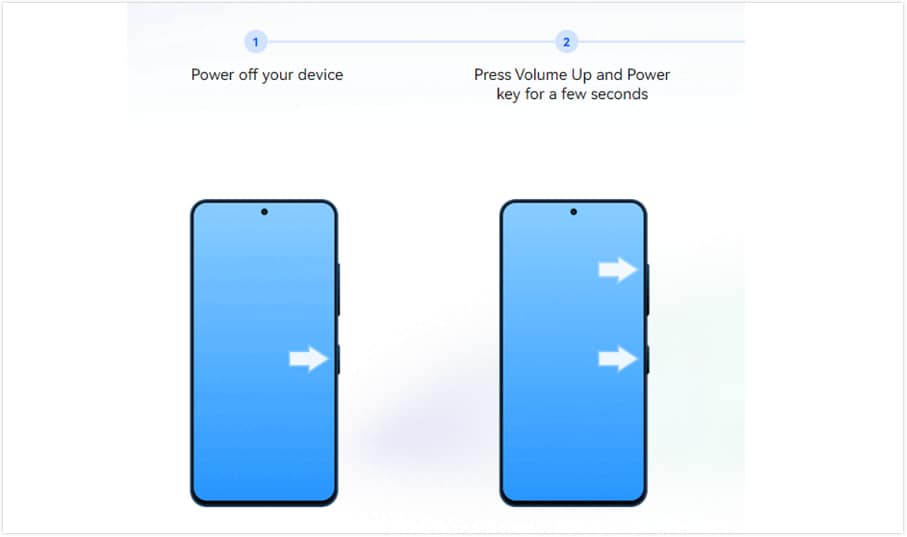
Step 1 Switch off your locked Redmi 12 or Redmi 13. Then press the corresponding keys until Recovery Mode appears on the screen.
-
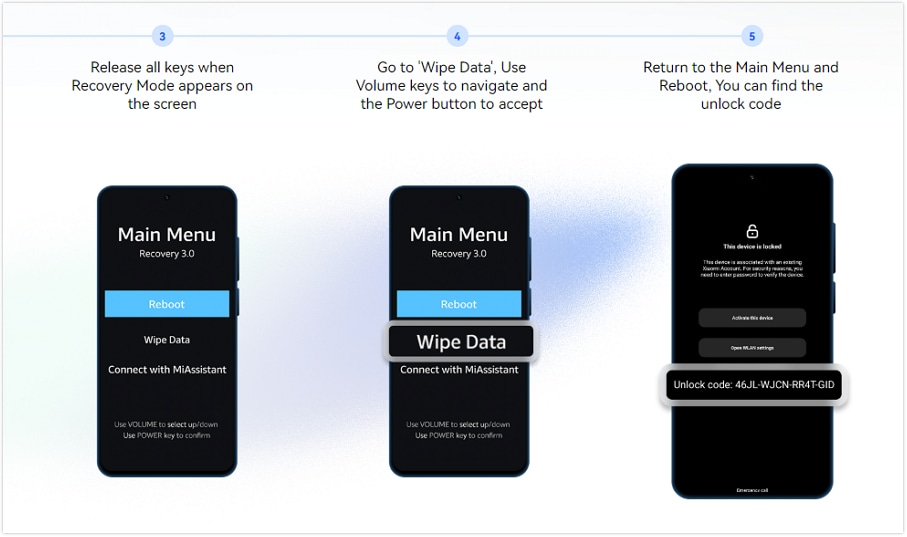
Step 2 Find the device unlock code shown in Recovery Mode. Write it down exactly as it appears on the screen.
-
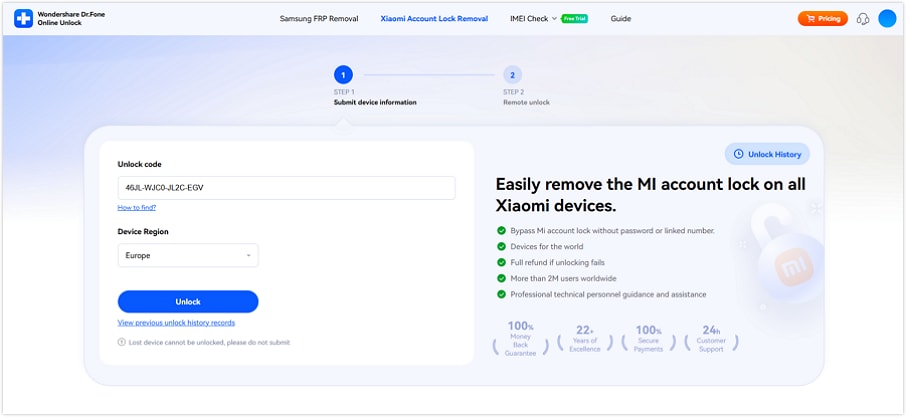
Step 3 Open your browser and go to Dr.Fone Online Unlock. Choose the option for removing Xiaomi Account lock.
-
Step 4 Enter the unlock code and select your device region. After checking the details, submit the request.
-
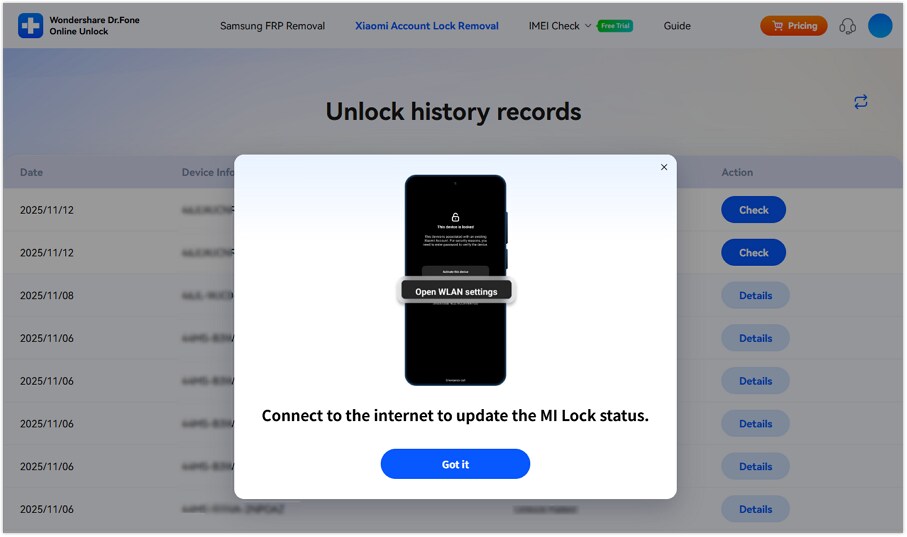
Step 5 Follow the online instructions on the page. You may also receive an email with a tracking ID for the request.
-
Step 6 Once the removal process is complete, restart your Redmi phone and connect it to Wi-Fi.
-
Step 7 Set up the phone with a Mi Account that you control. Enable two-factor protection to avoid another Xiaomi device lock issue later.
Part 3. Bypass Methods for Xiaomi Account Lock on Redmi 12/13 Compared
After checking each method, the best choice depends on account access, device mode, HyperOS patch level, PC skills, and whether you want official or guided recovery.
| Method | Best For | Needs Password? | HyperOS Reliability | Key Limitation |
|---|---|---|---|---|
| Remove Mi Account in Settings | Users who still know the Mi Account password | Yes | High, if account access works | Cannot help if the phone is already locked after reset |
| Remove Device via Xiaomi Cloud | Seller or owner removing the Redmi remotely | Yes | High, if Find Device/device list is accessible | Needs the linked Xiaomi Account login |
| PC-Based Mi Account Unlock Tool | Users are trying a local unlock tool after a reset | No | Unstable on newer patches | Tool support may vary by MIUI/HyperOS build |
| TPS Xiaomi Tool | Users are comfortable with Fastboot, EDL, ADB, and drivers | No | Lower on Redmi 13 HyperOS | Driver, mode, and security patch issues can block success |
| Dr.Fone Online Unlock | Non-technical users who want a guided browser workflow | No linked phone/email needed in many cases | Better suited for newer Redmi lock cases | Requires unlock code, correct region, and online request processing |
Conclusion
Redmi 12 and Redmi 13 unlock methods work best when matched to the right case. Settings removal is ideal before reset if you still know the Mi Account password. Xiaomi Cloud removal fits used phones when the seller is reachable. PC tools may help older builds, while TPS Xiaomi Tool suits users who understand Fastboot, EDL, and drivers.
For tougher Redmi 13 Mi unlock cases, especially on HyperOS, Dr.Fone Online Unlock feels more practical because it avoids APK files, flashing steps, and complex drivers. It gives a cleaner browser-based path for users who need guided Redmi 12 bypass support.
FAQ
-
1. Can Redmi 13 HyperOS bypass Mi Account lock?
Yes, but old APK and browser tricks are not reliable on Redmi 13 HyperOS. Use Xiaomi unlock appeal first. If that fails, Dr.Fone Online Unlock is a cleaner guided option as it utilizes the Recovery Mode unlock code. -
2. Does Redmi 12 bypass still work on MIUI 14?
At times, just on the older patch builds. Generally, Redmi 12 runs MIUI 14 or Android 13. Resetting the password, removing from Xiaomi Cloud, or appealing to Xiaomi are safer than using a random bypass. -
3. Is Redmi 13 harder to unlock than Redmi 12?
Yes. Redmi 13 is usually harder because HyperOS has newer security patches. Redmi 12 MIUI 14 may still allow more recovery options, while Redmi 13 often requires a Xiaomi appeal or a guided online unlock.