ChatGPT
 Perplexity
 Gemini
 Claude
 Grok
Grok
Xiaomi resale is bigger than ever. Redmi and POCO phones sell fast in used-phone markets because they offer strong specs at lower prices. But one lock screen can turn a good deal into a blocked device: “This device is locked.” HyperOS has made this problem harder because older APK tricks and browser shortcuts fail more often now.
Many users do not want flashing tools, ROM files, or deep repair knowledge. They want a cleaner path. This Dr.Fone Xiaomi unlock review looks at whether Dr.Fone Mi account removal can help in modern Xiaomi lock cases. It also checks how the Wondershare Mi online method works, where it fits, and what users should know first.
In this article
- Part 1. Dr.Fone Online Unlock for Xiaomi Overview
- Part 2. Comparing Dr.Fone with Other Mi Account Removal Without Password Tools
- Part 3. How to Use Dr.Fone Online Unlock for Mi Account Lock
- Part 4. Pros and Cons
- Part 5. Hands-On Review Scorecard: Quick Verdict
- Part 6. Bonus Tip: Dr.Fone Online vs Dr.Fone Desktop — Which One Should You Use?
- Part 7. Dr.Fone Online Unlock Pricing Plans
- Conclusion
Part 1. Dr.Fone Online Unlock for Xiaomi Overview
Dr.Fone Online Unlock Mi account removal is part of a wider online unlock toolkit made for common device lock problems. The platform includes tools for Xiaomi account lock removal, Xiaomi activation lock checking, IMEI checking for Android and iPhone devices, and Samsung FRP removal.
The main goal is to give users a simpler and more organized way to handle lock-related issues without depending on difficult repair methods.
One important feature in this Dr.Fone Xiaomi unlock review is Mi Account removal. It helps users regain access to Xiaomi phones when the original password is no longer available. The platform also provides guided steps and support for users who need to remove a Mi Account without the password.
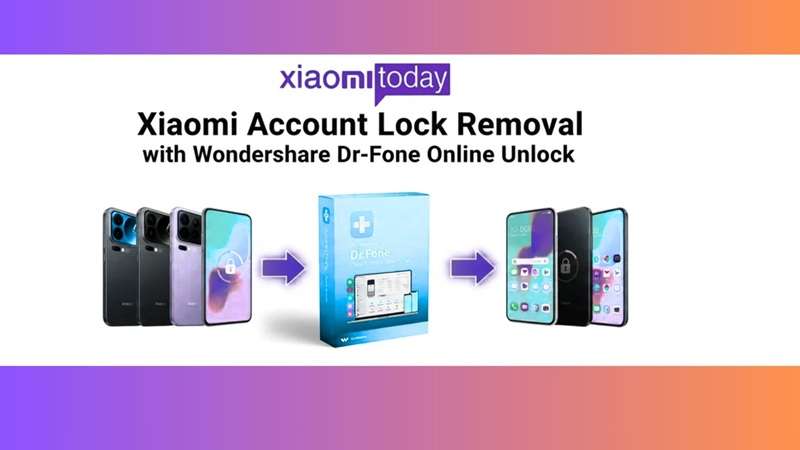
This makes the Wondershare Mi online workflow more useful for users who want a cleaner process with less technical setup.
1.1 Key Features
- Xiaomi Account Lock Removal
Xiaomi phones use Mi Account protection to keep user data secure and prevent unauthorized access. Dr.Fone Mi account removal helps users deal with this lock in a guided way. It is useful when a Xiaomi phone is still linked to an old account after a reset.
This can help second-hand phone buyers who cannot contact the previous owner or do not have the old login details. - Free Xiaomi Activation Lock Check
Before starting the unlock process, users can check if the Xiaomi phone is linked to an active account. This free check helps users understand the phone’s lock status first.
It can also reduce mistakes before trying Mi Account removal. - Free IMEI Check for Android and iPhone
Dr.Fone Online Unlock also offers a free IMEI check for different phones, including Android and iOS devices. This feature helps users check the device identity, lock status, and possible unlock needs.
In this Dr.Fone Xiaomi unlock review, this feature adds value by helping users better understand the phone before choosing the next step. - Samsung FRP Removal
The platform is not limited to Xiaomi only. It also supports Samsung FRP removal. FRP is a security lock used on Samsung phones after a reset.
This makes the Wondershare Mi online unlock platform more useful for users who manage multiple phone brands.
1.2 Why Wondershare Dr.Fone Online Unlock Is Effective
Wondershare has a wealth of experience in mobile software, and Dr.Fone Online Unlock leverages that expertise to simplify unlocking your phone. This equipment helps those who like easy steps, great help, and less risk when lock-related issues arise.
Here is what makes it useful:
- Reliable device support: It works with many Xiaomi and Samsung devices, making it useful for various lock cases.
- Simple guided flow: The interface breaks complex unlock tasks into clear steps. Users do not need to guess the next move.
- Multiple unlock tools: It covers Dr.Fone Mi account removal, Samsung FRP removal, and IMEI checks in one place.
- Safer process: The workflow is designed to protect device stability and reduce the risk of bricking or data loss.
- Online and desktop choice: The online method suits regular users, while the desktop option suits IT professionals who need a repeatable process.
1.3 User Experience
The user experience is built around clear steps. The interface keeps the Dr.Fone Mi account removal process simple from start to finish.
Users can move through device detection, lock checking, and account removal without technical skills. The flow tells them what to do next, so the process feels easier to follow.
The online platform also saves time. Users do not need to install large software files before starting.
1.4 Performance and Compatibility
Dr.Fone Online Unlock is made to work across many Xiaomi models and MIUI versions. This gives the Dr.Fone Mi account removal method a wider range of use for common Xiaomi lock cases.
Its compatibility with popular Xiaomi devices helps keep the process steady. Users with different MIUI versions can still follow a similar unlock flow.
The tool also supports Samsung FRP removal across different Android versions. This makes it useful for people who handle phones with different ages, systems, and settings.
1.5 Safety and Security
Account removal tools can make users worry about their phone data. Dr.Fone Online Unlock focuses on keeping the process secure while users handle lock removal.
The Dr.Fone Mi account removal process is designed to protect device data during unlocking. This helps reduce the fear of data loss or damage.
The platform also reminds users to back up important files before starting any operation. This is a smart safety step before account removal or lock bypass.
1.6 Device Coverage and System Support
One strong point in this Dr.Fone Xiaomi unlock review is the wide device and system support. The online unlock method is designed for Xiaomi’s main phone brands, including Xiaomi, Redmi, and POCO.
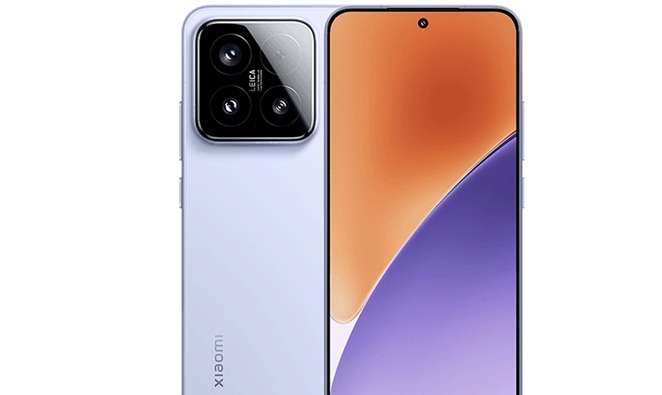
It also supports different Xiaomi software generations. This includes older MIUI versions and newer HyperOS builds.
Here is a quick overview of the supported range:
- Supported brands: Xiaomi, Redmi, and POCO
- Supported systems: HyperOS 1.5, HyperOS 1.0, and MIUI 1 to MIUI 14
- Region coverage: United States, Europe, Hong Kong, Japan, Mexico, Malaysia, UAE, and many other regions worldwide
For users seeking a broader Dr.Fone Mi account removal solution, this wider compatibility makes the process more practical across Xiaomi models and regions.
Part 2. Comparing Dr.Fone with Other Mi Account Removal Without Password Tools
Many tools claim to remove the Mi Account lock without a password. But their safety, speed, and device support are not the same. Some tools work only on limited models. Some need a PC. Others may bring malware or data-loss risks. So, it is better to compare them before choosing one.
| Feature | Dr.Fone Online Unlock | Mi Account Unlock Tool | Free Online Unlock Tools |
|---|---|---|---|
| Success Rate | Supports Xiaomi devices with a more stable unlock process | High only for limited models | Results vary and may be low |
| Safety | Secure process with lower malware and bricking risk | Official, but limited in use | Risk of malware and data loss |
| PC Required | No, it works through a web-based process | Yes, usually needs a PC | Mixed; some tools need a PC |
| Speed | Can process unlock requests within 1 to 24 hours | May take longer due to manual steps | Can be slow or unreliable |
| Device Compatibility | Supports Xiaomi, Redmi, and POCO devices globally | Mostly focused on Xiaomi devices | Limited by model and region |
| Technical Support | Offers professional assistance | Support is limited | Usually no support or community help only |
Dr.Fone Online Unlock stands out for offering a more guided and comprehensive process. It does not depend on random APK files or complex manual steps. In this Dr.Fone Xiaomi unlock review, the Wondershare Mi method appears stronger because it combines web access, broader device support, and professional assistance for Dr.Fone Mi account removal.
Part 3. How to Use Dr.Fone Online Unlock for Mi Account Lock
Follow the steps with care. Keep the phone charged. Use stable Wi-Fi. Do not reset the phone again during the process.
-
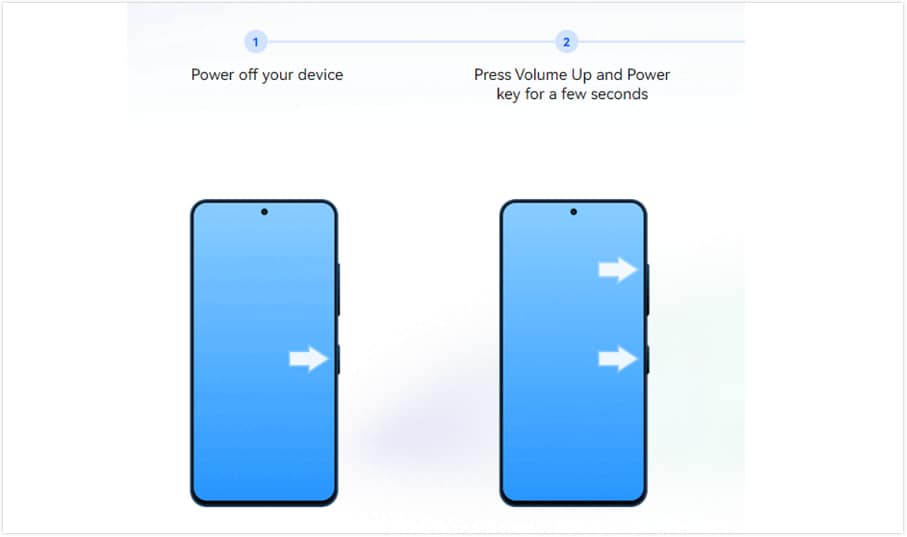
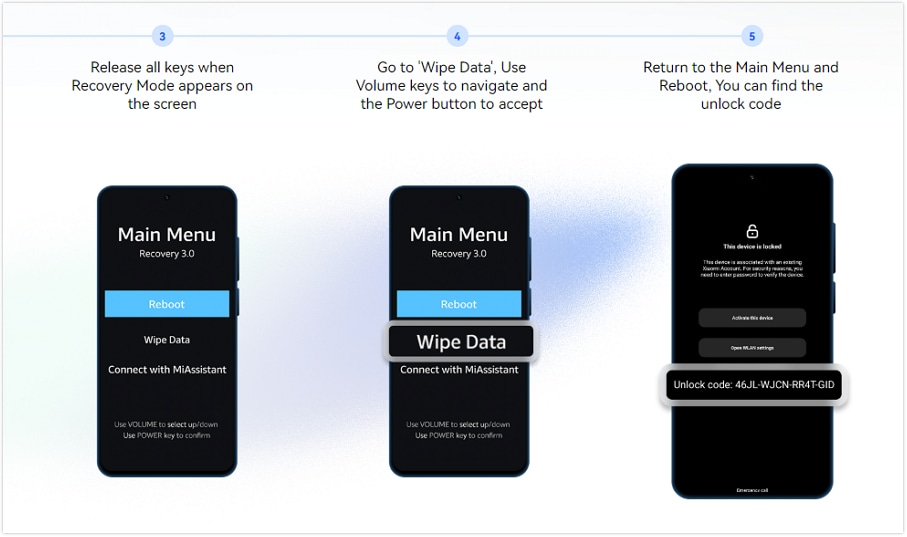
Step 1 Turn off your locked Xiaomi phone. Enter Recovery Mode by using the device key combination until the Recovery menu appears.
-
Step 2 Find the device unlock code shown in Recovery Mode. Write it exactly as it appears.
-
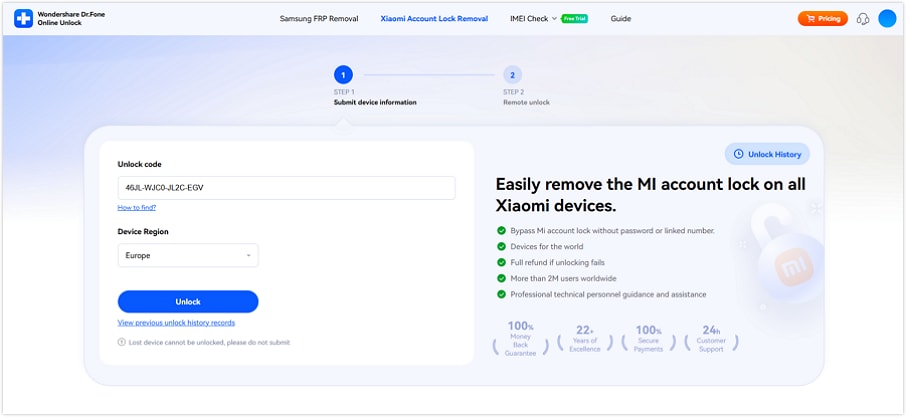
Step 3 Launch your browser and access Dr.Fone Online Unlock. Select the option to remove the Xiaomi lock.
-
Step 4 Input the unlock code and select your region. Now send the request.
-
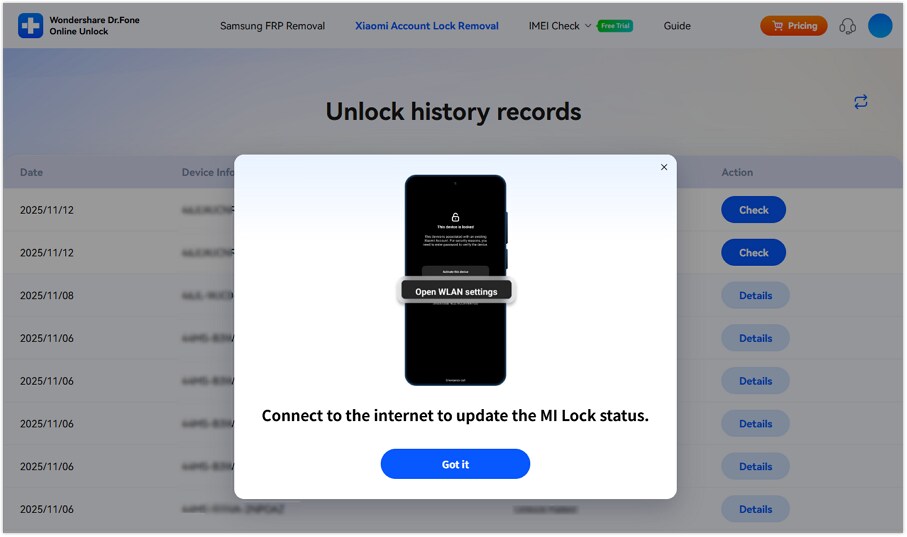
Step 5 Continue following the online instructions. You might get an email with a tracking ID.
-
Step 6 Once the removal process is complete, start the phone and connect to Wi-Fi.
-
Step 7 Configure the gadget with Mi Account, under your control. Enable two-factor protection to avoid the issue of another Xiaomi device being locked later.
Part 4. Pros and Cons
- Works with many Xiaomi and Samsung devices
- Includes free activation lock and IMEI check features
- The online platform removes the need for large software installations
- Step-by-step guidance keeps the unlock process easier to manage
- The Dr.Fone Mi account removal process focuses on device safety and keeping user data protected
- Needs a stable internet connection during the process
- Some new MIUI or Samsung security updates may not get support immediately
- Certain advanced cases may still require technical help
Part 5. Hands-On Review Scorecard: Quick Verdict
Here is a practical review based on the tool’s stated workflow, support claims, and user-facing unlock process.
| Factors | Rating | Quick Verdict |
|---|---|---|
| Ease of Use | 4.8/5 | Very simple for beginners |
| Setup Requirement | 4.9/5 | Almost no setup needed |
| Xiaomi/Redmi/POCO Coverage | 4.5/5 | Strong device range |
| HyperOS / MIUI Support | 4.3/5 | Better than old APK-style methods |
| Speed | 4.2/5 | Fast, but not always instant |
| Safety Compared With APKs | 4.6/5 | Cleaner and lower-risk |
| Support and Refund Positioning | 4.4/5 | More reliable than informal sellers |
| Best Use Case | 4.7/5 | Good for real owners without credentials |
| Limitation Awareness | 4.0/5 | Users still need caution |
Part 6. Bonus Tip: Dr.Fone Online vs Dr.Fone Desktop — Which One Should You Use?
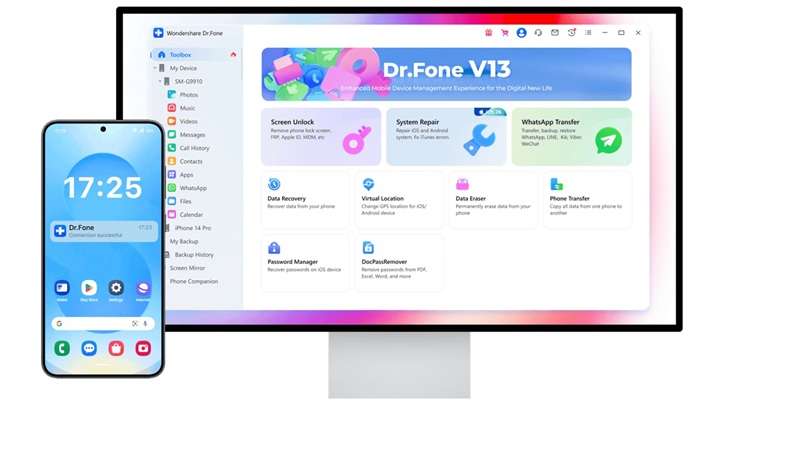
Dr.Fone offers two unlock routes, but they are not for the same problem. The online method is better for Mi Account lock. The desktop tool is better for screen lock and wider Android unlock needs.
| Need | Better Option | Why |
|---|---|---|
| Xiaomi is stuck on “This device is locked.” | Dr.Fone Online Unlock | Made for Dr.Fone Mi account removal |
| No old Mi Account password | Dr.Fone Online Unlock | Uses online unlock flow instead of account login |
| No PC software setup | Dr.Fone Online Unlock | Works through a browser |
| PIN, pattern, password, fingerprint, or face lock | Dr.Fone Desktop | Built for broader screen lock removal |
| More Android unlock tools | Dr.Fone Desktop | Offers wider device unlock functions |
Quick verdict: In this Dr.Fone Xiaomi unlock review, use the Wondershare Mi online method for Mi Account lock. Use Dr.Fone Desktop when the issue is a screen lock or a broader Android unlocking issue.
Part 7. Dr.Fone Online Unlock Pricing Plans
Dr.Fone Online Unlock shows two weekly Xiaomi unlock plans:
Standard Unlock Plan — \$29.95/week
Best for basic Dr.Fone Mi account removal.
- Unlock 1 device per week
- Full refund if unlocking fails
Advanced Unlock Plan — \$44.59/week
Best for users who want faster service and extra support.
- Unlock 1 device from any supported brand
- 80% faster unlocking queue
- Higher success rate technology
- VIP support channel
- Full refund if unlocking fails
Quick pick: Choose Standard for one Xiaomi unlock case. Choose Advanced if you want faster processing, VIP support, and wider brand coverage.
Conclusion
Mi Account removal needs the right path for the right case. Official Xiaomi recovery is best when the old phone number, email, or password still works. Free tools may suit simple old MIUI models, but they bring more risk to HyperOS. Desktop unlock tools are for users who need screen lock removal or more advanced Android support.
For users stuck on “This device is locked” without credentials, Dr.Fone Online Unlock gives a cleaner middle route. It avoids APK files, flashing steps, and guesswork. This Dr.Fone Xiaomi unlock review highlights its real strengths: guided steps, broader device support, and safer handling for genuine Xiaomi, Redmi, and POCO owners.