ChatGPT
 Perplexity
 Gemini
 Claude
 Grok
Grok
A Xiaomi phone can turn on normally, connect to Wi-Fi, and still stop at one message: “This device is locked.” This generally indicates that the phone is still associated with a Mi Account. It happens after resetting the phone, getting a second phone, or forgetting the password. The great news is that there are safe choices. Some are official, like Xiaomi password reset and Xiaomi Cloud removal. Others help when the old account or seller is not available.
This guide explains Mi account removal in simple steps, shows how each method works, and helps you choose the safest route before you try to remove Mi lock from your Xiaomi, Redmi, or POCO phone.
In this article
Part 1. What Is Mi Account Lock on Xiaomi Devices?
Mi Account Lock is Xiaomi’s account-based security lock. It connects your Xiaomi phone to Xiaomi Cloud and Mi Account. If the Find Device setting is enabled on a Xiaomi phone, the phone can be located, locked, and wiped via Xiaomi Cloud. Additionally, Find Device can remotely lock the device and clear data in Lost Mode.
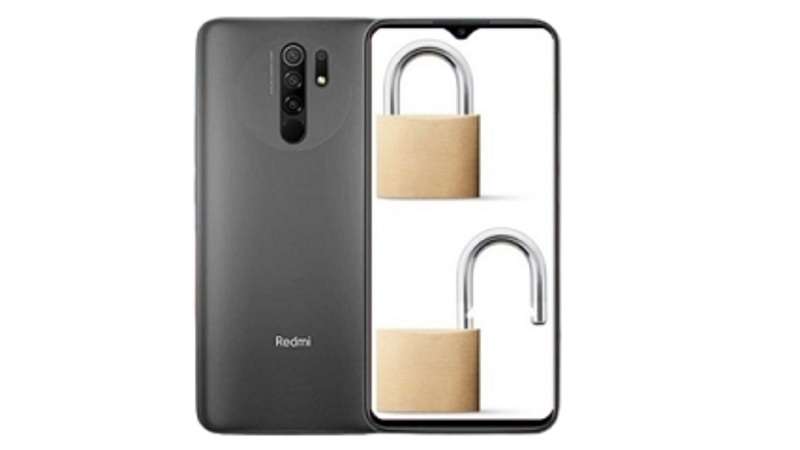
Why Your Xiaomi Phone Shows “This Device Is Locked”
A Xiaomi mobile gives this message for several reasons, but to no avail. First, make sure to check what type of lock it is.
- Mi Account Lock: Your phone is still connected to a Mi Account. To unlock it, you need the right Mi Account login details or recovery options. This is the main case where Mi account removal may be needed.
- Factory Reset Protection: After a factory reset, the phone may prompt you to sign in to the Google or Mi Account you used before the reset. This prevents someone from using the phone without your green flag.
- Forgotten Screen Lock: In some cases, the screen lock is the problem only. You might have forgotten the phone’s PIN, pattern, password, fingerprint, or face unlock that you set.
- Security Details Are Not Available: You may not have access to the phone number or email linked to the Mi Account. In that case, normal Xiaomi account unlock steps can become harder.
- Network or Carrier Lock: Some Xiaomi phones are locked to one carrier. This is not the same as Mi Account Lock. For this, you usually need help from the carrier.
Part 2. Before You Start: Quick Checklist
Before you try any Mi account removal method, confirm the basics first. This allows you to select the suitable solution and dodge unsafe shortcuts.
- Mi Account email/phone: Make sure you know the linked email, phone number, or Mi Account ID.
- Password reset: Try Xiaomi’s official password reset before using any tool.
- Previous owner: For a second-hand phone, request that the seller delete the device from their Xiaomi Account.
- Proof of purchase: Retain receipt of invoice, box, IMEI, and order to prove purchase.
- Device details: Find your Xiaomi model, region, and unlock code if needed.
- Backup: If the phone still opens, back up your data before starting Xiaomi account unlock.
Part 3. What Methods Work to Remove Mi Account Lock on Xiaomi Devices?
Once you know why the lock appeared, select the method that is suitable for your case. Use the official options first, and if not possible, move on to the guided tools for recovery or seller help.
Method 1 — Reset Your Mi Account Password Officially
If you still have access to your phone number or email, refer to this method. This includes Mi Account ID. After resetting it, you can use the new login details to activate the device again.
-
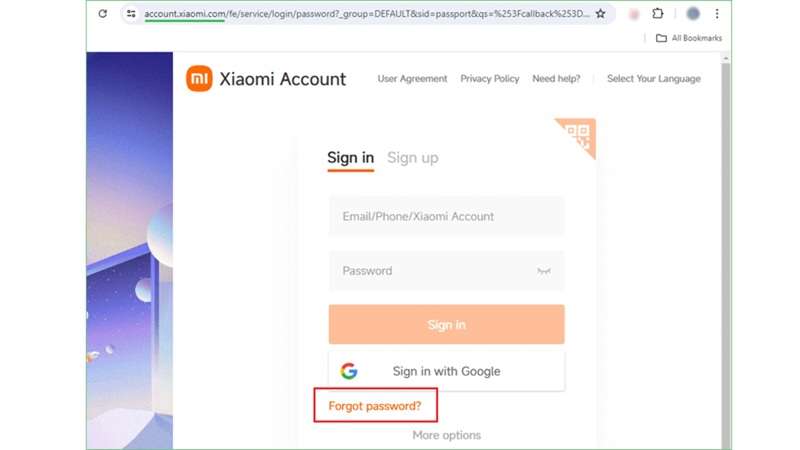
Step 1 Take your browser to account.xiaomi.com. Press forgot password from the login box.
-
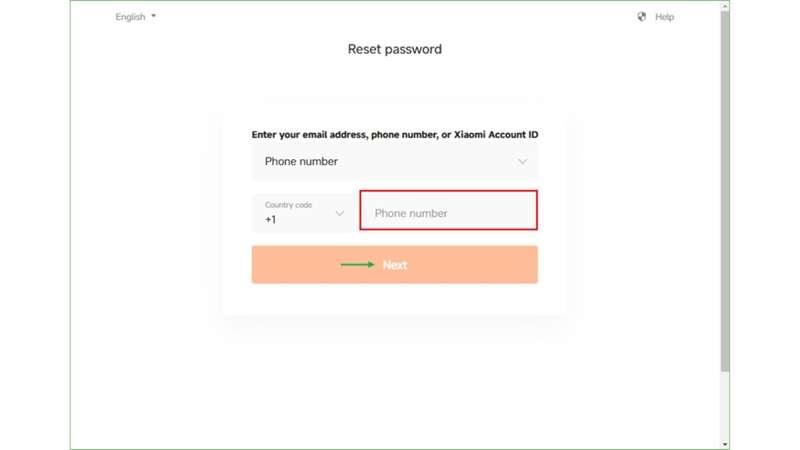
Step 2 Following that, input the phone number, email, or Xiaomi Account ID that is linked to the locked phone. Subsequently, select Next.
-
Step 3 To view a verification code via SMS or email, click Send. Type the code and hit Submit.
-
Step 4 On the new screen, insert a new password for your Mi Account. Press Submit to store it.
Return to your Xiaomi Phone that has been locked back. To proceed with the Xiaomi account unlocking process, sign in using the new password.
Method 2 — Ask the Previous Owner to Remove the Device
This is the best method for a second-hand Xiaomi phone. It is official, safe, and works well when the seller is real and ready to help.
Ask the previous owner to:
-
Step 1 Sign in to the Mi Account that is connected to your Xiaomi Phone.
-
Step 2 Then, open Xiaomi Cloud or the devices section in their account.
-
Step 3 Remove the Xiaomi phone from their account. Make sure you turn off Find Device for that mobile.
-
Step 4 After that, reboot the smartphone and connect it to Wi-Fi later.
-
Step 5 Give the configuration another effort.
This method is useful when the seller still has access to the account. It can help with Xiaomi account unlock without using risky tools or unknown files.
Method 3 — Contact Xiaomi Support With Proof of Ownership
If the above method does not help you to unlock your Xiaomi device, then try this one. It can be unlocked by Xiaomi Support, but it may take a lot of time.
-
Step 1 Visit your country’s Xiaomi official website.
-
Step 2 Proceed to the help section.
-
Step 3 Call on Xiaomi customer support through Live Chat, Email, or Phone.
-
Step 4 State the problem clearly. Inform them that you are unable to unlock your Xiaomi device.
-
Step 5 Follow their instructions. Share any proof of ownership they ask for.
-
Step 6 Wait for their response. If this method does not work or you receive no reply, move to the next Mi account removal option.
Method 4 — Use Dr.Fone Online Unlock To Easily Remove The Mi Account Lock On All Xiaomi Devices
Pro Tip: When the official Xiaomi recovery does not work, and the previous owner is unreachable, Dr.Fone Online Unlock can be a cleaner next step for Mi account removal. It works through a browser and guides users through the unlock-code process.
It can remove Mi Account Lock online without the old password or linked number, supports Xiaomi, Redmi, and POCO devices, and offers technical support plus refund terms if unlocking fails.
What does Dr.Fone Online Unlock offer?
- Bypass Mi account lock without password or linked number.
- Devices for the world
- Full refund if unlocking fails
- More than 2M users worldwide
- Professional technical personnel guidance and assistance
-
Step 1 Submit device details
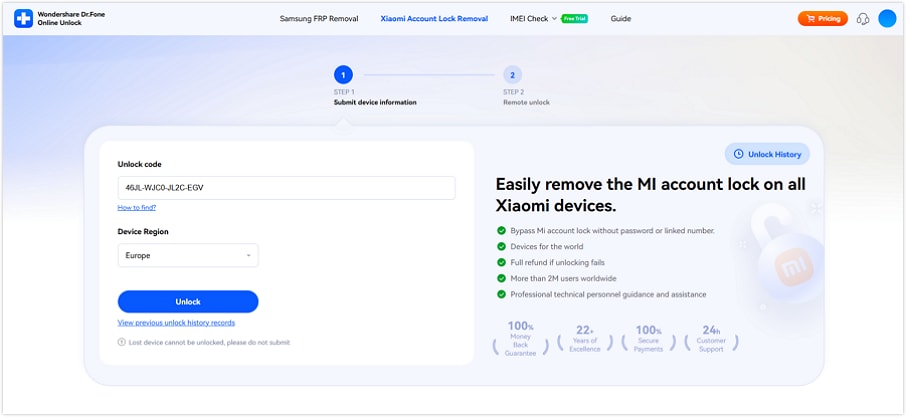
Open the Xiaomi Account Lock Removal page in your browser. Enter the device unlock code and choose the correct device region.
-
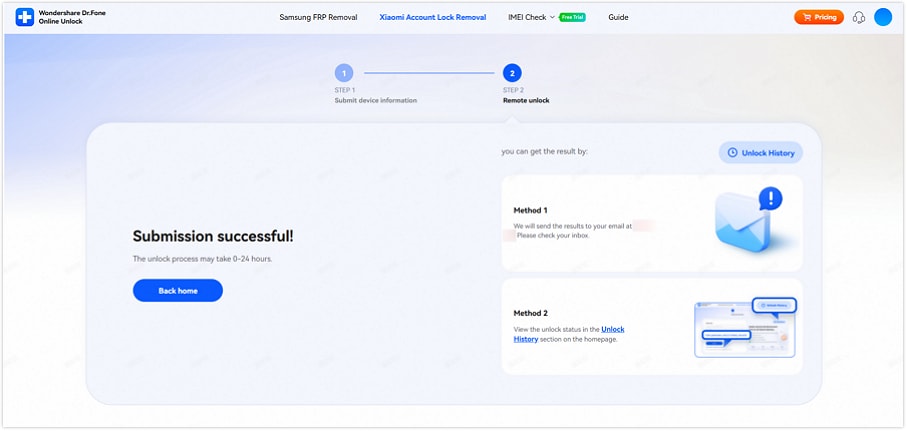
Step 2 Wait for processing
After submission, the unlock request goes into processing. It usually takes 0–24 hours, but the time can change by model or region.
-
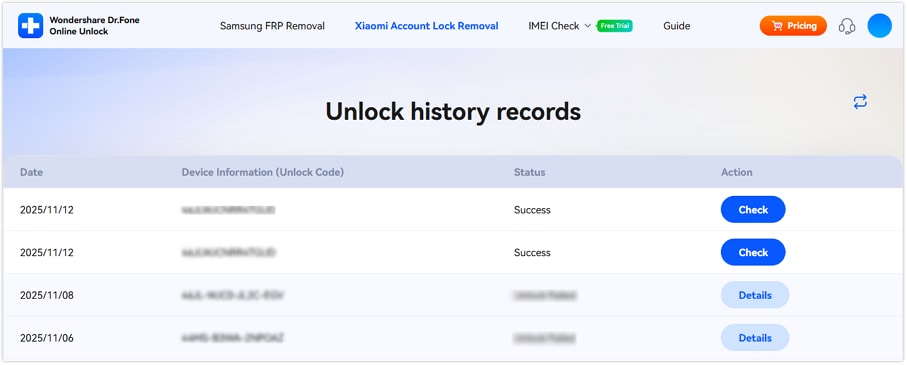
Step 3 Check the result
You will get an email when the result is ready. You can also open Unlock History to see the request time, status, and result notes.
-
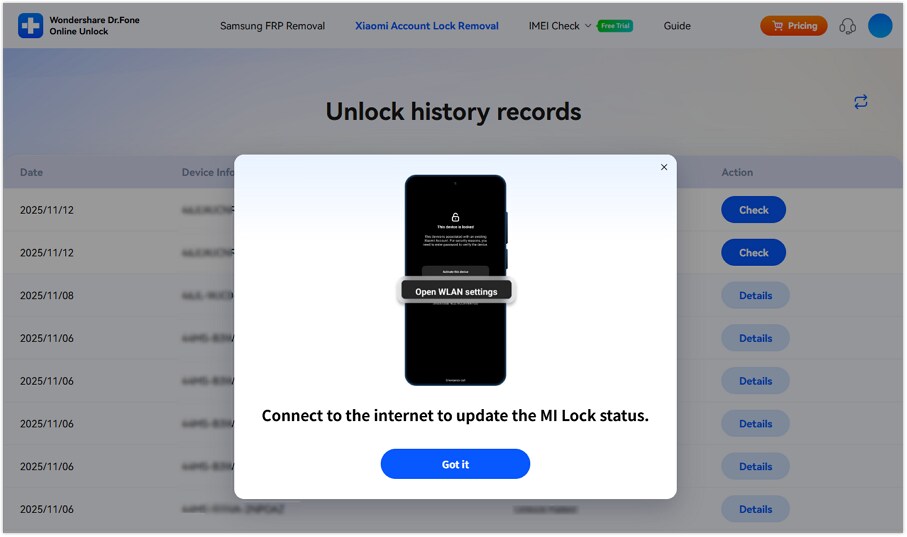
Step 4 Connect and activate the phone
After a successful unlock, connect the Xiaomi phone to the internet. This updates the Mi Lock status. Then follow the screen steps to activate the device again.
Part 5. Things to Avoid During Xiaomi Account Unlock
Not all shortcuts are safe. Some tricks may result in phone damage, data theft, or making your lock even trickier.
- Random APK files from unknown sites
- Free “one-click” tools with no clear company behind them
- Unofficial ROM flashing without technical skill
- Buying used Xiaomi phones before the seller removes their Mi Account
- Unlocking lost or stolen devices
- Sharing IMEI, unlock code, or account details with random sellers
A safe Xiaomi account unlock should protect both the phone and the owner’s data.
Part 6. Comparison Table
| Method | Best For | Needs Password? | Difficulty | Risk |
|---|---|---|---|---|
| Xiaomi Password Reset | Original owner with recovery access | Yes | Easy | Low |
| Previous Owner Removal | Buyers of second-hand Xiaomi phones | No, the seller handles it | Easy | Low |
| Xiaomi Support | Genuine owners with proof of purchase | Not always | Medium | Low |
| Dr.Fone Online Unlock | Locked-out users without old account access | No | Easy | Low–Medium |
Conclusion
Mi Account Lock is not the same for every Xiaomi user, so the right fix depends on the situation. Password reset works best for owners who still have access to their recovery email or phone number. Previous-owner removal is the safest option for second-hand devices. Xiaomi Support fits users who can prove ownership but cannot recover account details.
Dr.Fone Online Unlock becomes a more pragmatic option when the official routes no longer work, as it is an online Mi account removal solution that supports many Xiaomi, Redmi, and POCO models. The guided approach is also simpler for users who prefer to remove Mi lock without any risky APK's, unknown flashing tools, and complicated manual methods.
FAQ
-
1. Can I remove Mi lock without a password?
Yes, but official recovery should come first. Try Xiaomi password reset or ask the previous owner to remove the device. If those options fail, Dr.Fone Online Unlock can help with Mi account removal without the old password. -
2. Is it safe to remove the Mi account?
It’s safe when using official Mi recovery, Xiaomi Support, or trusted services. Don’t use random APK files, unknown unlock tools, or flash ROMs. -
3. Does unlocking a Xiaomi account erase data?
Most often, that is the response. If the phone had a factory reset done before the appearance of the lock, the old local data is most likely already deleted. If the device can still be accessed, first back up files. -
4. Can the Mi lock be removed online?
Yes. Dr.Fone Online Unlock’s Mi Account Lock removal will be done via browser for compatible Xiaomi, Redmi, and POCO phones using an unlock code and region. -
5. Is it possible to get rid of the Mi Account Lock from a second-hand phone?
Affirmative. The safest way is to ask the previous owner to remove their phone from their Xiaomi Account and disable Find Device before setup. -
6. What is the difference between Mi Account Lock and FRP lock?
Mi Account Lock is Xiaomi’s own security system linked to Xiaomi Cloud and Find Device. FRP lock is Google’s Factory Reset Protection linked to the Google account used on the phone.