ChatGPT
 Perplexity
 Gemini
 Claude
 Grok
Grok
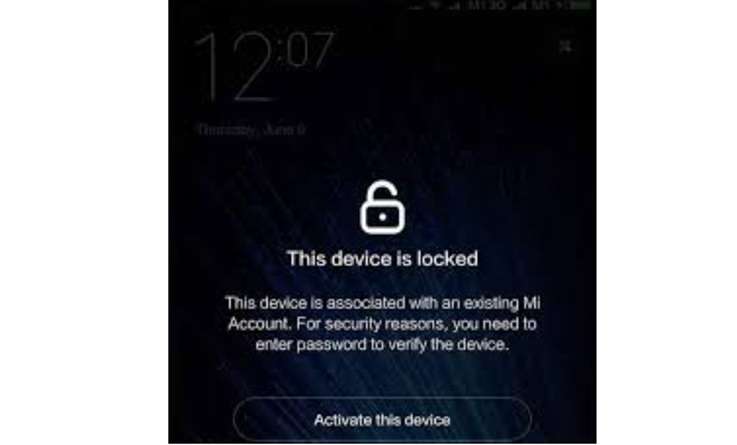
A Xiaomi phone can pass the reset screen and still refuse to open. The message is usually clear: “This device is locked.” It indicates that the device is still associated with a Xiaomi account or is Find Device-enabled. When you buy a new Xiaomi, Redmi, or POCO mobile phone from OLX, Facebook Marketplace, or local stores, this mostly happens. This may also occur if you forget an old password or lose access to your recovery number. In such cases, Mi account unlock without a password needs a safe path, not random APK files.
This guide explains official Xiaomi fixes first, then shows when a guided option like Dr.Fone Online Unlock can help with bypassing Mi account no password cases. Xiaomi and Dr.Fone both frame this as an account-lock recovery issue, especially after a reset or missing linked-number access.
In this article
- Part 1. What is Mi Account Lock on Xiaomi phones?
- Part 2. Why do users need Mi account unlock without a password?
- Part 3. What Xiaomi Officially Recommends First
- Part 4. Before You Try Any Tool: Owner Checklist
- Part 5. Model-and-Version Quick Reference Table
- Part 6. Why Random APK Bypass Methods Often Fail
- Part 7. When Official Recovery Fails: Dr.Fone Online Unlock
Part 1. What is Mi Account Lock on Xiaomi phones?
A Mi Account is Xiaomi’s user account for its phones and services. It gives access to MIUI, Mi Store, and Xiaomi Cloud. After signing in, the phone connects with the account. This helps the user manage Xiaomi services in one place.
What It Helps You Do
A Mi Account supports daily phone use in many ways:
- Sync personal data
- Restore saved content
- Keep device use smooth
- Connect Xiaomi services
- Maintain continuity across Xiaomi products
Why Its Security Matters
A Mi Account can hold personal data and device access. So, its security is important. It helps protect both the user’s information and the phone.
Xiaomi protects account data through:
| Security Feature | Simple Meaning |
|---|---|
| Encrypted storage | Keeps private data safer |
| Secure transfer | Moves data through trusted protocols |
| Two-factor authentication | Adds one more login check |
| OAuth 2.0 support | Let's outside apps connect without exposing core login details |
Part 2. Why do users need Mi account unlock without a password?
Many Xiaomi users face this lock in normal situations. The reason matters because each case may need a different fix. Sometimes it is a forgotten login. Sometimes it is a used phone with the old account still active.
Here are the most common cases:
| Situation | What Happens |
|---|---|
| Forgotten password | The user forgets the Mi Account password and cannot enter the phone. |
| Used phone purchase | The previous owner’s account is still active, so apps and files stay blocked. |
| Phone reset | The device is reset before signing out, and the Mi Account lock appears again. |
| Software update | After some updates, the system may ask for the original account to unlock. |
| Account hacked | The user loses access to apps and personal files, so recovery or removal becomes urgent. |
In these cases, Mi account unlock without a password becomes necessary to regain safe access to the Xiaomi phone.
Part 3. What Xiaomi Officially Recommends First
Before using any third-party tool, start with Xiaomi’s official recovery routes. These options are safer and should come before any Mi account unlock without password tool.
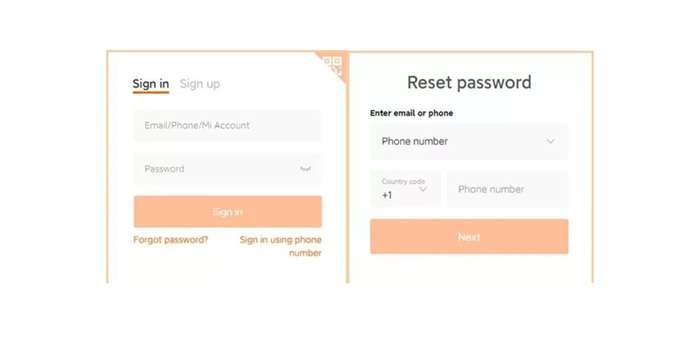
Method 1: Reset Your Xiaomi Account Password
Xiaomi allows users to reset the account password through recovery phone or email. Registered users of Xiaomi can reset the password of their Xiaomi devices by clicking on the “Forgot password” link or alternatively use the Xiaomi account site from the browser. Furthermore, they can also reset using their recovery phone or authentication email.
First of all, use this if you still have access to the old phone number, email or account recovery.
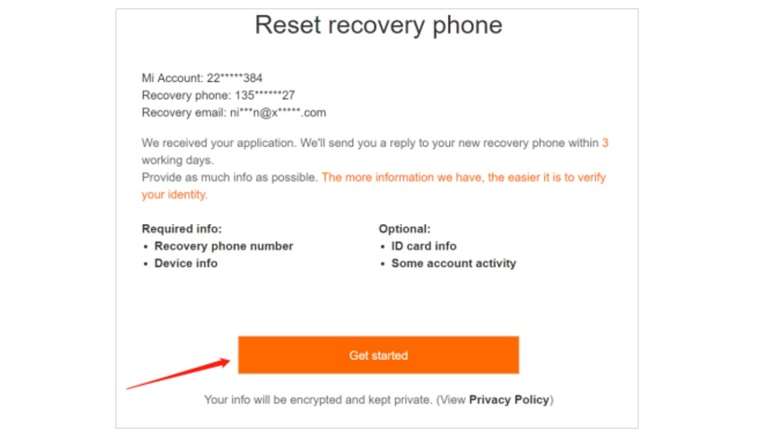
Method 2: Submit Xiaomi Unlock Application
Xiaomi also provides an unlock application route. Its users can submit an unlock application when they no longer use or have forgotten the phone number or email linked to the Xiaomi Account.
This is useful when you have a recovery phone number or email, and the device is yours.
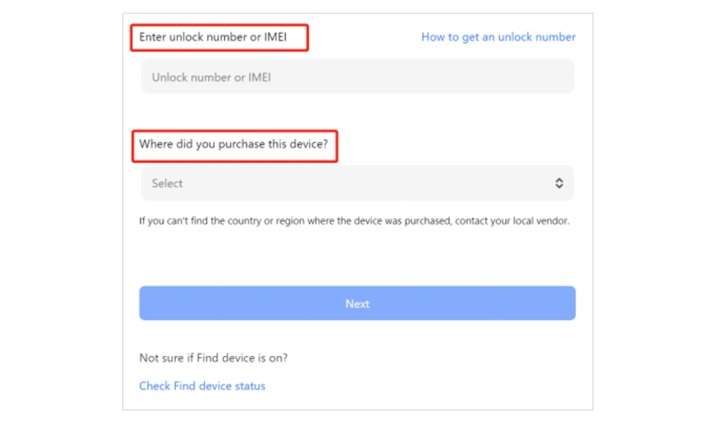
Method 3: Use IMEI or Unlock Number
Xiaomi’s activation lock page allows users to enter an unlock number or IMEI. Xiaomi’s IMEI can be found on the phone box, while the unlock code appears on the Mi Account lock prompt.
The process uses the unlock number or IMEI and asks users to select the purchase region. Keep these details ready before submitting any request.
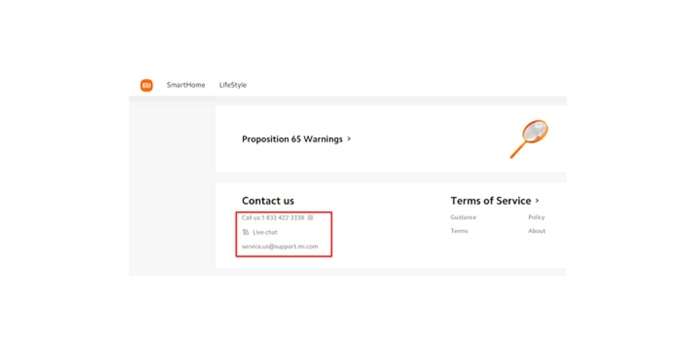
Method 4: Contact Xiaomi Support or Service Center
Xiaomi customer support may need account information, creation country, previous passwords, and devices used with the account for identity checks. Its customer service may require the unlock code or IMEI plus proof of purchase, such as an order number or invoice.
This is the best route if you have a valid invoice, shop bill, or box details.
Method 5: Ask the Previous Owner to Remove the Phone
For second-hand phones, this is still one of the best fixes.
Ask the seller to sign in to the Xiaomi Account linked to the phone, open Xiaomi Cloud, check Find Device, and remove the phone from their account. This is safer than trying unknown APK files.
This method works best when the seller is honest and still reachable. It is common for sellers to forget this step before selling on OLX, Facebook Marketplace, or through a local shop. It can solve bypass Mi account no password cases without risky tools.
Part 4. Before You Try Any Tool: Owner Checklist
Do this before you pay for anything or download anything:
| Checklist Item | Why It Matters |
|---|---|
| Try Xiaomi password reset first | It is the cleanest fix |
| Contact the seller | The seller may remove the device remotely |
| Ask the seller to remove it from Xiaomi Cloud | This can clear the lock from the account side |
| Keep the invoice or proof of purchase | Needed for the service center or support |
| Note the IMEI and unlock number | Needed for unlock appeal |
| Check device region | Some unlock routes ask for the purchase country |
| Avoid random APK files | Many are unsafe or patched |
| Avoid fake unlock generators | They often steal data or waste money |
Part 5. Model-and-Version Quick Reference Table
| Device Family | Example Models | Software | Common Lock Scenario | Recommended First Fix |
|---|---|---|---|---|
| Xiaomi Flagship | Xiaomi 12, 13, 14, 15 | MIUI / HyperOS | Reset after Find Device | Password reset |
| Redmi Note | Note 11, 12, 13, 14 | MIUI / HyperOS | Used-phone lock | Seller removal |
| Redmi Series | Redmi 10, 12, 13 | MIUI / HyperOS | Forgot account | Unlock appeal |
| POCO Series | POCO X, F, M, C | MIUI / HyperOS | ROM flash/wipe | Dr. Fone/appeal |
Xiaomi still provides monthly security update information for smartphones and tablets, including Android security patch details. Newer updates are one reason old bypass tricks can stop working over time.
Part 6. Why Random APK Bypass Methods Often Fail
Old Mi Account APK tricks often rely on weak setup screens, browser loopholes, or outdated apps. MIUI 13, MIUI 14, HyperOS, and later versions of Android generally do not work; this may work on older MIUI builds.
Security patches also close these routes fast. So, a trick that worked on Android 11 or 12 may not work on Android 14 or 15.
For a safer Mi account unlock without a password, avoid random APK files. These can come with ads, malware, hidden permissions, and fake unlock generators that will ask for IMEI, payment, or personal data without result.
Part 7. When Official Recovery Fails: Dr.Fone Online Unlock
So, when official recovery is no longer possible, Dr.Fone Online Unlock can help with bypassing Mi account no password cases in a cleaner and more guided way. It is not the first step. It is the next sensible step after safe recovery options fail.
Wondershare Dr.Fone Online Unlock is positioned for Xiaomi, Redmi, and POCO Mi Account Lock cases. It is browser-based, does not require APK installation, and uses an unlock code taken from Recovery Mode. People utilizing this tool can get the unlock code from Recovery Mode and send it to the Online Unlock Workbench.
This is handy for non-technical users who prefer not to flash ROMs, install dangerous APKs, or employ patched setup-screen tricks.
Key Highlight:
- Designed for Xiaomi, Redmi, and POCO Mi Account Lock cases
- Supports newer MIUI and HyperOS devices
- Browser-based process
- No APK installation required
- No advanced flashing knowledge needed
- Uses unlock code from Recovery Mode
- Helpful for users who no longer have access to the linked Xiaomi account, phone number, or seller
-
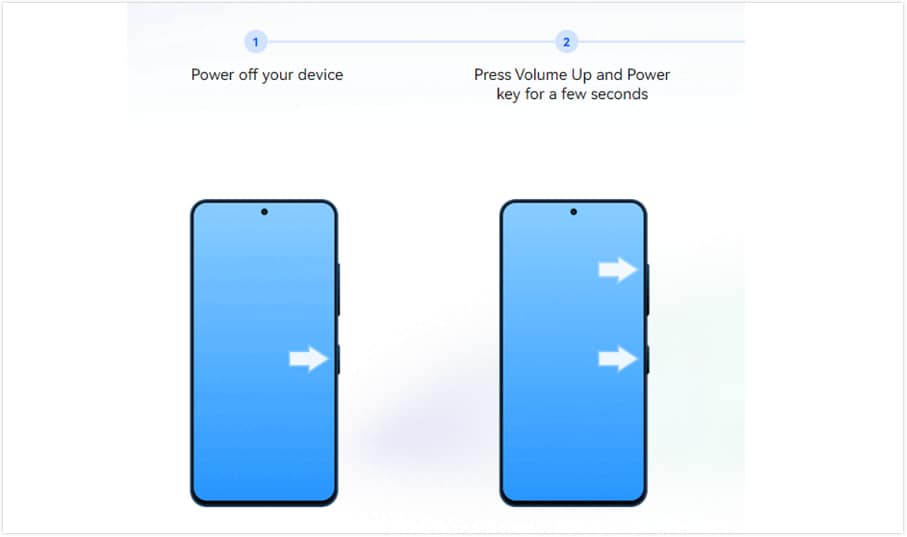
Step 1 Find Your Unlock Code
First, get the special unlock code from your Xiaomi phone. Power off the device completely. Then press and hold Volume Up + Power at the same time until the main menu appears.
-
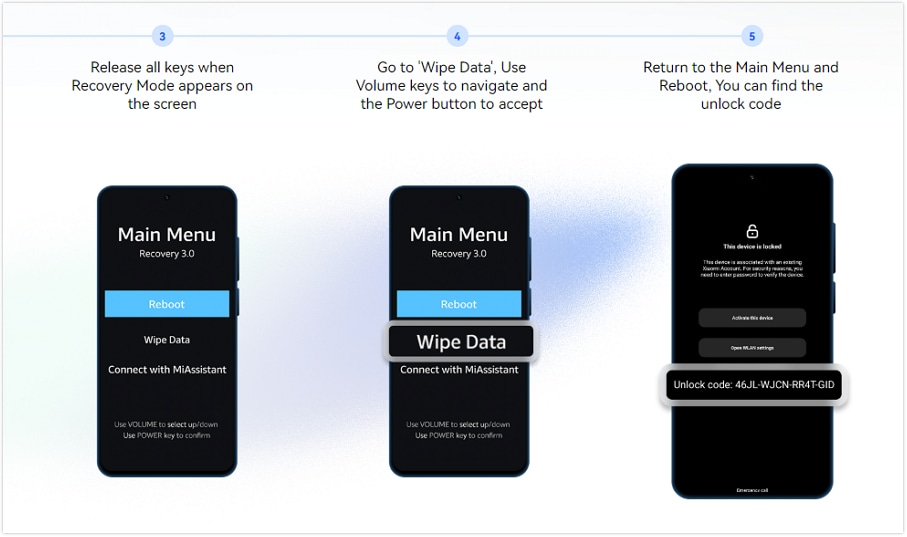
Step 2 Enter Recovery Mode
Use the volume keys to move through the menu. Select Wipe Data. A code will appear on the screen. This is your unique unlock code.
If this does not work, reboot the phone. On the locked screen, tap the padlock icon 10 times to show the code.
-
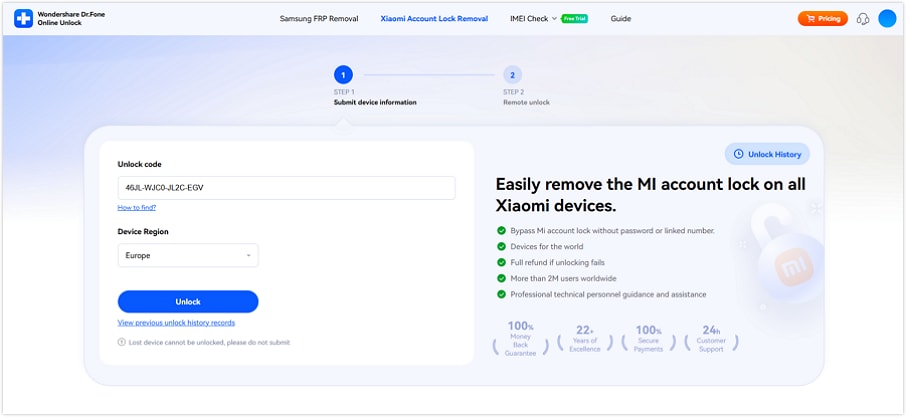
Step 3 Submit Your Information
Go to the Dr.Fone Online Unlock website for Xiaomi Account Lock removal. Carefully enter the unlock code you found on your phone. Then add your device region and click Unlock.
-
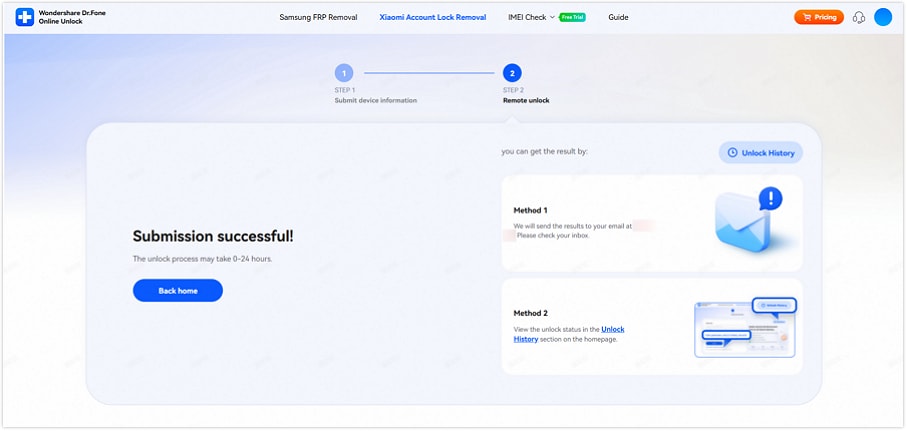
Step 4 Complete the Unlock
After you submit the details, the remote service starts processing your request. You will receive an email once the unlock is complete. After that, your phone should be free from the previous Mi Account and ready to set up as new.

Conclusion
Mi Account Lock needs the right fix, not a risky shortcut. Password reset is best when you still have your phone or email. Xiaomi unlock appeal works well when you have the IMEI or unlock code. Service center support is ideal when you have proof of purchase. Seller removal is the cleanest fix for used phones.
For newer MIUI and HyperOS devices, random APK tricks are weak and unsafe. When these safe routes fail, Dr.Fone Online Unlock gives lawful owners a guided browser-based option. It fits Mi account unlock without password cases because it uses the Recovery Mode unlock code and avoids flashing, APK files, and complex steps.
FAQ
-
1. Can Xiaomi remove Mi Account Lock with proof of purchase?
Yes. Xiaomi could request the unlock code or IMEI together with proof of purchase, for instance, an invoice or order number, before helping with account-lock removal. -
2. Does a factory reset remove Mi Account Lock?
No. A reset does not always remove Mi Account Lock if the phone is still linked to Xiaomi Find Device. Xiaomi says locked devices may need an appeal if Find Device locks the phone. -
3. Can I unlock a second-hand Xiaomi phone without the previous owner?
Yes, in some cases. Use Xiaomi’s unlock application with the unlock number or IMEI. If the seller is gone and official recovery fails, Dr.Fone Online Unlock can be a practical next option for lawful owners. -
4. Does Mi Account unlock work on HyperOS?
The model, region, and lock status are the deciding factors. Xiaomi still sends security updates to phones and tablets, so older APK tricks may not work. Dr.Fone states that its online Mi Account unlock supports MIUI and HyperOS devices.