ChatGPT
 Perplexity
 Gemini
 Claude
 Grok
Grok
A used Redmi Note may look clean, cheap, and ready. Then one message appears after reset: “This device is locked.” The phone is not broken. It is still tied to a Xiaomi Account. This often happens when a Redmi Note is sold without removing Find Device first. The safest fix is not a random APK or fake code. It starts with knowing why the lock appears and what proof the phone may need.
This guide explains the Redmi Note Mi account lock in simple words. It also shows how to choose the right Redmi Note unlocking path for safe Mi removal.
In this article
Preparing for Redmi 7 Mi Account Removal
Before you start Redmi 7 Mi Account removal, take a short pause. This step can affect your phone data and some Xiaomi services. So, prepare first and avoid regret later.
Quick Prep Checklist
| What to Do | Why It Matters |
|---|---|
| Back up your Redmi 7 / Note 7 data | The removal process may cause data loss |
| Save important files first | Photos, contacts, videos, and documents may be affected |
| Know what you may lose | Some Xiaomi services and features may stop working after removal |
| Think before you proceed | Mi Account removal is not just a simple sign-out step |
Why Backup Comes First
Your Redmi 7 or Redmi Note 7 may lose data during the removal process. So, copy your important files before you move ahead. Keep your photos, contacts, messages, and documents in a safe place.
Xiaomi Services May Change
When you remove the Mi Account, you may also lose access to some Xiaomi features and services linked to that account. Keep this in mind before you continue with Redmi Note Mi removal or any Redmi 7 Mi Account removal process.
Redmi Note Mi Account Remove Without PC
You do not always need a computer for Redmi Note Mi Account removal. Some safe options can be done from your phone or through official support. The two methods below are simple and do not need a laptop or PC.
Method 1: Recover Your Mi Account Password First
For Redmi 7 Mi Account removal, Xiaomi may ask you to prove that the account belongs to you. This is done through account login details. Resetting the password is your first step in a situation like this.
A security verification is usually the best way to access your Mi Account.
Steps to Reset Your Mi Account Password
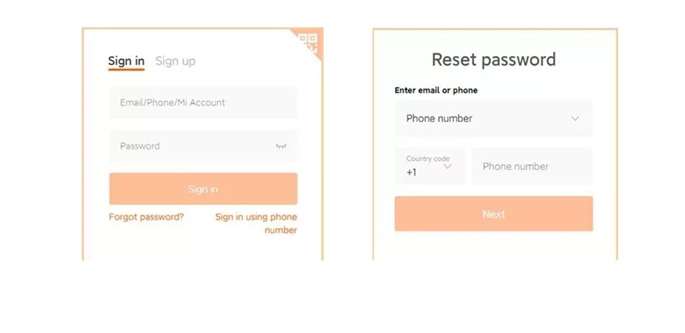
- You need to go to the Mi Account sign-in page on Redmi 7 or Redmi Note 7.
- Tap the Forgot password option below the password box.
- Enter the required account details. These details help Xiaomi confirm that the account is linked to you.
- Select Next to proceed.
- An alert will pop up on the screen if the information is accurate.
- Select a verification method you like.
- A verification code will be sent by Xiaomi.
- Verify your account by entering the code.
- Tap Submit.
- Create a new password.
- Sign in again and use your Mi Account.
This method is useful when you still have access to the linked phone number or email. It is also a safer first step before trying any other Redmi Mi Account removal option.
Method 2: Get Help From a Mi Service Center
If password recovery does not work, visit the nearest Mi Service Center. This is a better option when you cannot access your account or keep seeing lock messages on your phone.
Before you go, prepare the phone and the needed items.
What to Carry With You
| Item | Why You Need It |
|---|---|
| Redmi 7 or Redmi Note 7 phone | The service team needs to check the device |
| Required accessories | They may need them during checking |
| Screenshots of error messages | These help explain the exact issue |
| Any account or purchase details | These may help prove ownership |
Before Handing Over the Phone
Before taking the device to the service center, ensure to take off the SIM and SD cards. This will ensure your data safety and hedge against possible damage or loss.
A Mi Service Center is a safe choice for Redmi Note Mi Account removal when you cannot fix the issue yourself. It is also better than using random files or unclear online shortcuts.
Method 3: Dr.Fone Online Unlock - The Credential-Free Powerhouse
If you bought a used Redmi Note 13 or Redmi Note 14 and the previous owner’s Xiaomi account is blocking setup, start with password recovery, seller removal, or Xiaomi’s unlock appeal. But when those routes do not work, Dr.Fone Online Unlock gives non-technical Redmi Note users a guided way to handle Redmi Note Mi removal without risky APK files.
Dr.Fone Online Unlock is positioned for Xiaomi, Redmi, and POCO Mi Account Lock cases. The process runs in a browser, does not require APK installation, and uses the unlock code from Recovery Mode, which is submitted to its Online Unlock Workbench. This approach, developed by Wondershare, is designed for compatibility with HyperOS and MIUI. Below are the detailed steps.
Why it fits Redmi Note users
- It supports Xiaomi, Redmi, and POCO Mi Account Lock cases.
- It works through a browser.
- It does not require APK installation.
- It avoids advanced flashing steps.
- It is useful when the linked number, email, or seller is unavailable.
- It is easier for users who do not want chipset-specific drivers.
-
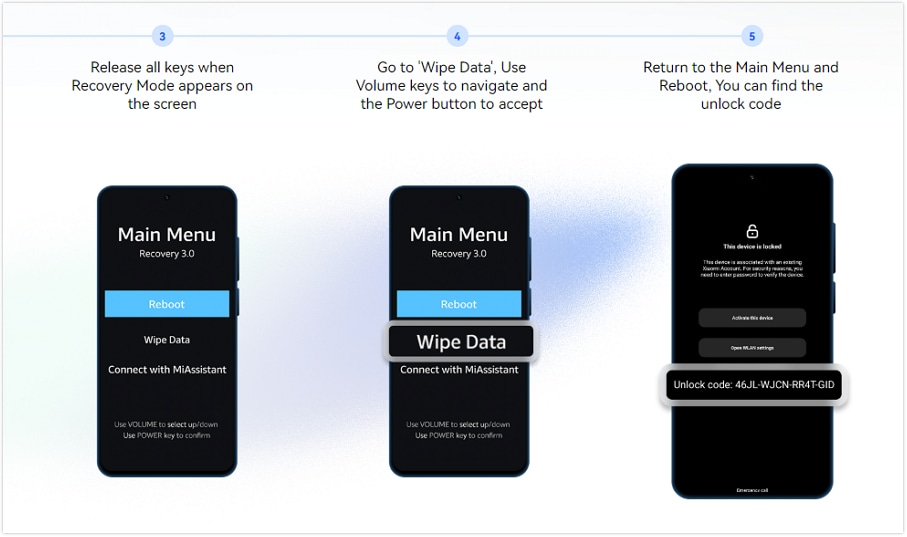
Step 1 Get the unlock code from the device
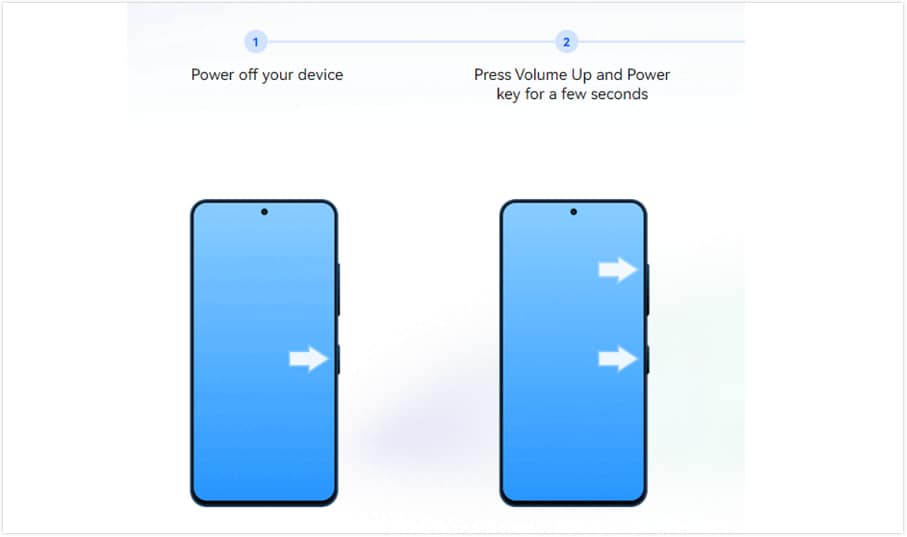
- First, switch off the phone by pressing and holding the Power button and then tap on the Power off button of Redmi Note 7 or Note 8.
- Enter the recovery by holding Volume up + Power until the Mi logo appears and then releasing. Use the volume controls to navigate to the Wipe Data/Factory Reset option and confirm that this will start without the changes to permanent data as long as the appropriate tools are handy.
- When the phone reboots, there will be a unique 16-digit code displayed on your lock screen pertaining to your IMEI. Capture it by photo or writing.
- Do not connect to Wi-Fi to avoid reactivation; exit recovery mode carefully.
This process is simpler than hardware-based alternatives, which forums like XDA caution may harm device ports on models like the Note series.
-
Step 2 Submit and Process Securely Online
- Open a browser and go to https://unlock-android.wondershare.com/mi-unlock from any device.
- You have to enter the 16-digit code, IMEI, device model Redmi Note 7/8, and region.
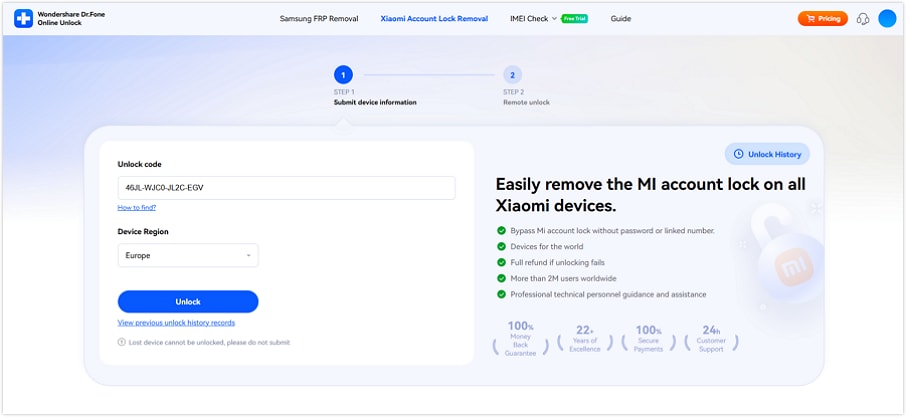
- Your unlock request will be added to the queue upon submission.
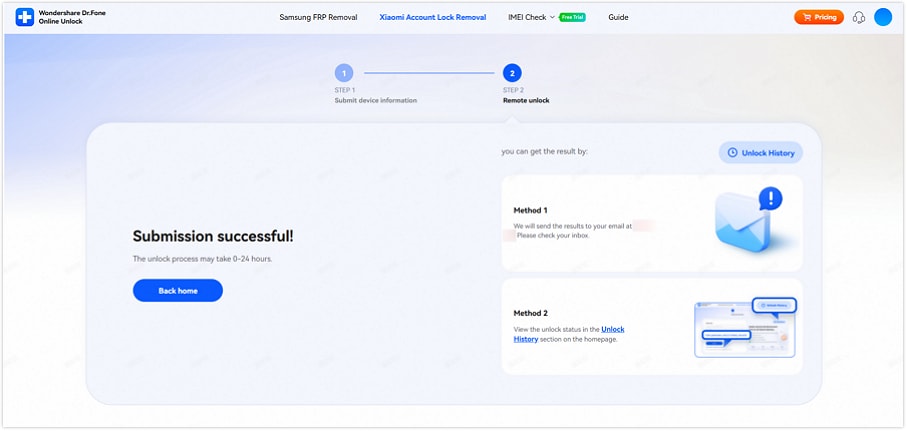
Users like Dicobz Amoier rave about the malware-free ease: "Unlocked my Note 8 in a day—no fuss."
-
Step 3 Implement the Unlock and Complete Setup
- Use the emailed instructions to re-enter recovery mode.
- Type the resulting code on the lock screen. The device will process it and release the lock.
- Establish a new Mi account if desired or proceed without. Verify core functions like calls, apps, and connectivity. An optional IMEI verification can confirm the status.
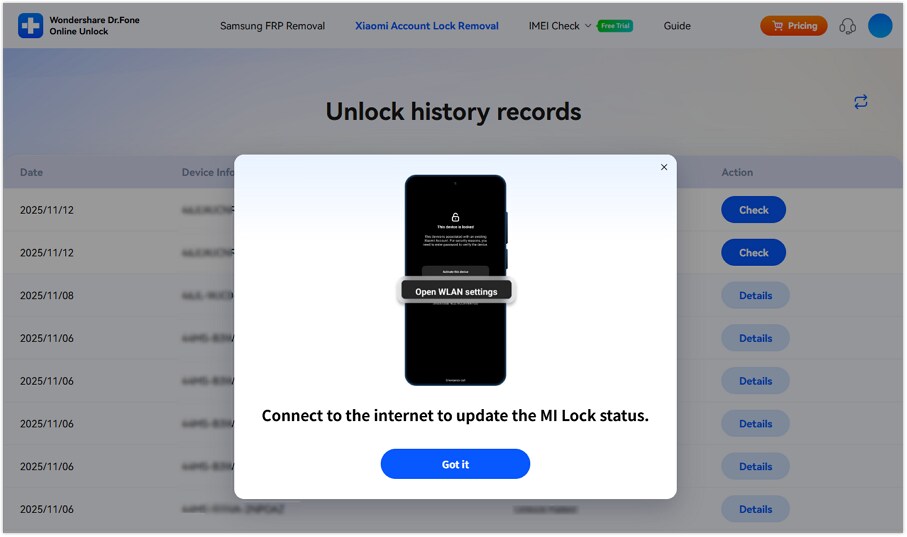
Dr.Fone reports a success rate of over 95% on the first try, making it a strong option for users seeking a smoother Redmi Note Mi removal process with lower risk to their data.
If you have a Redmi Note 7 or Note 8 and face issues with the Redmi Note Mi account, follow this guide for a solution. No matter the reason, whether you’d like to resell the phone, fix an account problem, or switch to another account, it lays out the essential steps plainly. Follow the process carefully to make Redmi Note unlock easier and more organized.
Redmi 7/Note 7 Mi Account Remove With PC
Some Redmi Note Mi removal methods need a PC. These options are usually used when phone-only recovery does not work. You may need a USB cable, recovery mode, fastboot mode, and the right drivers.
Method 1: Use Mi Account Unlock Tool
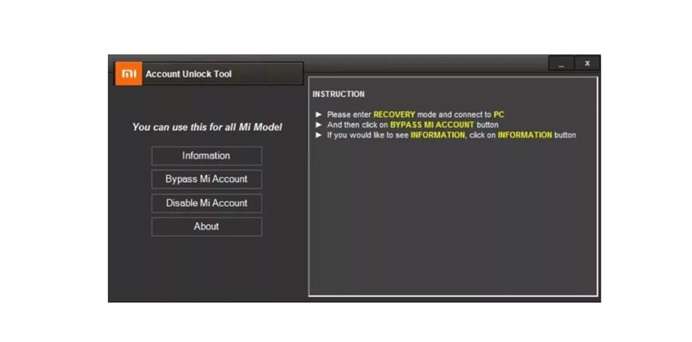
A Mi Account Unlock Tool is a PC-based option used for Redmi 7 or Redmi Note 7 account-lock cases. It generally connects the phone with the computer and tests the status of the device before continuing.
Step-by-Step guide:
- Download the Mi Account Unlock Tool on your laptop. Extract the ZIP file.
- Run the .exe file on your computer. Put your Redmi 7 or Redmi Note 7 into recovery mode.
- Link the phone to the computer using a USB cord. Launch the Mi Account Unlock Tool on your computer.
- Wait for the tool to detect your phone. Click Bypass Mi Account.
- The phone may reboot on its own after the process.
Risks to Know
- The phone may fail to authenticate.
- Slow internet can interrupt the process.
- Wrong details can cause errors.
- Your data may be lost.
- The phone may stay locked if the process fails.
So, use this Redmi Note Mi removal route only after safer options like password reset or service center support.
Method 2: Use TPS Xiaomi Tool
TPS Xiaomi Tool is another PC-based option for Redmi 7 or Redmi Note 7 Mi Account removal. It can help with Mi Account Lock issues, but it needs more technical steps than a simple password reset.
Steps to Use TPS Xiaomi Tool
- Download and install TPS Xiaomi Tool on your computer. Launch the tool. Run the .exe file and follow the on-screen instructions.
- Open TPS Xiaomi Tool. To put the Redmi 7 or Redmi Note 7 into Fastboot mode, power off the phone.
- To connect the phone to the computer, use a USB cable. Get ADB and Fastboot Drivers on your pc. Activate USB debugging.
- Open Command Prompt on your PC. Enter
adb devices. Enteradb reboot edl. - A pop-up may appear on your phone screen. Tap OK to allow USB debugging. Click Check Device Info in the tool.
- Make sure the phone is connected properly. Open Account Lock. Select Disable Mi Account. Click Bypass Mi Account to complete the process.
Comparison of Redmi Note Mi Account removal methods
| Method | Best For | Compatibility | Needs Password? | Needs PC? | Main Strength | Limitation |
|---|---|---|---|---|---|---|
| Mi Account Password Reset | Original owner with linked email or phone | Redmi 7, Redmi Note 7, and other Xiaomi/Redmi phones with account recovery access | Yes, recovery access needed | No | Safest first step because it restores account access through Xiaomi | Not useful if the linked email or phone number is lost |
| Mi Service Center | Genuine owner with proof of purchase | Redmi 7, Redmi Note 7, and most Xiaomi/Redmi models | No | No | Official support route with lower technical risk | May need invoice, box, ID, or service-center approval |
| Dr.Fone Online Unlock | Locked-out owner or used-phone buyer when official routes fail | Xiaomi, Redmi, and POCO Mi Account Lock cases; suitable for MIUI/HyperOS-based devices if eligible | No | No | Browser-based, no APK, no rooting, no flashing knowledge needed | Eligibility and final result depend on model, region, and lock status |
| Mi Account Unlock Tool | Users who choose a PC-based third-party route | Often used for older Redmi/Xiaomi models; support varies by tool version and device state | No | Yes | Can work when phone-only recovery is not enough | Not an official Xiaomi method; may fail, cause data loss, or keep device locked |
| TPS Xiaomi Tool | More technical users handling PC-based Xiaomi lock cases | Mainly used on selected Xiaomi/Redmi models; it depends on drivers, connection mode, and software build | No | Yes | Gives more technical control for advanced users | Requires drivers and technical steps; higher error and data-loss risk |
Conclusion
Mi Account removal is safest when you match the method to your case. Use password reset if you still have the linked email or number. Visit a Mi Service Center if you own the phone and have proof. Though the advanced user may like to use the PC tools, they have a greater risk. Also, they need drivers and can create errors.
Dr.Fone Online Unlock seems to be more practical for used-phone buyers or non-technical users because it works through a browser and requires no APK, rooting, or flashing. It gives a cleaner path for Redmi Note Mi removal when official recovery fails and makes Redmi Note unlock easier to manage.
FAQ
-
1. Why is my Redmi Note asking for a Mi account after a reset?
The device is still linked to the former Xiaomi Account. Xiaomi stated that a password request for the previously bound Xiaomi Account might occur, even after data wipe. -
2. Can I remove the Redmi Note Mi account without a password?
Yes, but use safe routes first. Try Xiaomi password recovery, Xiaomi unlock appeal, previous-owner removal, or a Mi Service Center. If these fail, Dr.Fone Online Unlock can be used as a guided Redmi Note Mi removal option for supported devices. -
3. Does Redmi Note unlock work on HyperOS?
It is possible, but it will depend on the specificities of the model, region, lock, and software version. Xiaomi does have HyperOS on their Redmi devices; certain features or behavior may vary by device and system version. -
4. Is Redmi Note Mi removal different on Snapdragon and MediaTek models?
Yes, mainly for PC or flashing-based tools. Phones equipped with Snapdragon chipsets and those with MediaTek chipsets may require different types of drivers or connection modes. Browser-based services like Dr.Fone Online Unlock are easier as they avoid chipset-specific driver work.