ChatGPT
 Perplexity
 Gemini
 Claude
 Grok
Grok
Getting a secondhand phone or trying to turn on a new device from Verizon without verifying the IMEI first may result in quite a few issues, like the phone not working on the network, getting the blacklist, or facing activation troubles. Therefore, a Verizon IMEI check should be your first action.
Verizon is still one of the largest mobile carriers with approximately 146.8 million wireless connections in the United States, which is why IMEI checks are a must for millions of users every year. This article will show you how to do an IMEI check with Verizon, explain the meaning of the results, and inform you how to check whether a device is compatible, unlocked, and ready for activation. Let's check IMEI with Verizon.

In this article

Part 1. What a Verizon IMEI Lookup Can Reveal
Checking a Verizon IMEI number is a simple procedure, and you will get the necessary information about the phone in just a few minutes. We highly recommend that you do a Verizon IMEI check before selling, buying, or activating a phone.
Generally, by doing a Verizon IMEI scan you can:
- Verizon Network Device Compatibility: Finding out whether a phone is suitable for working with Verizon's network technologies and frequency bands will be the direct result of an IMEI lookup Verizon.
- Blacklisted, Lost, Or Stolen: A report through this check can also be expected if the phone was stolen, lost, or used in fraud.
- Lock and unlock status of the phone to Carrier: If a phone is only usable with the Carrier that sold it, or if the phone is capable of being used with other carriers, it could be determined by verifying a Verizon IMEI.
- Activation eligibility: Some devices can't even be activated because they have unresolved balances, their accounts are restricted, or their hardware is not supported.
- Device model and specifications: IMEI database can provide information such as phone's model, type of storage, manufacturer, and network capabilities, etc.
Part 2. How to Find Your Verizon IMEI Number
Before performing a Verizon IMEI verification, you first need to locate your phone's IMEI number Verizon. Here are the easiest ways to find it.
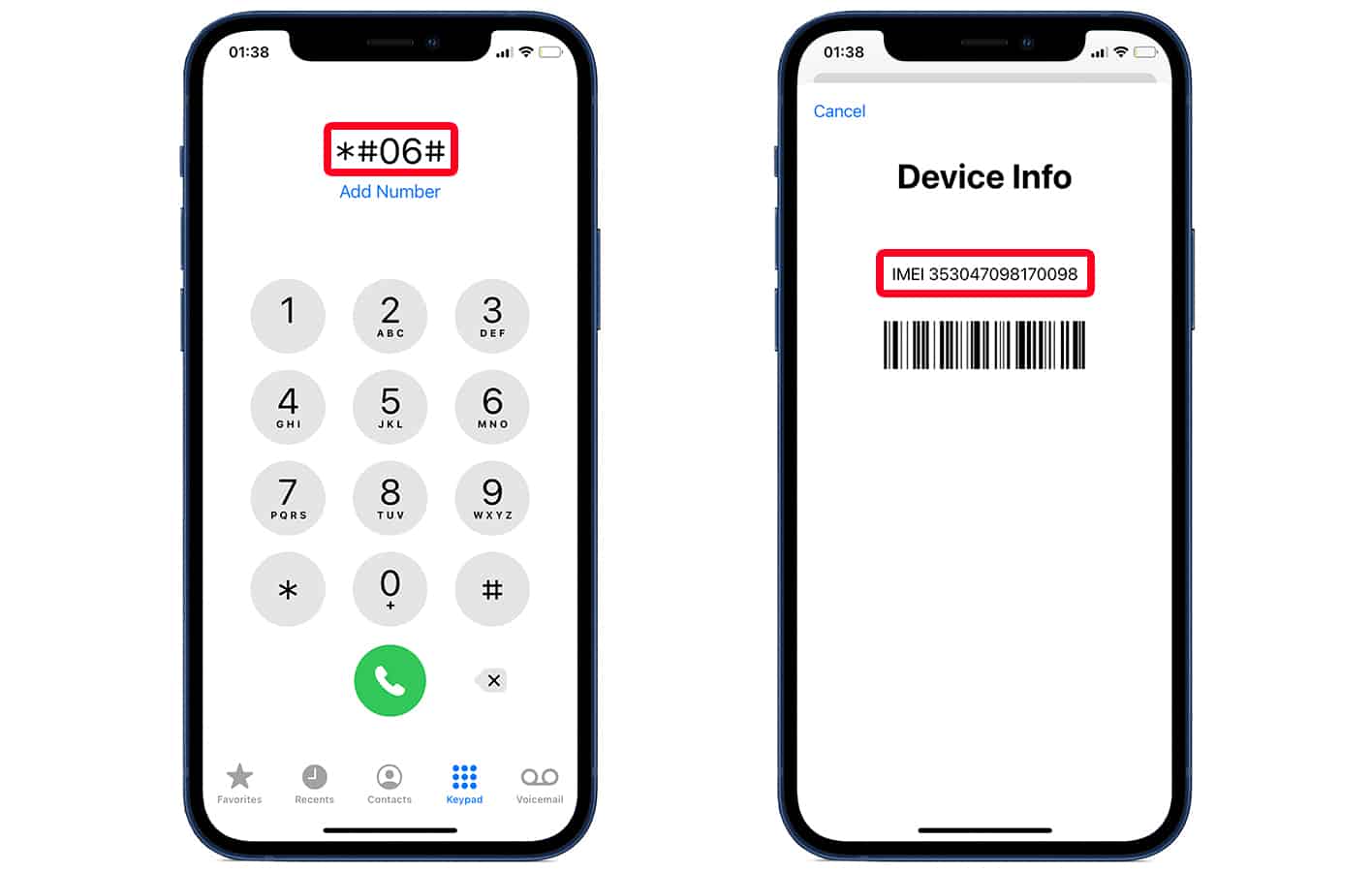
Method 1: Dial *#06# (Fastest)
This is the quickest and most common way to look up your IMEI number Verizon. It supports just about any smartphone, regardless of brand or Carrier.
Step 1 Open your phone's dialer.
Step 2 Enter *#06#.
Step 3 Your IMEI number will instantly appear on the screen.
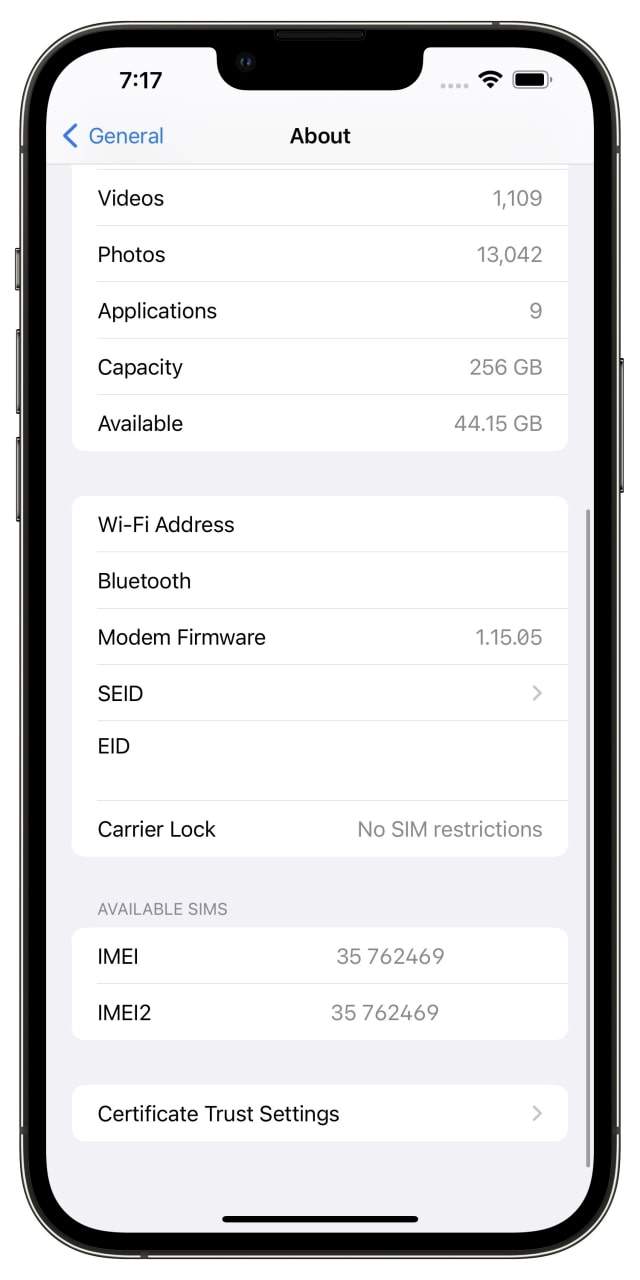
Method 2: Check Settings
An alternate place to check your IMEI number is your phone's settings. It will work on both Android and iPhone devices.
Step 1 Open the Settings app on your phone.
Step 2 Go to General (for iPhone) or About Phone (for Android).
Step 3 Tap on About or Status section if required. Scroll down to find your IMEI number.
Method 3: My Verizon Account (Existing Customers Only)
If your Verizon device has been already activated, then the My Verizon account feature would be one of the simplest ways for Verizon wireless IMEI lookup. It allows you to see all the devices connected under your account along with their complete device details including IMEI, MEID, or ESN. This method will be greatly helpful if the phone is lost, not in hand or you are managing multiple lines.
Step 1 Sign in to your My Verizon account by either the website or the My Verizon app.
Step 2 You will find the Account section where you can scroll down to see all the active lines and devices connected to your account.
Step 3 Pick the device that you want to check.
Step 4 Click or tap "Manage Device" to access detailed settings.
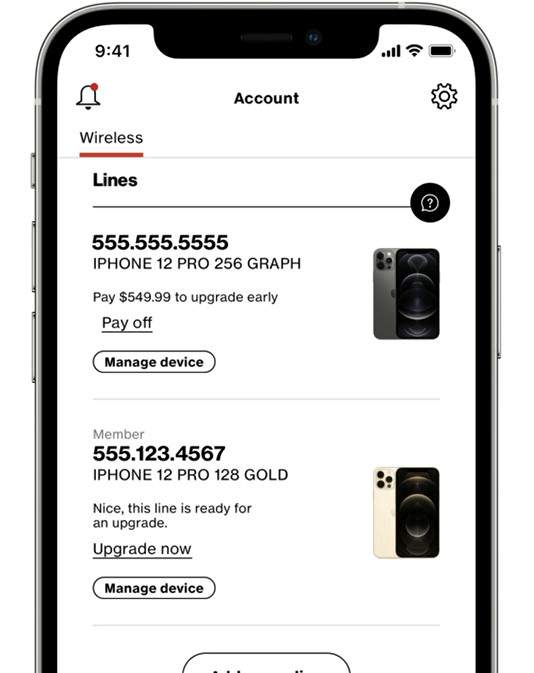
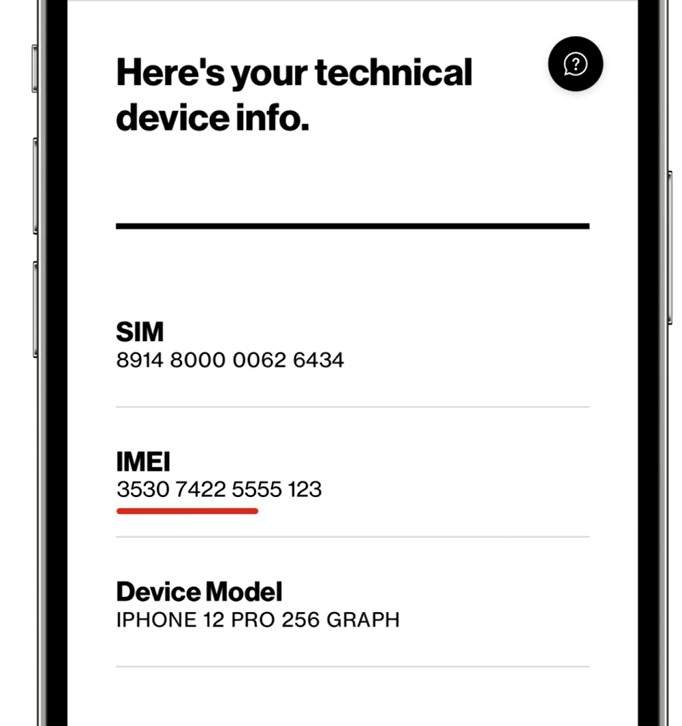
Step 5 Scroll down and select the "View IMEI information" option or if you just glance at the "Device Information" section you will see your IMEI number.
Method 4: Physical Check
In case your phone is out of power and you are unable to operate it or access its settings, locating the IMEI number on the device itself or its very first packaging can be very helpful. Actually, many manufacturers print or the IMEI on the SIM tray, box label, or even purchase documents is a very common practice.
Step 1 Take out the SIM card tray and see if it carries a printed IMEI number (not all phones have this feature).
Step 2 Go through the original box of the device and find a label that has the IMEI, MEID, or serial number info on it.

Part 3. How to Check Verizon IMEI Status
To prevent any unanticipated problems such as network incompatibility, activation failure, or blacklist restrictions, you should verify the IMEI of your device when you activate it or switch to Verizon.
Method 1: Use Verizon's Official IMEI Checker
The best method to find out if your device is suitable for and ready for Verizon is by making use of Verizon's official Bring Your Own Device (BYOD) IMEI checker. This service will rapidly inform you if your phone can work on Verizon's network, if it is ready for activation, or whether it has restrictions like being locked or not supported. The tool comes in handy when you are about to buy a used device or when you want to change your service provider.
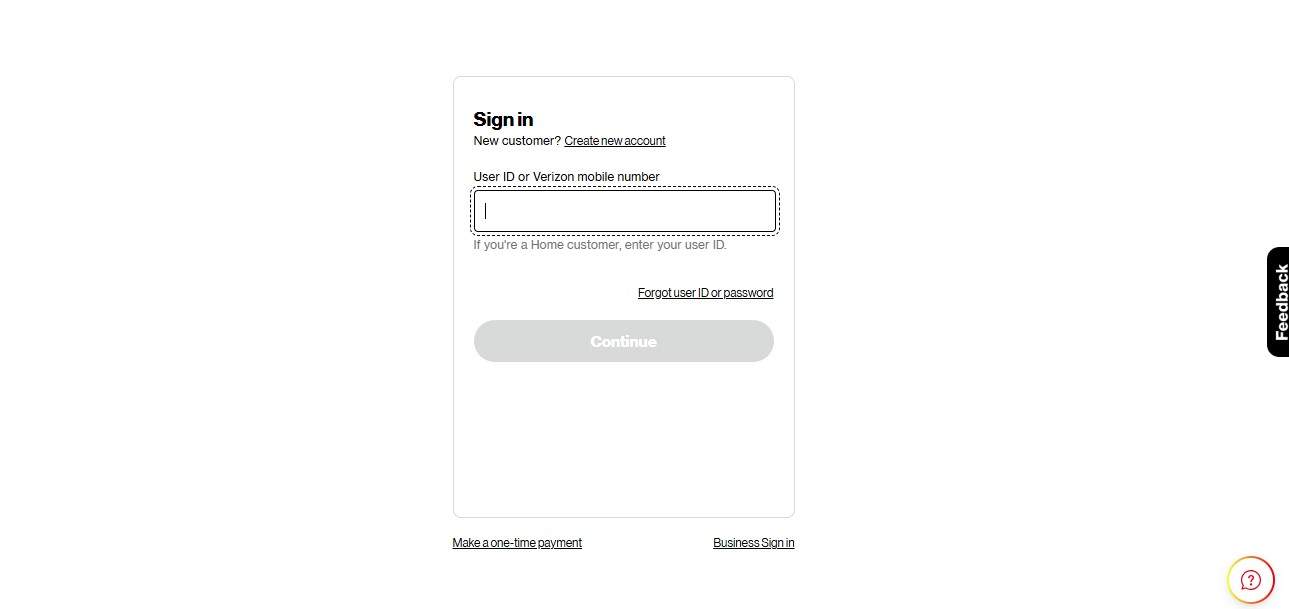
Step 1 Open the official Verizon BYOD page.
Step 2 Enter your User ID or Verizon Mobile Number in the provided field.
Step 3 Select your device type if prompted (phone, tablet, etc.).
Step 4 Click on the "Check compatibility" or "Continue" button.
Step 5 Review the results showing whether your device is compatible, eligible for activation, or has any restrictions.
Results
- Compatible: The device can be used on the Verizon network without any technical limitations and is officially supported by the Carrier.
- Incompatible: The device lacks the necessary specifications (like the required frequency bands or technology) for Verizon's network and hence cannot be used for its service.
- Carrier Locked: The device is tied to the network of a different carrier and will need to be unlocked before Verizon activation can be done.
Limitation:
Verizon's IMEI checker tool simply tells you if a device can work on Verizon's network. It doesn't always accurately check if a device is blacklisted, stolen, or involved in a fraud case.
Method 2: Use an Online Verizon IMEI Lookup Tool
IMEI lookup tools available online offer a more comprehensive method of checking device status as opposed to regular carrier checks. One such tool is Dr.Fone IMEI Check, which is a very popular platform that enables you to generate 20+ detailed device verification reports by entering just one IMEI number.
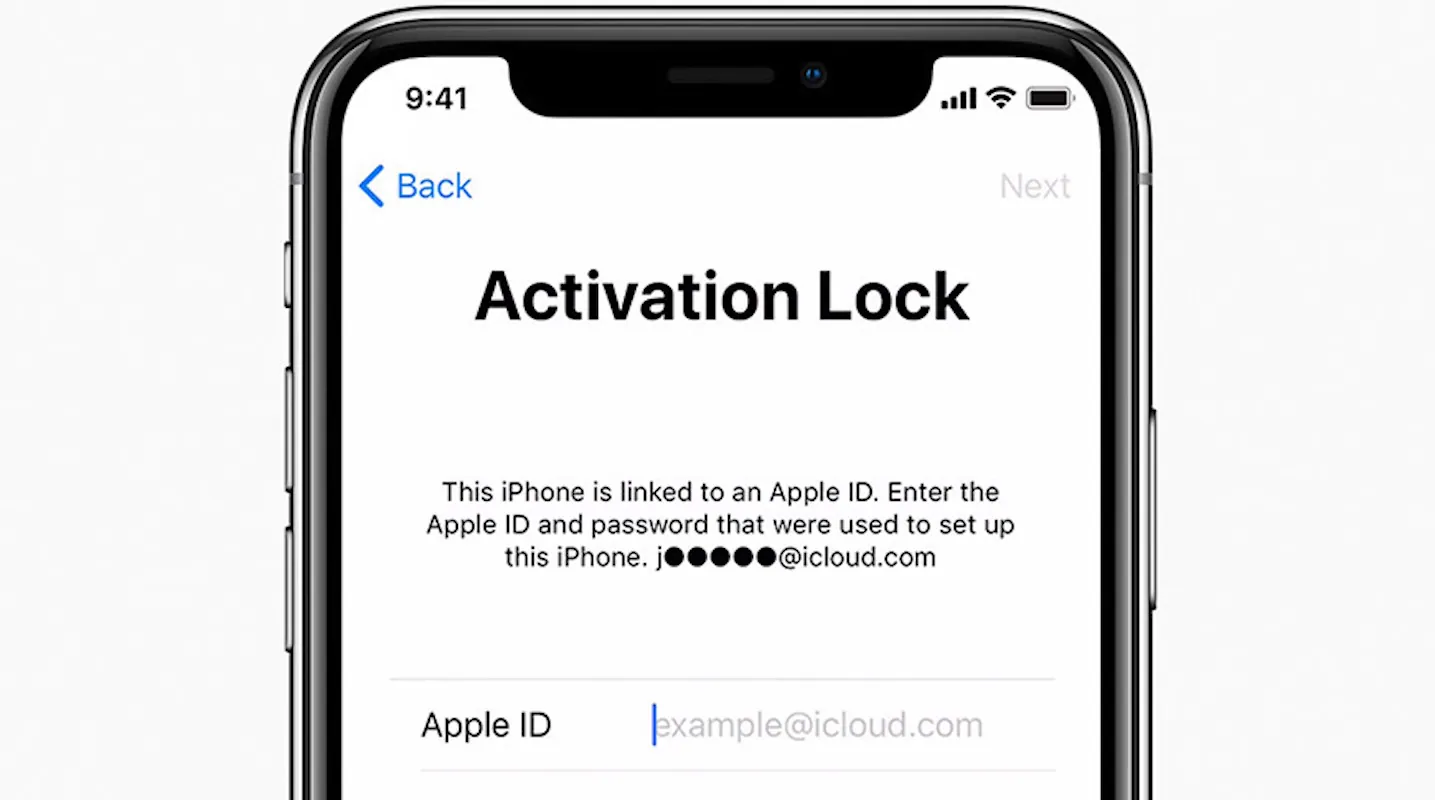
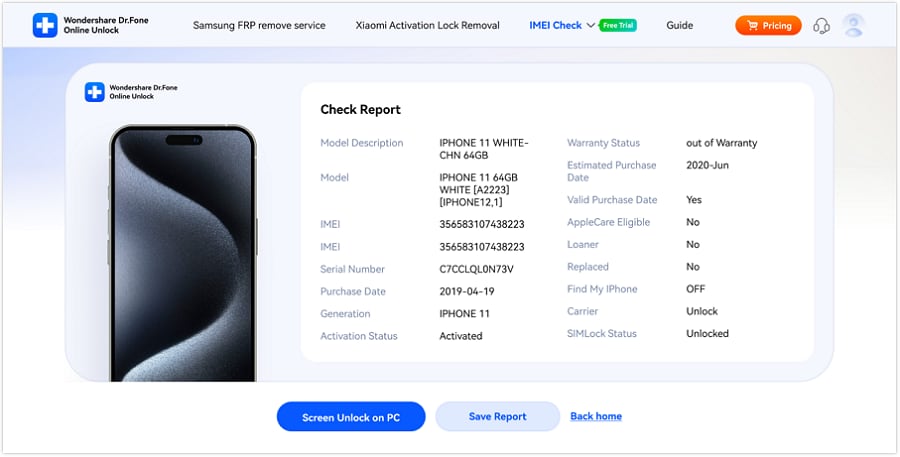
Dr.Fone Online Unlock's IMEI Check is a great platform to instantly access the comprehensive details of a device including but not limited to blacklist status for both Android and iOS, carrier lock status, the presence of Apple's Activation Lock, status of iCloud account, MDM (Mobile Device Management) lock, Samsung KNOX Guard status, Xiaomi account or activation lock, warranty validity, verification of device model, dates of purchase and activation (where available), brands' specific security locks across Apple, Samsung, Huawei, OPPO, Vivo, and other major manufacturers.
Steps to use Dr.Fone IMEI Check for Verizon device verification
Step 1 Navigate to the official Dr.Fone IMEI Check website, and then from the top menu or dashboard, find and select the IMEI Check option that suits your verification requirements e.g., Full Info Check (Apple/iOS).
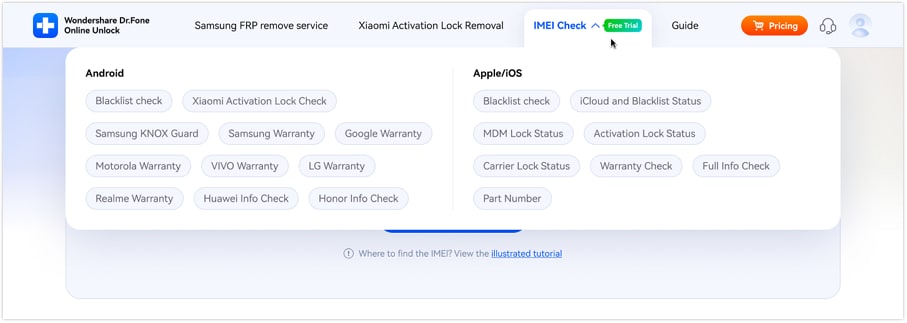
Step 2 On the page after that, find the IMEI input box, carefully enter your 15-digit IMEI number, and then click the "Check Now" button to begin the analysis.
Step 3 Give a few moments to the system to prepare your report, then check out the results on the screen and click "Save Report" if you desire to download or keep a copy for the later reference.
Method 3: Contact Verizon Support (If Results Are Unclear)
In case your IMEI check results confuse you or are not complete or even contradictory, the safest choice is to contact Verizon support physically. Customer care executives can maintain your phone status in the databases of the authorized carriers and also realistically tell you regarding compatibility, activation eligibility, or restrictions related to the account.
Part 4. What Verizon IMEI Check Results Actually Mean
- Result 1 - Compatible + Unlocked: The phone will work perfectly.
- Result 2 - Compatible + Carrier Locked: Although the phone is technically functional on Verizon's network, it is locked to a different carrier.
- Result 3 - Incompatible: The phone is not compatible with Verizon's LTE/5G bands and therefore cannot be activated due to the feature limitations of the hardware.
- Result 4 - Blacklisted / Stolen: The phone is listed as lost, stolen, or involved in fraudulent activity and, under such conditions, cannot be activated on Verizon.
- Result 5 - Financing Hold: The phone is linked to a pending installment for which the payment has not been made, and the phone can only be unlocked once the repayment has been made.
Expert opinion: "Blacklisted phones remain the biggest concern in the secondhand market because it is almost always the case that the buyer finds out about the restrictions only after making the purchase, "
Part 5. Common Verizon IMEI Problems
| Issue | Meaning | Fix |
|---|---|---|
| Carrier locked | Device is locked to another carrier | Request official unlock from the original Carrier and wait for approval |
| Blacklisted device | IMEI is flagged as lost, stolen, or fraudulent | Contact seller and request refund or file dispute |
| Financing hold | Device still under installment plan | Check Verizon account and pay remaining balance |
| Incompatible hardware | Phone does not support Verizon LTE/5G bands | Compare supported bands and switch devices if needed |
| IMEI status issue (invalid/not found) | IMEI is incorrect or not recognized | Re-check IMEI (*#06#) and contact Verizon support if needed |
Conclusion
Doing a quick Verizon IMEI check before you switch on or purchase a device on Verizon is very important. The main purpose is to make sure that you won't end up with a phone that is not compatible, carrier-locked, with financing restrictions, or even a blacklisted one. Checking will confirm if your phone is really set up for activation. It will also assist you in making a safe and well-informed purchase.
Besides the ordinary carrier checks, if you want to ensure the device thoroughly, you can consider using the Dr.Fone Online Unlock's IMEI Check, which offers additional information such as blacklist checking, carrier lock status, warranty information, and other restrictions that may be hidden. In addition to that, it is quite handy when you are buying a used phone or want to be sure that the device is authentic without any doubt.

Wondershare
Dr.Fone
Wondershare Dr.Fone
Need More Phone Tools? Discover More on Dr.Fone — One Toolkit for All Your Phone Solutions.


 Try It Free
 Try It Free
 100% Clean & Safe
FAQs
-
Can I check an IMEI with Verizon without an account?
Yes, you can use Verizon's BYOD IMEI checker without logging in to verify basic device compatibility. -
Does Verizon use IMEI or MEID?
Verizon primarily uses IMEI for modern LTE/5G devices, while MEID was used for older CDMA-based phones. -
Will a Verizon IMEI check show if a phone is stolen?
Not always. The basic compatibility tool mainly checks network compatibility, not full blacklist or stolen status. -
Can I use any iPhone or Android phone on Verizon after an IMEI check?
No, the device must be compatible, unlocked, and supported by Verizon's network bands even if it passes an IMEI check.