ChatGPT
 Perplexity
 Gemini
 Claude
 Grok
Grok
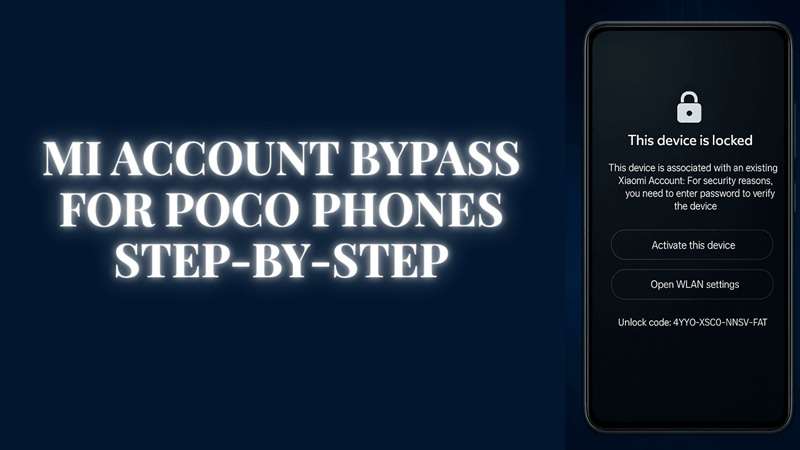
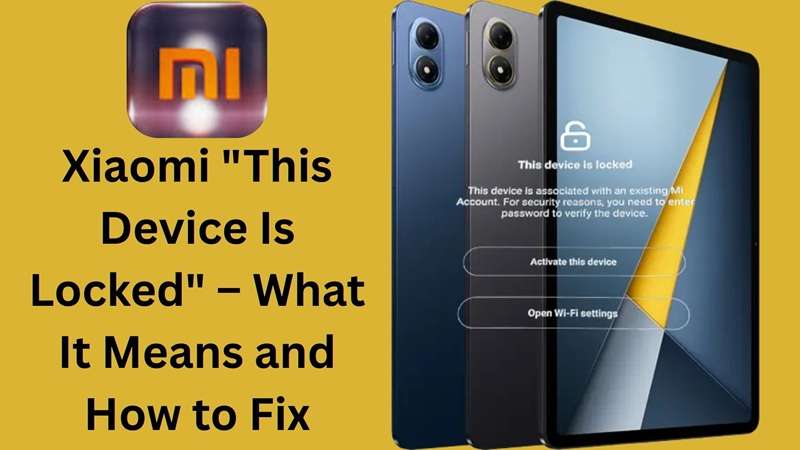
This device is locked Xiaomi is not just a random setup error. It means your phone is still tied to a Xiaomi Account.
This screen often appears after a reset, wipe, or used-phone purchase. Users may need the old Xiaomi Account password after wiping data. It also allows an unlock application using the IMEI or unlock number when the linked phone or email is no longer available. Xiaomi Cloud’s Find Device can also lock, erase, and protect a phone if it is lost.
So, the Mi lock screen is not there to annoy you. It is there to stop unknown users from opening the phone. But for real owners, it can become a serious block. This guide shows the safest ways to fix the Xiaomi device is locked issue without fake APK files, risky shortcuts, or scam unlock codes.
In this article
- Part 1. Why does the “This Device Is Locked” screen appear on Xiaomi phones?
- Part 2. Which Xiaomi, Redmi, and POCO models are commonly affected?
- Part 3. Mi Lock Screen vs Screen Lock vs Google FRP
- Part 4. How to Fix the “This Device Is Locked” Message on Xiaomi and Redmi
- Method 1: Reset Your Mi Account Password with Email or Phone Number
- Method 2: Add a New Phone Number to Your Mi Account
- Method 3: Use a Mi Account Unlock Tool Only with Caution
- Method 4: Ask Xiaomi Support to Help Reset the Mi Account
- Method 5: Try Dr.Fone Online Unlock When Account Recovery Is Not Possible
- Part 5. Method Comparison: Which Xiaomi Lock Fix Should You Choose?
- Part 6. Troubleshooting: Xiaomi Still Shows “This Device Is Locked”
- FAQ
- Conclusion
Part 1. Why does the “This Device Is Locked” screen appear on Xiaomi phones?
‘‘This device is locked Xiaomi’’ warning does not appear without a reason. It is usually linked to Xiaomi’s anti-theft and account safety system. When the phone finds a risk, it may ask for the Mi Account that was used on the device before.
The phone could be in perfect condition but still have problems. The 'This Device Is Locked' error appears mostly on popular devices like the Redmi Note 9 Pro, Redmi Note 8 and the Redmi 8. But other Xiaomi, Redmi & POCO phones can also show the issue. Such as after reset, flashing, and account mismatch cases.
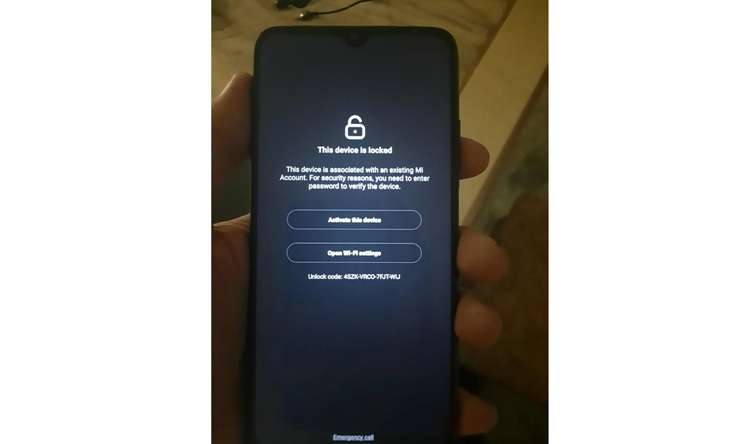
These are some common reasons your Xiaomi device is locked.
- The phone underwent a factory reset process.
This device will ask for the same Mi Account that was logged in, if it has been reset to factory settings. - The previous owner still has the phone linked.
Xiaomi, Redmi, and POCO phone buyers often face this issue. If the device was not removed from the Mi Account by the old owner, the Mi lock screen will ask for their password. - A new firmware or ROM was flashed.
After flashing the ROM or firmware, the phone may require Mi Account verification in order to activate it again. - The wrong Mi Account password was entered many times
Too many failed password attempts can trigger a temporary lock. In that case, the phone may stop you from moving ahead. - The Mi Account password was changed online
When a password change takes place online and not on the phone, the phone will identify a mismatch and will prompt you again for verification.
Part 2. Which Xiaomi, Redmi, and POCO models are commonly affected?
The lock can appear on many Xiaomi, Redmi, and POCO phones. It is not limited to one series.
| Device Family | Common Examples | Software Base | Lock Risk Scenario | Best First Method |
|---|---|---|---|---|
| Xiaomi Flagship | Xiaomi 12, 13, 14, 15 | MIUI / HyperOS | Reset after Find Device is enabled | Password reset/appeal |
| Redmi Note | Note 11, 12, 13, 14 | MIUI / HyperOS | Second-hand resale | Previous owner removal |
| Redmi Series | Redmi 10, 12, 13 | MIUI / HyperOS | Forgot old account | Xiaomi unlock application |
| POCO Series | POCO X, F, M, C | MIUI / HyperOS | ROM flash or wipe data | Account recovery / Dr.Fone |
This issue can appear on MIUI and HyperOS devices. It can affect Android 11, 12, 13, 14, and newer Xiaomi builds.
Newer HyperOS versions may block old shortcut-style tricks. So older YouTube APK or menu methods may fail, especially after security updates.
Part 3. Mi Lock Screen vs Screen Lock vs Google FRP
Many users mix these three locks. They are not the same.
| Lock Type | Linked To | Appears When | Best Fix |
|---|---|---|---|
| Mi lock screen | Xiaomi Account / Find Device | After reset or wipe | Xiaomi password, appeal, seller removal |
| Screen lock | PIN, pattern, password, fingerprint | On the normal lock screen | Screen lock reset or device reset |
| Google FRP | Google Account | After Android reset | Google account recovery |
The Mi lock screen is Xiaomi’s own activation lock. Google FRP is linked to Google. A screen lock is only the local phone password.
Part 4. How to Fix the “This Device Is Locked” Message on Xiaomi and Redmi
The right fix depends on why the phone is locked. If you forgot the Mi Account password, start with the official password reset method. This is the safest first step before trying any other option.
Method 1: Reset Your Mi Account Password with Email or Phone Number
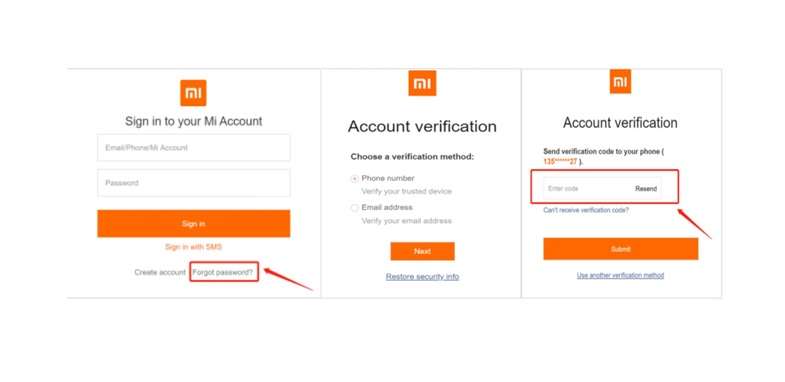
A forgotten Mi Account password can trigger the this device is locked Xiaomi screen. The good thing is that Xiaomi gives users a “Forgot Password” option. You can use your linked phone number or email to create a new password.
-
Step 1 Open the official Mi Account website on another phone or computer. Select “Forgot Password.”
-
Step 2 Enter the phone number or email linked to your Mi Account. Request the verification code.
-
Step 3 Type the code Xiaomi sends you. Then create a new password.
-
Step 4 Return to the locked Xiaomi phone and enter the new password to unlock the Mi lock screen.
Method 2: Add a New Phone Number to Your Mi Account
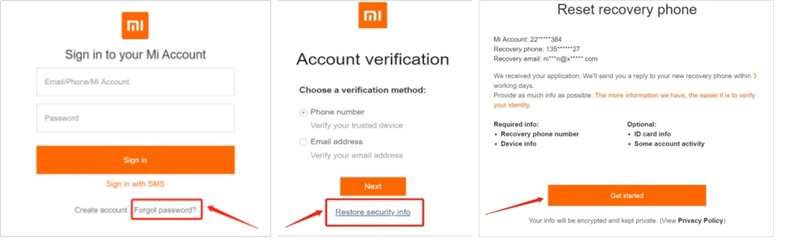
If you cannot use the phone number or email linked to your Mi Account, you can try adding a new phone number. This may help you reset the password and fix the this device is locked Xiaomi error.
-
Step 1 Go to https://id.mi.com on another device. You can also tap “Forgot Password” on the locked Xiaomi phone.
-
Step 2 Enter your Mi Account phone number or email.
-
Step 3 Select “Restore security info.”
-
Step 4 Tap “Get started” to reset the recovery phone number.
-
Step 5 After the new number is linked, use it to recover your account and unlock the Mi lock screen.
Method 3: Use a Mi Account Unlock Tool Only with Caution
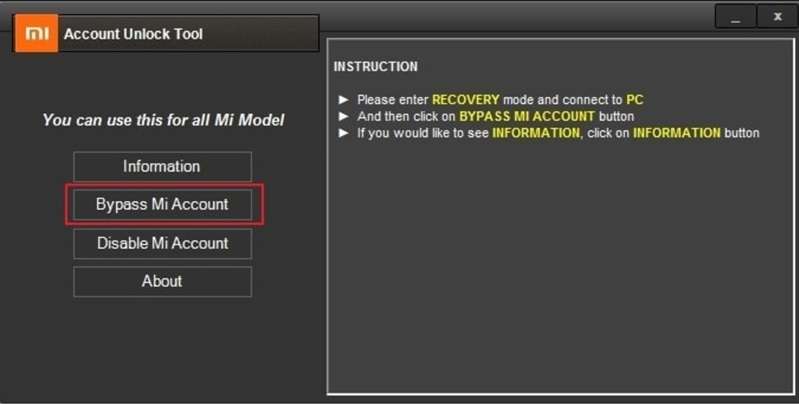
You can attempt to bypass the Mi account verification process using a third-party program called Mi Account Unlock if you don't know the Mi account ID or password associated with your device.
You don't need a password to use this program to delete the Mi account from your device. Nevertheless, this approach might not be compatible with all devices and could result in data loss. To use this tool for Mi lock screen, follow these steps:
-
Step 1 To unlock your Mi account, download the Mi Account Unlock Tool zip file on your PC, then open it.
-
Step 2 Agree to the terms and conditions. Utilize this tool as an administrator.
-
Step 3 Press the volume and power keys together to turn off your device and enter recovery mode.
-
Step 4 Connect your device to the computer with a USB cord, then wait for the tool to recognize it.
-
Step 5 You may click on Information to validate the device details and verify it is the right device.
-
Step 6 Select “Bypass Mi Account” and wait for the process to complete.
-
Step 7 Restart your computer to delete your device. Bypassing the Mi account verification will let you use your device without any problems.
Method 4: Ask Xiaomi Support to Help Reset the Mi Account
If you cannot access the linked email or phone number, the “Forgot Password” option may not help. In this case, contact Xiaomi customer support. After verifying details about the device and proof of ownership, they might assist you in resetting the Mi account password.
-
Step 1 Visit the Xiaomi Customer Support web page and find the support contact running in your region.
-
Step 2 Tell them you are facing the this device is locked Xiaomi issue. Share the phone’s IMEI number and proof of ownership, such as the purchase receipt.
-
Step 3 Xiaomi support will guide you with the next process. Your Mi Account password can be reset, or they can suggest a way to unlock the Mi lock screen safely.
Method 5: Try Dr.Fone Online Unlock When Account Recovery Is Not Possible
If the password reset does not work and the phone still shows a Xiaomi locked screen, the device may require account verification that you cannot complete. This often happens with a used Xiaomi or Redmi phone that is still linked to the old owner’s account. It can also happen when the original recovery email or phone number is no longer available.
For rightful owners, Dr.Fone Online Unlock can be a simpler option after official methods fail. It is a web-based Wondershare service made for Mi Account lock removal. It provides users with a guided online process without requiring them to install APK files or desktop software.
Why it can help:
- Built for Mi Account Lock removal
- Supports Xiaomi, Redmi, and POCO devices
- Works through a browser-based process
- No PC software or APK file is required
- Uses the device unlock code from Recovery Mode
- Helpful when the old Mi Account, recovery number, or seller is unavailable
How to Use Dr.Fone Online Unlock for Mi Account Lock
Follow the steps with care. Keep the phone charged. Use stable Wi-Fi. Do not reset the phone again during the process.
-
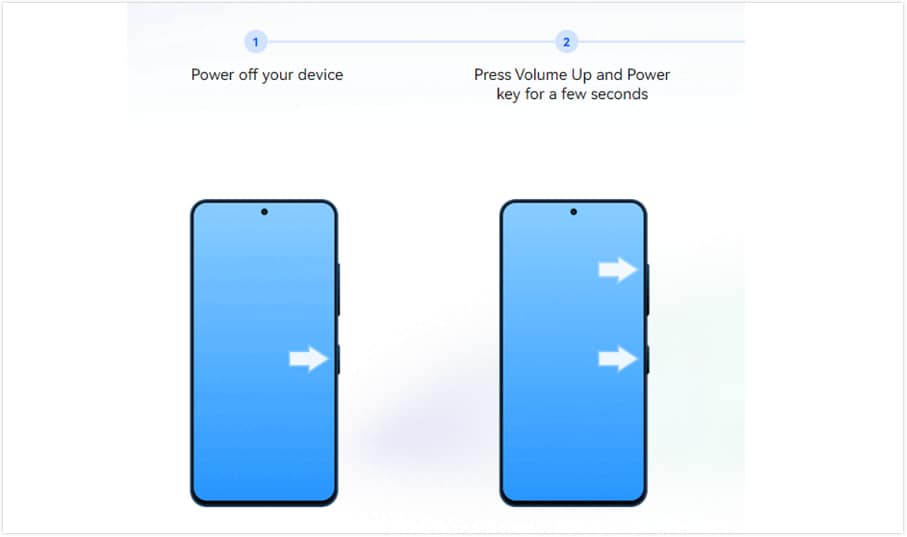
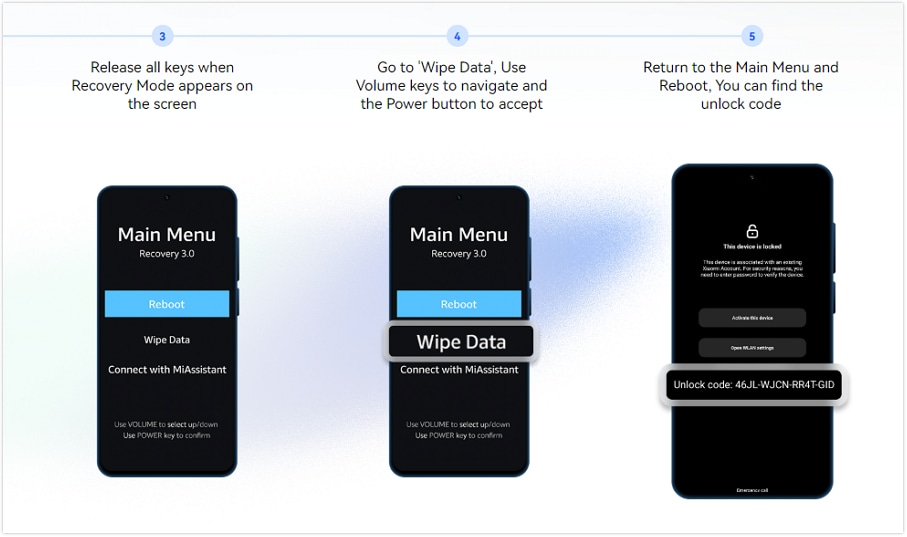
Step 1 Turn off your locked Xiaomi phone. Enter Recovery Mode by using the device key combination until the Recovery menu appears.
-
Step 2 Find the device unlock code shown in Recovery Mode. Write it exactly as it appears.
-
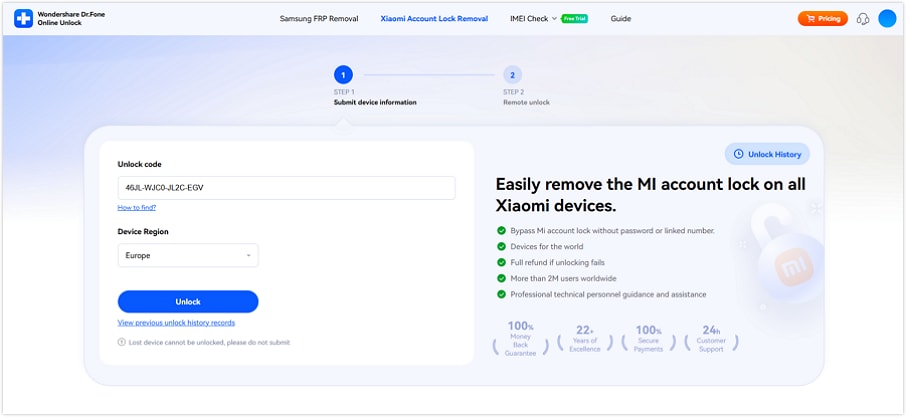
Step 3 Launch your browser and access Dr.Fone Online Unlock. Select the option to remove the Xiaomi lock.
-
Step 4 Input the unlock code and select your region. Now send the request.
-
Step 5 Continue following the online instructions. You might get an email with a tracking ID.
-
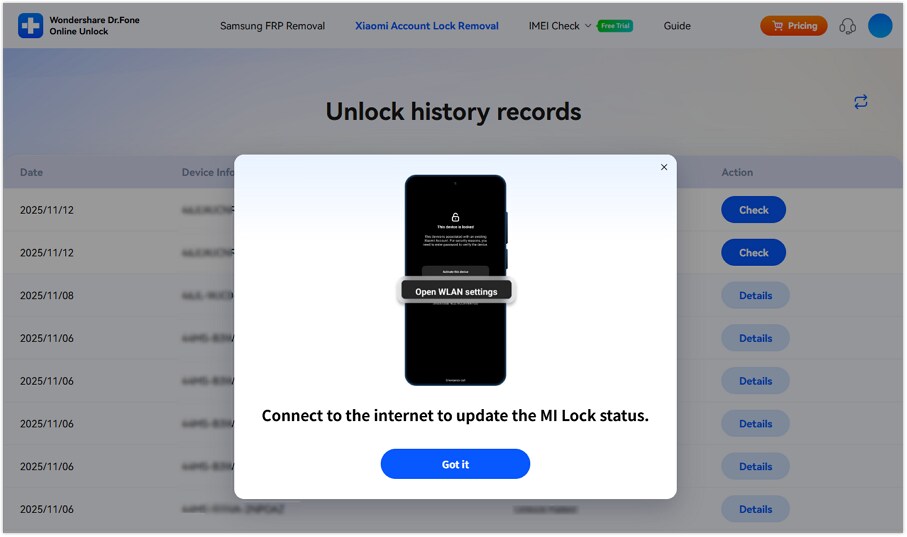
Step 6 Once the removal process is complete, start the phone and connect to Wi-Fi.
-
Step 7 Configure the gadget with Mi Account, under your control.
Enable two-factor protection to avoid the issue of another Xiaomi device being locked later.
Part 5. Method Comparison: Which Xiaomi Lock Fix Should You Choose?
After reviewing each fix, the next step is to match the method with your exact lock situation.
The table below helps you compare account recovery, Xiaomi Support, third-party tools, and Dr.Fone Online Unlock before choosing the safest route.
| Method | Best For | Model Support | Software Fit | Main Risk / Limit |
|---|---|---|---|---|
| Method 1: Reset Mi Account Password | Users who still have the linked email, phone number, or Xiaomi Account ID | Works across Xiaomi, Redmi, and POCO phones linked to a Mi Account, including Redmi Note, Redmi, POCO, and Xiaomi flagship models | MIUI and HyperOS devices where the lock is caused by forgotten Mi Account details | Will not work if the linked recovery phone or email is lost |
| Method 2: Restore Security Info / Add New Phone Number | Users who lost access to the old recovery phone or email | Suitable for most Xiaomi Account-locked devices, such as Redmi Note 10 Pro, Redmi 12, POCO X/F/M/C series, and Xiaomi 12/13/14 series | MIUI / HyperOS account recovery cases | Xiaomi may require verification time before recovery is approved |
| Method 3: Mi Account Unlock Tool | Users are considering a third-party offline tool when account details are missing | Some tools claim support for older Redmi models like Redmi 4, Redmi 9, Redmi 12, Redmi Note 4, Redmi Note 10 Pro, and more | More likely to work on selected older MIUI builds than newer HyperOS builds | Not official, support is not guaranteed, may fail, may erase data, and can be risky if downloaded from unknown sites |
| Method 4: Xiaomi Support | Users who cannot recover the account but can prove ownership | Best for any genuine Xiaomi, Redmi, or POCO phone with proof of purchase | MIUI and HyperOS devices, including newer Xiaomi builds | Can take time and depends on the region, proof, and Xiaomi’s review |
| Method 5: Dr.Fone Online Unlock | Users who tried the official recovery but still cannot pass the Mi lock screen | Wondershare states it supports Xiaomi, Redmi, and POCO devices through its online Mi Account Lock workflow | Useful for Mi Account Lock cases where the device shows an unlock code in Recovery Mode | Paid service; should only be used on a phone you own or can prove you have permission to unlock |
Part 6. Troubleshooting: Xiaomi Still Shows “This Device Is Locked”
If your Xiaomi, Redmi, or POCO device still shows the ‘‘this device is locked Xiaomi’’ message, do not repeat the same fix. Do this instead. Initially, check what type of lock you are facing. This issue can be due to your Mi Account or a Google FRP issue, old recovery details or carrier lock.
Use this quick guide to choose the next step.
| Problem | Likely Reason | What to Try Next |
|---|---|---|
| You cannot use the linked phone number or email | Your Mi Account recovery details may be old or no longer active | Go to id.mi.com and restore your security info. You can also contact Xiaomi Support |
| Hard reset sends you back to verification | The reset may have triggered Mi Account Lock or FRP | Use the original account details or choose a supported recovery method |
| The phone asks for a Google account after a reset | Google Factory Reset Protection is active | Sign in with the Google account that was synced before the reset |
| The phone is linked to someone else’s Mi Account | The previous owner may not have removed the phone from their account | Ask the seller to remove the device or contact Xiaomi with proof of ownership |
| The SIM does not work after unlock attempts | The phone may be carrier-locked or IMEI-locked | Contact the carrier or seller. Mi Account fixes may not solve this issue |
FAQ
-
1. Is Mi lock screen the same as Google FRP?
No. The Xiaomi Account is linked with the Mi lock screen. When you factory reset your Android phone, Google FRP is linked to your Google account. Samsung’s Android support states that the user may need to re-enter the Google account to complete setup after a factory reset. -
2. Can I unlock a second-hand Xiaomi phone?
Yes, but ask the seller to remove the phone from their Xiaomi Account first. If the seller is unavailable, use Xiaomi recovery or support with proof of ownership. Dr.Fone Online Unlock can be a practical next step when official access is no longer possible. -
3. Does a factory reset remove Mi Account Lock?
No. A factory reset can erase phone data, but it may still ask for the previous Xiaomi Account after restarting. That is why a hard reset alone is not a reliable fix for Mi Account Lock.
Conclusion
The ‘‘this device is locked Xiaomi’’ message is best fixed by matching the method to the cause. Use the password reset if you still have the linked email or phone number. Restore security info if your old number is gone. Contact Xiaomi Support upon proof of ownership. Using an offline unlock tool is a risky business, as it may fail or could wipe data.
For second-hand phones or where the previous account, seller, or recovery number is not available, Dr.Fone Online Unlock is less risky, plus the process is set up in the browser with no risky APK files. Mi lock screen will take care of your phone, so unlock the one you own.

Dr.Fone
AI Video Editing App & Software
Best tool for making videos anywhere for all creators!
Lorem Ipsum is simply dummy text of the printing and typesetting industry. Lorem Ipsum has been the industry's standard.