ChatGPT
 Perplexity
 Gemini
 Claude
 Grok
Grok
Imagine you're out at a crowded cafe, and you suddenly realize your phone is missing. It's not only the price that causes panic to set in, but it's also the personal information contained within. The IMEI number is the ultimate number that helps protect your hardware, while passwords help protect your software. With advanced security measures in place, it is crucial to grasp this 15-digit code in 2026.
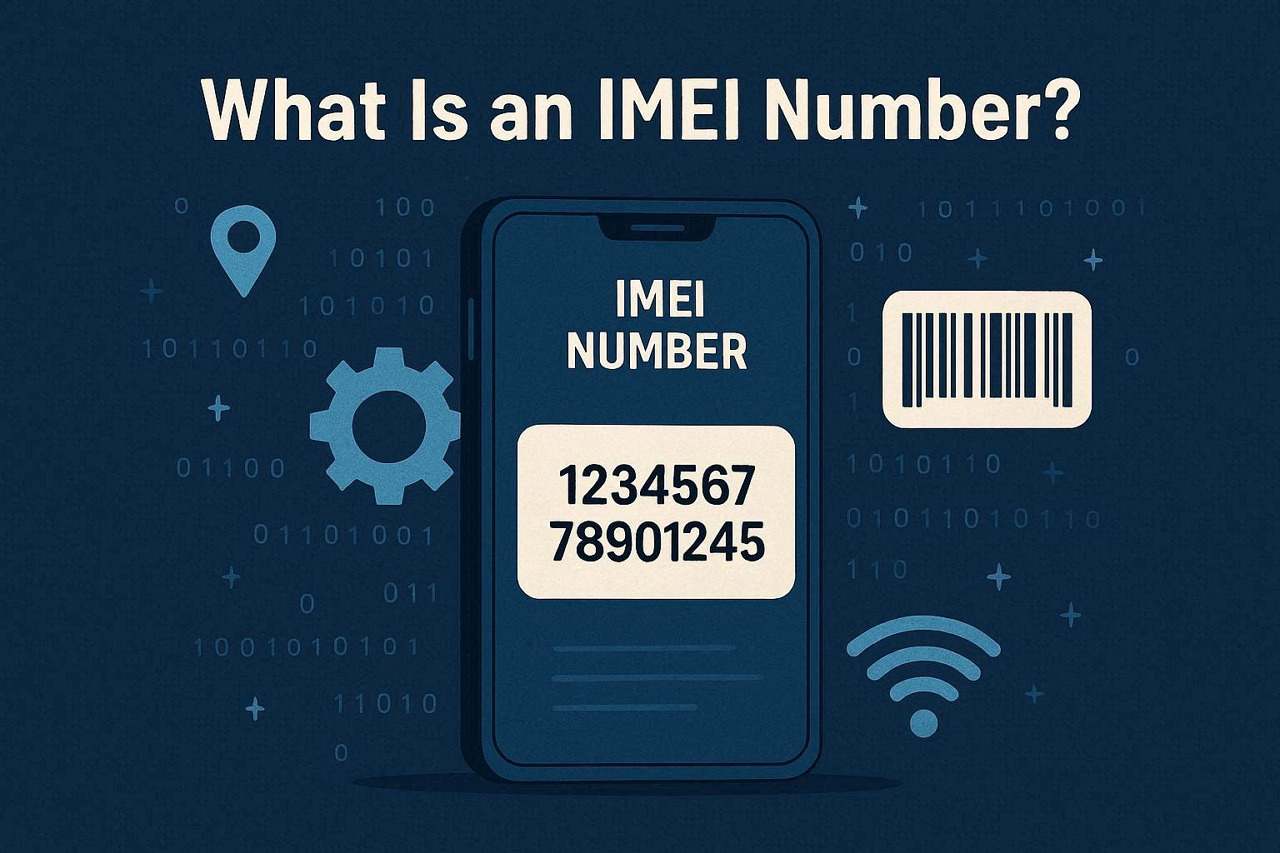
IMEI is essential for proving ownership of a device, whether you're purchasing a used phone, attempting to reclaim a lost device, or troubleshooting network locks. Thus, read this comprehensive guide to understand what an IMEI number is, how to obtain it, and how to use tools like Dr.Fone Online Unlock to get IMEI device details for free.
In this article

What Is an IMEI Number?
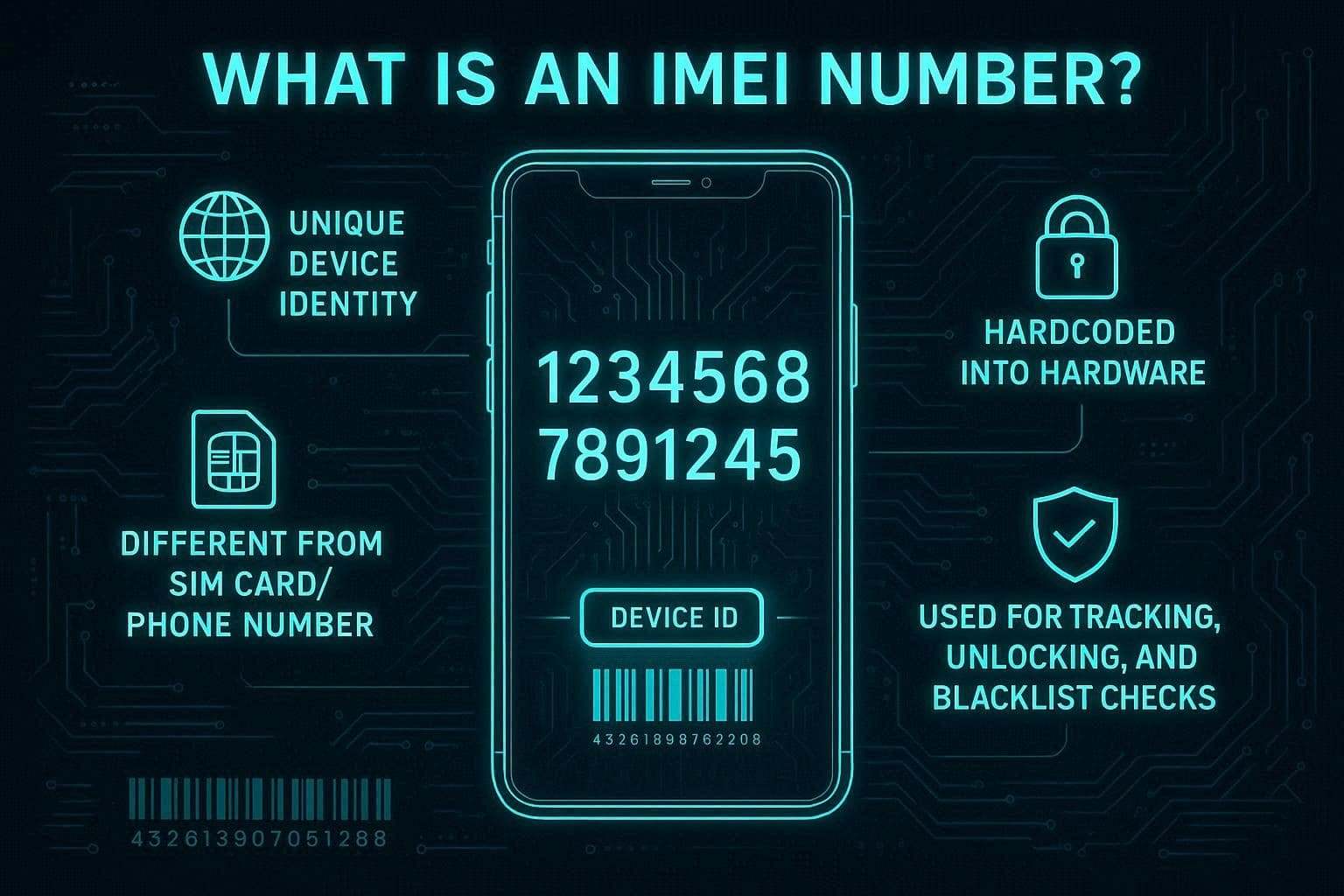
IMEI is the acronym for International Mobile Equipment Identity, which is a 15-digit code that is unique to your device. As you learn what IMEI is, remember that it is a number that is embedded in the phone's hardware and cannot be modified like the SIM card or phone number.
What Does an IMEI Number Look Like?
IMEI is what helps safeguard your device, and to know this 15-digit string, review the mentioned details:
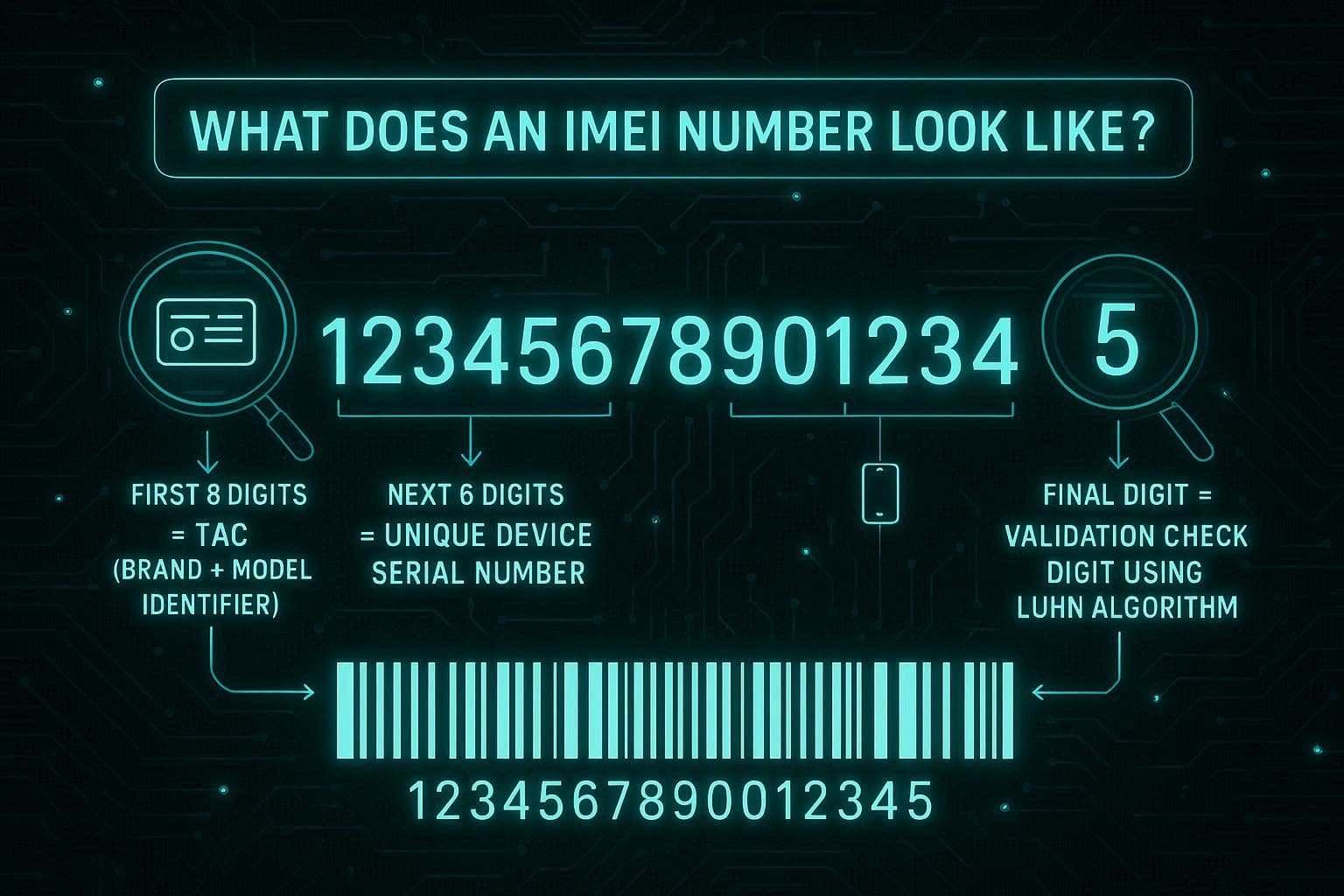
- The First 8 Digits: These digits are known as the Type Allocation Code and indicate the manufacturer of the phone and the model.
- The Next 6 Digits: This is a manufacturer's serial number that is unique to a particular physical unit of the phone.
- The Final Digit: This final digit is there to make sure that the entire string of 15 digits is a valid sequence. It is typically verified with the Luhn algorithm, which can assist systems in determining if a person has entered an incorrect quantity or if a number is fake.
What Are IMEI Numbers Used For?
While learning what IMEI stands for, get to know where it can be used via the 5 mentioned use cases:
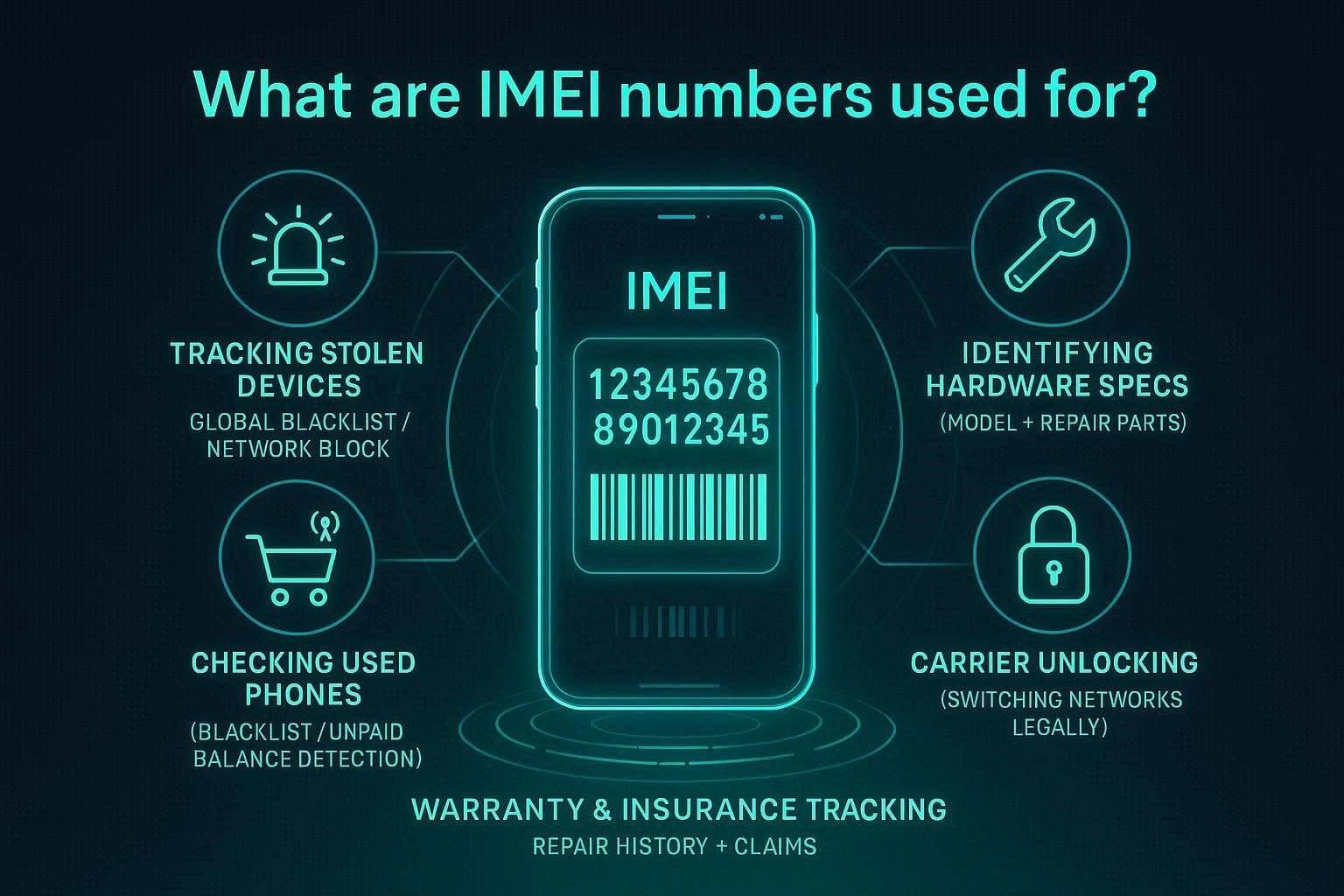
- Track Stolen Devices: If your phone gets lost or stolen, you can give your network provider the IMEI number to add it to a global blacklist. This means that the device can't connect to any cellular network, even if thieves replace the SIM card in it.
- Identifying Hardware Specs: The IMEI is a digital card that gives networks and repairers an idea of what model and brand of phone you have. In this way, it allows technicians to locate the correct components for fixing and guarantees that your service provider will post the appropriate settings for your particular gadget.
- Buying Used Phones: For those who want to buy used phones, the IMEI can be used to verify that the phone has not been reported lost or has an outstanding balance. This means you don't purchase a brick that you can't activate or a device that is still under someone else's ownership.
- Warranty and Insurance: Insurance companies and manufacturers use this unique 15-digit code to track your specific handset's warranty period and repair history. It guarantees that if you make a claim, the services will be applied to the same device that you originally insured or bought.
- Unlocking Network Carriers: If you want to move your phone to a different service provider, the original carrier will often require your IMEI to process a network unlock. This code allows them to identify your phone in their system and legally release it so it can accept SIM cards from other companies.
How to Use IMEI Number to Check Your Device Information For Free?
As you know, IMEI numbers are used for various purposes. You can use Dr.Fone Online Unlock to check IMEI for free. Users can perform this IMEI check on Android and iOS online and get 20+ types of device verification, including Blacklist Check, iCloud, Blacklist Status, Google Warranty, etc. It is compatible with all the major OS versions and can be accessed with ease on all these platforms.
In addition, the IMEI check is completed in 3 simple steps, and you can save the detailed report to submit a safe, carrier-approved unlock request for your phone. The unlocking action can be done directly in the tool if the phone is screen-locked, which is a great advantage of Dr.Fone Online Unlock. Overall, the tool reads this data from official databases, doesn't share it with third parties, and has no learning curve.
Guide to Use the IMEI Number on Dr.Fone Online Unlock
While learning what an IMEI number looks like, let's test how you can use these digits to check the device details via the mentioned Dr.Fone guide:
-
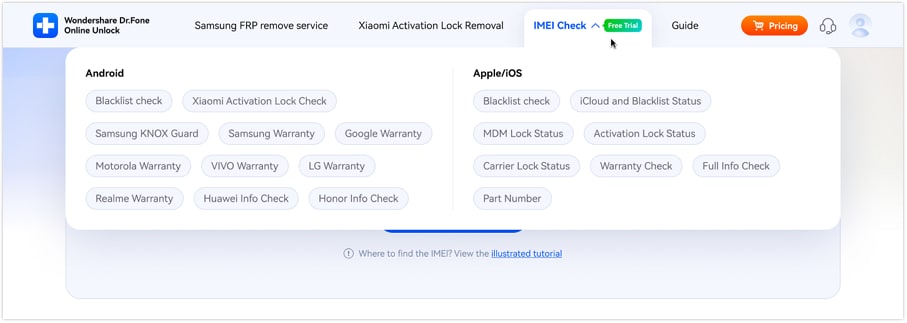
Step 1 Choose to Perform IMEI Check for Android/iOS
Expand the menu for "IMEI Check" and decide whether you want to access details for Android or iOS.
-
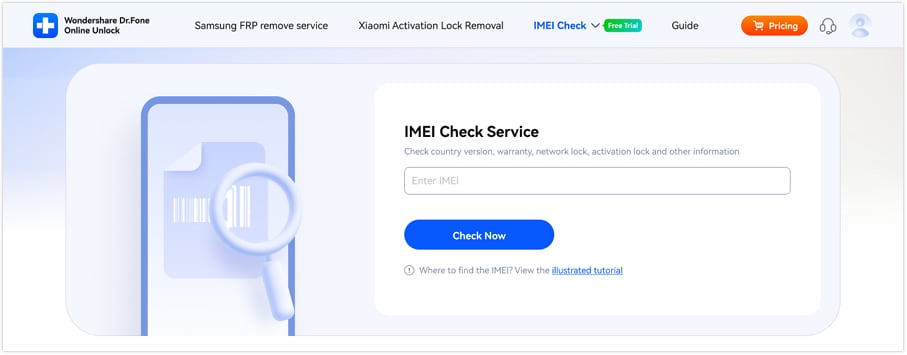
Step 2 Add the IMEI Details on the Tool
Here, add the IMEI details and click the "Check Now" button.
-
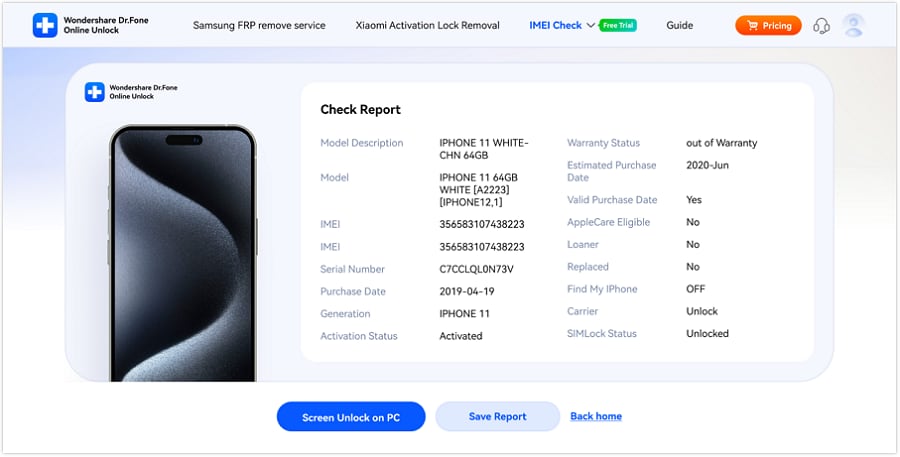
Step 3 Preview the Device Details and Export Report
As the tool starts reading the data from the official database, review the displayed details and tap "Save Report."
How to Find Your IMEI Number on Any Phone?
Though you know what IMEI is and might want to use it on Dr.Fone Online Unlock. However, you need to know where you can locate it, and the 3 simple methods are given in this section:
Method 1. The Universal Dial Code
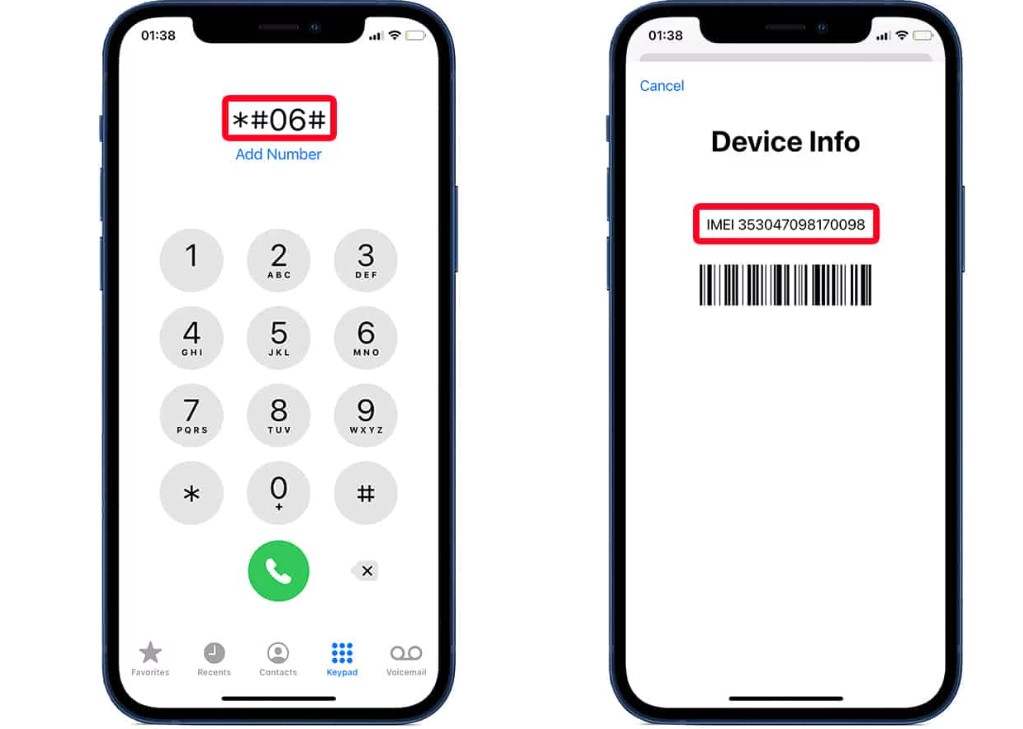
This is the fastest way to find the IMEI on a functioning phone and uses the dial code "*#06#." Simply open the phone pad on Android and iOS, and you will get the IMEI details in the popup menu to use later. This method works on both ancient feature phones and the latest smartphones.
Method 2. Check the Settings Menu
You can also obtain the official device identification number without having to dial any code from your phone using this method. Moreover, it is fast, safe, and convenient as there is no need to install additional apps, tools, or even Internet access. Understand where to get it on Android and iOS by reading the detailed guide mentioned:
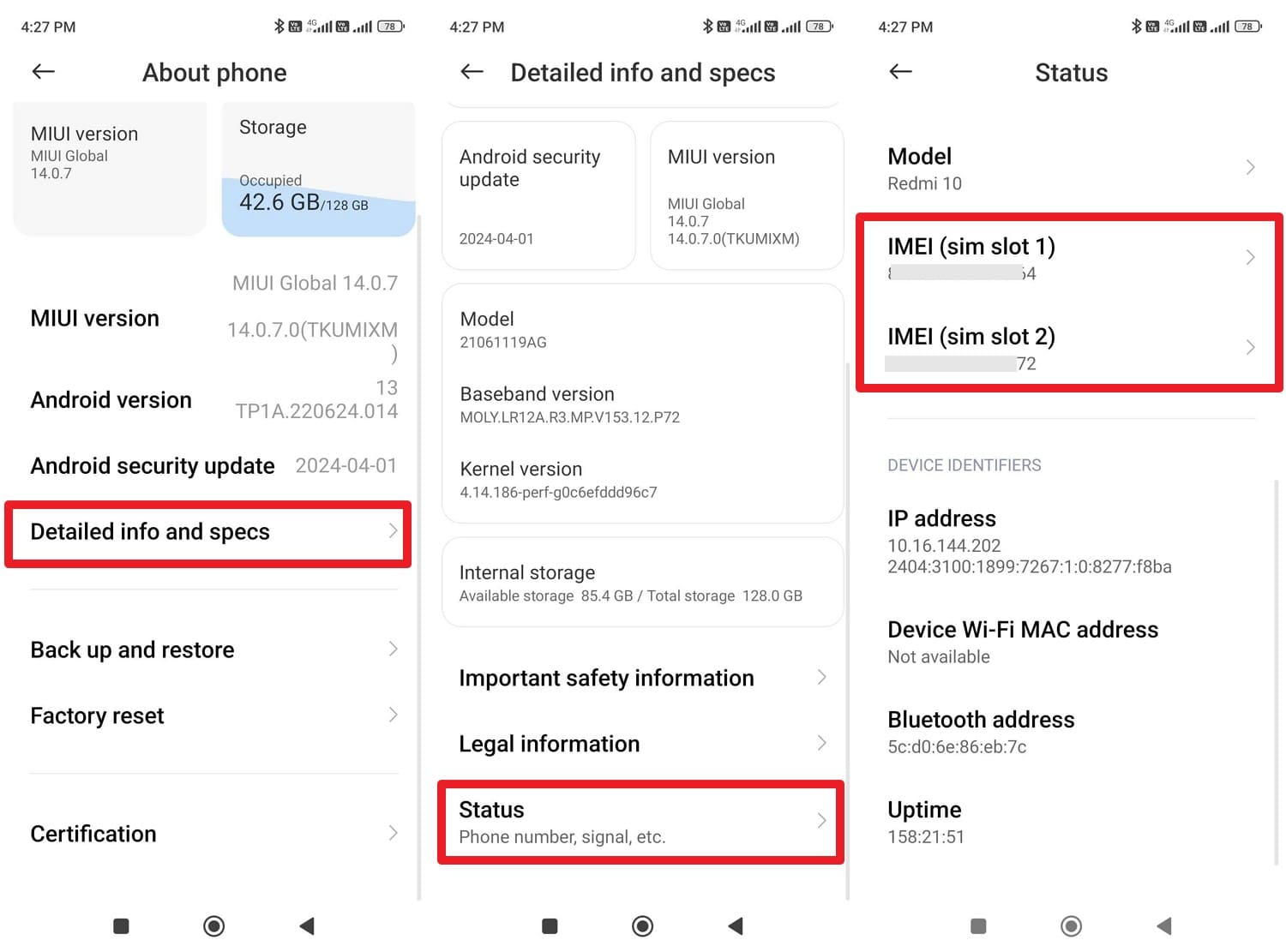
For Android
Instructions: In the About phone settings, choose the "Detailed Info and Specs" and "Status" options, and note the IMEI number shown in the new interface.
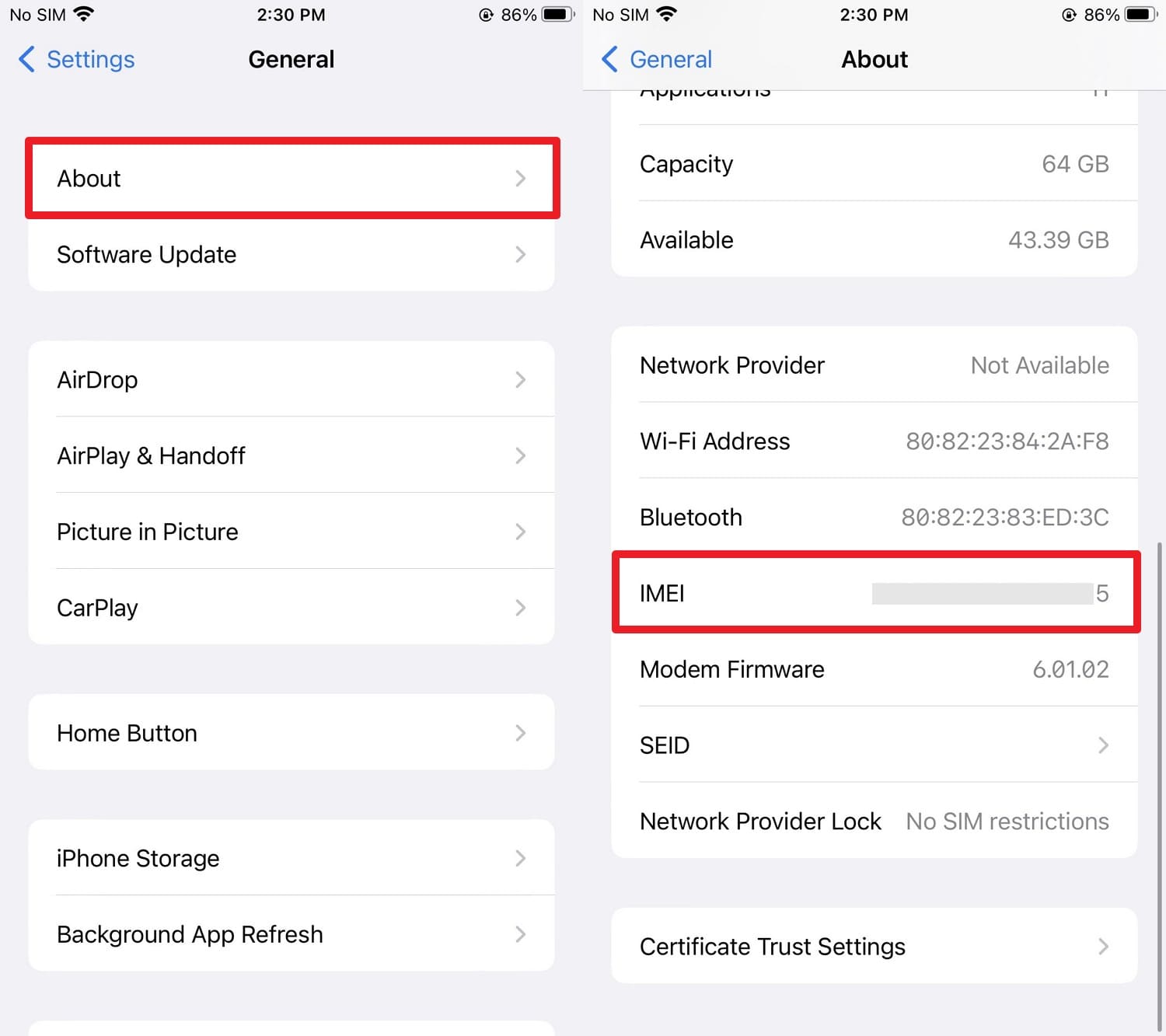
For iPhone
Instructions: In the General settings, go to "About" and locate the "IMEI" details displayed in the new interface.
Method 3. Look at the Physical Hardware
After knowing what IMEI means, if you want to locate this number but the phone won't turn on, locate it directly on the hardware. On modern iPhones and Androids, the IMEI is laser-etched in tiny print on the SIM card tray. So, use the paperclip to popup the tray out and note the details.
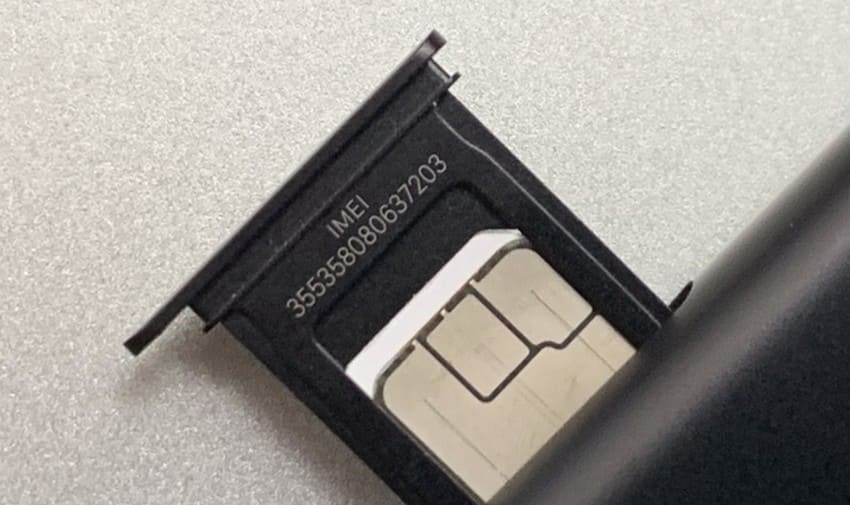
The IMEI is usually very small and is located at the base of the back glass or metal. If you have an older phone with a removable battery, the IMEI is usually on a white sticker under the battery.
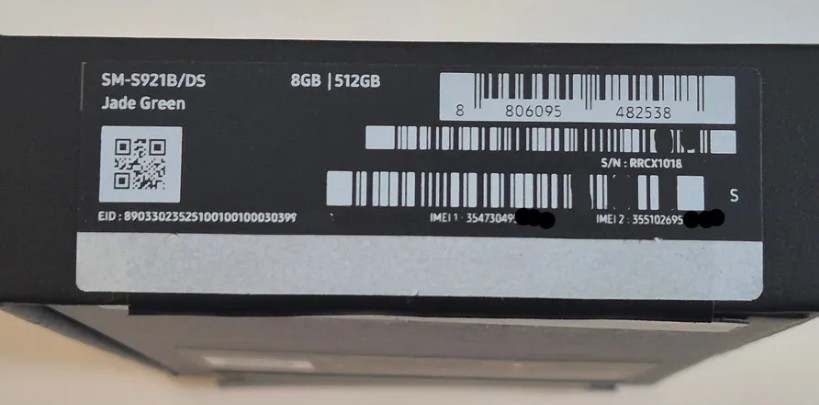
Method 4. Check the Original Packaging
If you've lost your phone (such as it was stolen), you can view the IMEI on the original packaging. Find a white bar code sticker on the side or bottom of the pack that is clearly marked as "IMEI" or "IMEI1."
What Can Someone Do With My IMEI Number?
In most cases, if you wonder what someone can do with my IMEI number, it is far from harmless in the wrong hands. According to the FCC report, the most common risk is IMEI cloning, where a bad actor programs your 15-digit code onto a stolen or counterfeit device. This can cause your legitimate phone to be blacklisted by carriers, effectively cutting off your cellular service.
The GSM Report and the Apple Community also say that older devices are particularly vulnerable to these exploits. This is because they lack the advanced hardware-level encryption found in modern smartphones. To stay safe, experts recommend treating your IMEI like a digital fingerprint and sharing it only with trusted service providers or when absolutely necessary for a trade-in.
How to Check if an IMEI Number Is Valid?
When learning what IMEI stands for, it's important to determine the validity of this 15-digit string via the 5 ways provided below:
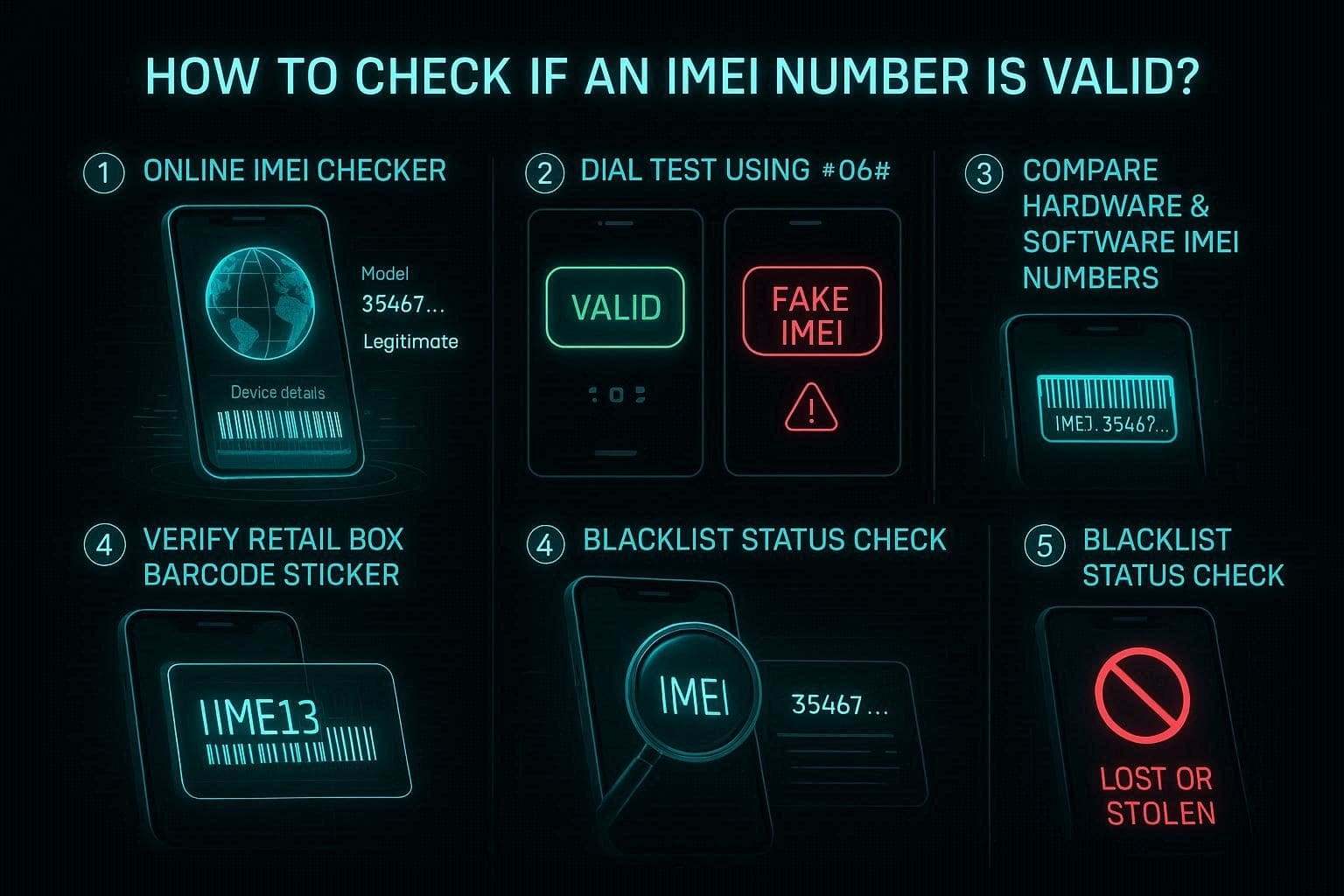
- The Secure Method: A dependable means of doing this is utilizing a free IMEI checker such as Dr.Fone Online Unlock. Just add the 15-digit code, and the system will immediately provide device information to check if the number is valid and matches the device type.
- Do the Dial Test: Dial *#06# and see if you get a valid 15-digit string on the screen. If you see "Invalid IMEI" or zeros, then it may have been tampered with or is a fake.
- Locate Settings: Check the IMEI number in "About" settings on your phone and compare it with the number on the SIM tray or on your device. These numbers should match exactly; the software might have been altered illegally to be a valid phone.
- Check the Packaging: Check the bar code sticker on the original retail box and compare this 15-digit code to that displayed on the phone's screen. In fact, there's always a match between these numbers, and if you find any discrepancy, that's a serious indication of fake or repackaged phones.
- Check the Blacklist Status: Use a service like Dr.Fone Online Unlock to see whether the IMEI has been flagged by carriers as lost or stolen. A valid number will show a "clean" status, whereas an invalid or problematic one will be blocked from connecting to mobile networks.
Conclusion
Many ask what the IMEI number is and how to locate and utilize it. Therefore, with this guide, all of this information has been discovered, and how others can use it illegally. Generate a detailed status report through a specialized online verifier like Dr.Fone Online Unlock. This will help you to ensure that any mobile phone you have or buy is legitimate, safe, and can be officially unlocked on any network.

Wondershare
Dr.Fone
Wondershare Dr.Fone
Need More Phone Tools? Discover More on Dr.Fone — One Toolkit for All Your Phone Solutions.


 Try
It Free
Try
It Free Try It
Free
Try It
Free 100% Clean
& Safe
100% Clean
& SafeFAQs
-
1. Is it possible for two phones to have the same IMEI?
No, by design, every mobile device manufactured globally is assigned a unique 15-digit identifier. If you find two devices with the same number, one is likely a cloned or counterfeit handset, which can lead to network blocking. -
2. Does a factory reset change my IMEI number?
No, a factory reset only wipes your software and personal data. Since the IMEI is hard-coded into the device's physical hardware, it remains the same throughout the phone's lifespan. -
3. What should I do if my IMEI is blacklisted?
A blacklisted IMEI usually means the phone was reported lost, stolen, or has unpaid bills. You should contact the original carrier to resolve the status or use a professional diagnostic tool to verify the specific reason for the block.