ChatGPT
 Perplexity
 Gemini
 Claude
 Grok
Grok
Your AT&T smartphone is a powerful tool, but its utility is often limited by a network lock. It prevents you from switching to a more affordable carrier or using international SIM cards. While these restrictions are standard for many devices purchased through installment plans, they aren’t permanent. By simply understanding the AT&T SIM unlock requirements and the official methods, you can gain carrier freedom.
Therefore, this guide will highlight the eligibility criteria and official means. For some reason, if you are ineligible, learn how Dr.Fone Online Unlock, among all online services, can be a reliable solution.
In this article
Part 1. AT&T SIM Unlock Policy and Eligibility Requirements
According to AT&T, the AT&T unlock phone rules are different for AT&T Wireless, Business, and Prepaid plans. To know what the eligibility criteria are, here are some points you need to know:
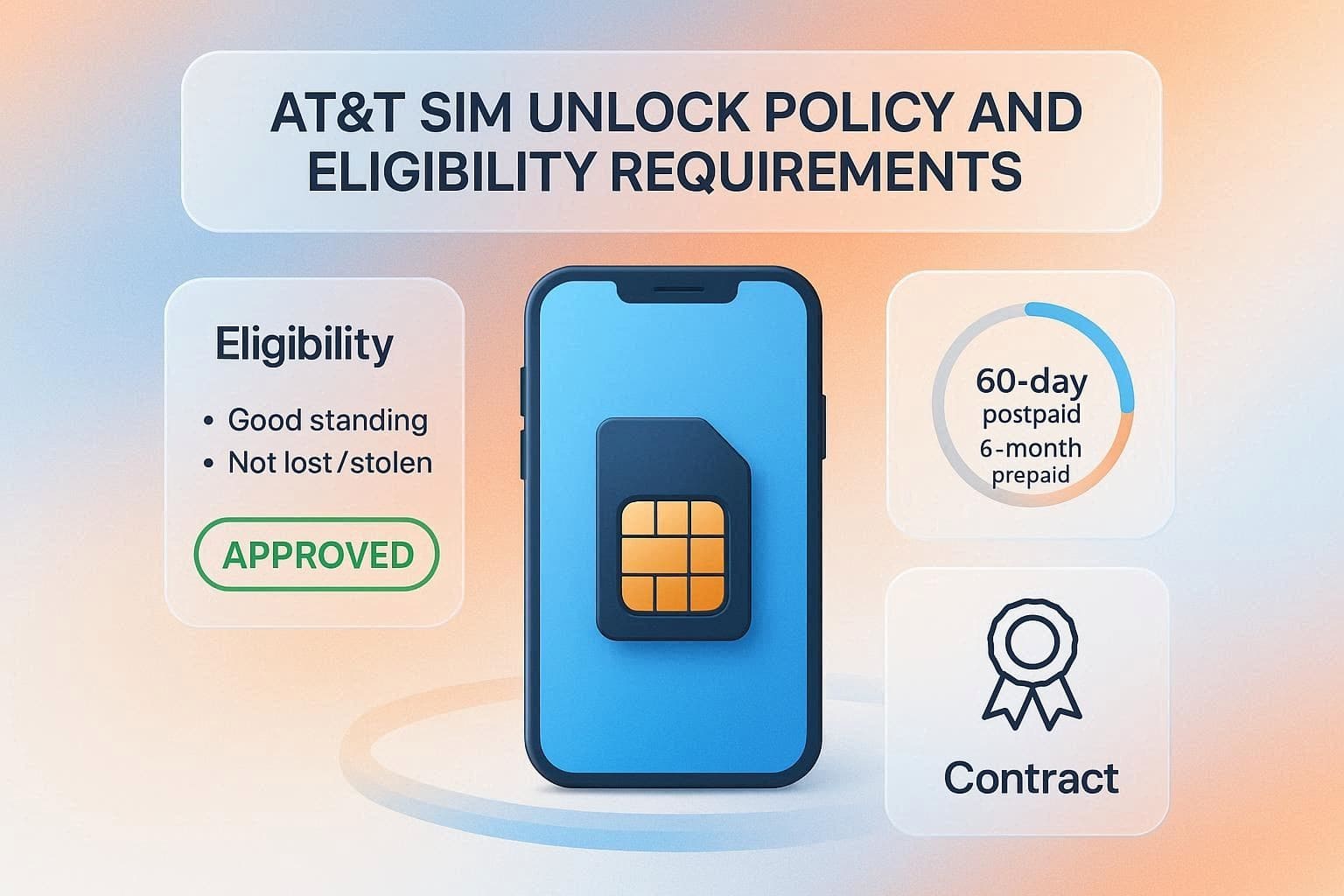
General Eligibility Rules:
- The phone must be originally sold by AT&T and must not be reported lost or stolen.
- If you are a current customer, your account must be in good standing and have no past-due balances.
- The device cannot be active on another AT&T customer’s account.
Specific Plan Requirements:
- The device must be active for at least 60 days and fully paid off on postpaid plans.
- The Prepaid AT&T devices require at least 6 months of paid and active service.
- For Business Accounts, the device must have completed its service commitment term or contract before they are eligible. In addition, if you upgraded your phone early while still on a 2-year contract, you must wait 30 days after the upgrade to unlock the device.
Special Exceptions:
- If you are deployed, AT&T can waive the 60-day and 6-month rules when you submit your deployment orders.
- Most wearables and tablets sold by AT&T are unlocked by default and do not require a request submission.
Part 2. How to Check If Your AT&T Device Is SIM Locked
For the AT&T Wireless, Business, and Prepaid accounts, it's important to know the lock status before using any AT&T carrier unlock method. So, this section discusses the basic procedures for each device.
AT&T Wireless and AT&T Business
Here is how you can view the lock status via the 3 simple methods mentioned:
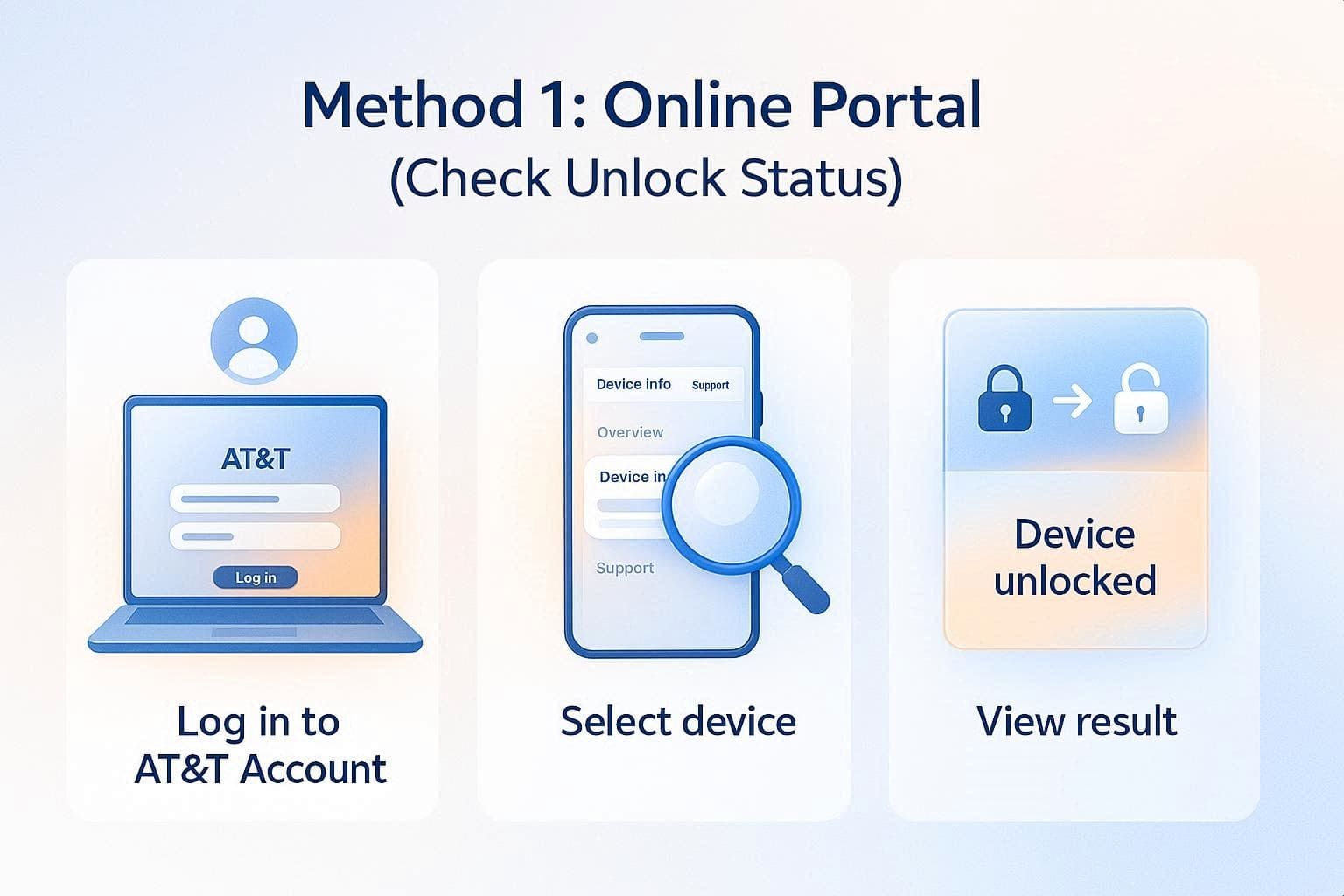
Method 1. Online Portal
Log in to the AT&T account and select the device whose status you want to view. Under the “Device Info” tab, if you get the “Device Unlocked” option, it's unlocked.
Method 2. Via Phone Settings
For iPhone and Android users, settings options can vary and are guided ahead for clarity:
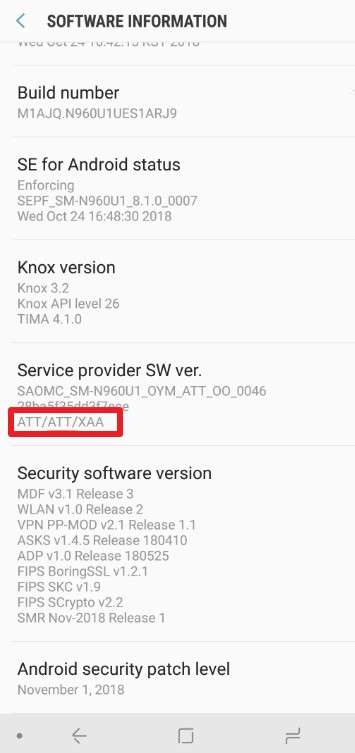
For Android
Instructions. Access the “Software Information” section by going to “Settings” and “About” on your phone. If the “Service Provider Software Version” ends with ATT/ATT, the phone can be unlocked by AT&T. If it contains ATT but ends differently, the phone is already unlocked. Finally, if there’s no ATT, you must contact the original carrier to unlock the SIM.
Samsung (Released After Sept 2025): Go to Settings > Connections > More Connection Settings > Network Lock Status.
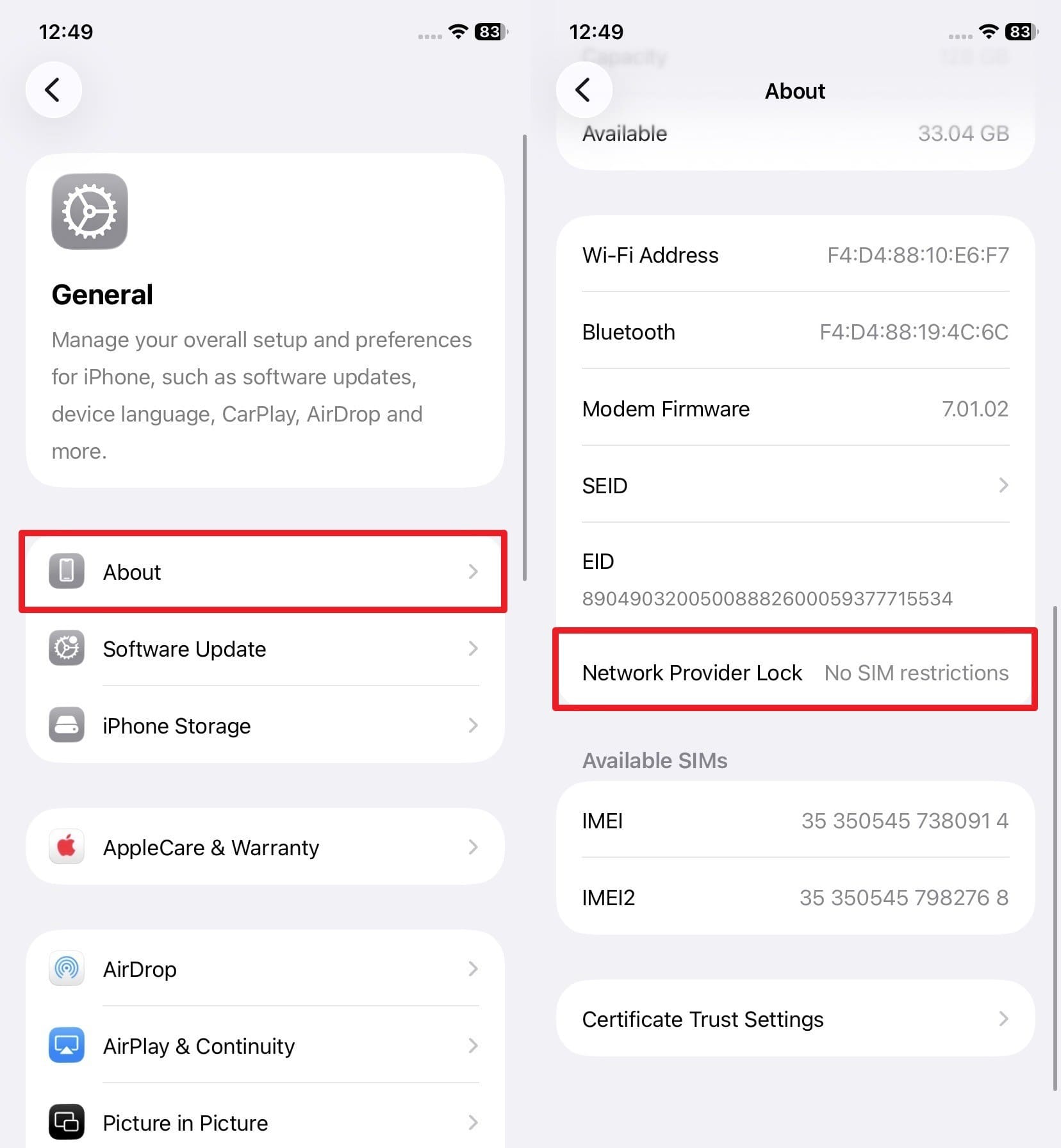
For iPhone
Instructions. Access the “Network Provider Lock” option in the About settings, and if it says, “No SIM Restrictions,” it's unlocked.
AT&T Prepaid
To check the AT&T carrier unlock status, here are 2 options, ranging from SIM card to eSIM:
- For SIM Card: Insert a non-AT&T SIM into the device, and if you see a message “SIM Not Supported,” the device is locked.
- For eSIM: In this case, you have to request the device unlock based on the device type.
Part 3. AT&T Device Unlock Guide: SIM Unlock Methods 2026
If you have checked the lock status and seek the AT&T SIM unlock method, this section has you sorted.
Method 1. Request SIM Unlock via AT&T Unlock Portal
Ideally, the unlock method is automatic for eligible devices from Apple, Samsung, or Google. This is done after the carrier confirms the financial and time requirements are met. Hence, users can easily locate the SIM lock status via settings and switch carriers.
However, if automatic unlocking fails, you need to submit a manual unlock request. You will require the IMEI information, the account holder's information, a valid email address, and a phone number for this. When all the prerequisites are in place, submit the Device Unlock Request as follows:
-
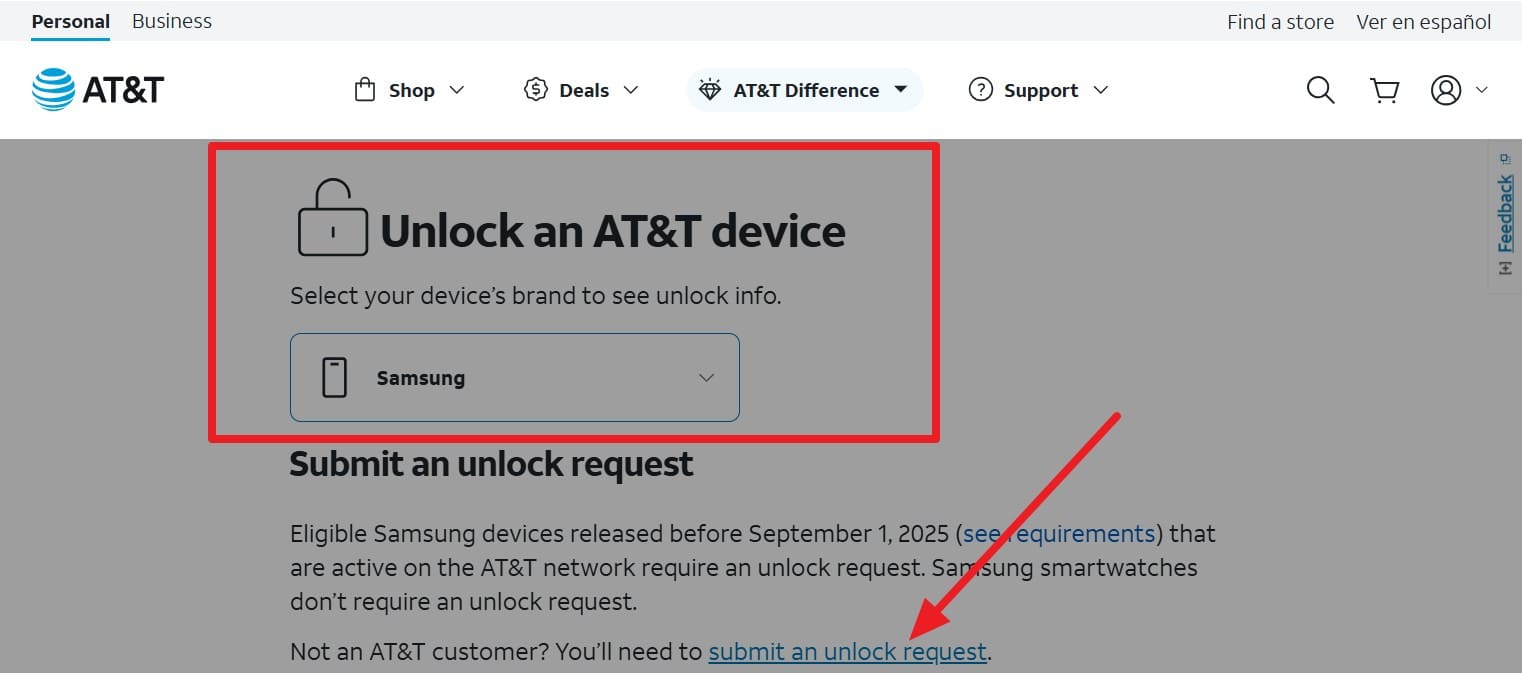
Step 1 On the AT&T unlocking site, select your device under the “Unlock an AT&T Device” menu. Choose the device by expanding the “Unlock an AT&T Device” menu. After that, press the “Submit an Unlock Request” link and continue to add the details.
-
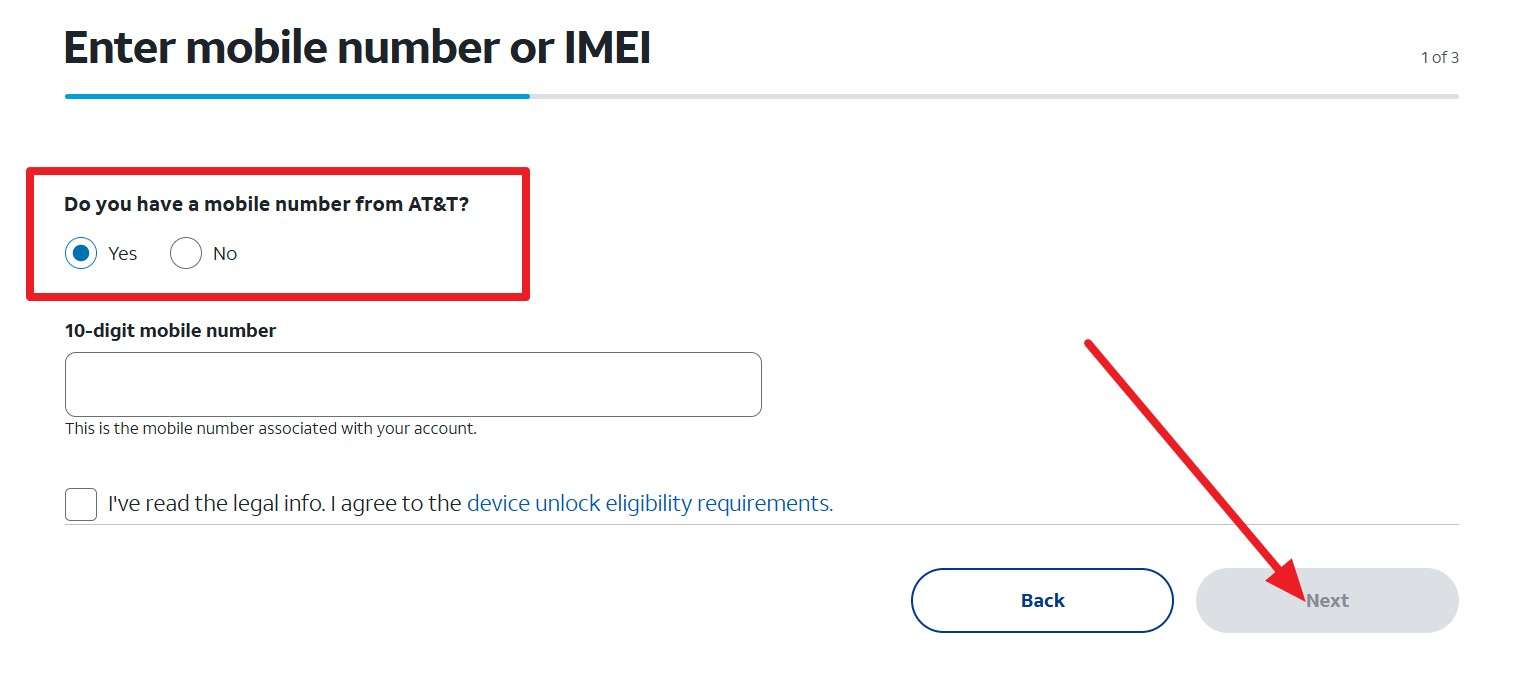
Step 2 Under the “Enter Mobile Number or IMEI,” pick the yes or no option, add the phone number, and click “Next.” After that, add the email and wait for the request to be approved within 48 hours. Once approved, the instructions will be given, and the phone will be unlocked.
-
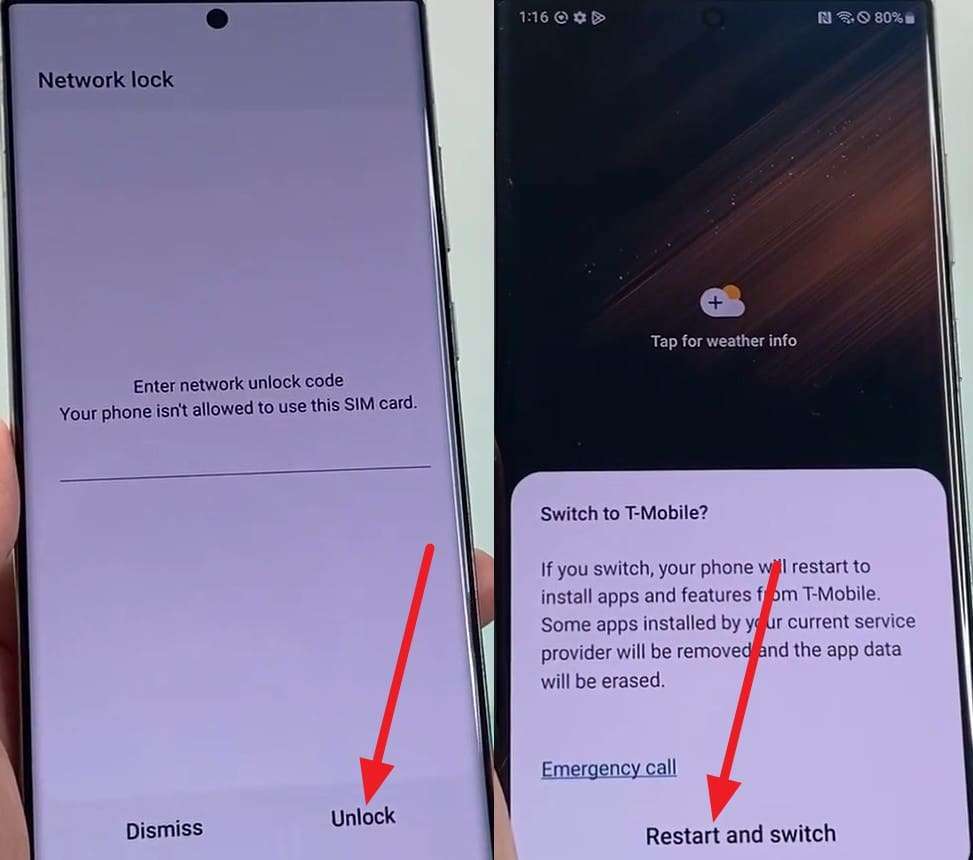
Step 3 The iPhone unlock happens automatically, and you just have to restart. For Android, you might get an unlock code and have to insert a new SIM into the phone. A popup menu will appear where you have to add the code and tap the “Unlock” button. When it ends, choose “Restart and Switch” to start using the different network.

Method 2. AT&T Device Unlock App (Prepaid Android)
If you have an AT&T prepaid Android phone, such as a Motorola or an older Samsung, you can use the preinstalled app, Device Unlock. Using this AT&T unlock phone method, you won’t have to access any portal and can easily choose between “Permanent” and Temporary” unlock options. So, to know how it can be done, follow the mentioned guide:
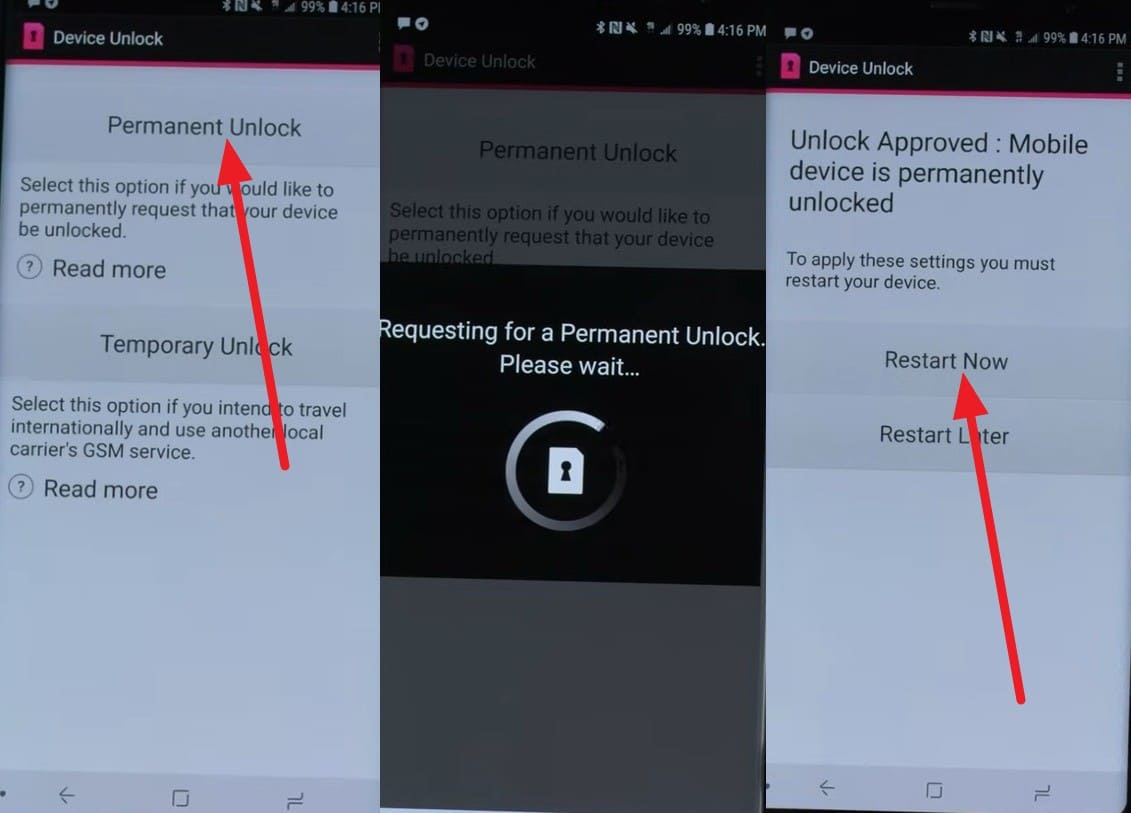
Instructions. In the app, grant the necessary permissions by selecting “Allow,” then choose “Permanent Unlock.” The application will communicate with the AT&T servers, and if you’ve met the 6-month requirement, it will be unlocked. Later, you can choose the “Restart Now” or “Restart Later” options.
Method 3: Unlock AT&T Device Using IMEI Services
Regarding the AT&T carrier unlock, you can also use SIM unlock services, as mentioned:
1. Dr.Fone Online Unlock
With support for multiple carriers in its weekly updates, this is a suitable SIM-unlocking solution. Dr.Fone Online Unlock is designed to submit the network bypass request to the cloud servers so that the user’s data remains intact. In addition, it doesn’t need jailbreaking and rebooting to ensure the warranty remains intact. Unlike other tools, it offers 2 options for monitoring the request process.
Users can access the detailed unlocking history once the request is accepted via official means within 24 hours. Additionally, it comes with no hidden costs and promises a refund if unlocking fails. Not to mention, the tool confirms the details and takes 2-3 simple steps to submit the request and unlock the SIM.
How to Use Dr.Fone Online Unlock to Unlock AT&T Devices
-
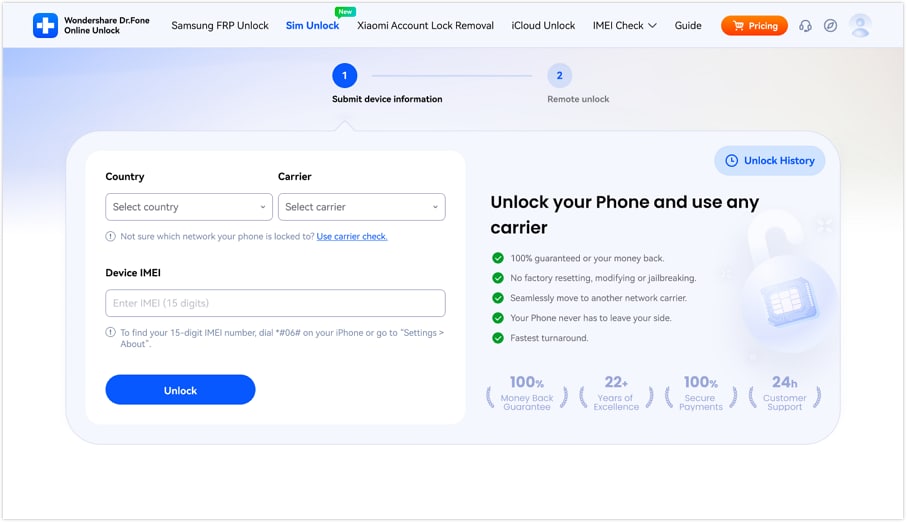
Step 1 Add the AT&T Device Details
Search for the Dr.Fone SIM Unlock page on any device and add the requested details to click the “Unlock” button.
-
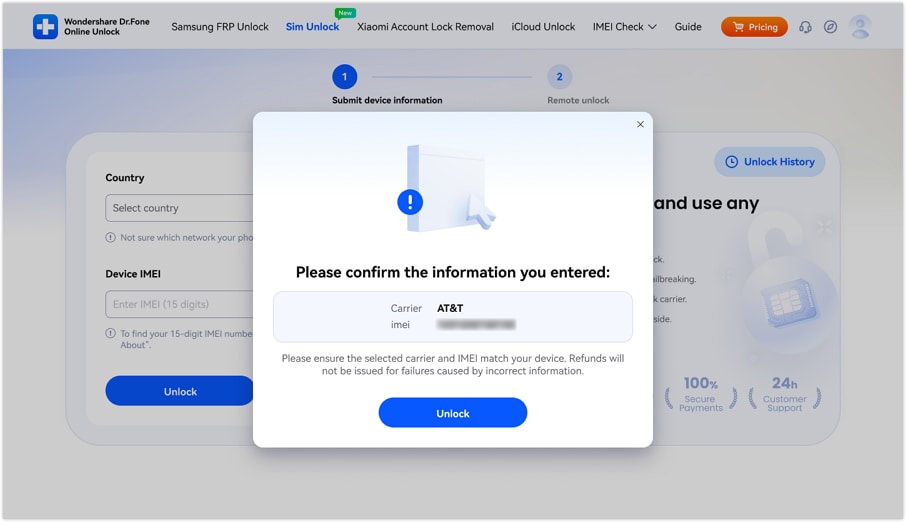
Step 2 Confirm the AT&T Details to Submit Request
When the popup menu appears, confirm the AT&T device detail and tap “Unlock” again.
-
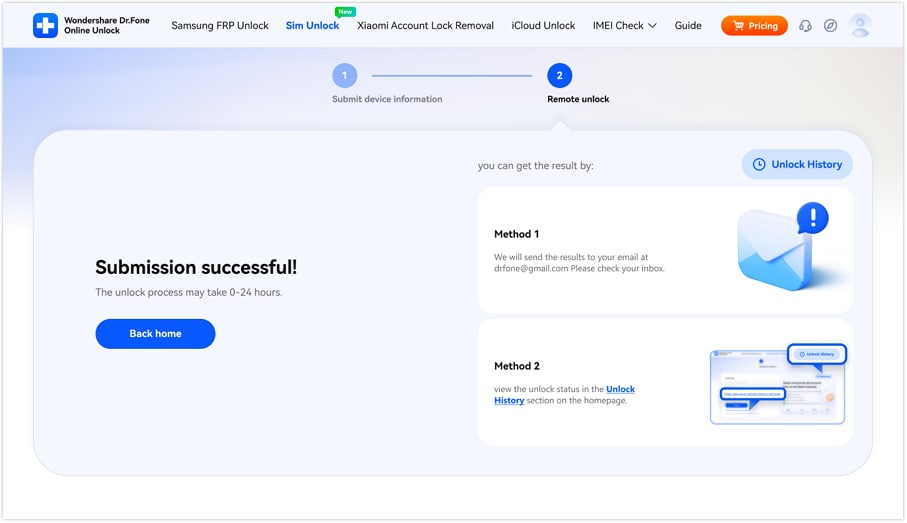
Step 3 Wait & Monitor the AT&T SIM Unlock Request
The tool will submit the request to the cloud, and it will take 0-24 hours to process.
2. DirectUnlocks
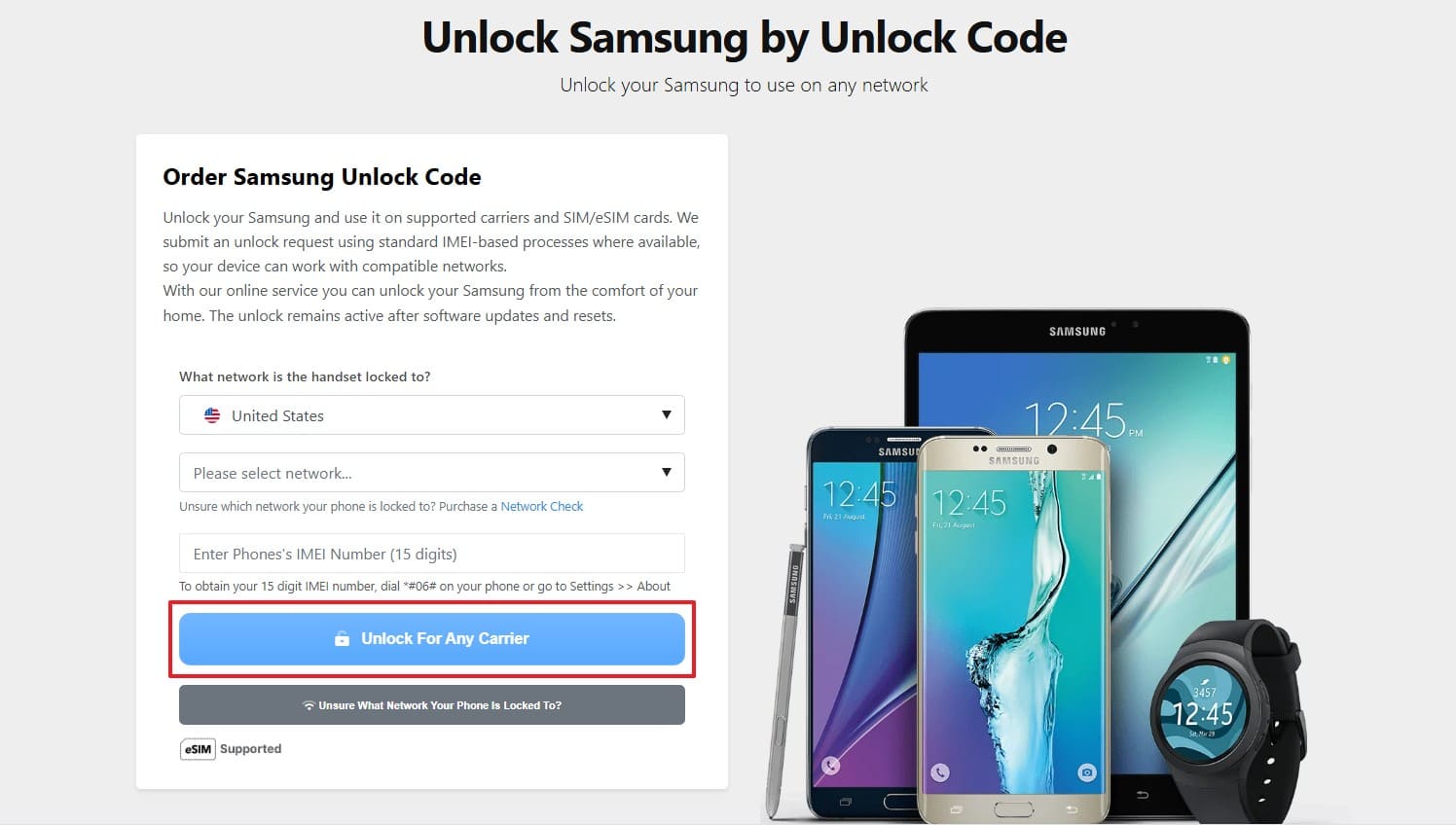
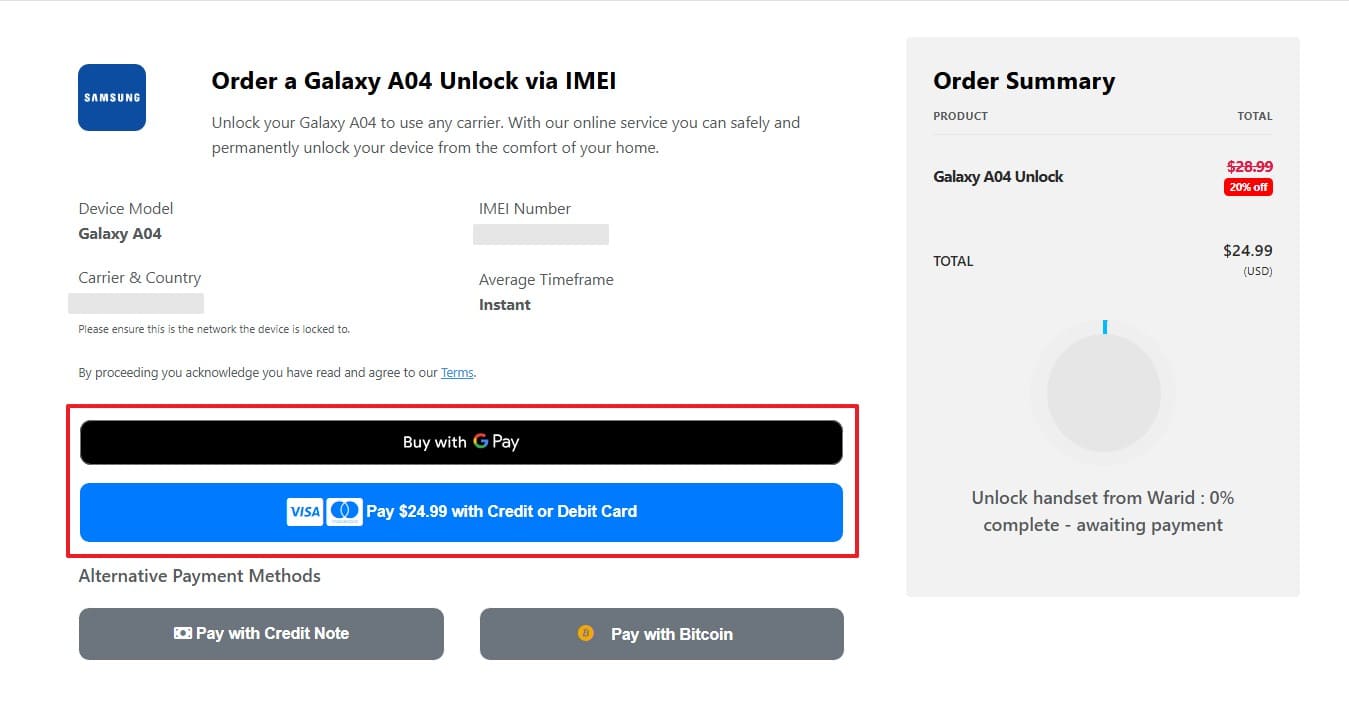
For the AT&T unlock phone, this tool uses the IMEI and submits the request through the carrier-authorized process. Additionally, users can track the process, and no device modification is required. Though the tool covers multiple devices, it comes with hidden costs, and is guided below:
-
Step 1 Add the AT&T device details, then click the “Unlock for Any Carrier” button.
-
Step 2 After that, confirm the details and continue with the payment. Once the payment is made, you will receive an email with instructions to unlock the device within a week.
3. Official SIMUnlock
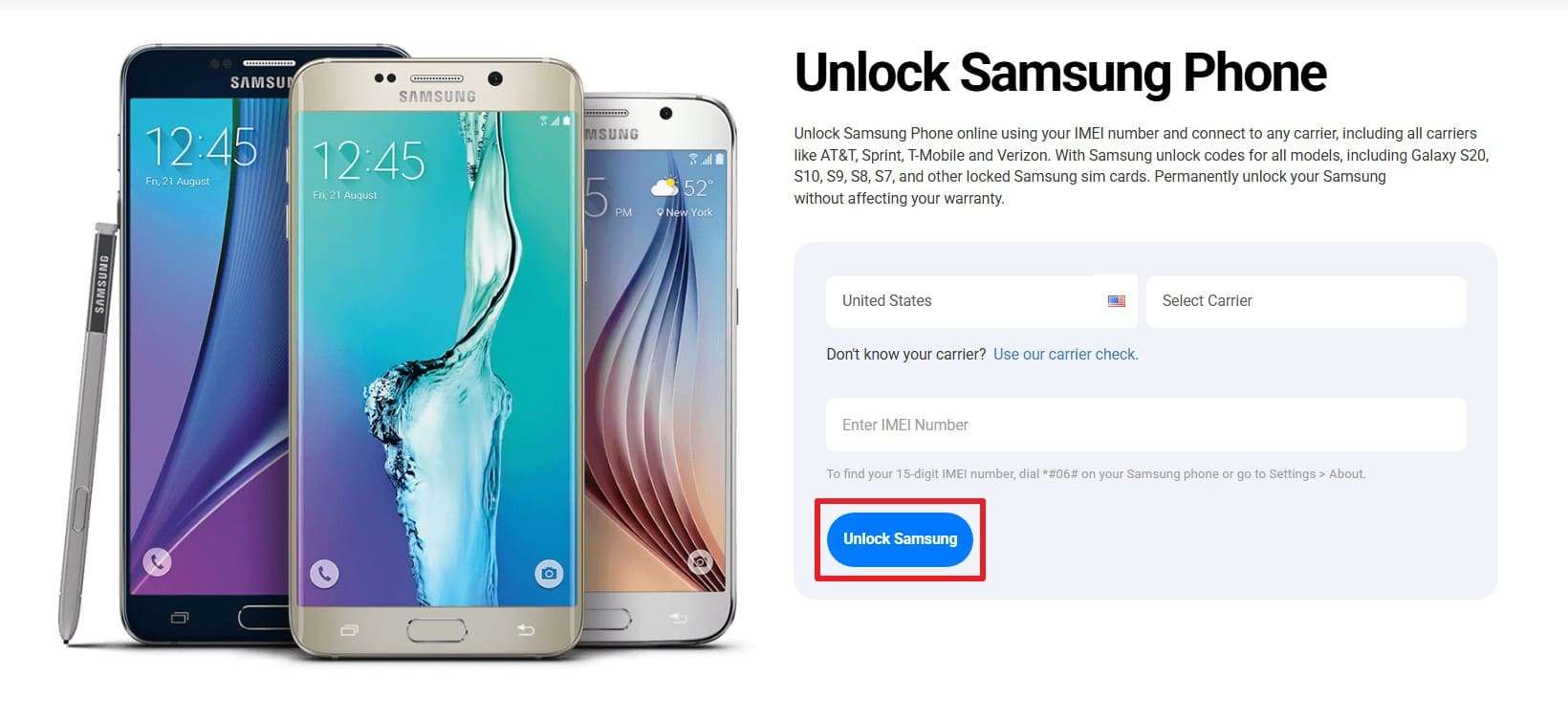
This is also the reliable choice for the AT&T carrier unlock, as it claims 24-hour delivery and supports multiple brands. Additionally, it can perform international carrier unlocks and guarantees to secure the data. Though the process is tied to payment and there is limited support for older models, here is how you can use it:
-
Step 1 After tapping the “Unlock” button on the site, add the AT&T device details and press the “Unlock Samsung” button.
-
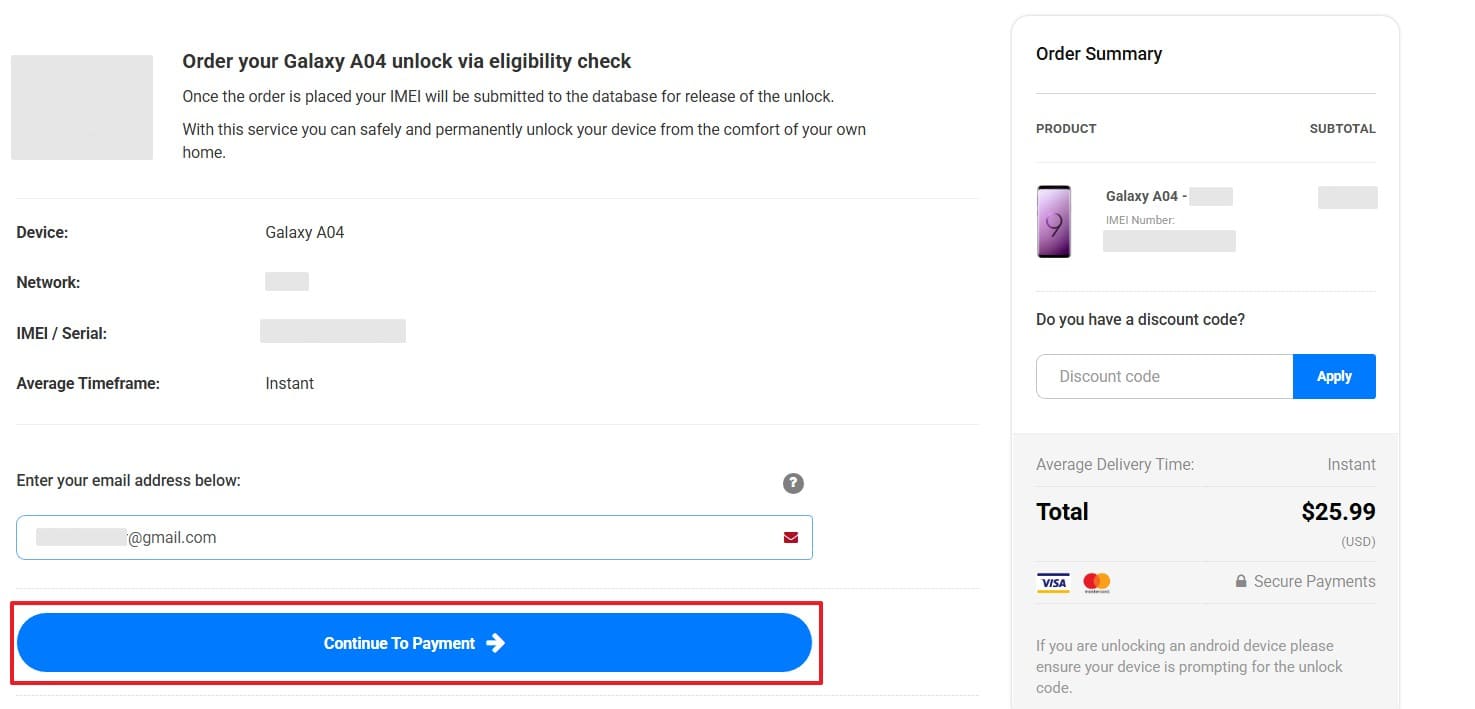
Step 2 Then, make the payment and wait for the tool to send the confirmation link. Upon receipt, you will receive an unlock code for your Android device; follow the instructions to complete the unlock.
| Metric | Dr.Fone Online Unlock | DirectUnlocks | OfficialSIMUnlock |
|---|---|---|---|
| Success Rate | 99% Guaranteed | Moderate | High |
| Processing Time | 0–24 Hours | 24 Hours – 1 Week | 24–72 Hours |
| Hidden Fees | None (Transparent) | High (Pre-order fees) | Low |
| Jailbreak Needed | No | No | No |
| Refund Policy | Full Refund | Partial/Credit only | Limited |
| Best For | Fastest & Most Reliable | Tracking features | International brands |
If you need a tool that processes SIM unlock requests within 24 hours, with no code or human intervention, Dr.Fone Online Unlock is the right choice. Additionally, experts say that the tool comes with no hidden fees and guarantees that the unlock is permanent.
Part 4. Is AT&T SIM Unlock Legal and Safe in 2026?
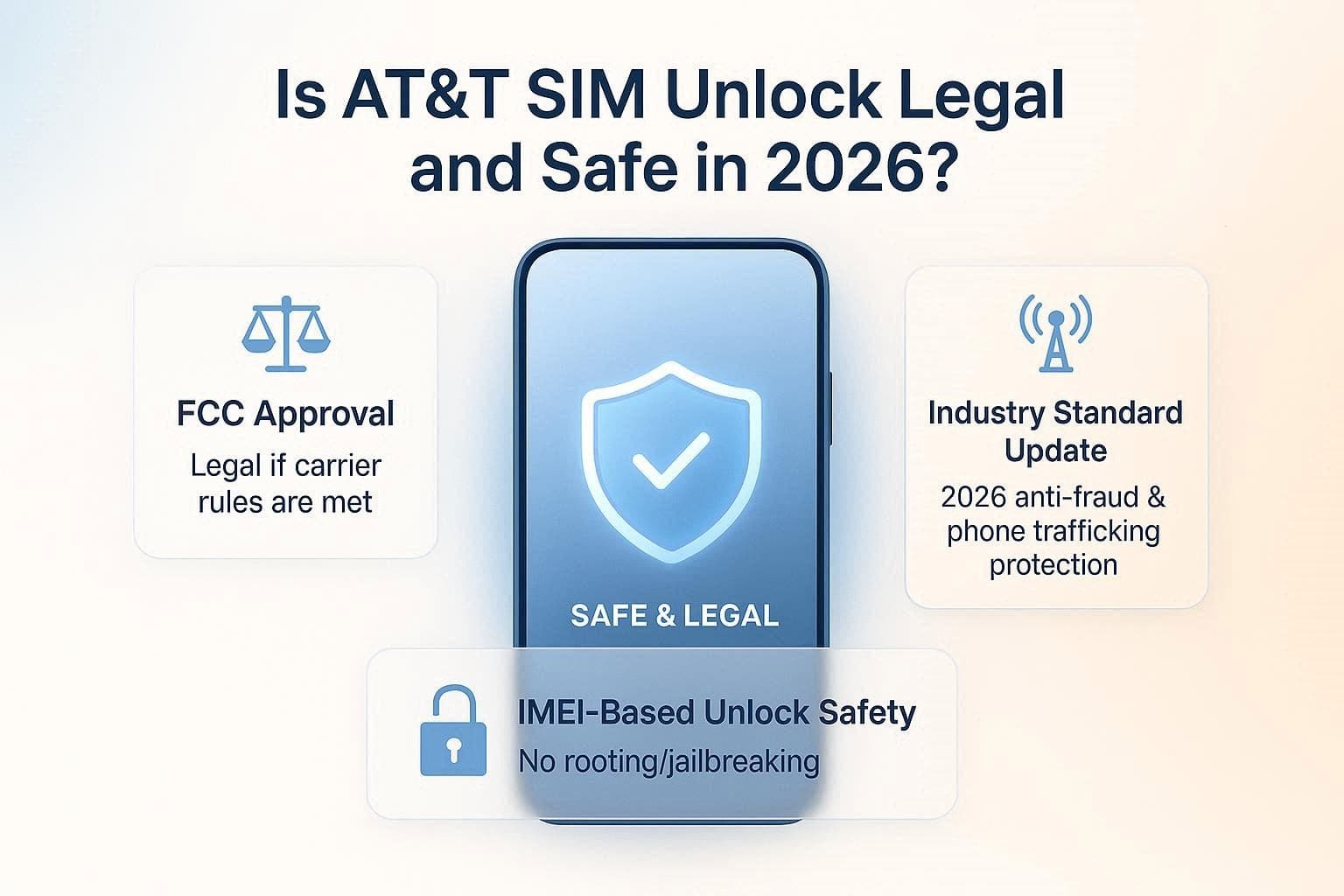
Regarding the AT&T carrier unlock, the FCC says it's legal if you unlock your device and meet all carrier requirements. Furthermore, the FCC has granted the carriers a common industry standard to assist in the fight against phone trafficking and fraud as of January 12, 2026. Therefore, there are no dangers involved in IMEI-based SIM unlocking, as it does not involve jailbreaking or rooting of the smartphones.
Nonetheless, the process is non-destructive if one user uses online tools such as Dr.Fone Online Unlock. So, remain compliant with AT&T’s legal terms, and if they are difficult to meet, you can use Dr.Fone Online Unlock.
Conclusion
The process of AT&T SIM unlock is safe and legal, as stated in FCC reports. Since the method needs legal means, this guide has explained how you can use the AT&T unlock portal or app (for older devices) when you are eligible. However, when you are ineligible, the usage of online tools like Dr.Fone Online Unlock can help you bypass network lock within 24 hours.
Frequently Asked Questions
-
1. Will unlocking my phone allow it to work with any carrier worldwide?
Yes, most modern smartphones are compatible with the required frequency bands (GSM/LTE/5G) for the world. Older or budget-oriented models, however, are hardware-restricted and can't connect to specific 5G or high-band networks on other carriers. -
2. What happens if I enter the wrong unlock code too many times?
Android phones come with a limited number of attempts, typically 5-10. When you go beyond this, the phone could go into a hard lock, and you may be forced to use a PUK code or a manufacturer’s factory reset. -
3. I’m traveling tomorrow; can I get an expedited unlock?
Ideally, the SIM unlock takes 2 business days to process the request. However, if you are in a rush and don’t meet the 60-day requirements, tools like Dr.Fone Online Unlock can process requests within 24 hours.