ChatGPT
 Perplexity
 Gemini
 Claude
 Grok
Grok
Imagine you’ve found a great deal on a used smartphone or decided to switch to a more affordable plan. However, you realize that it is locked to the old carrier, and this roadblock has left you stuck with expensive roaming fees or a phone that won’t make calls. If you want a way out, you can contact the carrier, but it will take 2 business days and require you to meet certain conditions.
So, this guide explains how online services like Dr.Fone SIM Unlock can be helpful. Since many users have found this as a ranking result when searching for “Online SIM Unlock Tool,” here you will know whether it's worth using.
In this article
Part 1. What Is Dr.Fone Online SIM Unlock Tool?
Dr.Fone Online Unlock is the Wondershare SIM unlocking tool designed to work on the web, across any device. Unlike Dr.Fone’s downloadable suite, the online tools primarily focus on SIM unlocking using only the IMEI. This tool not only bypasses carrier restrictions but also helps you find out which carrier you are locked to.

Switching carriers used to be really stressful because of AT&T's restrictions. Whereas the SIM unlock worked smoothly, and I was able to use a local SIM while traveling overseas, saving time and money.
Daniel Carter
Key Features of Dr.Fone SIM Unlock Tool
So, to continue with the Dr.Fone carrier unlock review, review the detailed key features of this tool:
- IMEI-Based Unlocking: As mentioned, the tool uses the phone’s IMEI to unlock it. Thus, this is done to ensure that the tool uses official means that do not void the warranty and will keep user data secure.
- Universal Carrier Compatibility: Dr.Fone supports major US carriers, including AT&T, T-Mobile, and Verizon. It can also work with worldwide providers throughout the UK, Canada, and Australia. All these carriers are added to the list in the weekly updates, so this is a versatile, up-to-date solution.
- All Major Brands supported: Unlike other tools, it supports a variety of brands, including Apple, Samsung, Google, Motorola, Xiaomi, and OnePlus. It is also capable of unlocking SIMs from old phones, such as Alcatel and Sony.
- No Technical Skills Required: The tool's interface is intuitive and features separate tabs, with a detailed guide for accessing the IMEI and submitting an unlock request. Since this aspect requires no skills, Dr.Fone SIM unlock is an ideal choice for novices. In addition, users just have to add the IMEI details, and the tool handles the rest automatically.
- Safe and Permanent: The tool submits the SIM unlock request to cloud servers to ensure security and legality. Once the carrier restriction is removed, Dr.Fone claims it's permanent and won’t change regardless of any device changes made afterward.
- Order Tracking System: When a request is submitted, users can track it using 2 methods. Either they can add the email to get a tracking link or access Unlock History to view past unlock requests. Regardless of the option chosen, the tool takes only 0-24 hours to process the SIM unlock request.
- Money-Back Guarantee: Even though the SIM unlock is permanent, the tool states that all charges are refundable if the process fails. Since you get the money back, you can choose the Advanced or Standard plan. This ranges from $29.95 to $19.95 to SIM unlock 1 device per week or 1 device from any brand.
- Built-in Verification Tools: After unlocking, you can use the optional carrier check and IMEI status report to verify whether the phone is network unlocked. Hence, this saves time accessing carriers' BYOD pages or waiting 2 days for them to call back.
Part 2. How to Use Dr.Fone for SIM Unlock (Step-by-Step)
If you want to know how to use this Wondershare SIM unlocking service, it's best to test it. To make it easier, this section has performed a real-world test by using both Android and iOS devices to determine its success rate and unlocking time, as guided:
-
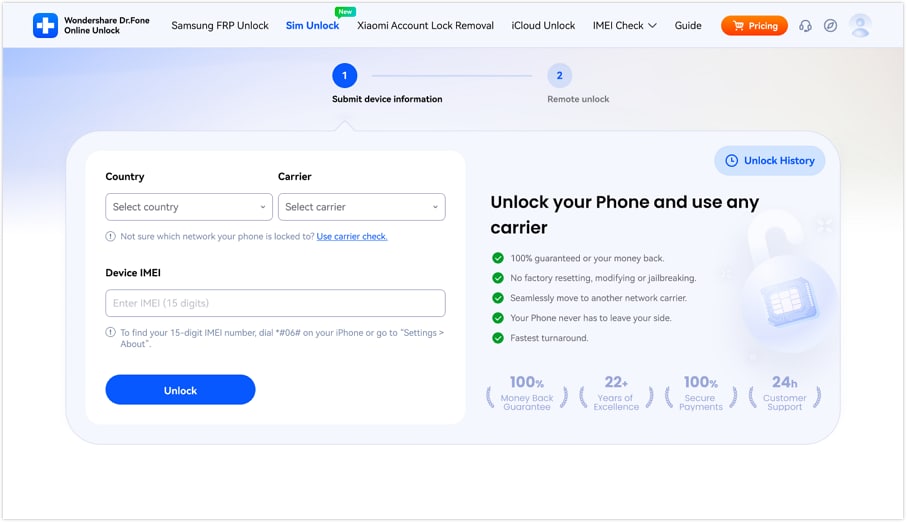
Step 1 Access the Dr.Fone SIM Unlock Online Tool
Search for the Dr.Fone SIM Unlock page on any device and add the details in the “Country,” “Carrier,” and “Device IMEI” textboxes. In case you don’t know which carrier you are locked to, tap the “Use Carrier Check” link and pick “Unlock” after confirmation.
-
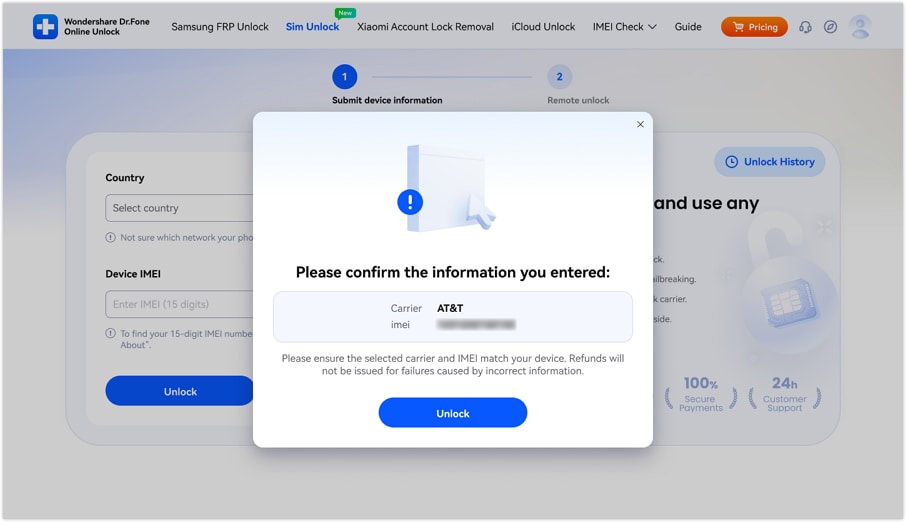
Step 2 Confirm Carrier and IMEI to Start Unlock
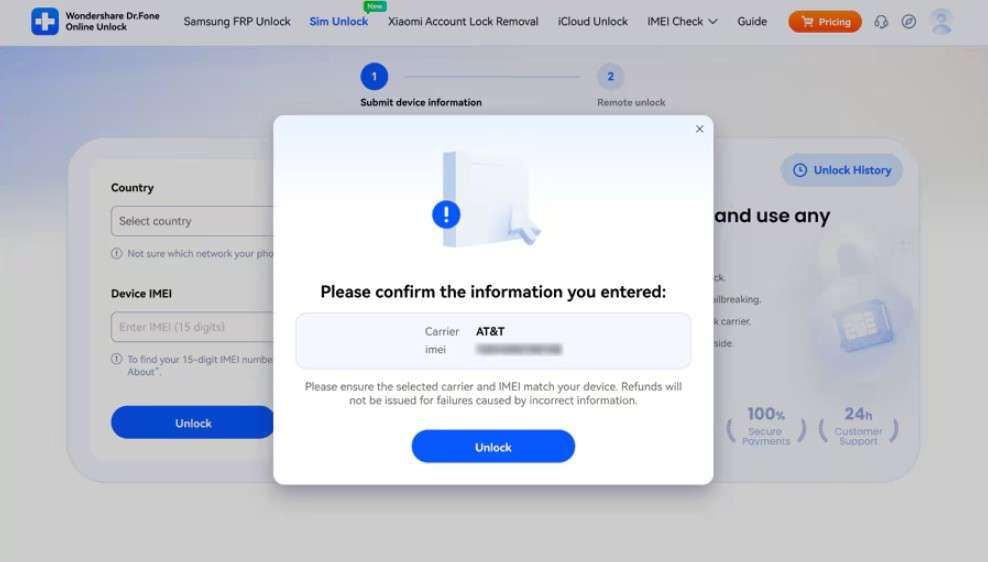
On the new interface, confirm the “Carrier” and “IMEI” details from the pop-up menu and click on “Unlock.”
-
Step 3 Wait 24 Hours and Keep Track of the Request
Upon doing so, a SIM unlock request will be submitted to the cloud that will be processed within 24 hours. So, wait, and use either “Method 1” or “Method 2” to track SIM unlock requests.
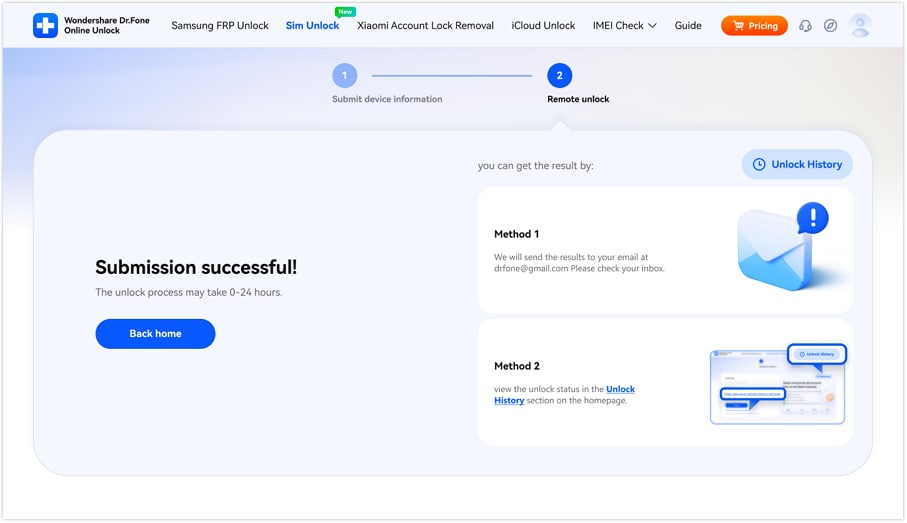
Results: The ideal time to unlock both devices was actually within 24 hours, as claimed by the vendor. Additionally, the detailed progress was shown in the Unlock History tab, and can be used as evidence later.
Success Rate: 95% - 98%
What Users Say:
"I bought a second-hand iPhone locked to AT&T and expected unlocking it to be complicated. The software did everything automatically with clear steps, and it worked just as promised." – Amanda Brooks
Part 3. Is Dr.Fone SIM Unlock Tool Free or Paid?
In this Dr.Fone carrier unlock review, it's also important to know what you are getting in its paid plans. Since pricing also determines the worth of the tool, here are the comprehensive details you need to be aware of:
The Free Trial vs Paid Reality
When using the Free version, you can access the tool, add the carrier, country, and IMEI details. This will allow you to see if your device and carrier are compatible and proceed with the SIM unlock. So, as you press the “Unlock” button, the tool asks you to purchase either the “Advanced” or “Standard” plan, depending on your preferences.
Pricing Structures (2026 Estimates)
To get a detailed idea of the Dr.Fone SIM unlock plans, here is the pricing table for you:
| Plans | Price | Details |
|---|---|---|
| Advanced Unlock Plan | $29.95 |
|
| Standard Unlock Plan | $19.95 |
|
Part 4. Is Dr.Fone SIM Unlock Tool Safe and Legit?
Based on the testing and user reviews, it can be said that Wondershare's SIM unlocking functionality is safe and legit. This is because the tool requires no jailbreaking or rooting and uses only IMEI details to remove carrier lock. Most of all, there are no hidden fees; all the guides and plans are clearly listed.
- The tool permanently removed the SIM lock using IMEI.
- Simple web-based tool, needs no requirements to meet.
- It keeps the warranty intact; no jailbreaking or rooting is needed.
- Compatible with major carriers and phone brands.
- Comes with clear pricing; refundable if unlocking fails.
- Must pay the fee, though it's clear and refundable.
Part 5. Final Verdict: Is Dr.Fone Worth It for SIM Unlock?
As a final choice, let’s compare Dr.Fone SIM unlock with other tools to see whether it remains a reliable option in 2026.
| Metrics | Dr.Fone Online Unlock | Official SIM Unlock | UnlockBase | SIM Unlock.net | Unlock River |
|---|---|---|---|---|---|
| Primary Method | Official IMEI | IMEI Whitelist | IMEI + Database | IMEI + Unlock Code | IMEI + Remote |
| Success Rate | 95% - 98% | 90% - 94% | 91% - 95% | 88% - 92% | 85% - 90% |
| Average Speed | 1 - 24 Hours | 24 - 72 Hours | 1 - 5 Days | 2 - 4 Days | 1 - 3 Days |
| Safety Ranking | Very High | Moderate | High | Moderate | Moderate |
| Refund Policy | Strict / Verified | Restrictive | Fair (Credit) | Standard | Credit/Refund |
| User Interface | Modern / Clean | Basic | Professional | Dated | Modern |
| Tracking System | Real-time Trace and Email + Unlock History options | Email Only | Order Dashboard | Email Only | Email Only |
| Customer Support | 24/7 Live Chat | Email Ticket | 24/7 Support | ||
| Blacklist Check | Integrated | Paid Add-on | Included | Basic | Paid |
Among all the options, it's evident that Wondershare SIM unlocking facility is by far the most reliable choice. For users on major carriers like AT&T, T-Mobile, Verizon, and UK/Canadian networks, Dr.Fone Online Unlock unlocks devices faster than the usual carrier processing time.
Conclusion
To conclude, Dr.Fone Online Unlock is considered one of the best options when searching for an alternative to carrier unlock methods. Therefore, this guide has reviewed the tool in detail and compared it with other options to determine whether it is actually worth using in 2026.
So, based on user reviews and detailed real-world tests conducted by experts, the tool delivers what it claims. In fact, experts say that it can be a reliable, safe, and legal choice to remove the carrier lock when you can’t meet the official requirements.
Frequently Asked Questions
-
1. Does using Dr.Fone SIM Unlock delete my phone data?
No, the tool needs no jailbreaking or rooting, so all the data and the device warranty remain intact. In fact, the tool processes the AIM unlock request on cloud servers and uses only the user’s IMEI for their safety. -
2. Can I use the tool if my phone is still under contract?
Yes, you can use this tool; it requires no requirements or access to NCK codes to remove the SIM lock. You just have to add the IMEI, carrier, and country details at any time, and the tool will process the request within 24 hours. -
3. Will the unlock work if I travel to a different country?
Yes, according to Dr.Fone Online Unlock, the SIM unlock is permanent. Whether you update the version or perform the reset, the status will remain the same, and you can even confirm it using its IMEI and carrier status checkers.