ChatGPT
 Perplexity
 Gemini
 Claude
 Grok
Grok
Verizon’s policy changes in 2026 have created significant hurdles for users seeking carrier freedom. While the 60-day rules previously offered a quick path, the new FCC-approved waivers allow Verizon to enforce a 365-day active service requirement for prepaid and value brands. So, if you want to know what concerns led to these changes and how they have affected postpaid devices, this guide is for you.
Understand how this update has caused delays and what Verizon SIM unlock ways can be used to immediately bypass network restrictions. While learning how to check the lock status, learn how online tools like Dr.Fone Online Unlock can save you from waiting long.
In this article
- Part 1. Verizon SIM Unlock Policy: What You Need to Know
- Part 2. How to Check If Your Verizon Phone Is Already Unlocked
- Part 3. How to SIM Unlock Verizon Android Phones Safely in 2026
- Part 4. How to Complete SIM Unlock on Verizon Android Phones
- Part 5. Is Verizon SIM Unlock Legal and Safe in 2026?
- Frequently Asked Questions
Part 1. Verizon SIM Unlock Policy: What You Need to Know
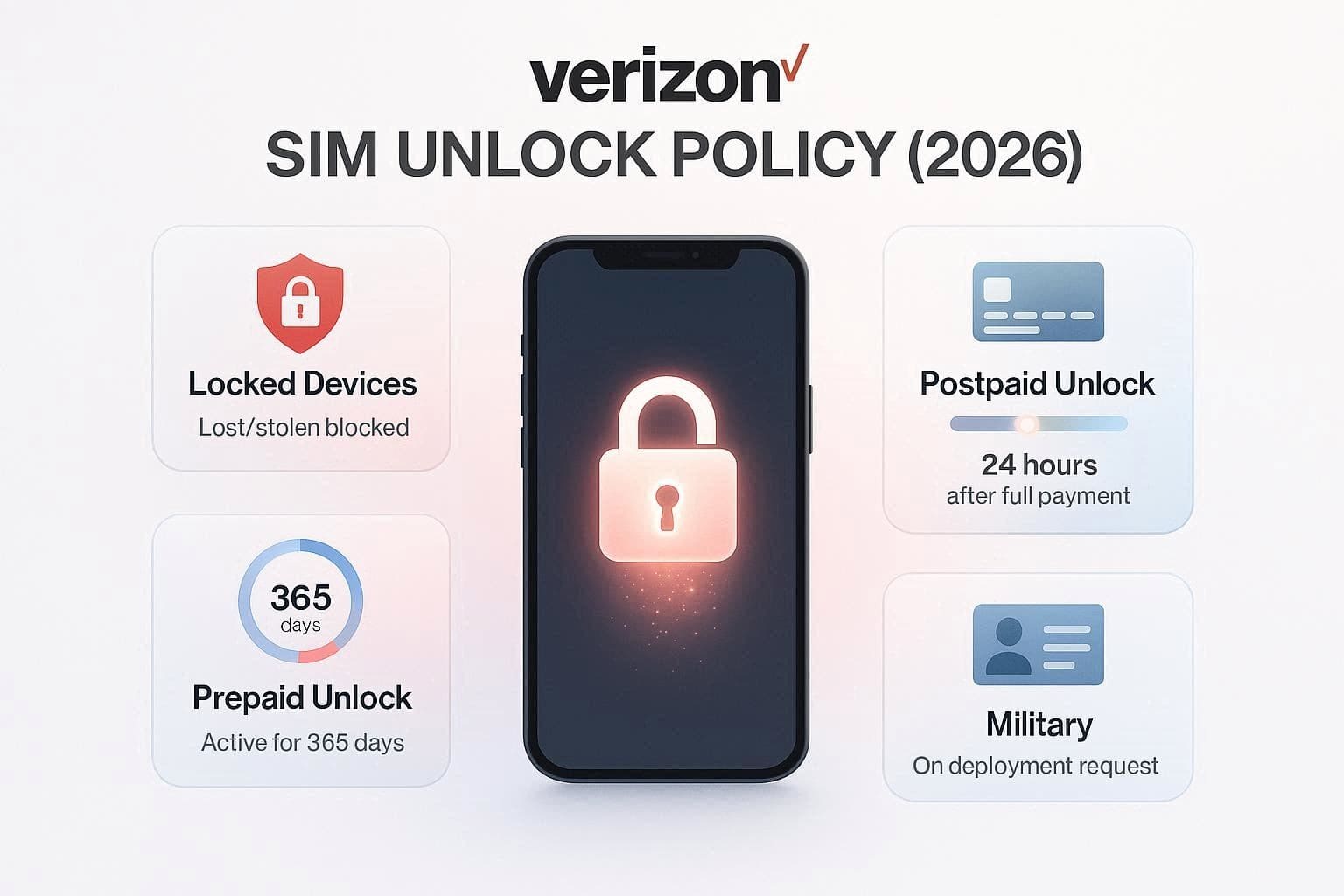
After the FCC allowed Verizon to remove the old 60-day automatic rule, the SIM unlock policy was changed on January 20, 2026. This is because the company said that the short unlocking rule helped in phone trafficking and fraud, as people quickly resold unlocked phones. So, when dealing with the Verizon unlock phone methods, the first step is to know whether you meet the carrier’s updated policy.
General Terms:
- Verizon devices reported lost or stolen will not be unlocked at any cost.
- One must use secure payment methods to complete the device payments.
- All devices purchased from Verizon are network-locked, including Business, prepaid, and postpaid.
- Once the lock is removed, it will be permanent, regardless of any changes made later.
Postpaid Devices:
- The device purchased on or after January 27, 2026, remains locked until the full device payment is made or the contract terms are fulfilled.
- Once the balance reaches $0, the device is automatically unlocked within 24 hours.
- If you pay off the device using a non-secure method, such as gift cards or paper checks, Verizon applies a 35-day security wait before the unlock is triggered.
Prepaid & Value Brands (Visible, Total, Straight Talk):
- Devices activated on or after January 20, 2026, now require 12 months (365 days) of active, paid service before eligibility.
- Unlike postpaid, prepaid users may need to proactively request an unlock after the 12-month period.
Legacy Devices:
- Any phone purchased or activated before the January 2026 cut-off date continues to follow the original 60-day automatic unlock rule.
Deployment Terms:
- If you get relocation orders outside the Verizon Coverage Area, you can suspend your line after verification.
- As you confirm the account in good standing, it will be unlocked after it has been active for 60 days.
Part 2. How to Check If Your Verizon Phone Is Already Unlocked
If you comply with the Verizon carrier unlock, let’s now check the device status. Due to the policy changes, these steps are now crucial and are mentioned below in detail:
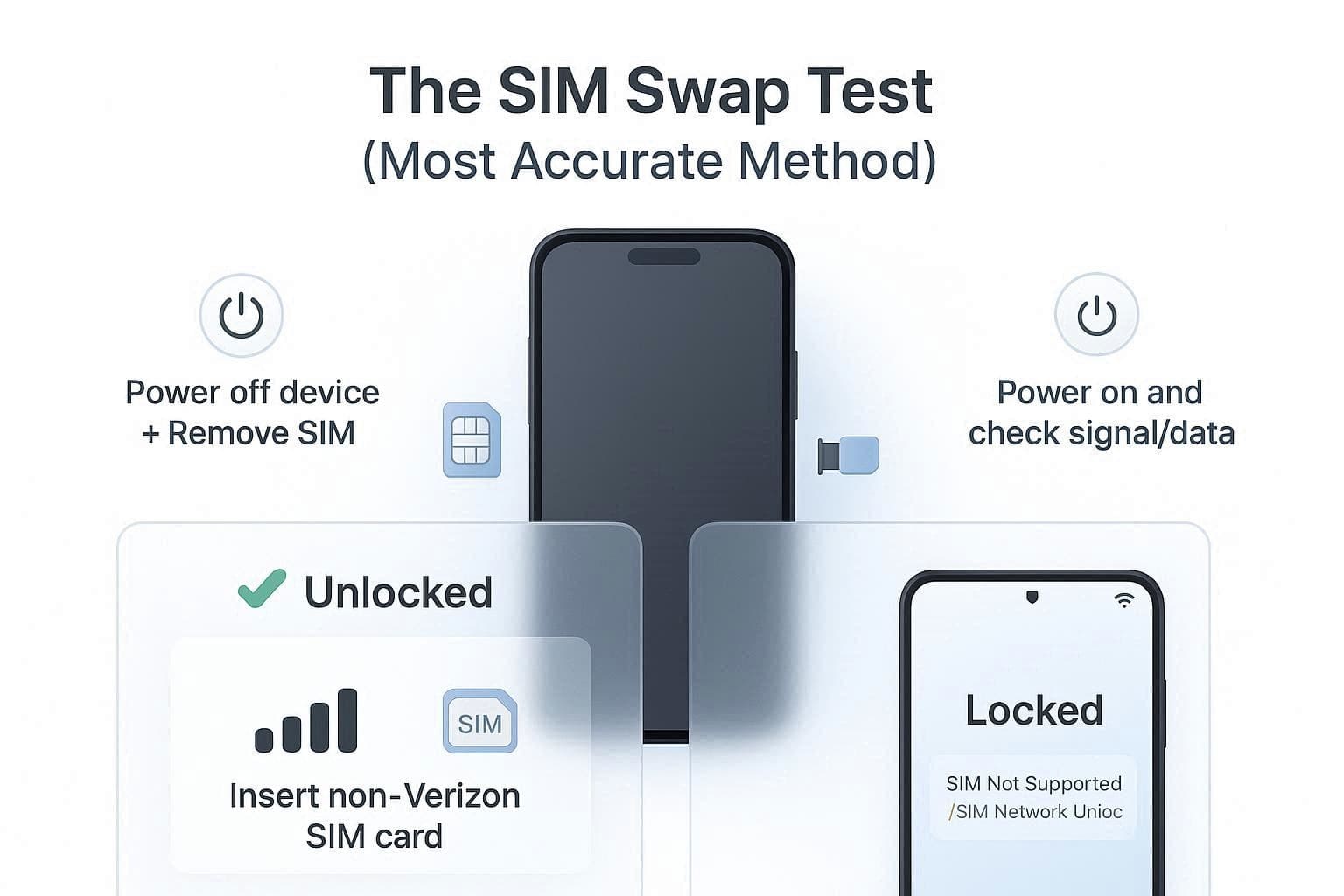
Method 1. The SIM Swap Test (Most Accurate)
Since it's a fast real-world test, you just have to use the non-Verizon SIM. So, power off the device, insert the SIM, and turn it on. If it catches the signal and services like mobile data work, it's unlocked. However, if you get a “SIM Not Supported” or ‘SIM Network Unlock PIN” message, the network is locked.
Method 2. Check via Phone Settings (No Spare SIM Required)
Users can also check the SIM lock status from the settings, and the steps for Android and iOS are mentioned ahead:
For Android
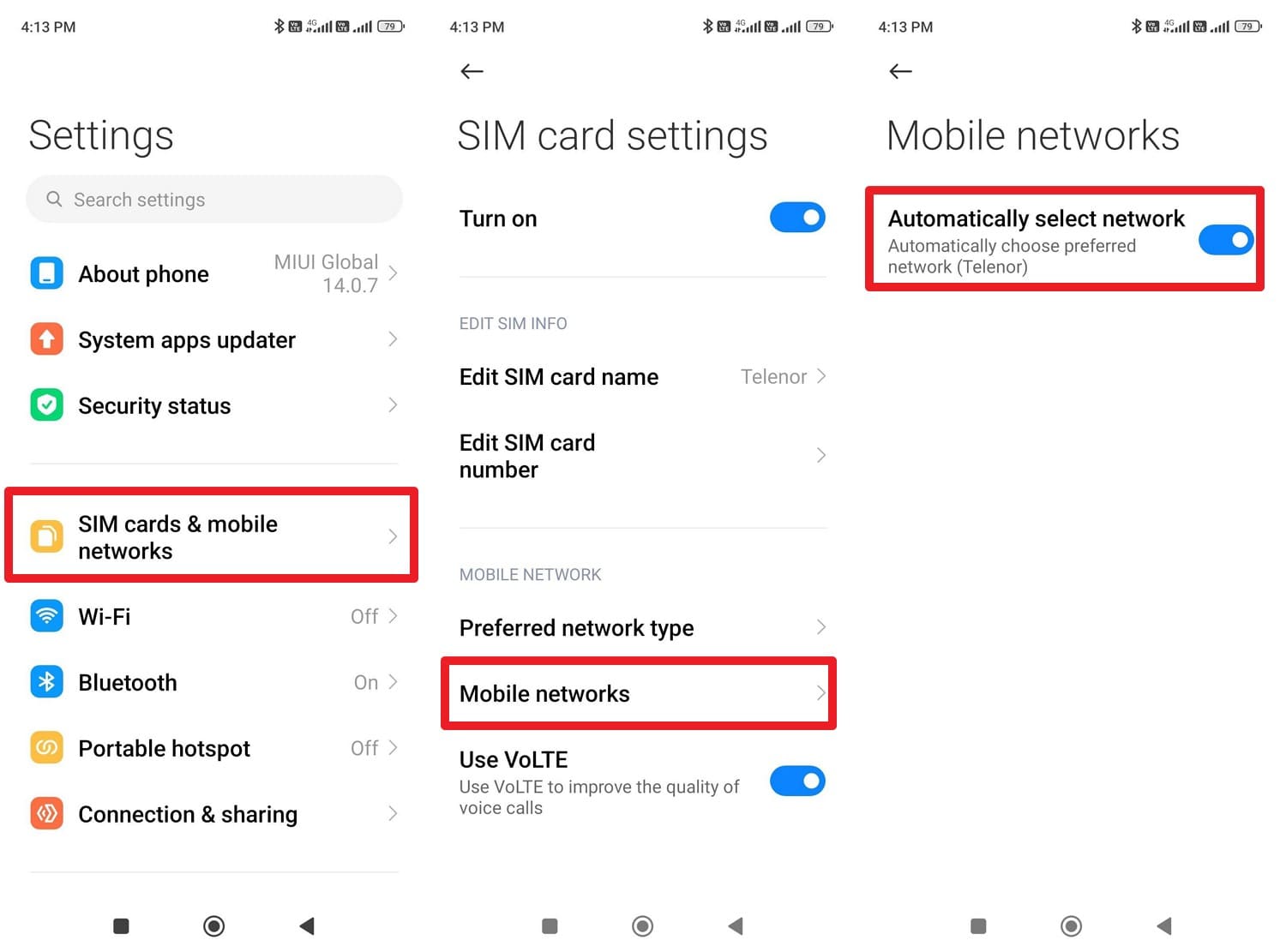
Instructions. After picking the “SIM Cards & Mobile Networks” option, choose the SIM from the listed options. Then, press on “Mobile Networks” and activate the “Automatically Select Network” option. If you get a list of carrier options to choose from, it's unlocked; otherwise, it's locked.
For iPhone
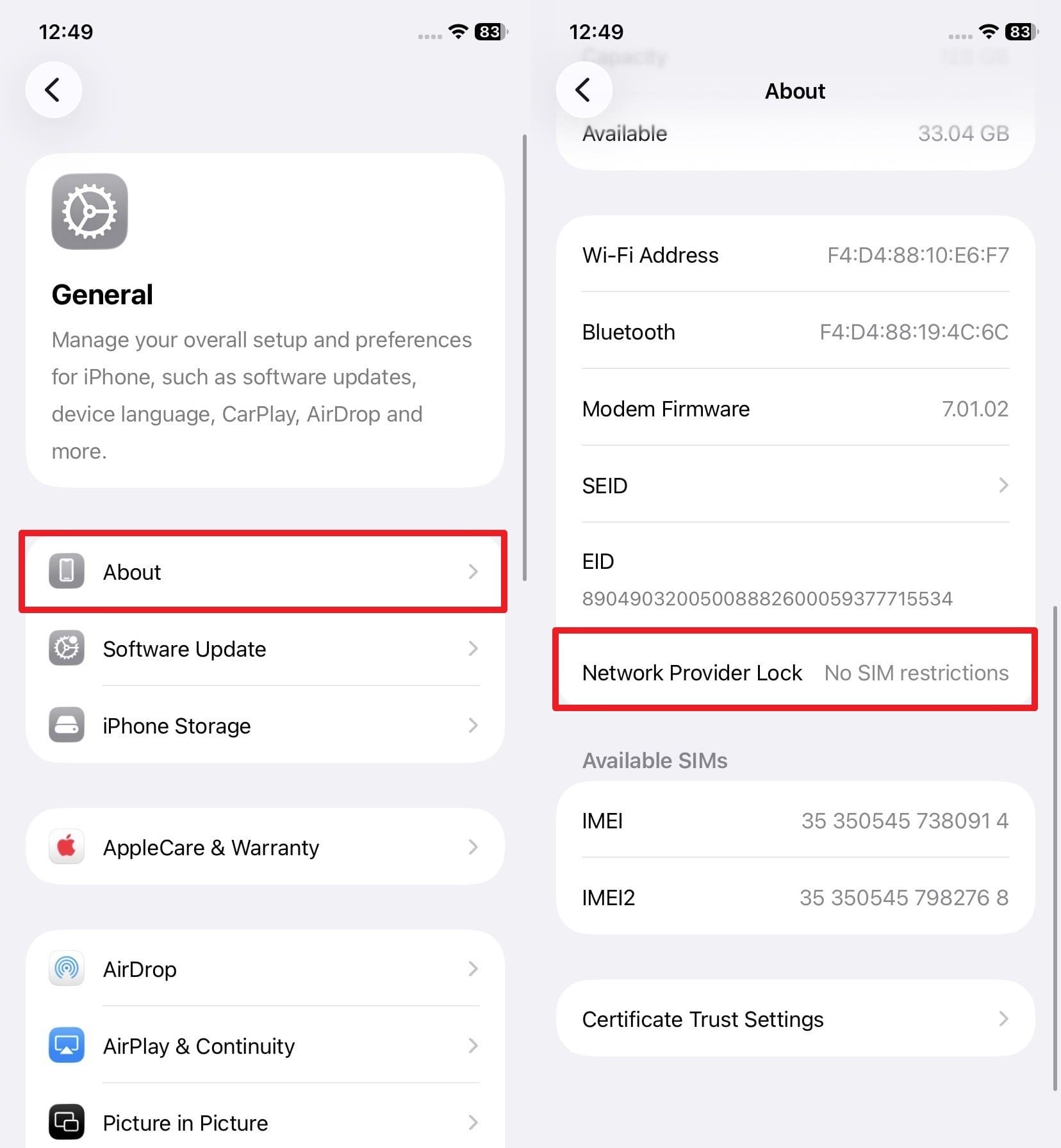
Instructions. From the General settings, locate the “Network Provider Lock” option in the “About” settings. If you can see the “No SIM Restrictions” alert, your iPhone is unlocked.
Method 3. Check Eligibility via IMEI
While exploring the Verizon unlock phone method, if you don’t have the device, use this method to check the lock status.
Instructions. Note down the IMEI details from the phone’s box and go to Verizon’s “Enter Your IMEI” page. Add the 15-digit code, and if it says “Device is Compatible,” the phone is unlocked. However, this method doesn’t guarantee that your phone is compatible with all networks.
Part 3. How to SIM Unlock Verizon Android Phones Safely in 2026
As mentioned, the Verizon carrier unlock policy now involves updated 365-day and paid-in-full policies. Therefore, this section highlights automated, official, and third-party solutions to achieve digital freedom.
Method 1. Automatic Verizon SIM Unlock Process
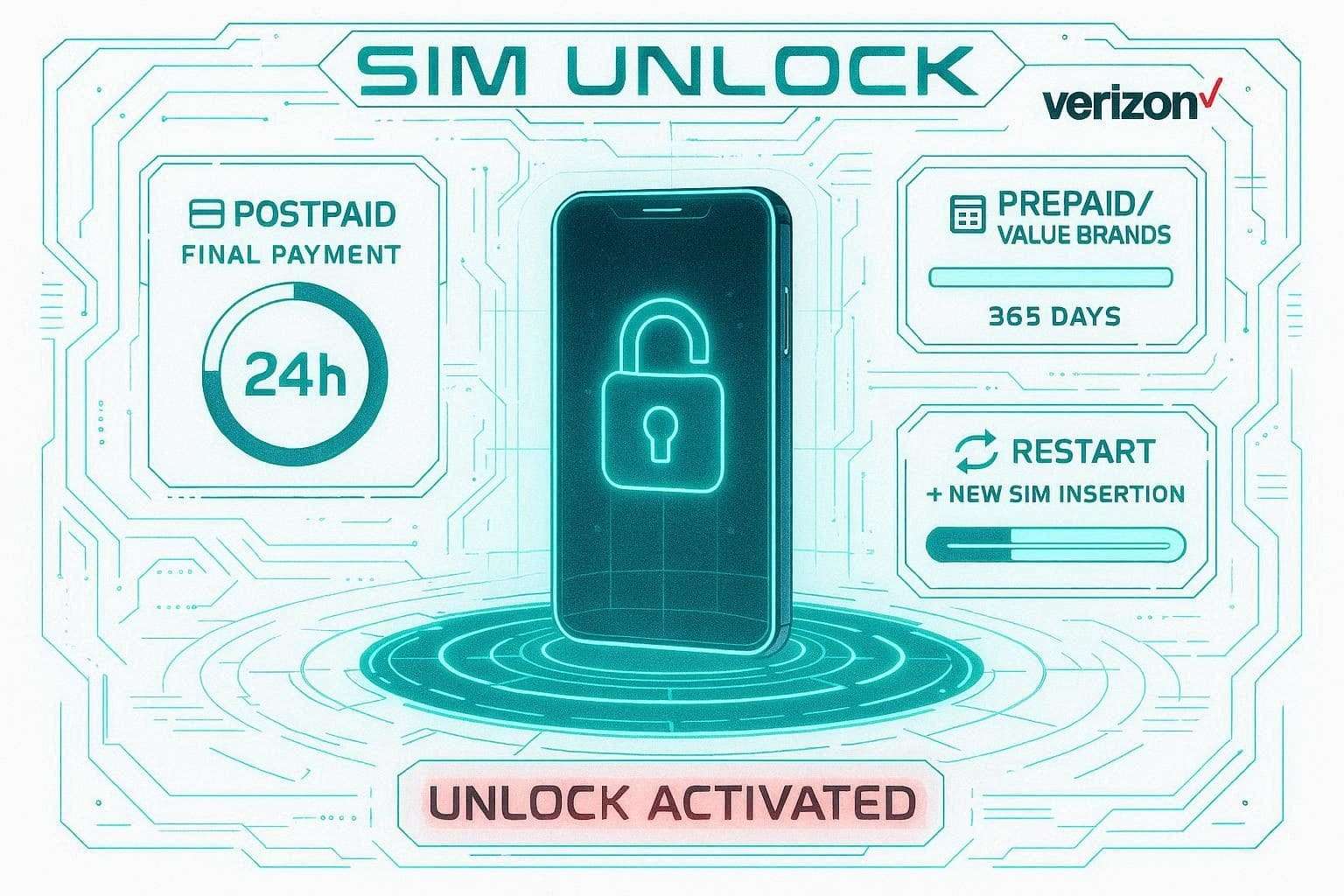
This method needs no code and access to the sites to continue the SIM unlock. Instead, if you are a postpaid user, the device will be automatically unlocked within 24 hours of your final payment being cleared.
However, the unlock is triggered after 365 days of active, paid service for prepaid or value-brand users. After the network lock is bypassed, simply add the non-Verizon SIM after a restart, and the lock status will be updated.
Method 2. Contact Verizon Support for Unlock Help
If you are eligible and the device is still locked, use this method for Verizon unlock phone. You can also use this for older prepaid models or business accounts that require a manual request. Since this method needs no third-party tool usage, here is how you can do that in real time:
Instructions: Call “888-294-6804,” “888-258-0939,” or dial “*611” from your handset. After that, give them the IMEI details and confirm your account condition. If you are eligible, the representative can verify eligibility and help process the unlock request.
Method 3. Use IMEI Unlock Services (If Needed)
If you don’t meet the 60 or 365-day waiting period, you can use IMEI-based SIM unlock services like Dr.Fone Online Unlock. Such tools claim that the Verizon SIM unlock is done via the official means and that the unlock is permanent. In addition, it requires only the IMEI and processes the request on cloud servers to ensure the user’s data and device warranty remain intact.
Unlike others, it offers weekly updates and supports all national and international carriers, including Verizon, AT&T, and T-Mobile. Users can easily remove the SIM lock from legacy and latest Android and iOS models with no activation time limit. In fact, the request is processed within 24 hours, and if it fails, the payment is refundable. SIM is unlocked in 3 steps, and users can track the process via email or Unlock History.
How to Use Dr.Fone Online Unlock Tool to Remove Verizon Carrier Restrictions
-
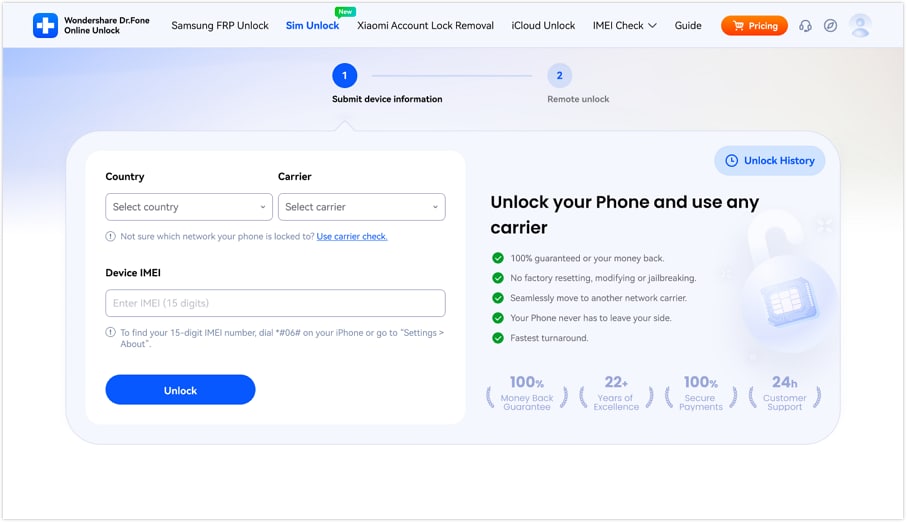
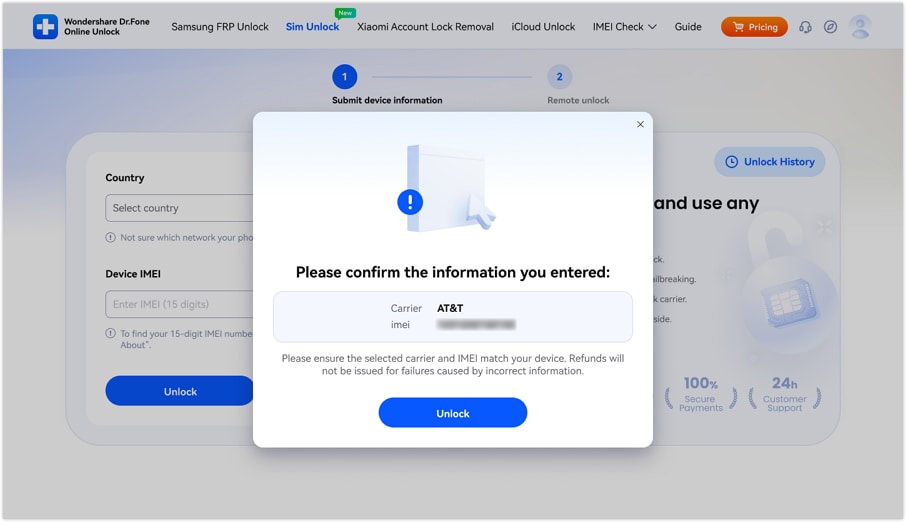
Step 1 Input the Verizon Device Details to SIM Unlock
Press the “Unlock” button as you add the Verizon device details on the Dr.Fone SIM Unlock page.
-
Step 2 Submit the Request to Remove Verizon Carrier Lock
After that, confirm the details by clicking the "Unlock" button, which will submit the cloud request.
-
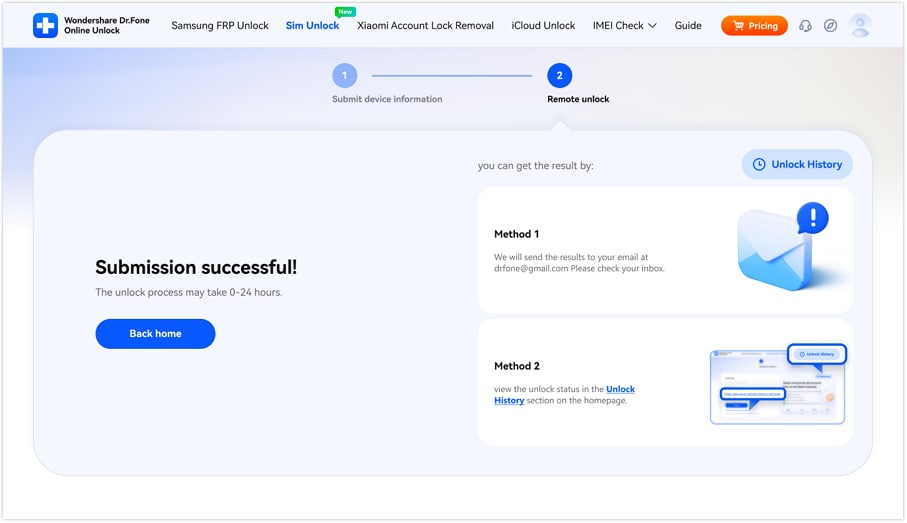
Step 3 Monitor the Dr.Fone SIM Unlock Request Progress
It will be processed within 24 hours, and you can track its progress by choosing “Method 1” or “Method 2.”
Part 4. How to Complete SIM Unlock on Verizon Android Phones
After the Verizon unlock phone is completed, here is how you can conclude the process:
Option 1. Finalize the Automatic Unlock
Turn the device off, insert the non-Verizon SIM, and turn the device on, along with the Wi-Fi. This is crucial, as the phone needs to check in with the manufacturer's server to update its lock status. As such, the phone will briefly flash "Organizing System” or “Updating Carrier Settings” and then pop up with bars.
Option 2. Completing a Manual Code Unlock
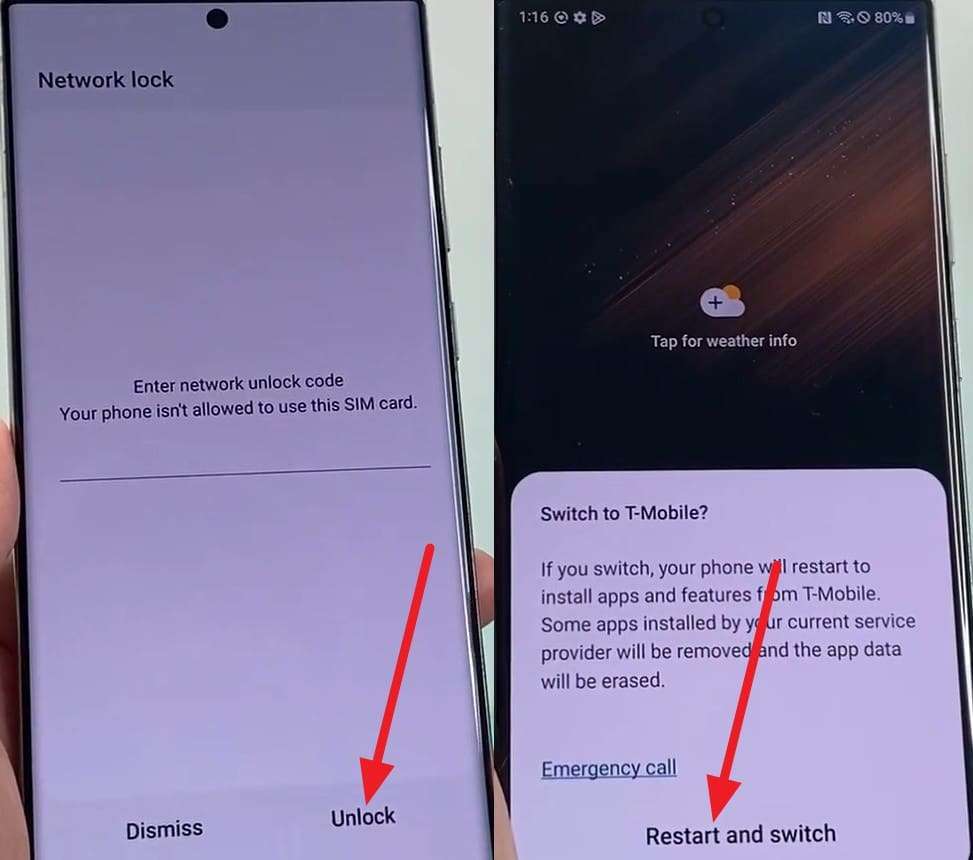
If you are using a budget Android or an older Motorola/ZTE that does not support remote unlocking, you need to request the code via support. Once the code is accessed using the provided contact details, add the non-Verizon SIM.
The device will display “Enter SIM Network Unlock PIN,” add the 8-digit code, and press the “Unlock” button. When the switch carrier pop-up menu appears, pick the “Restart and Switch” option to continue.
Part 5. Is Verizon SIM Unlock Legal and Safe in 2026?
Yes, the FCC says SIM unlock is permanent and safe when done via official channels. Additionally, one needs to meet Verizon’s updated policy, which was updated to reduce fraud and phone trafficking. Nevertheless, if you don’t need the Verizon carrier unlock terms, you can use online services like Dr.Fone Online Unlock.
Conclusion
Verizon SIM unlock has become trickier since its policy was updated in January 2026. Regardless of that, this guide has explained official, automated methods to regain digital freedom. For users who can’t meet the prepaid and postpaid 365-60 days’ rule, usage of online services can help.
Since the FCC says it's legal as long as they use legal methods, you can consider options like Dr.Fone Online Unlock. Carrier experts say the tool ensures the unlock is permanent, requires no device modification, and processes cloud requests within 24 hours.
Frequently Asked Questions
-
1. Does LTE Roaming mean my phone is already unlocked?
No, roaming lets your Verizon SIM card switch to partner networks, such as Vodafone or América Móvil, when you're traveling internationally. This is a service feature, not a device status, so you'll have to get a SIM unlock to replace the Verizon SIM with a local, cheaper international SIM. -
2. I have a dual-SIM phone; can I use Verizon on one slot and another carrier on the second?
Yes, you can use it, but only if the device is unlocked. Even if you only want to use the second slot for a different carrier, Verizon’s policy locks the entire device hardware until the eligibility requirements are met. -
3. Does a Temporary Unlock exist for international travel?
Unlike some GSM carriers, Verizon does not offer temporary unlocks. According to the policy, once the device is unlocked, it remains unlocked permanently. However, if you don’t meet the requirements for a permanent unlock before a trip, you can use an IMEI service like Dr.Fone Online Unlock to gain immediate access to local networks.