ChatGPT
 Perplexity
 Gemini
 Claude
 Grok
Grok
Just imagine you found the perfect travel deal or a cheaper mobile plan, only to realize your smartphone is trapped on its current network. Being in this situation feels like owning a car only to drive on a single route that limits your freedom and costs you money. To get out of this, most users search for a free SIM unlock option, not knowing how threatening they can be.
In addition, most users search YouTube tutorials; they are only advised to use APK or code generators that are illegal and banned by the FCC. While the internet is full of tricks, it's important to choose the FCC-approved, legitimate method. Thus, this guide explains the aftermath of free SIM unlocking and introduces you to official, paid yet effective solutions, such as Dr.Fone Online Unlock.
In this article
- Part 1. Can You Really SIM Unlock a Phone for Free?
- Part 2. How to SIM Unlock Phone for Free: Safe Methods Explained
- Part 3. 3 Methods That Don’t Actually Work (Avoid These)
- Part 4. Try SIM Unlock Paid Options (If Free Methods Fail)
- Part 5. How to Know If Your Phone Is Already Unlocked
- Frequently Asked Questions
Part 1. Can You Really SIM Unlock a Phone for Free?
If you have searched for the free carrier unlock option, note that you can only remove the SIM lock for free through the official support channels. This is the user's right protected by the CTIA Consumer Code and FCC regulations, but users must meet the carrier's requirements. So, to know the carrier-specific and general SIM unlock criteria, follow the mentioned points:
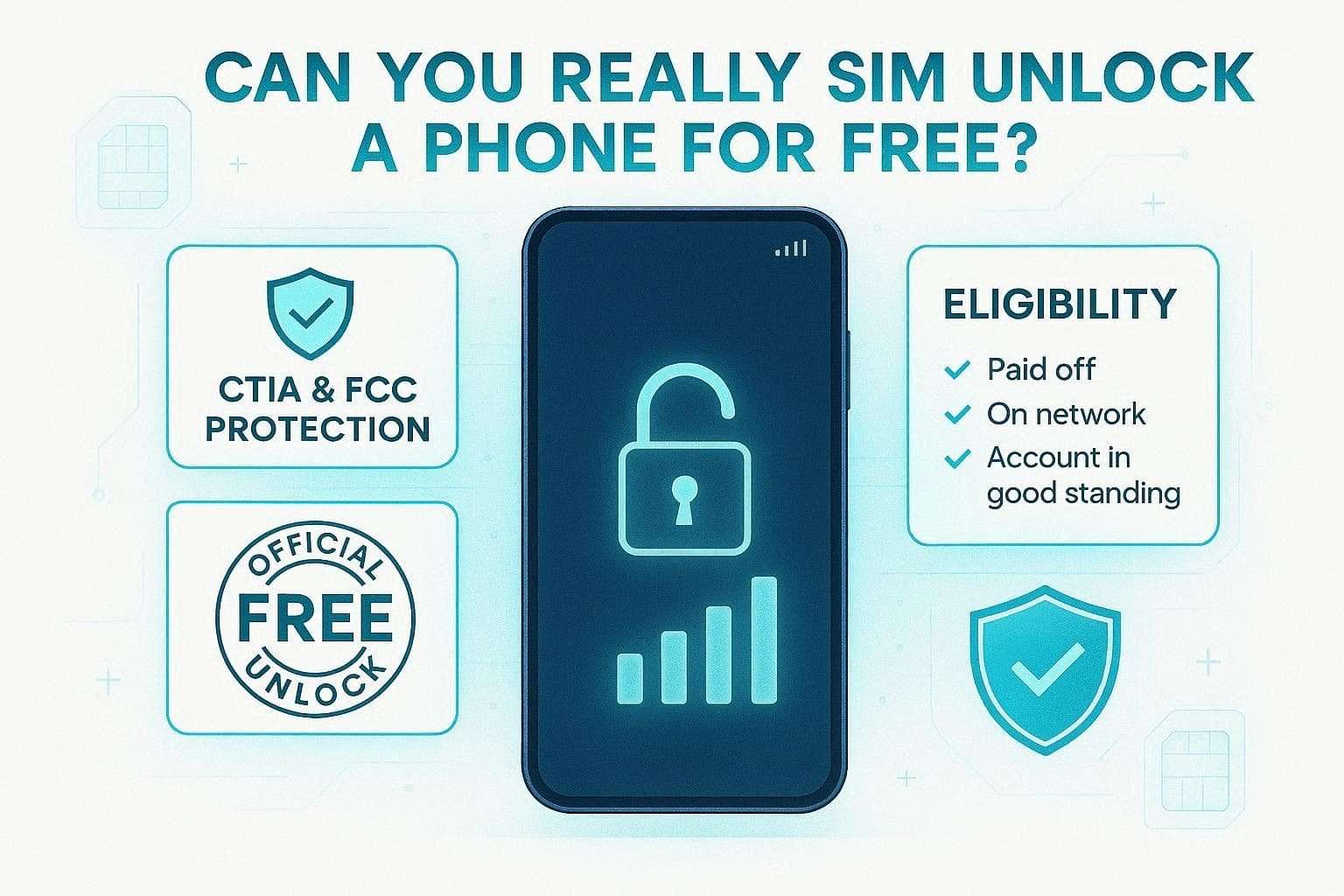
- The device must be paid off in full; any remaining installment balance or early termination fees must be settled.
- Your service account must be current, with no outstanding balance, and must not be reported as lost or stolen.
- If you are not the current customer, you must provide the original account holder’s information or proof of purchase.
Carrier-Specific Time Requirements (2026)
If you want to leverage the SIM unlock free methods (Official Support), make sure you also meet the given carrier-specific requirements:
| Carrier | Postpaid Requirement | Prepaid Requirement |
|---|---|---|
| Verizon | Automatically after payoff | 365 days of active service |
| AT&T | 60 days of active service | 6 months of active service |
| T-Mobile | 40 days on the network | $100 in refills or 1 year of service |

Part 2. How to SIM Unlock Phone for Free: Safe Methods Explained
For those who fulfill the requirements to use the free SIM unlock official method, follow the detailed guide. Learn how to use them and how long it will take to process the carrier unlock request.
Method 1. Carrier Free SIM Unlock (Most Reliable Method)
As this remains the standard for security and performance, you need to request that your service provider whitelist your device’s IMEI. To that end, you have to contact them through the app, web portal, or by dialing the official number and providing your IMEI.
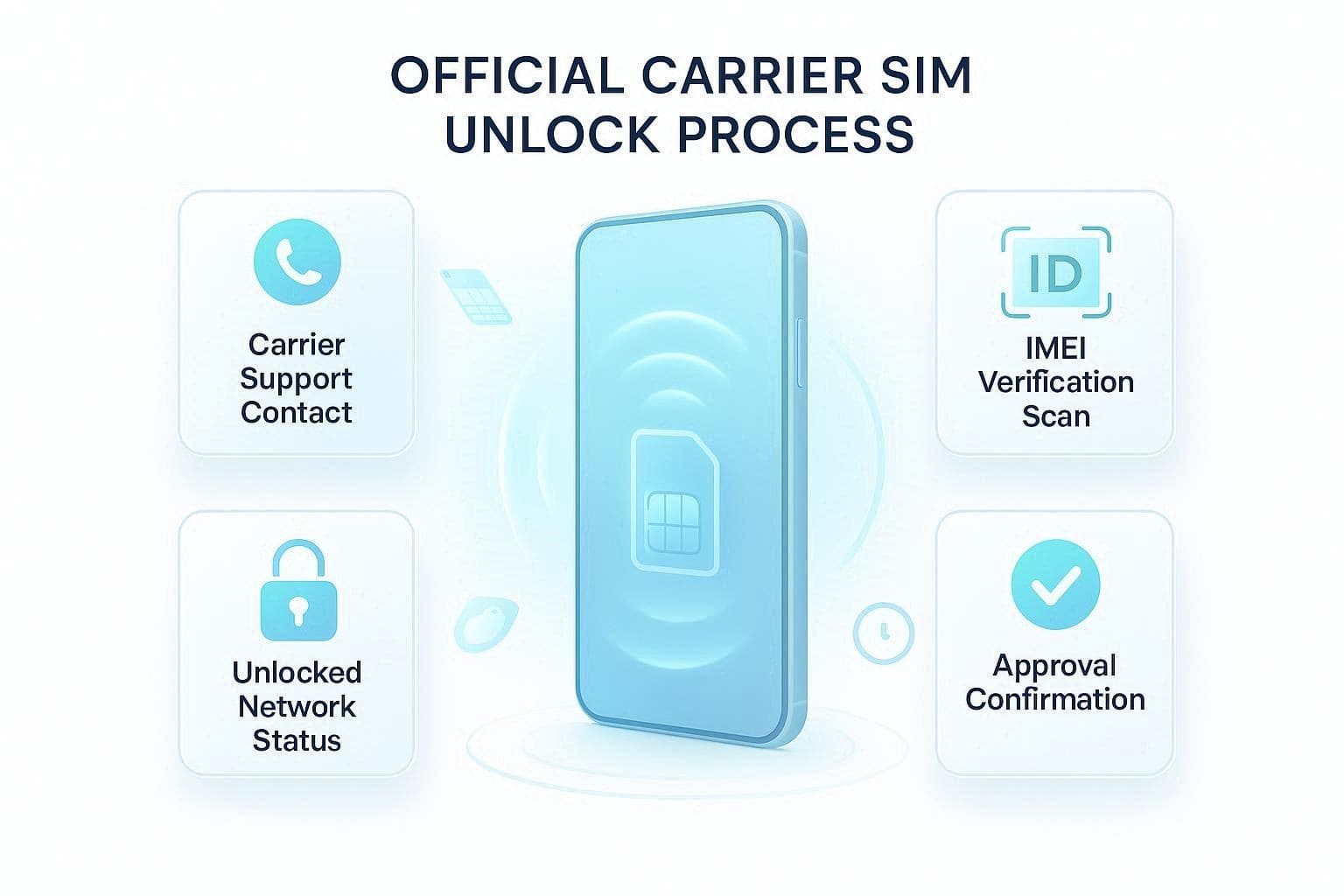
- Verizon: Dial *611 from your device, or call “888-294-6804” or “888-258-0939.”
- AT&T: Use Device Unlock Portal, call 1-800-331-0500, or use a prepaid “Device Unlock” app.
- T-Mobile: Use the “Device Unlock” app, call 1-800-937-8997 or 1-833-800-0323 for Business accounts.
After account verification, the representative sends a signal to the phones and provides an 8-16-digit unlock code (mainly for Androids). Overall, the process is safe, doesn’t void the warranty, and the lock remains permanent.
Method 2. Automatic Unlock After Contract Completion
Most carriers have not only offered a free carrier unlock option but have made it fully automated. However, this is only done if the device supports remote unlocking or meets the carrier's criteria. For instance, carriers like Verizon say that devices purchased after January 2026 will unlock automatically after 24 hours (for postpaid plans).
However, devices locked before the 2026 policy shift still follow the 60-day automatic-unlock rules. To finalize this, simply insert a SIM card from a different carrier while connected to Wi-Fi, and the phone will check in.
Method 3. Android Built-in Unlock Features (Limited Cases)
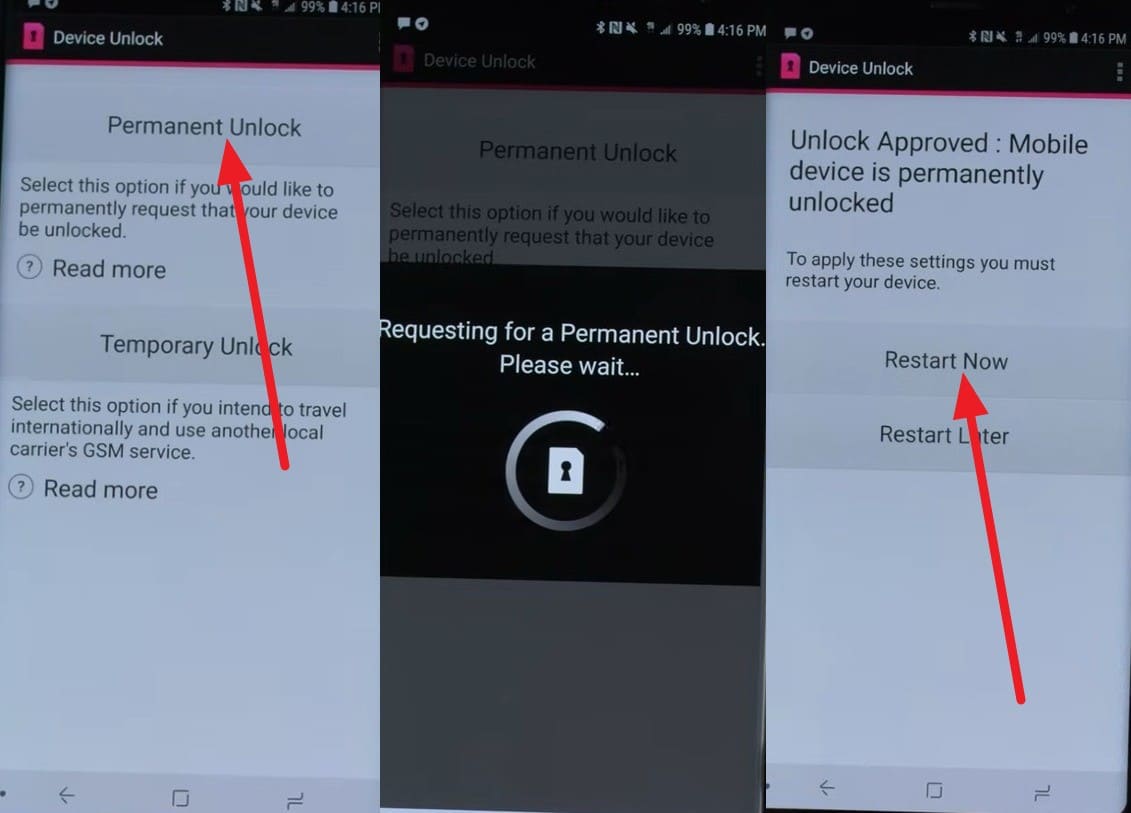
Most Android manufacturers have integrated the preinstalled application for carrier-subsidized phones. For example, T-Mobile or AT&T carriers can use the “Device Unlock” app if they meet the service requirements. To know how it can be done, here are the simple steps to try this free SIM unlock method:
Instructions. Press "Allow" on the pop-up menu to grant the necessary permissions as you launch the app. After that, choose the "Permanent Unlock" option, and the app will connect with the network carrier to check the account details. If you meet the criteria, the SIM will be unlocked, and you can pick the “Restart Now” button.
Part 3. 3 Methods That Don’t Actually Work (Avoid These)
While the free carrier unlock is bound to carrier requirements, the internet is flooded with “Free Tricks.” So, to know what they can be and what effect they can have, review this part in detail.
Fake “Free Unlock Code” Websites and IMEI Generators
These sites are designed to look like official databases but are fishing traps that need IMEI and personal details. They claim to generate the unlocking codes, but they never work and can introduce malware into the devices. In reality, scammers can misuse IMEI and personal details for fraud, phishing, or unauthorized device-related requests.
Risky APKs, PC Tools, and Firmware Hacks
In many SIM unlock free methods, you are also told to download the APKs on Android or a tool on PC to remove the SIM lock. To work, they need to root the device or flash unofficial firmware, which voids the warranty and bricks the phone. In reality, they can monitor your activity and steal the passcodes as you install them.
Why Some “Free” YouTube Tricks Are Dangerous
In most cases, free carrier unlock methods on YouTube can be a risk rather than a solution. Viral videos can guide you in trying secret codes like *#8656# to unlock your phone. Nonetheless, these codes are considered legacy debug menus that no longer work on modern 5G devices or are misleading. Using them can trigger a hard lock that will permanently prevent the phone from being locked, even by the carrier.
Part 4. Try SIM Unlock Paid Options (If Free Methods Fail)
Instead of searching for the free carrier unlock method, it's best to use paid IMEI-based services like Dr.Fone Online Unlock. This tool can also work when you don’t meet the carrier requirements and lets you submit the cloud request in 3 simple steps. Additionally, the service supports multiple international carriers, including T-Mobile, AT&T, and Verizon, with additional carriers coming in weekly updates.
Unlike free tricks, it claims that the lock is permanent and needs no rebooting or jailbreaking. The tool uses official means that keep the user's data and device warranty intact. In addition, you can monitor the request's progress via email and Unlock History, which will take only about 24 hours. You can confirm the added details, and you are required to use the IMEI details to securely remove the SIM lock.
Detailed Guide to Use the Dr.Fone Online Unlock Tool
To learn how this service can be a safe alternative to free SIM unlock options, review the mentioned guide. Here, a real-world test is performed using Android and iOS devices to test its claims and success rate:
-
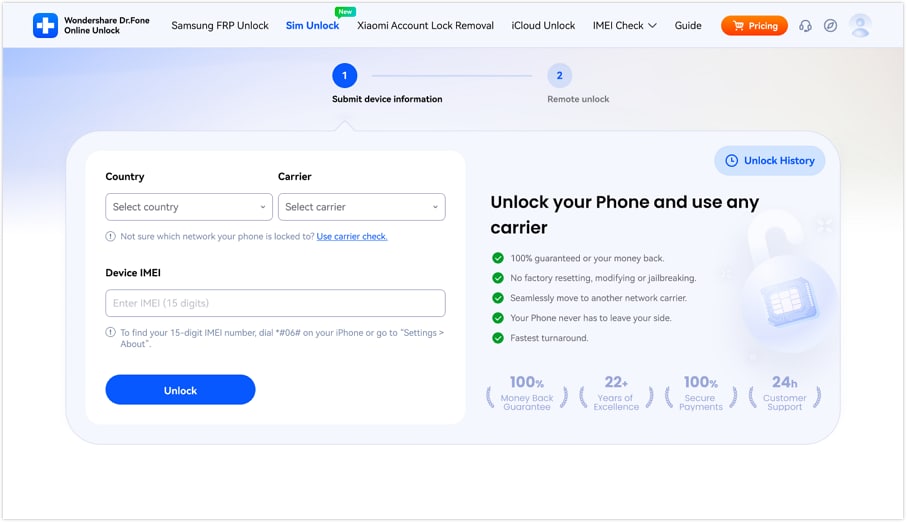
Step 1 Add the Device Details and Start
On the SIM Unlock page of Dr.Fone Online Unlock, add the device details you want to unlock and tap the “Unlock” button.
-
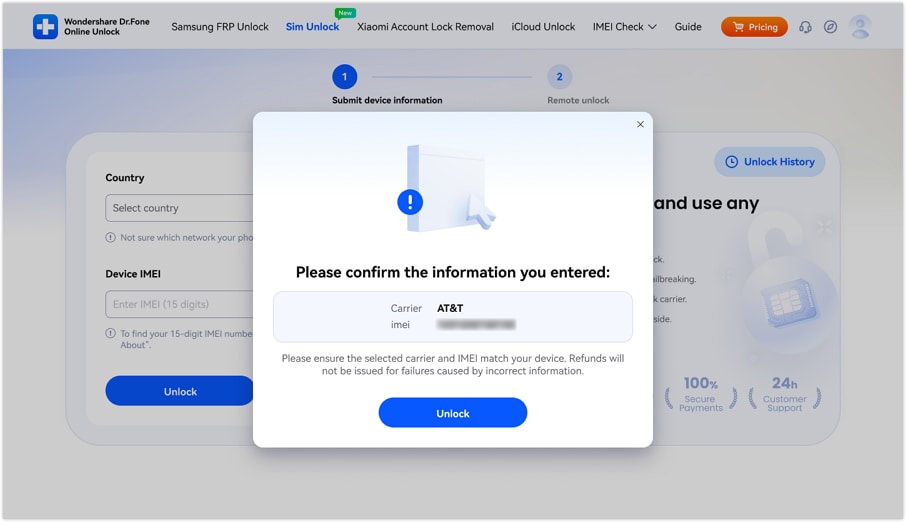
Step 2 Confirm the Details on Dr.Fone to Submit the Request
After that, confirm the details in the popup menu by pressing the “Unlock” button, then submit the SIM Unlock request to the cloud.
-
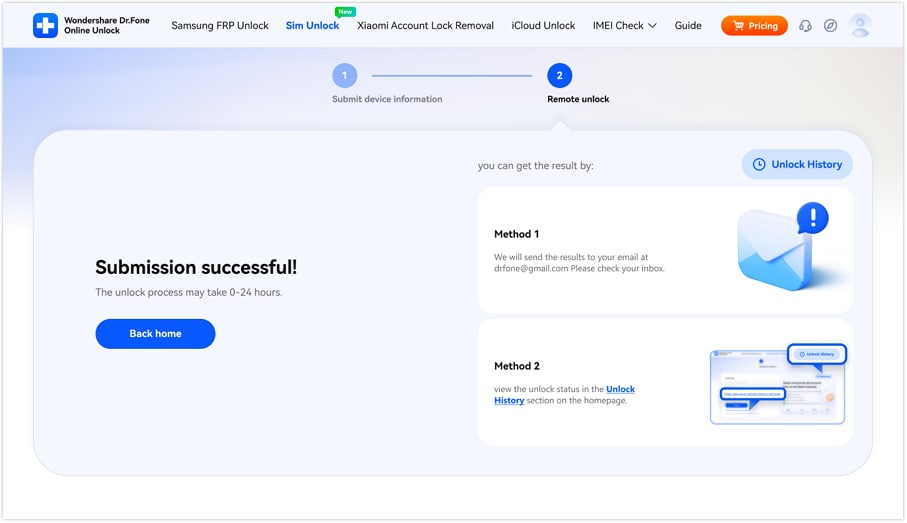
Step 3 Monitor the Unlock Progress and Wait for 24 Hours
Wait 0-24 hours for the SIM to unlock; meanwhile, track progress by selecting the provided monitoring methods.
Trusted Third‑Party IMEI Services (Not Free, Use Carefully): If you have decided to use this service instead of the free carrier unlock methods, it's important to know that it is paid. Dr.Fone Online Unlock comes with 2 plans: Advanced and Standard, which can cost between $29.95 to $19.95.
Using any plan, you can SIM unlock 1 device per week, and the payment is refundable if it fails. Given that claim, experts say this tool can be a reliable choice because the process is secure and complies with FCC rules.
Part 5. How to Know If Your Phone Is Already Unlocked
Whether you have used the official, free carrier unlock method or Dr.Fone Online Unlock, finalizing the unlock is a must. If you don’t know how it can be done, try the 4 options mentioned below:
Method 1: The Settings Check (No SIM Required)
Without using any physical card from the carrier, this method is a quick way to check the lock status. For Android and iOS, the simple steps to access the settings are given ahead:
For Android
Instructions. In the settings, select the “SIM Cards & Mobile Networks” option, tap any SIM, and choose “Mobile Networks.” Here, toggle the “Automatically Select Network” option; if you can choose from carriers, it's unlocked.
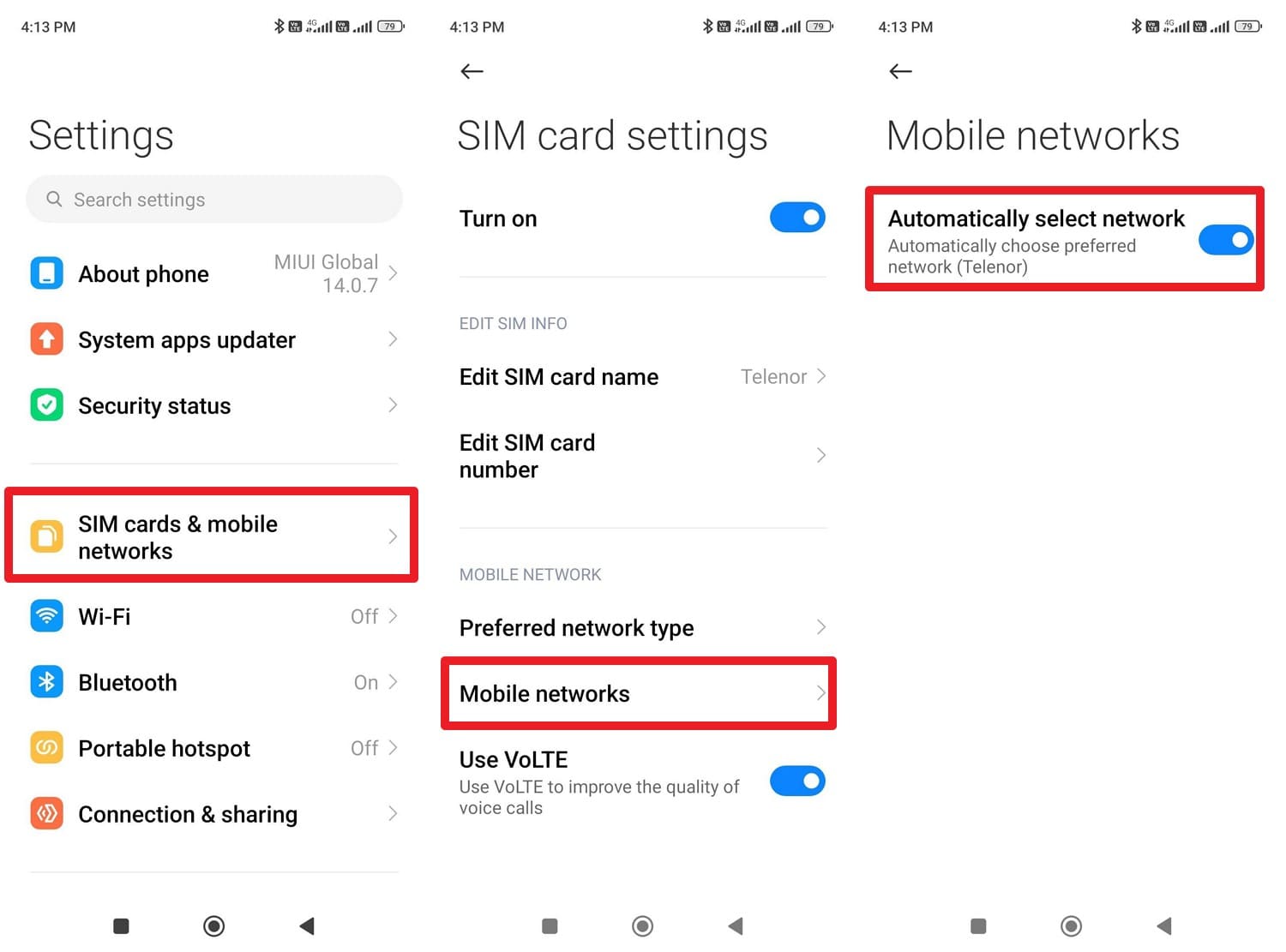
For iPhone
Instructions. Locate the “Network Provider Lock” in the “About” settings within General settings. If the option says “No SIM Restrictions,” it's unlocked.
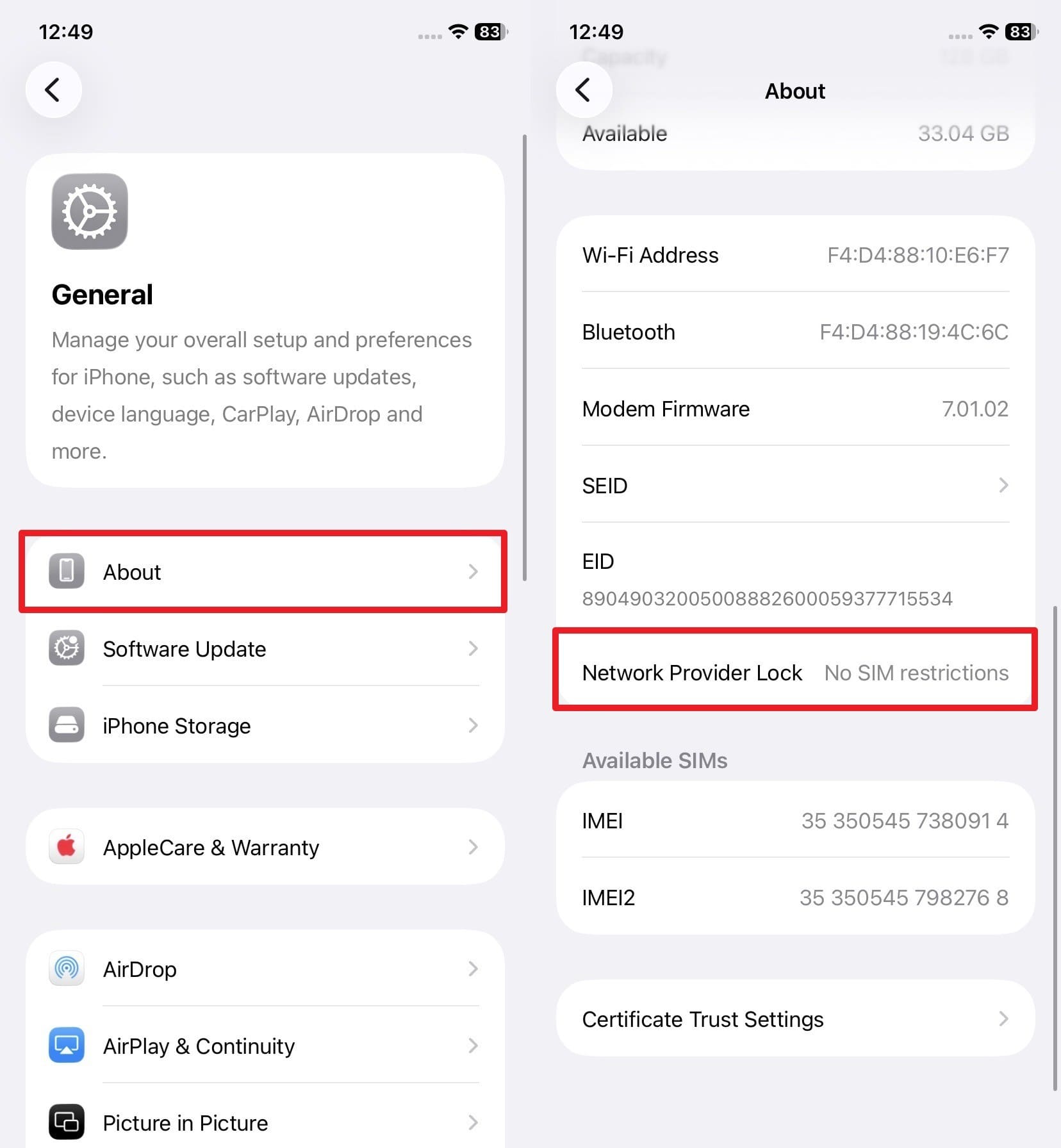
Method 2. The SIM Swap Test (Most Accurate)
To test the accuracy of the official free carrier unlock method, swap the SIM with a non-carrier SIM. Just power off the device, insert the SIM, and if it doesn’t show a “SIM Not Supported” or “SIM Network Unlock PIN” alert, it's unlocked.
Method 3. Official IMEI Compatibility Check
When you don’t have the SIM or device but only the IMEI details, use the BYOD page on the carrier's website. Take T-Mobile as an example and follow the mentioned guide to learn how to check the status:
-
Step 1 On the T-Mobile “Bring Your Own Device” page, press the “Check Compatibility” option.
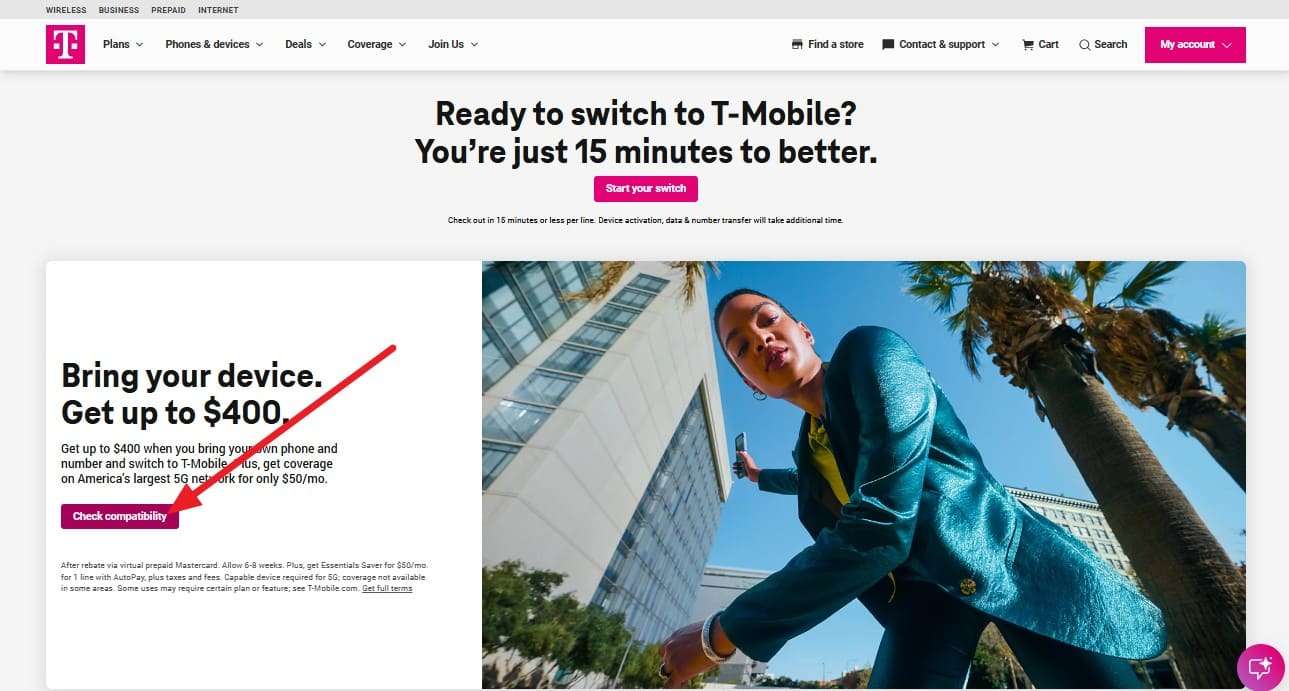
-
Step 2 After that, add the “IMEI” details and press the “Check Phone” button. If the carrier says “Your Device Is Compatible,” it means the phone is unlocked and ready for their network.
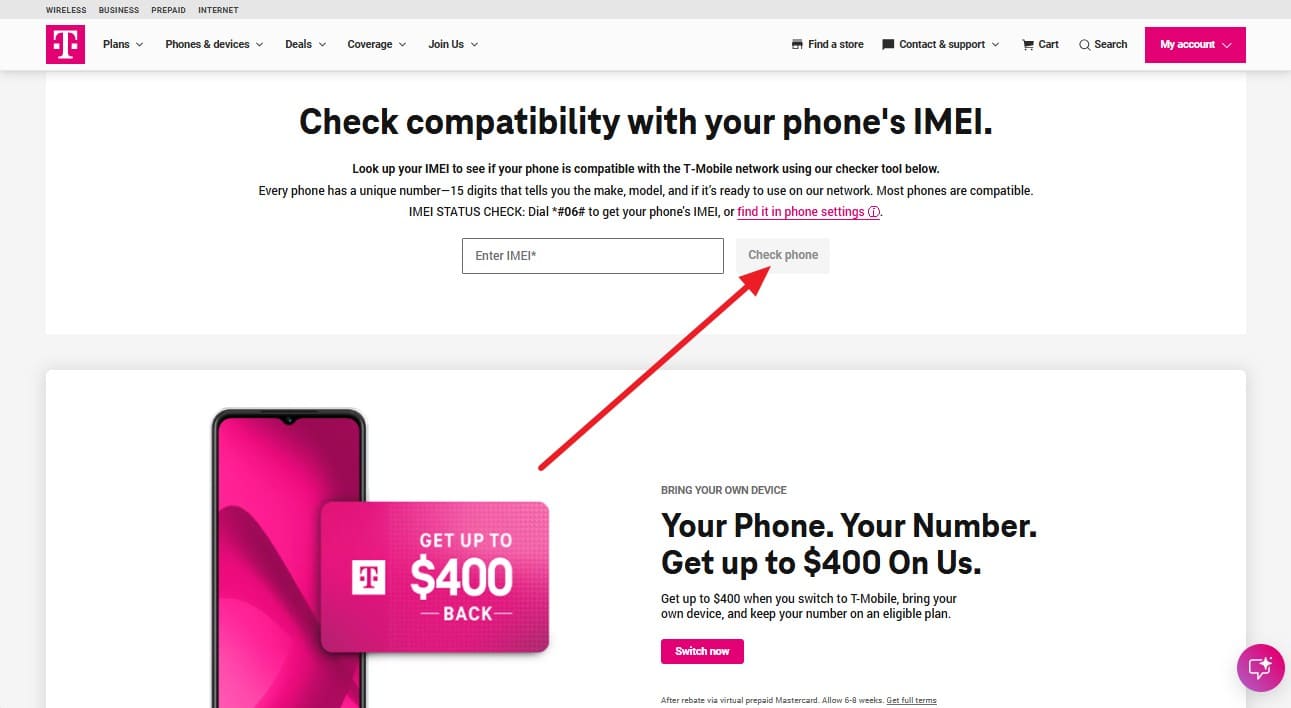
Method 4. Contacting the Carrier
To determine whether your official SIM unlock free methods worked, contact the carrier as the last option. For Verizon, you can dial “888-294-6804” or “888-258-0939,” and for AT&T or T-Mobile, you can contact 611. Simply ask the automated assistant for “Device Unlock Status,” and it will tell whether the 60, 40, or 365-day requirements are met.
Conclusion
In 2026, many sites and YouTube tutorials claim to offer free SIM unlock methods. Nonetheless, the FCC says that free unlocking is only possible via the official carrier unlock methods. Thus, this guide has debunked the “Free Unlocking Site” myths and has introduced true free unlock methods.
For some reason, if you don’t meet the carrier's needs, you can use paid SIM unlock services. FCC says that as long as they meet official methods, they can be used, and Dr.Fone Online Unlock can be a reliable choice.
Frequently Asked Questions
-
1. Why did Verizon move from a 60-day to a 365-day rule for prepaid phones?
This change was made in January 2026 to stop the box-breaking scheme in which people buy subsidized prepaid phones at retail, wait 60 days, and then resell them overseas. Hence, the 365-day active service requirement ensures the phone stays on the Verizon network for a full year, making it unprofitable for sellers. -
2. Will my prepaid phone unlock automatically after exactly one year?
This can work for most modern devices, but for legacy models, the unlock is not automatic. In this case, you need to contact the carrier, like Verizon, to request the unlock code. -
3. I am being deployed; will Verizon unlock my phone if I suspend my service?
Yes, only if you submit the deployment order papers and the account has been verified in good standing.