ChatGPT
 Perplexity
 Gemini
 Claude
 Grok
Grok
Getting stuck with the “SIM Not Supported” error can be incredibly frustrating, especially when you need to switch carriers or travel abroad. In 2026, many users still face software restrictions that tie their high-end Android and iPhone hardware to a single provider. These SIM locks limit digital freedom, prevent the use of affordable local eSIMs, and lower resale value.
Nonetheless, identifying whether your phone is restricted has become straightforward, and this guide explains how. Here, you will get to know about the 7 best SIM unlock services in 2026 to permanently unlock your device for any global network, knowing why Dr.Fone Online Unlock is best.
In this article
Part 1. Key Factors to Choose the Best SIM Unlock Service
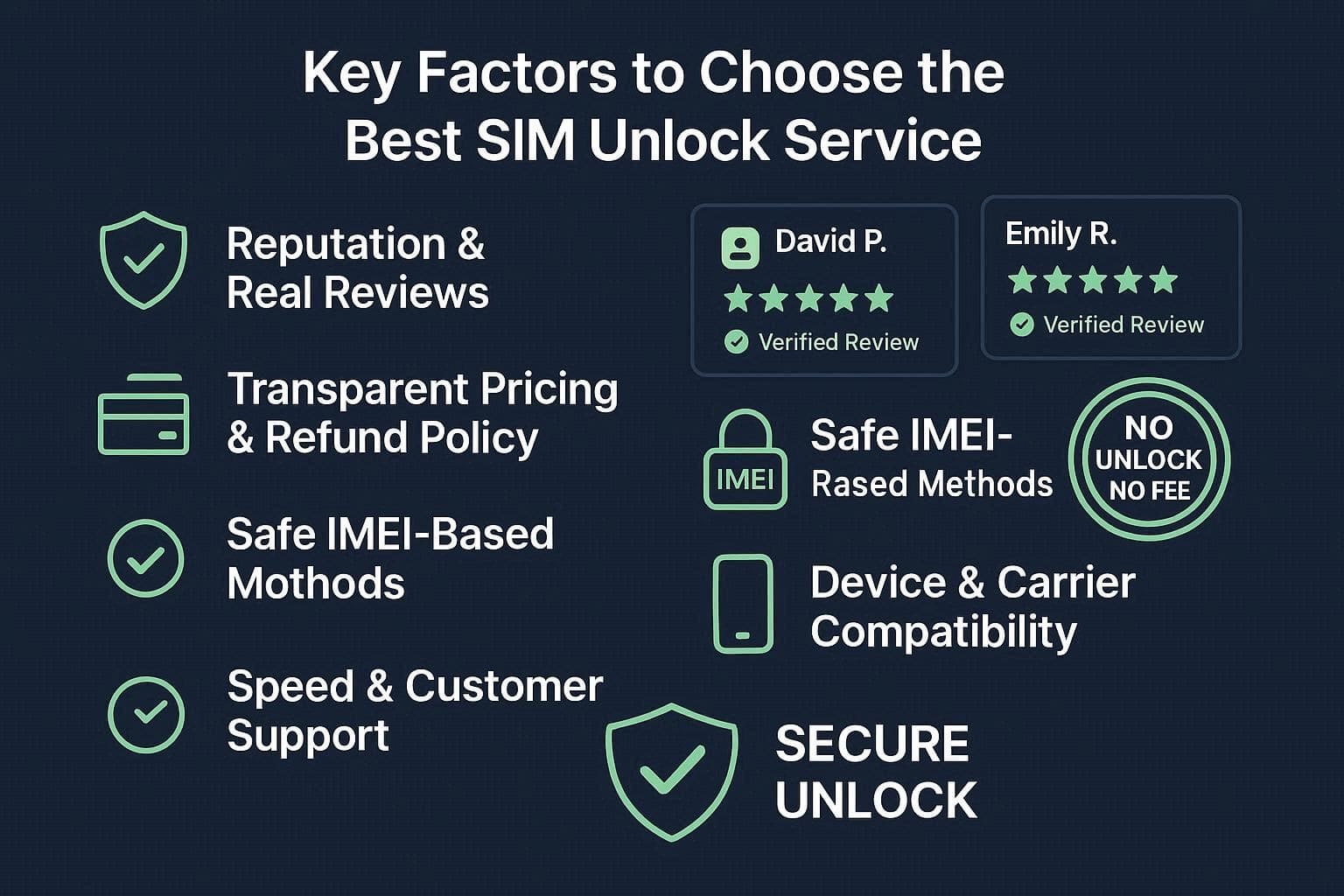
When choosing the top SIM unlock tools, it's important to know how to pick the right option. According to a report from MoneySavingExpert, unlocking a device can increase its resale value by 20-30%, as universal compatibility makes handsets significantly more appealing to buyers. To meet these standards, review the 5 considerations when choosing the right SIM unlocking tool:
-
1 Reputation and Trustworthiness
Check that the service has been around for a long time and has real, positive reviews on sites like Trustpilot. Additionally, stay away from those that promise instant results for every phone, as this is impossible and can pose a security threat to the IMEI.
-
2 Policy Transparency and Refunds
A good SIM unlocking company must have a clear “No Unlock, No Fee” policy so you don’t lose money if it doesn’t work. In addition, make sure the total price is shown clearly upfront so there are no hidden costs later.
-
3 Method Security and Safety
When unlocking the phone, use only services that ask for your IMEI number and unlock officially with the carriers. Never use a tool that requests personal information or downloads any unsafe software or malicious pop-ups.
-
4 Device and Carrier Compatibility
Ensure that you select a tool that is compatible with your specific phone model and carrier. Moreover, the unlock should be permanent, so it will not get lost when you update your phone's software.
-
5 Speed and Support Value
A reliable service will take no more than 24 hours for SIM unlocking, and will have a support team to solve any failures or problems encountered. You may want it to be done in seconds, but a realistic wait time often indicates that the job is being done right.
Part 2. Unlock Android SIM Easily: Best Services to Use in 2026
To dive into the SIM unlock reviews and usage guide of top tools, review the 7 listed options:
1. Dr.Fone Online Unlock
Designed for convenience, this tool features separate tabs and has no ads or pop-ups to prevent the downloading of malicious content. Additionally, the tool supports multiple carriers, including AT&T, T-Mobile, and Sprint, with additional carriers added weekly via updates. Regarding unlocking, the process takes 0-24 hours to process the request, and it's submitted on the cloud for extra security.
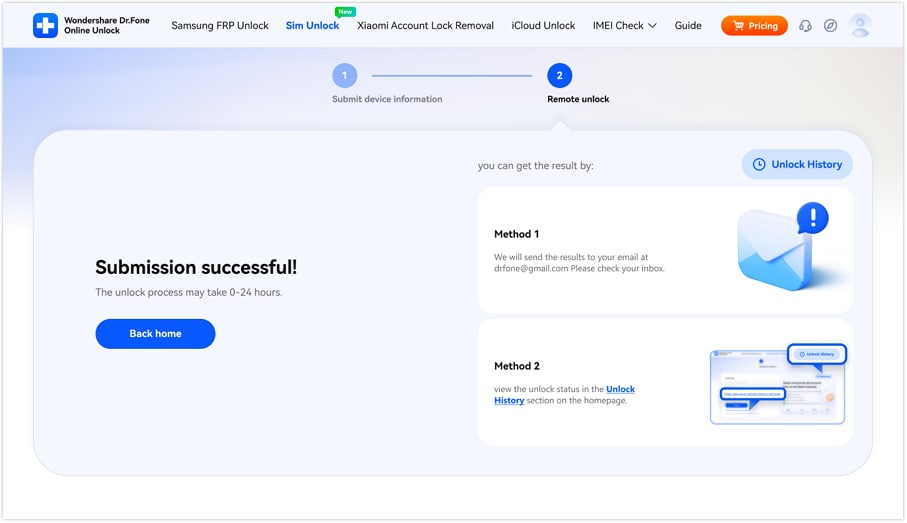
In addition, the tool repeatedly asks users to confirm the details and guarantees that the unlocking will be permanent. Since it needs no learning curve, jailbreak, or reboot, you can get your money back if it fails to bypass the network restrictions. In addition, you can preview the unlocking process via email and later access Unlock History seamlessly.
How to Use Dr.Fone Online Unlock for SIM Lock Removal
-
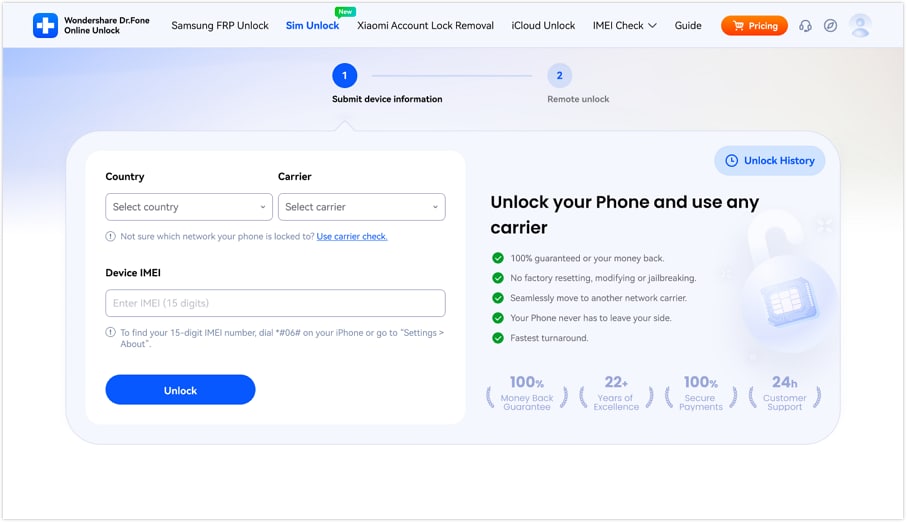
Step 1 Locate the Dr.Fone SIM Unlock Page
Go to the “SIM Unlock” page, and add the “Country, Carrier, and IMEI” details before pressing the “Unlock” button.
-
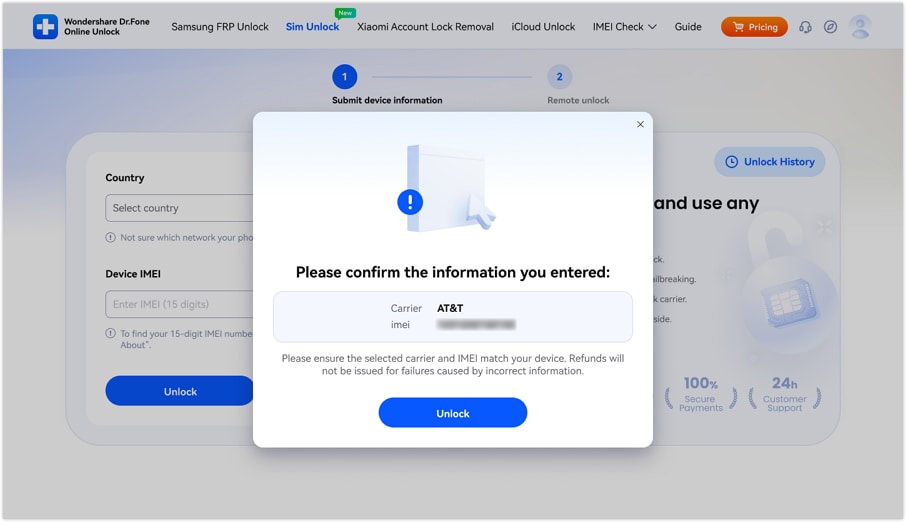
Step 2 Tap the Unlock Button to Submit the Request
Continue submitting the unlocking request in the cloud as you confirm the details, then tap the “Unlock” button again.
-
Step 3 Monitor the Unlocking Process on the Tool or Email
At this point, wait 0-24 hours, then choose “Method 1” or “Method 2” to monitor the progress of the SIM unlocking request.
- Your photos and messages remain safe throughout the unlocking process.
- It works with many Android brands and the latest iPhone models.
- This tool uses official IMEI methods to protect your phone's warranty.
- You must have a stable connection to submit your unlock request.
2. Official SIM Unlock
Among many top SIM unlock tools, this option permanently removes network restrictions for iPhone and Android devices. Additionally, it helps remove Mobile Device Management restrictions often found on corporate-owned devices. Using your IMEI details, it starts the unlocking (bound to payments) and lets you monitor the progress, as guided:
-
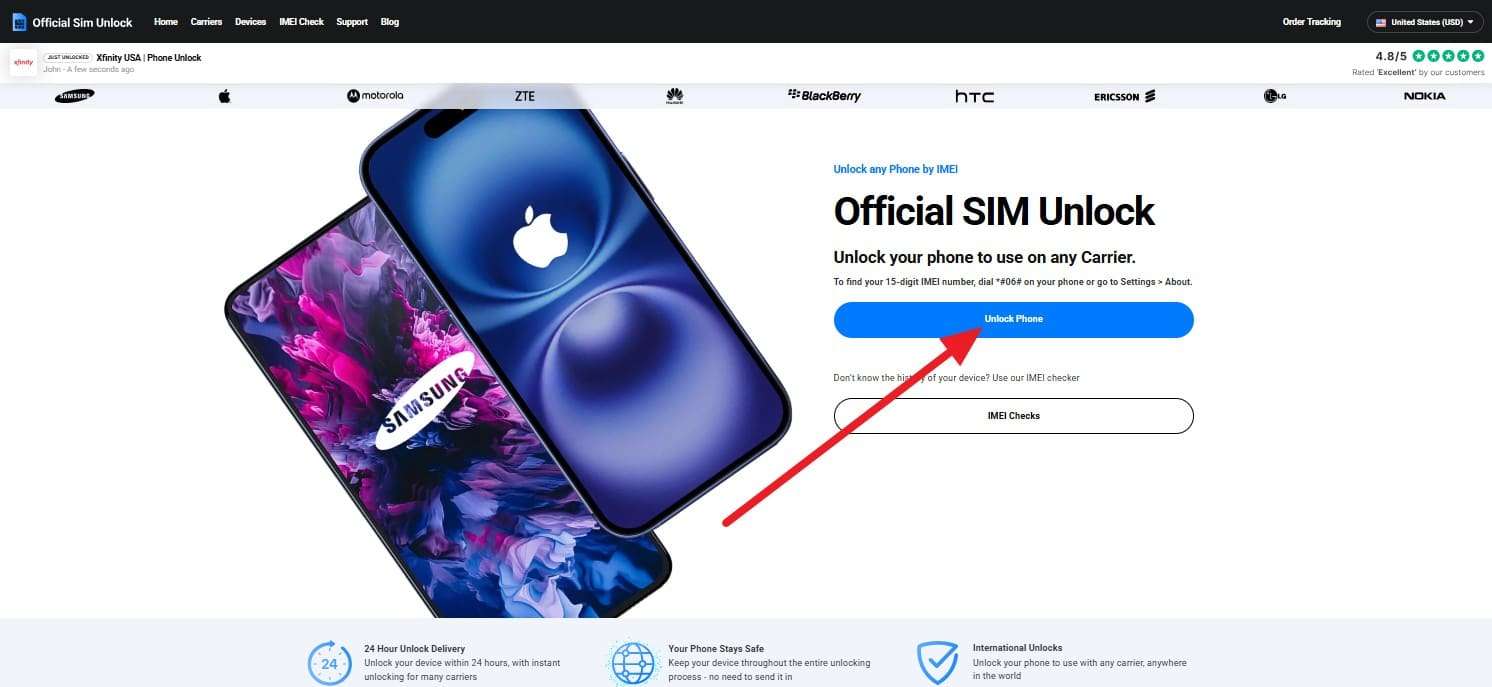
Step 1 Note the IMEI details to add to the tool and press the “Unlock Phone” button on the main screen.
-
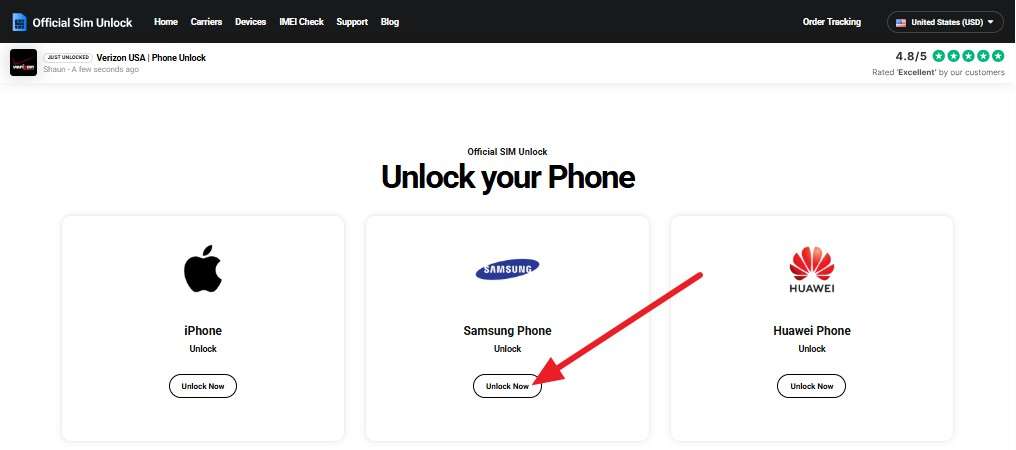
Step 2 If you want to remove the SIM lock from Android, choose a model like Samsung and pick the “Unlock Now” button.
-
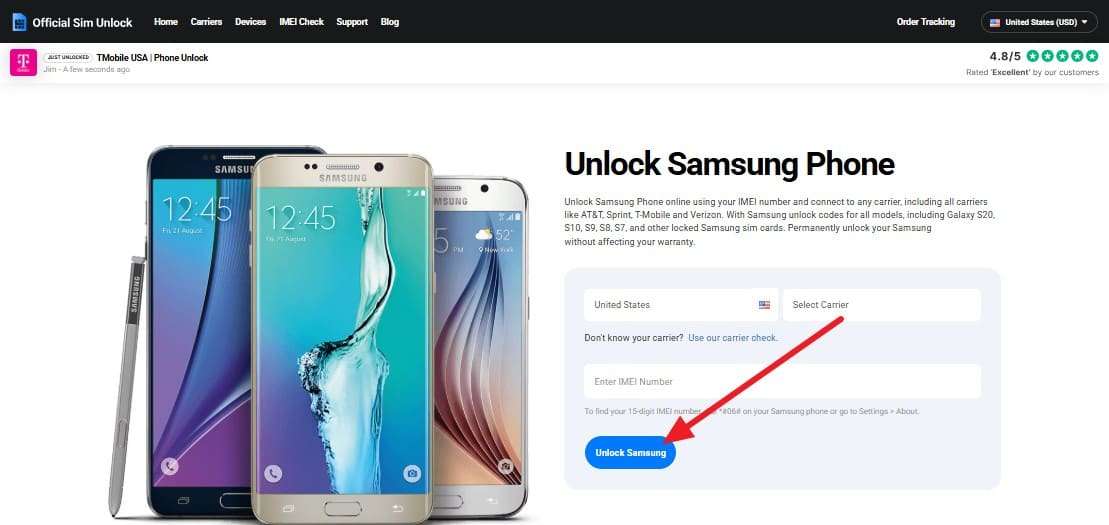
Step 3 Add the “Carrier, Country, and IMEI details,” and click the “Unlock Samsung” button. After that, continue with the payment method and add the email details to request the SIM unlocking. Within 2 weeks, once you have the link, access it within 24 hours and follow the manual steps to bypass network restrictions.
- You can unlock devices from almost any carrier worldwide.
- Can easily check your progress online with your IMEI number.
- There is often a hidden second payment after the first fee.
- It can take several weeks for the unlocking process to finish.
3. UnlockRiver
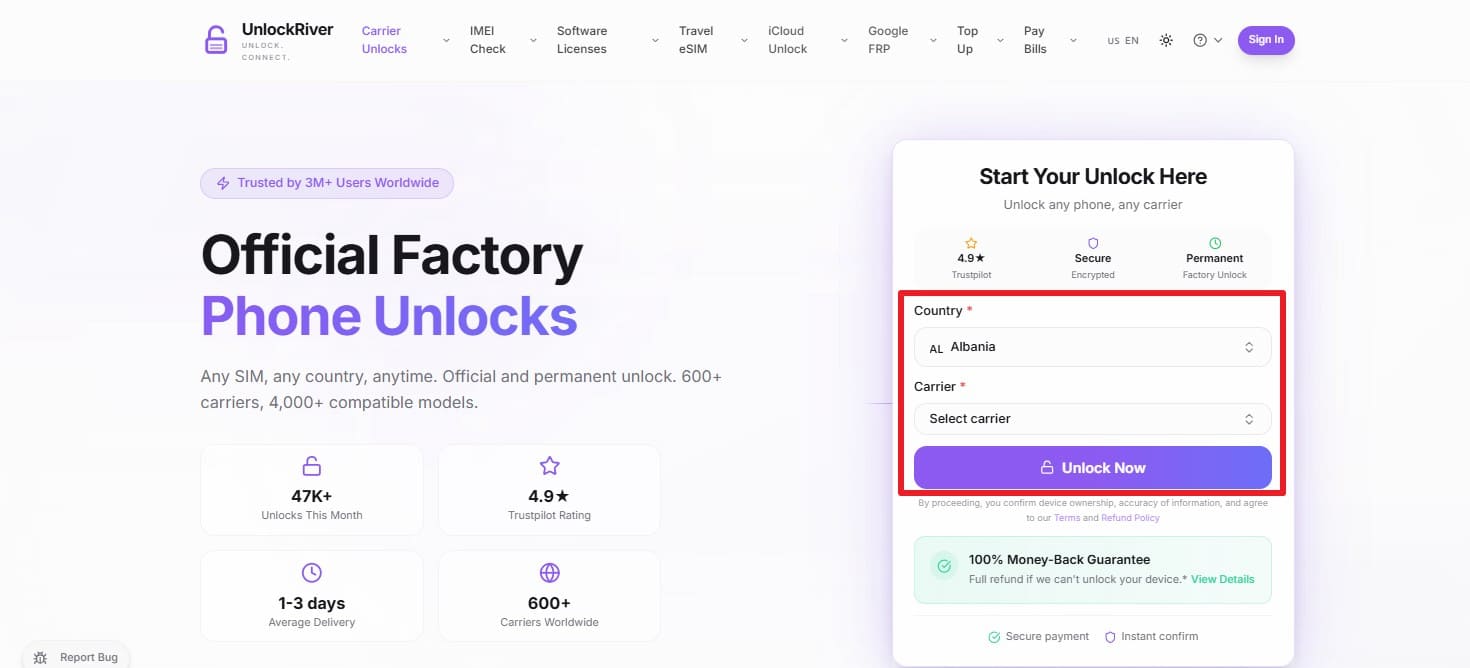
According to multiple SIM unlock reviews, UnlockRiver uses an IMEI-based, server-side process that preserves the device warranty. Through this, users can determine the carrier lock details and bypass it just by adding the carrier, country, and IMEI details. You can also monitor the unlock progress, and its official manufacturer channels ensure the unlock lasts forever. To know how it works, here is a detailed guide for better clarity:
Instructions. To begin, add the IMEI, country, and carrier details, then click the “Unlock Now” button. After adding the email details, you will receive the unlocking code with detailed instructions for payment.
- The entire process is handled remotely via email and cloud servers.
- Uses official manufacturer channels to ensure the unlock lasts forever.
- Unlocks can take anywhere from 1 hour to 3 business days.
- Success depends heavily on the specific carrier and device contract status.
4. SIM Unlock.net
As another best SIM unlock service 2026, this European-based platform provides permanent, server-side unlocks for major brands including iPhone, Samsung, Xiaomi, Sony, and Huawei. In addition, it supports carriers from the USA, the UK, Japan, and Europe. It also supports unlocking via code for Nokia, BlackBerry, Sony Ericsson, and Doro, or lets you make carrier-based orders, as guided:
-
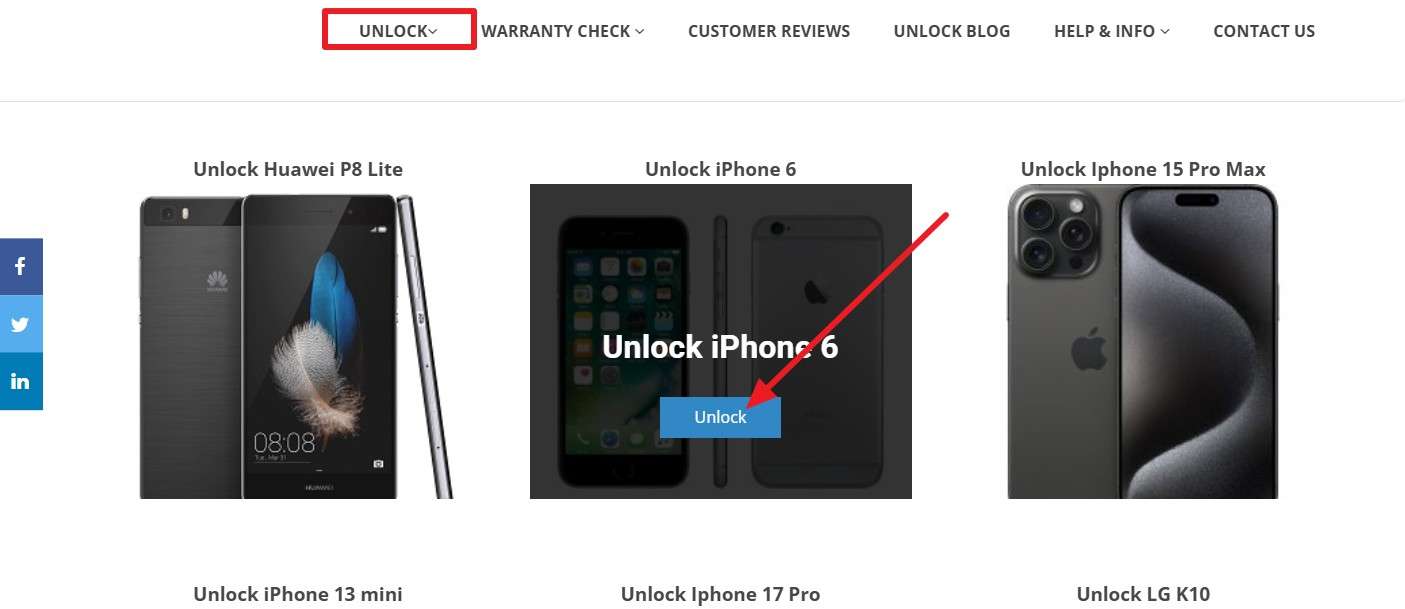
Step 1 In the “Unlock” tab, choose the brand you want to remove the SIM lock from and press the “Unlock” button.
-
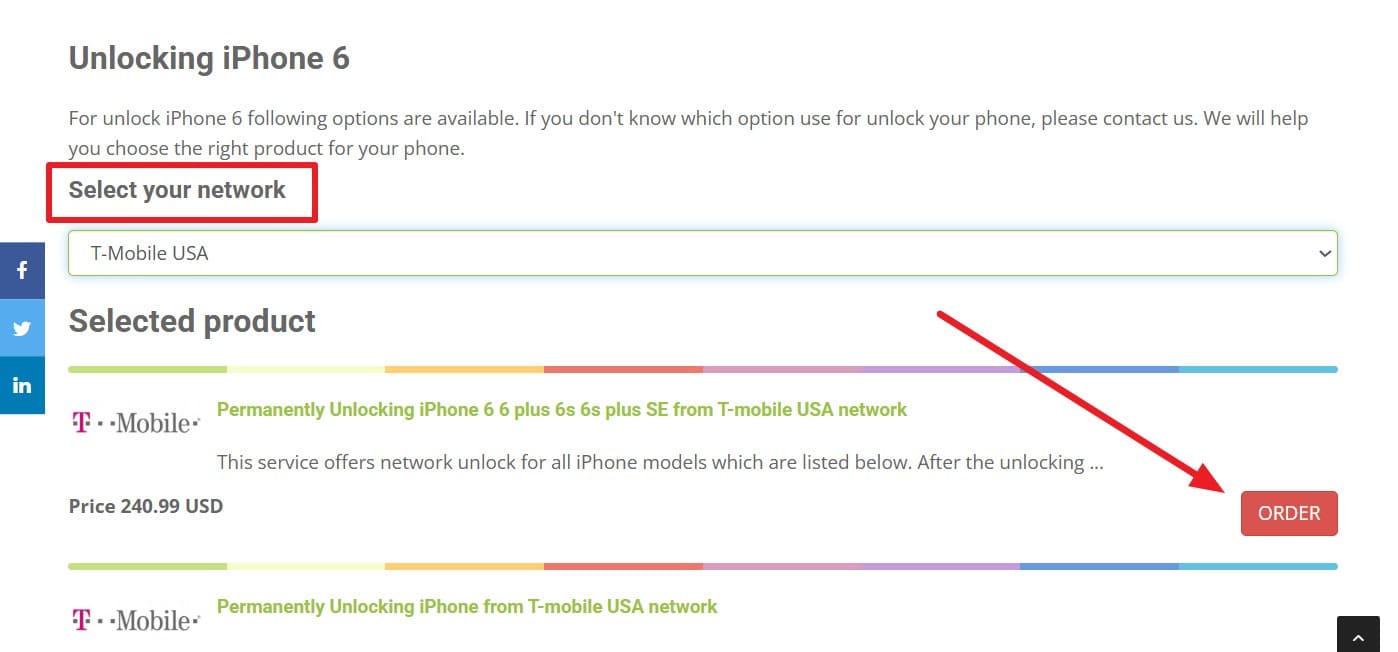
Step 2 In the “Select Your Network” tab, select a carrier, then choose one to “Order.”
-
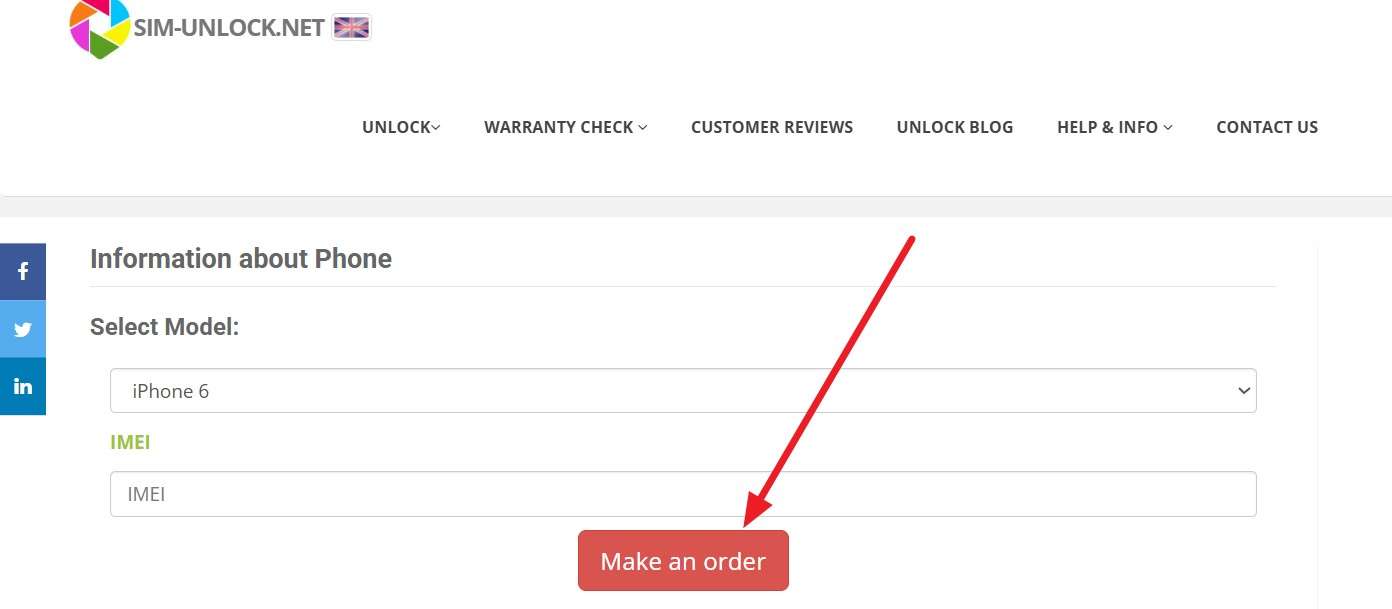
Step 3 Choose the model, add the IMEI details, and tap the “Make An Order” button. After submitting your request, you will be directed to a secure payment page. Once payment is made, you will receive a confirmation email with your order number. The Unlock.net team will process your request through official carrier servers. This typically takes 1 to 24 hours, depending on the specific network and device model.
- SSL security keeps your sensitive IMEI data completely safe online.
- Digital certificates provide proof of unlocking to help increase resale value.
- Certain network unlocks can take up to three business days.
- Some users report that extra fees are added after the first check.
5. UnlockBase
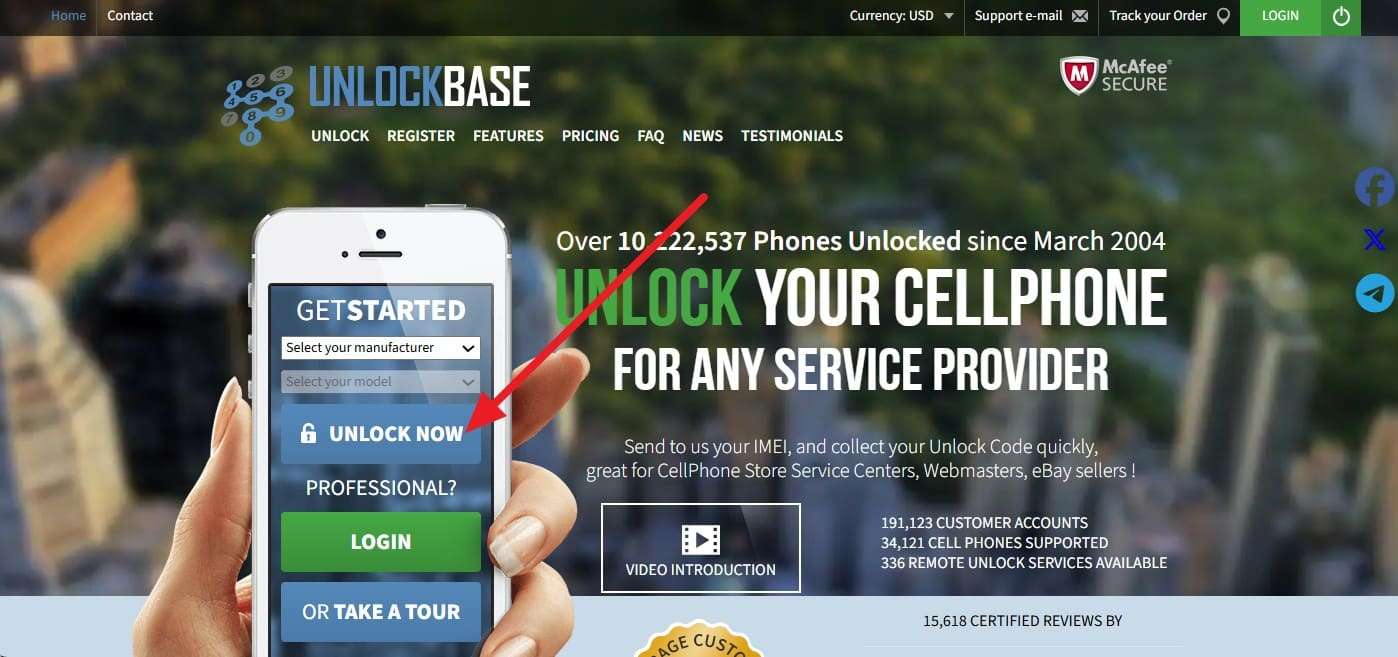
Listed among the top SIM unlock tools, the tool supports over 10 million mobile phones in 165 countries, including major 2026 flagships and niche legacy devices. Claiming to remove lifetime SIM locks, the tool uses IMEI details and lets you choose from multiple manufacturer options. In addition, it keeps an archive of all transactions and unlock codes for at least one year, once the request is submitted via the given steps:
Instructions. Choose the manufacturer and model on the main site and press the “Unlock Now” button. Later, the tool will ask you for payment and email details, and when you receive the link, add the code and continue SIM unlocking.
- Businesses get special discounts and tiered rates for high-volume unlocking orders.
- Pro users can automate their business using the powerful developer API tools.
- Wholesalers must buy credits upfront, which might confuse some new users.
- Some users report that 24/7 support can be slow on weekends.
6. Mobile Unlocked
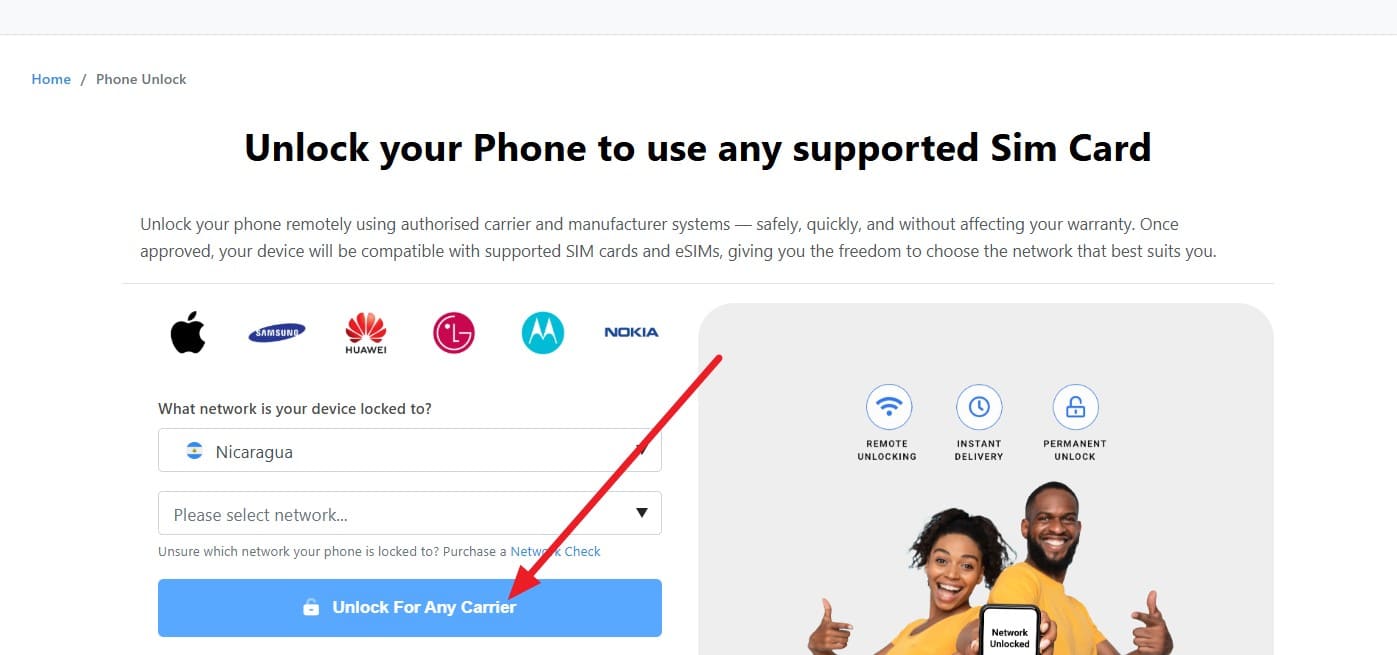
When going through SIM unlock reviews, if you find this tool, add the IMEI detail to permanently remove the SIM lock. It uses official carrier-side whitelisting to ensure that the device remains permanently unlocked even after future iOS or Android software updates. Additionally, iPhones are unlocked via Wi-Fi activation, while Androids receive codes via email. Regardless of the phone you choose, here are the detailed instructions:
Instructions. Choose the “Carrier” and “Network,” add the IMEI details, and press the “Unlock For Any Carrier” button. The tool will start the request submission; you will receive a confirmation link, and unlocking will begin based on the brand you choose. Most requests are processed within 1 to 24 hours, depending on the carrier’s speed.
- A dedicated page lets you check your order status at any time.
- Advanced security tools ensure your personal data stays safe and untouched.
- You will need to pay for an eligibility check before the unlock is completed.
- It is often very hard to get your money back easily.
7. DirectUnlocks
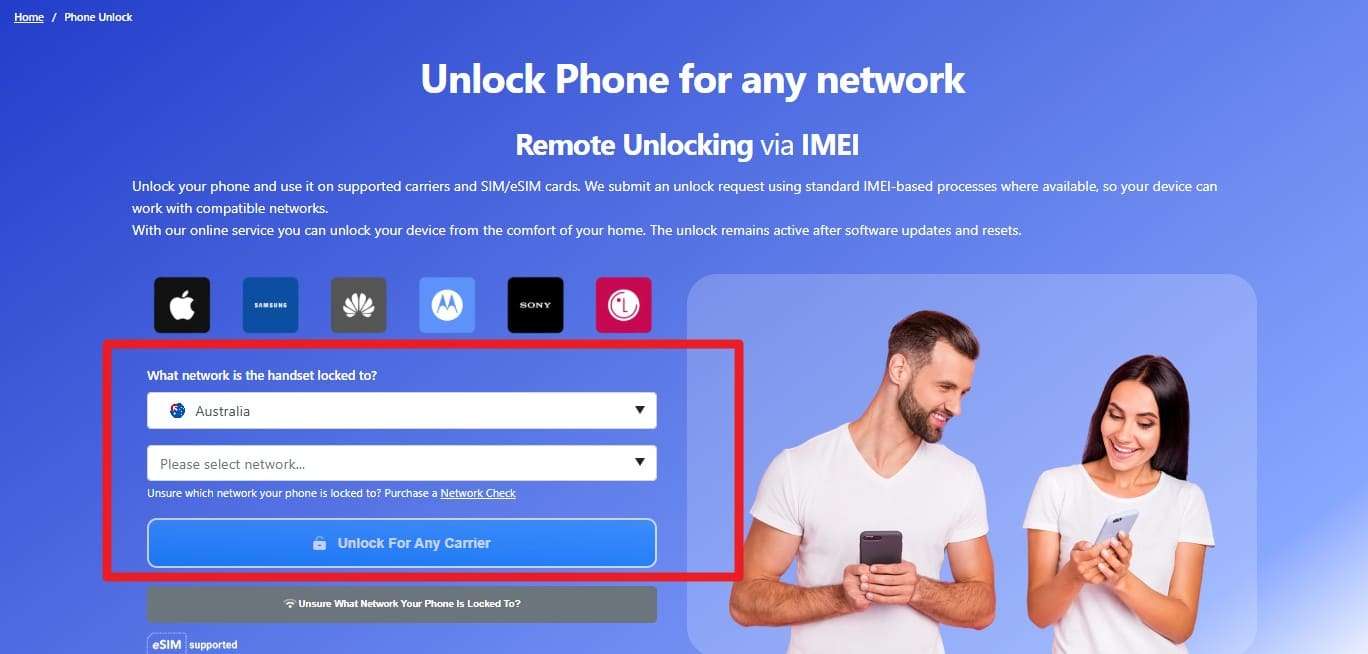
It's another best SIM unlock service 2026 that ensures the unlock is processed entirely via the cloud for Apple devices. In addition to iOS, the service also supports the latest hardware, like Samsung Galaxy S26, often within days of their release. After adding the IMEI details, it offers a dedicated page to monitor the unlocking process. So, if you wonder how it works, here is the detailed guide:
Instructions. Insert the details under the “What Network is the Handset Locked To?” section and tap the “Unlock for Any Carrier” button. After the system auto-detects your model, you will be prompted to pay a small Eligibility Check fee. Once the check is successful, you will receive an “Unlock Ready” notification. You must then complete the Standard Unlock payment to authorize the official carrier-side whitelist request.
- They promise a full refund if they cannot unlock your phone.
- A secure history of all past orders is saved for reference.
- Users often report that extra payments are required after the initial check.
- Not every phone or carrier is eligible for a successful unlock.
Part 3. Free vs Paid SIM Unlock Services: Which Is Better?
Of all the top SIM unlock tools discussed in this article, if you want a free or paid tool to choose from, review this comparison table:
| Service Tool | Success Rate | Processing Speed | Data Security | Price Transparency | Update Frequency | Warranty Safety |
|---|---|---|---|---|---|---|
| Dr.Fone Online Unlock | Claims a high success rate for supported devices | Usually completed within 24 hours | Secure cloud-based IMEI processing | Clear pricing with no major hidden fees reported | The carrier database is updated frequently | Uses official IMEI-based methods that generally preserve warranty status |
| Official SIM Unlock | Depends on carrier eligibility and device status | It can take several days to 2 weeks | Standard encrypted request handling | Some users report additional service charges later | Carrier support is updated periodically | Uses official carrier unlocking procedures |
| UnlockRiver | Reliable for many standard carrier unlocks | Typically takes 1 to 3 business days | Remote server-side IMEI processing | Mostly flat-rate pricing structure | Service support is updated regularly | Uses manufacturer-approved unlocking methods |
| SIM-Unlock.net | Reliable for European and global carriers | Delivery is often completed within 1 to 24 hours | SSL-secured unlocking requests | Pricing is generally displayed clearly upfront | Database updated periodically | Permanent server-side unlock methods |
| UnlockBase | Strong support for wholesale and legacy devices | Processing time varies by device and carrier | Secure API and IMEI request system | Credit-based pricing may confuse new users | Frequent compatibility updates | Uses official whitelisting procedures where supported |
| Mobile Unlocked | Performs well for supported iPhone models | Usually processed within 1 to 24 hours | Carrier-side encrypted processing methods | Some services require multi-step payments | Updated consistently for newer carriers | Uses permanent carrier-side whitelisting |
| DirectUnlocks | Strong compatibility with modern flagship devices | Many requests are processed within 24 hours | Cloud-based IMEI handling system | Initial pricing may not reflect final charges | Database synced frequently | Uses carrier-compliant unlock procedures |

Part 4. Are SIM Unlock Services Safe and Legal to Use?
If you have chosen the best SIM unlock service 2026, note that SIM unlocking is legal in most regions, as long as the device is owned outright. Additionally, reports such as the GSMA Mobile Economy 2026 and the FCC Waiver Order state that the unlocking must meet contract obligations.
According to the FCC.GOV report, Chairman Brendan Carr says that: Criminals used phone-unlocking loopholes for illegal trade, and new uniform rules help reduce phone theft and black-market sales. So, if you want to be safe and ensure security, prioritize verified SIM unlocking methods, such as Dr.Fone Online Unlock.
Conclusion
Choosing the best SIM unlock service in 2026 is important for device security while gaining digital freedom. To make it seamless, this guide has compared the 7 best options, and according to multiple reviews, Dr.Fone Online Unlock ensures a permanent, warranty-safe result. It also simplifies carrier switching for travel, resale, and access to affordable regional network plans.
FAQ
-
1. Will unlocking my phone remove the iCloud or Google FRP lock?
No, SIM unlocking only removes network restrictions and does not bypass security locks like iCloud Activation or Google's Factory Reset Protection. -
2. Can I unlock a phone that is still under a payment contract?
Third-party services may claim to process requests, but carrier unlocks usually require eligibility, payment completion, and no fraud flags. -
3. Is an unlock permanent if I factory reset or update my phone?
Yes, permanent unlocks usually remain after updates or resets, but the method depends on the carrier, device, and unlock type.