ChatGPT
 Perplexity
 Gemini
 Claude
 Grok
Grok
If you have ever tried a non-carrier SIM card on your Galaxy A53, A54, or A55, you might have faced the “SIM Not Supported” alert. This happens when the device is network-locked, limiting your digital freedom to switch to another carrier or try local SIMs. However, this limit is temporary, and Samsung A54 SIM unlock is possible if you meet the carrier's requirements and know the right method.
So, whether you want to switch to T-Mobile or AT&T, this guide explains the requirements and carrier-specific unlock methods. If you fail to meet any of them, learn how IMEI-based services like Dr.Fone Online Unlock can help you regain digital freedom within 24 hours.
In this article
- Part 1. Can You SIM Unlock Samsung A53, A54, A55?
- Part 2. Check If Your Samsung A Series Phone is SIM Locked
- Part 3. How to Unlock Samsung A Series SIM Card (A53, A54, A55)
- Part 4. How to Complete SIM Unlock After Approval
- Part 5. 5 Tips for Successful SIM Unlock on Samsung A Series
- Frequently Asked Questions
Part 1. Can You SIM Unlock Samsung A53, A54, A55?
According to FCC and Samsung Support, the Samsung A53 unlock is possible as the network lock is set by the carrier, not the company. Therefore, one needs to contact the carrier provider to request an NCK, provided that they meet the requirements. Moreover, if the device is purchased from T-Mobile or Metro by T-Mobile in the USA, users can also use the Device Unlock app.
In most cases, users try to use the universal codes, but they are no longer effective and can trigger a Hard Lock. Nonetheless, an IMEI-based online service can be used only if it's reliable, uses official means, and does not modify the device or void the warranty.
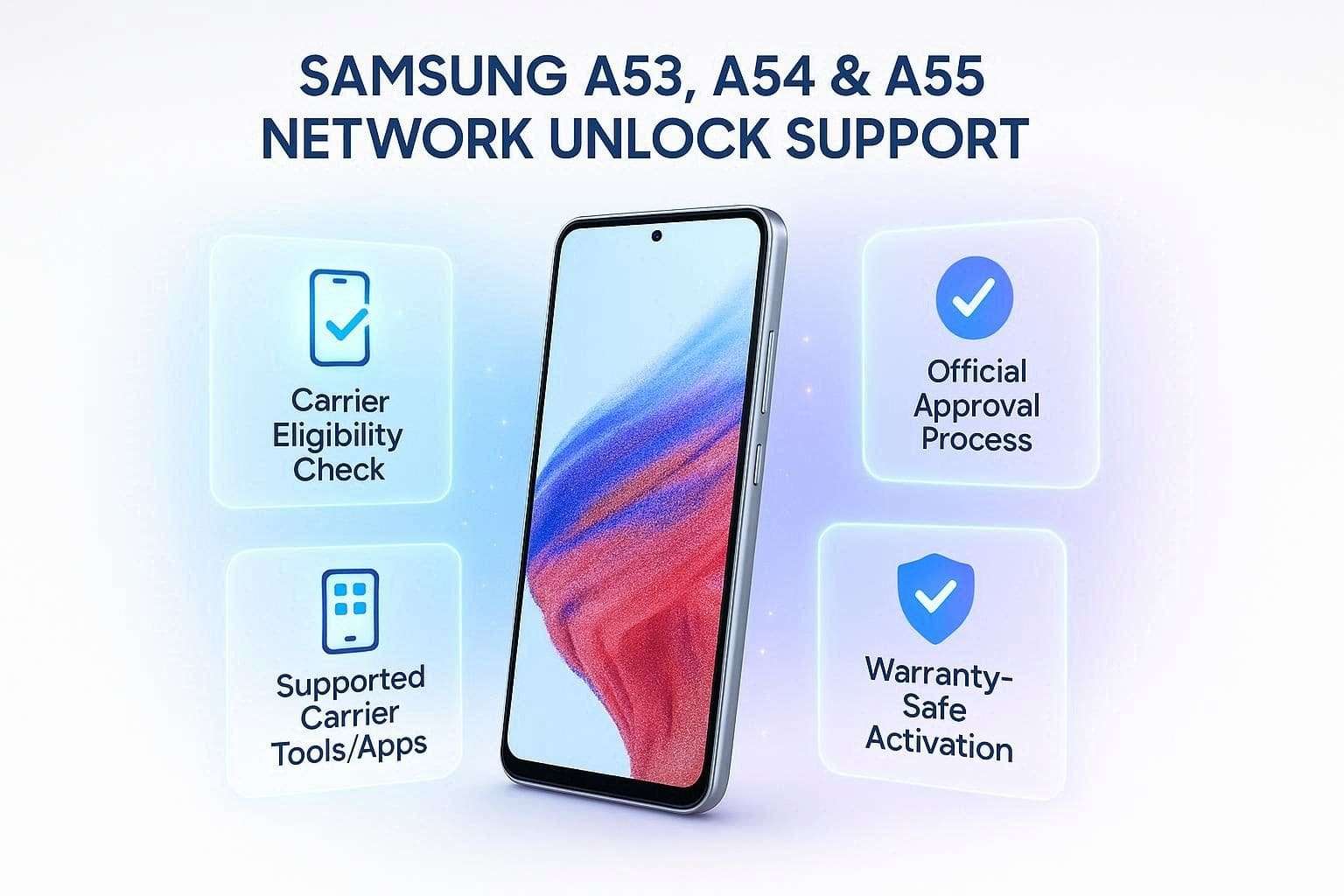
Requirements Before SIM Unlocking Samsung a Series
To continue with the Samsung A55 unlock, review the mentioned requirements. This will help you determine whether you can use the “Official” SIM unlock methods.
General Unlock Requirements:
- The device must not have any remaining charges, and the installment balance must be 0.
- Your device must not be reported as lost or stolen, or associated with any fraudulent activity.
- Your service account must be in good standing, and you must have the correct account holder's name and IMEI details.
- You must have a stable internet connection since it's required to communicate with the carrier’s servers.
- If you are a deployed military member, submit deployment documents; carriers may waive payment rules, but unlocking is not always immediate.
Carrier-Specific Criteria:
For the Samsung A54 SIM unlock, note that the “Activation” policy (prepaid and postpaid) can vary from carrier to carrier, and is mentioned ahead:
| Carrier | Postpaid Requirements | Prepaid Requirements |
|---|---|---|
| AT&T | Must be active on the AT&T network for at least 60 days. | Requires at least 6 months of paid service. |
| Verizon | Devices are automatically unlocked 60 days after purchase (if purchased before Jan 27, 2026). | The new 2026 policy may require up to 365 days of service for certain prepaid brands. |
| T-Mobile | The device must have been active on the network for at least 40 days. | Requires at least $100 in refills or 365 days of active service. |
Part 2. Check If Your Samsung A Series Phone is SIM Locked
Let’s say you meet the carrier requirements and can continue with the Samsung A53 unlock. The next step is to confirm the lock status, and the simplest methods are outlined below:
Method 1. Check via Android Settings
Without using any extra SIM, this method needs only “Settings” access, and is guided below:
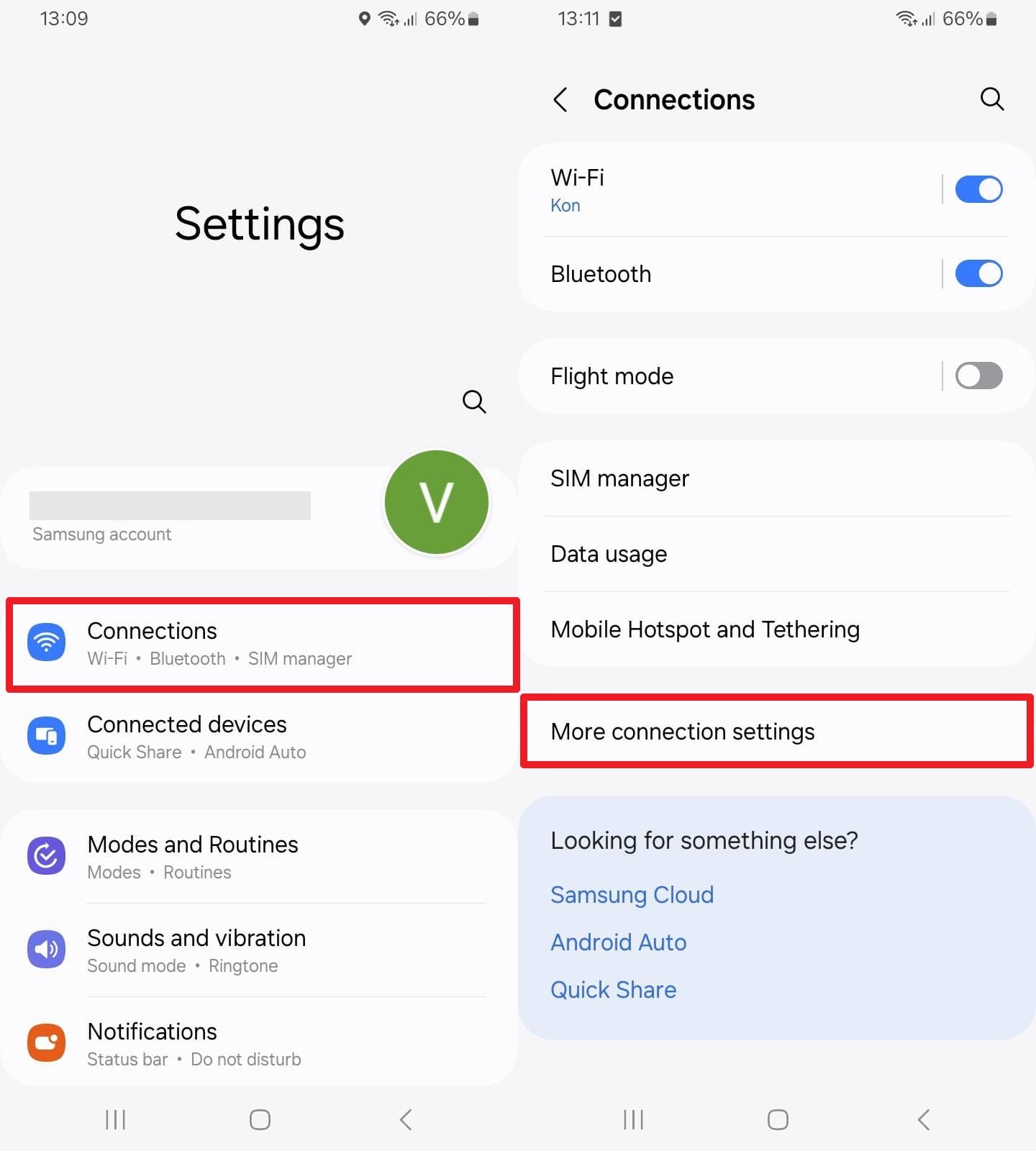
Instructions. In the settings, press the “Connections” option and tap on the “More Connection Settings.” Now, locate the “Network Lock Status” and check whether it says “Locked” or “Unlocked.”
Method 2. The Physical SIM Test
If you can’t use the settings option, simply swap the SIM with a non-carrier. To do so, power off the device, add the SIM, and turn the Samsung on. If it shows “SIM Network Unlock PIN” or “SIM Not Supported” message, it's locked.
Method 3. Contact Your Carrier
If you can’t perform any of the mentioned tests, confirm the status by contacting carriers, and continue with the Samsung A55 unlock. You will need to provide the IMEI details, and the representative will confirm the account condition and lock status. To know the contact details for the main carrier, contact the given numbers:
- Verizon: Dial *611 from your device, or call 888-294-6804 or 888-258-0939.
- AT&T: Call 1-800-331-0500 and provide the IMEI details when asked.
- T-Mobile: Contact on 1-800-937-8997 or 1-833-800-0323 for Business accounts.
Part 3. How to Unlock Samsung A Series SIM Card (A53, A54, A55)
If all the tests say your Samsung A series is locked, try the given method for Samsung A54 SIM unlock:
Method 1. Carrier SIM Unlock (Recommended Method)
It is the quickest and most reliable way to SIM unlock a Samsung device while maintaining the warranty. Nonetheless, you need to meet the carriers' general, prepaid, and postpaid criteria and must have the exact phone number and IMEI details. So, if you copy all the rules, take AT&T as an example, and request NCK via the given guide:
-
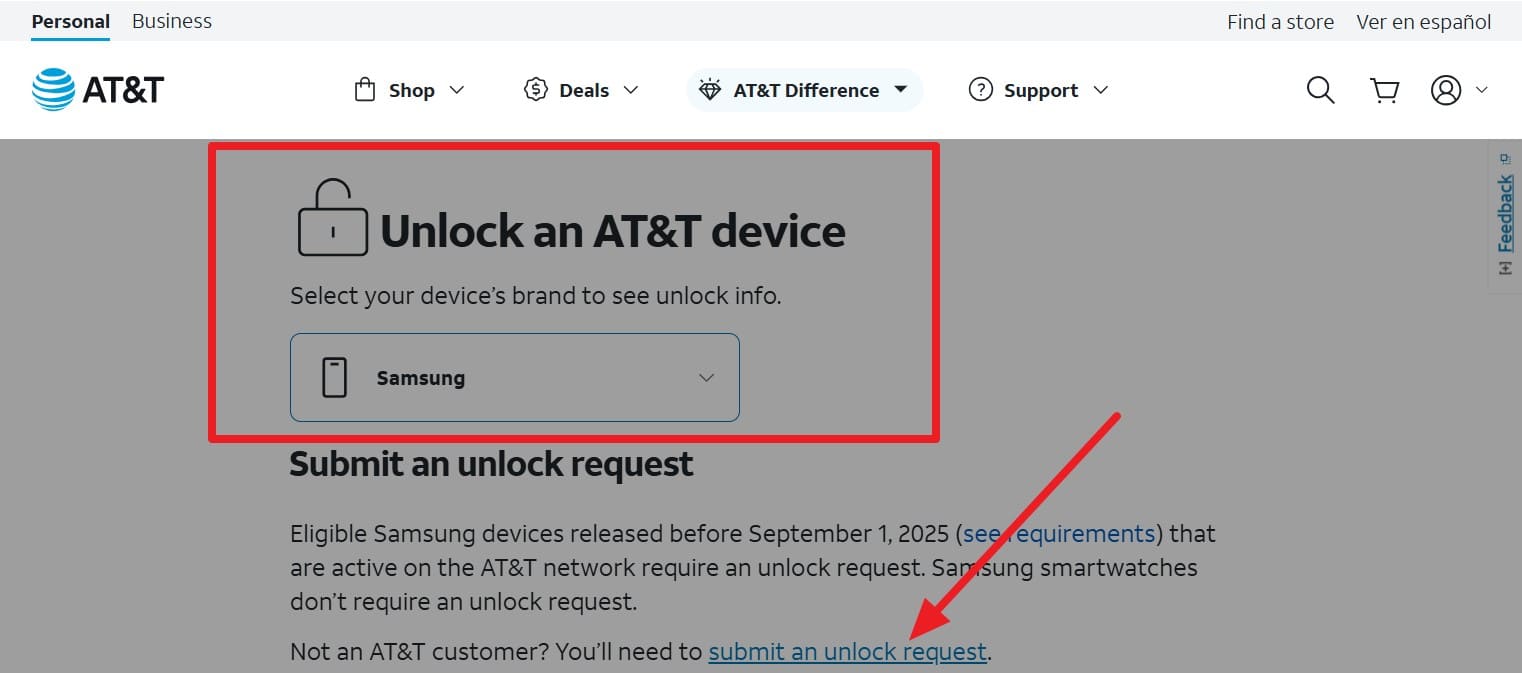
Step 1 Search for the AT&T Device Unlock page and choose “Samsung” from the “Unlock an AT&T Device” option. If you want to, review the requirements given in the note or tap the “Submit an Unlock Request” link.
-
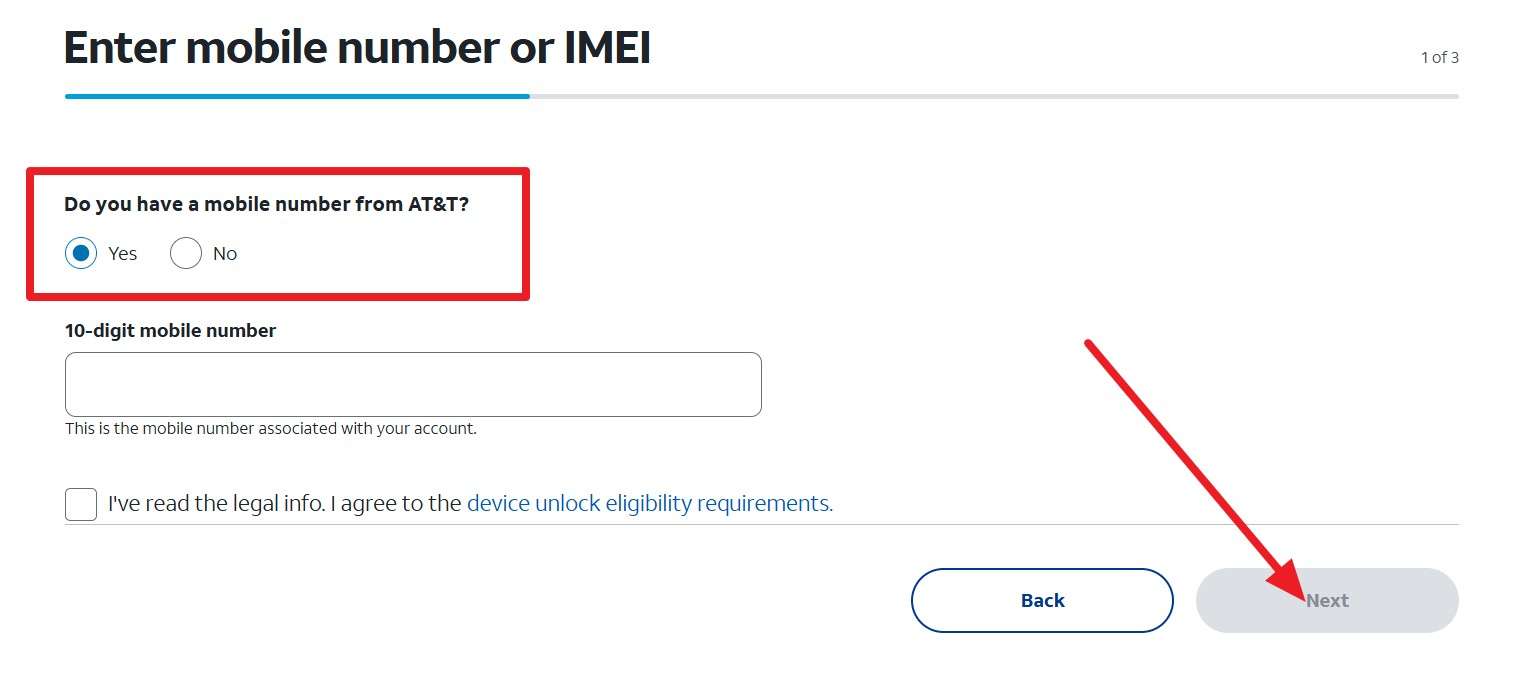
Step 2 Pick between “Yes” and “No” options for “Do You Have a Mobile Number From AT&T?” Then add the phone number and click the “Next” button to enter email details. As the request is submitted, you will get a link via email after 48 hours; open it within 24 hours. Follow the instructions as they come in, and you will get the NCK.
Method 2. Samsung Device Unlock App (If Available)
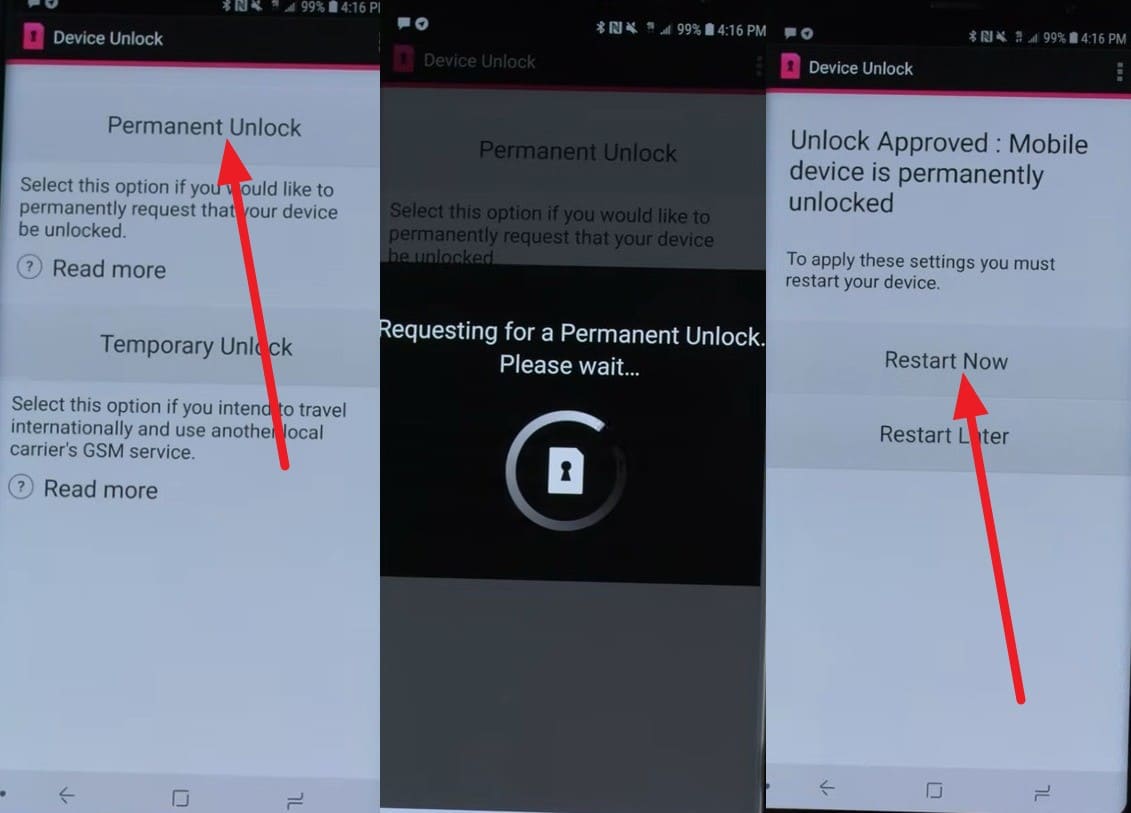
Samsung A53 unlock is also available for those who have bought the device from both carriers, T-Mobile and Metro by T-Mobile. Using the preinstalled Device Unlock app, you can choose between a permanent or temporary unlock option to unlock the SIM. Since the device needs no code and the availability varies by region and carrier, here is how it can be used:
Instructions. Tap “Allow” in the app when it asks to grant permissions and select “Permanent Unlock.” Once connected, it will communicate with the provider's servers to verify account information. If it is in good standing, the SIM will be unlocked, and you can choose the "Restart Now" option.
Method 3. Use Dr.Fone Online Unlock’s SIM Unlock Services (Alternative Option)
If you don’t meet the carrier’s Samsung A55 unlock requirements, you can use an IMEI-based service like Dr.Fone Online Unlock. This tool supports all major carriers, such as AT&T and T-Mobile, so you won’t have to contact each one individually. Moreover, it only needs the IMEI details, and without any jailbreaking or modification, it submits the request to cloud servers.
While securing the user data and device warranty, the SIM will be unblocked within 24 hours. Furthermore, the tool will be permanent, whether you update the version or reset the device. Unlike other options, it supports all legacy Android models, including Samsung, and removes SIM lock in 3 steps. Users can track the request progress or later access the Unlock History to keep the proof.
How to SIM Unlock Samsung A Series via Dr.Fone Online Unlock
-
Step 1 Add the Samsung Device Details to the Tool
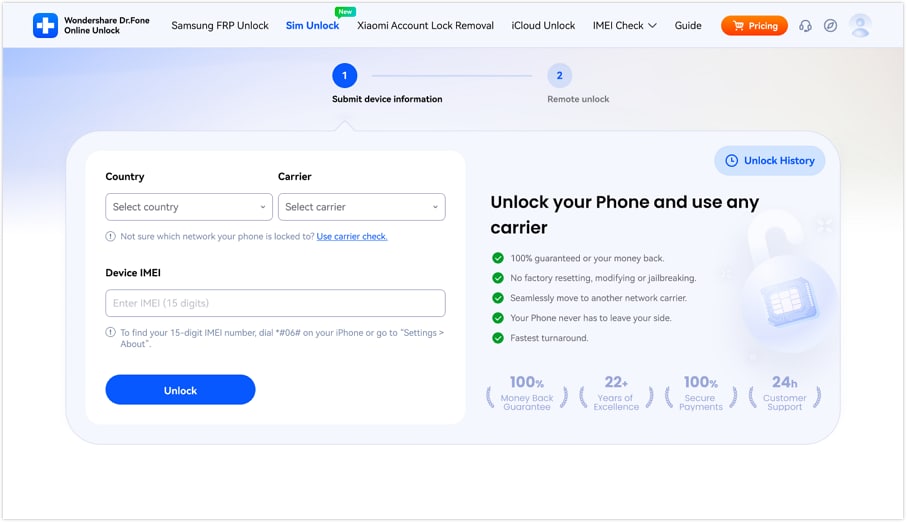
Access the Dr.Fone SIM Unlock page on any device, add the request details (Carrier, Country, and IMEI), and press “Unlock.”
-
Step 2 Submit Cloud SIM Unlock Request
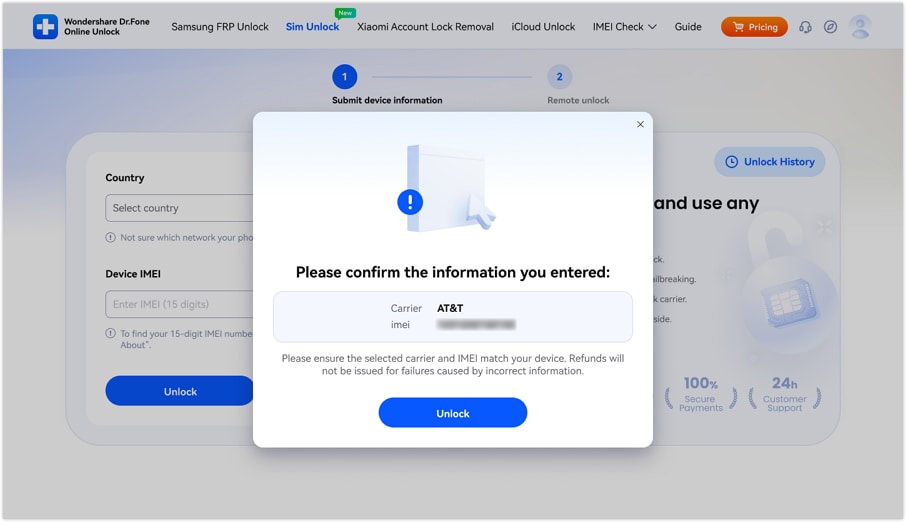
When asked by Dr.Fone Online Unlock, confirm the Samsung details, press “Unlock,” and submit the cloud request.
-
Step 3 Choose the Given Methods to See the SIM Unlock Time
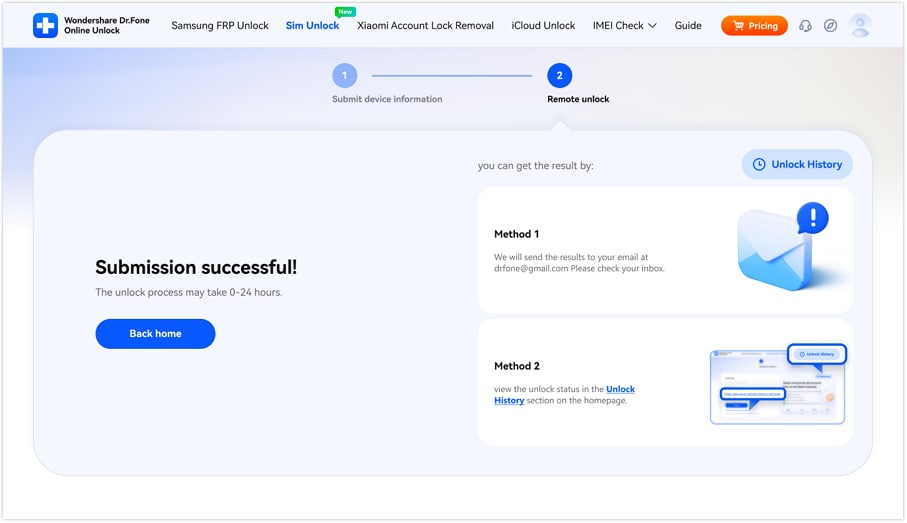
Wait 24 hours; meanwhile, you can choose “Method 1” or “Method 2” to track.
Part 4. How to Complete SIM Unlock After Approval
If you have used the official Samsung A54 SIM unlock, you need to finalize the process. Since this can be done automatically and manually, this section explains methods for both situations.
Enter SIM Network Unlock PIN (Code‑Based Unlock)
If you have contacted the carrier and have received the NCK code, here is what you need to do:
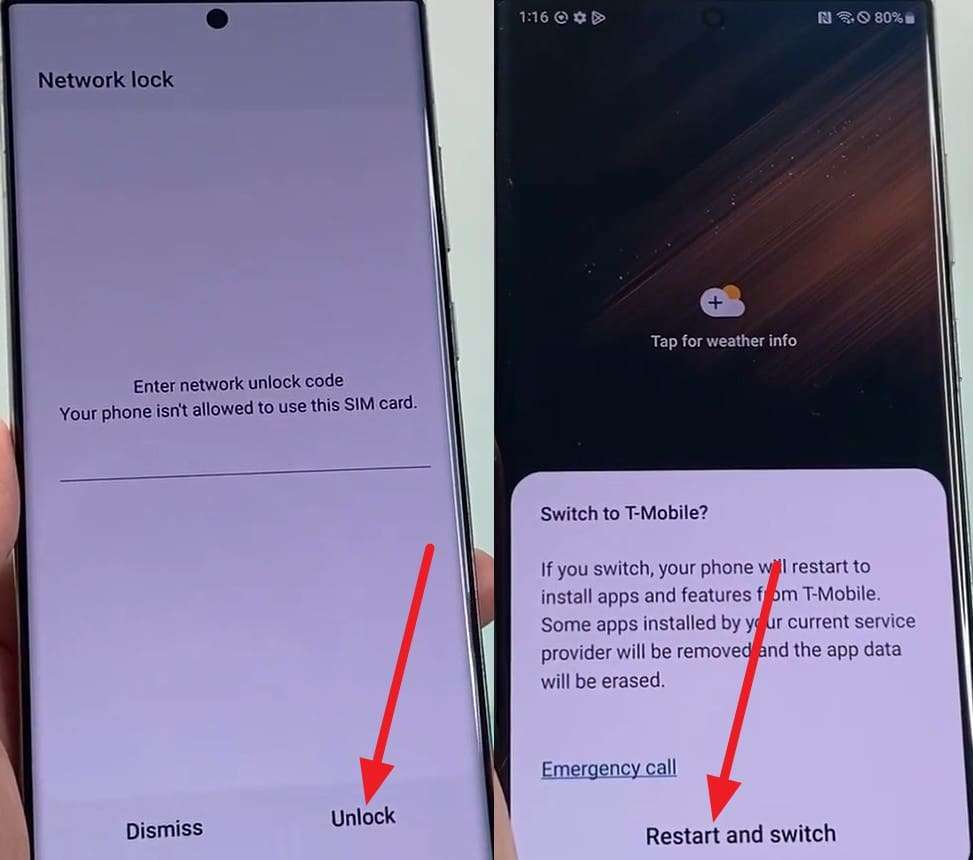
Instructions. Insert the SIM card from the carrier you want to switch to, then power on your Samsung. Add the 8-15-digit code and press the “Unlock” button to start the unlock request. When it's done, simply tap the “Restart and Switch” option to use the lock SIM or affordable carrier.
Automatic/Remote Unlock and Network Registration
For the T-Mobile, Metro, or newer Verizon models, the Device Unlock app automatically handles the unlock process. Other than the app, if your device meets the T-Mobile carrier's requirements, it will be unlocked automatically within 2 business days if it supports remote unlocking.
Part 5. 5 Tips for Successful SIM Unlock on Samsung A Series
For the successful and secure Samsung A53 unlock via official and online service, follow the mentioned tips:
| Tip | Action to Take | Why It Works |
|---|---|---|
| Verify Eligibility | Ensure your contract is completed and the device is fully paid off before requesting an unlock. | Carriers will automatically reject requests for devices with active installment plans or contract terms. |
| Use Stable Wi-Fi | Connect to a strong Wi-Fi network before initiating a Permanent Unlock in your phone's settings. | Remote unlock requests require a stable connection to communicate with the carrier's activation servers. |
| Check IMEI Status | Dial *#06# to get your IMEI and ensure it isn't blacklisted or reported as lost/stolen. | Devices on a global blacklist cannot be unlocked by any carrier or official service for security reasons. |
| Restart Post-Unlock | Always reboot your Samsung A53, A54, or A55 immediately after receiving a success message. | A restart forces the device to refresh its internal network configuration and register with the new SIM card. |
| Update Software | Ensure your device is running the latest Android version before attempting a remote unlock. | System updates often include the latest security patches and Device Unlock app improvements needed for the process. |
Conclusion
FCC and Samsung say that the Samsung A54 SIM unlock is possible to regain digital freedom if official methods are used. Therefore, this guide has uncovered the carrier requirements and has highlighted the official methods. For users who can’t wait 2 days or are ineligible, they can use Dr.Fone Online Unlock to remove the SIM lock within 24 hours.
Frequently Asked Questions
-
1. Can I unlock my Samsung A series phone if I am traveling abroad?
Yes, if you are in the military with a deployment order and your account is in good standing, you can remove the carrier lock regardless of the time requirements. Otherwise, you can wait 2 days for the carrier to start the automatic unlock, or use the Device Unlock app (T-Mobile and Metro by T-Mobile). -
2. Will unlocking my phone erase my photos or apps?
No, the standard SIM unlock only removes the network restrictions and does not perform a factory reset or delete personal data. However, if you use unlock code tricks that no longer work, you can end up with a hard lock, and even the carrier won't resolve it. -
3. What should I do if my phone asks for a Master Subsidy Lock (MSL)?
The MSL is the older type of code; for the modern Samsung A series, focus on getting NCK by contacting support. If the code doesn’t work, you can use online services like Dr.Fone Online Unlock, which only requires the IMEI to remove the SIM lock within 24 hours.