ChatGPT
 Perplexity
 Gemini
 Claude
 Grok
Grok
In 2026, checking your phone’s SIM lock status is a vital step for travelers, second-hand buyers, and anyone looking to switch carriers.
- Core Idea: A SIM-locked phone is restricted to one carrier, while an unlocked phone works with any provider worldwide.
- Benefits: Checking status helps you avoid expensive roaming fees, increase your device's resale value, and ensure compatibility with global networks.
- Top Methods: Checking SIM unlock methods includes swapping SIMs with a different carrier, checking the “Carrier Lock” status in the phone settings, and using IMEI or SIM unlock checkers like Dr.Fone Online Unlock.
- Carrier Contact: When in doubt, call your provider for official verification.
What if you are planning an international trip only to realize your phone might not accept local SIM cards? Not just that, you’ve found a much cheaper data plan, but you can’t seem to make the switch. In both situations, being stuck at the “SIM Not Supported” message is a common frustration that often stems from a carrier lock. In this era, it's seamless to check SIM lock status and the first steps towards digital freedom. Therefore, this guide simplifies the process and shows how to quickly identify if the phone is restricted. By using official methods and IMEI checkers, learn how tools like Dr.Fone Online Unlock can bypass SIM locks.
In this article
Part 1. What Does SIM Locked or Unlocked Mean?
If you ask, “Is my phone locked?” First, you need to know what SIM lock actually means. This term can baffle many users, as most of the Reddit comments say:

I’m traveling abroad and want to use a tourist SIM card, but my phone's settings show SIM locked, while T-Mobile says it’s unlocked. Will the tourist SIM work on my phone?
r/tmobile
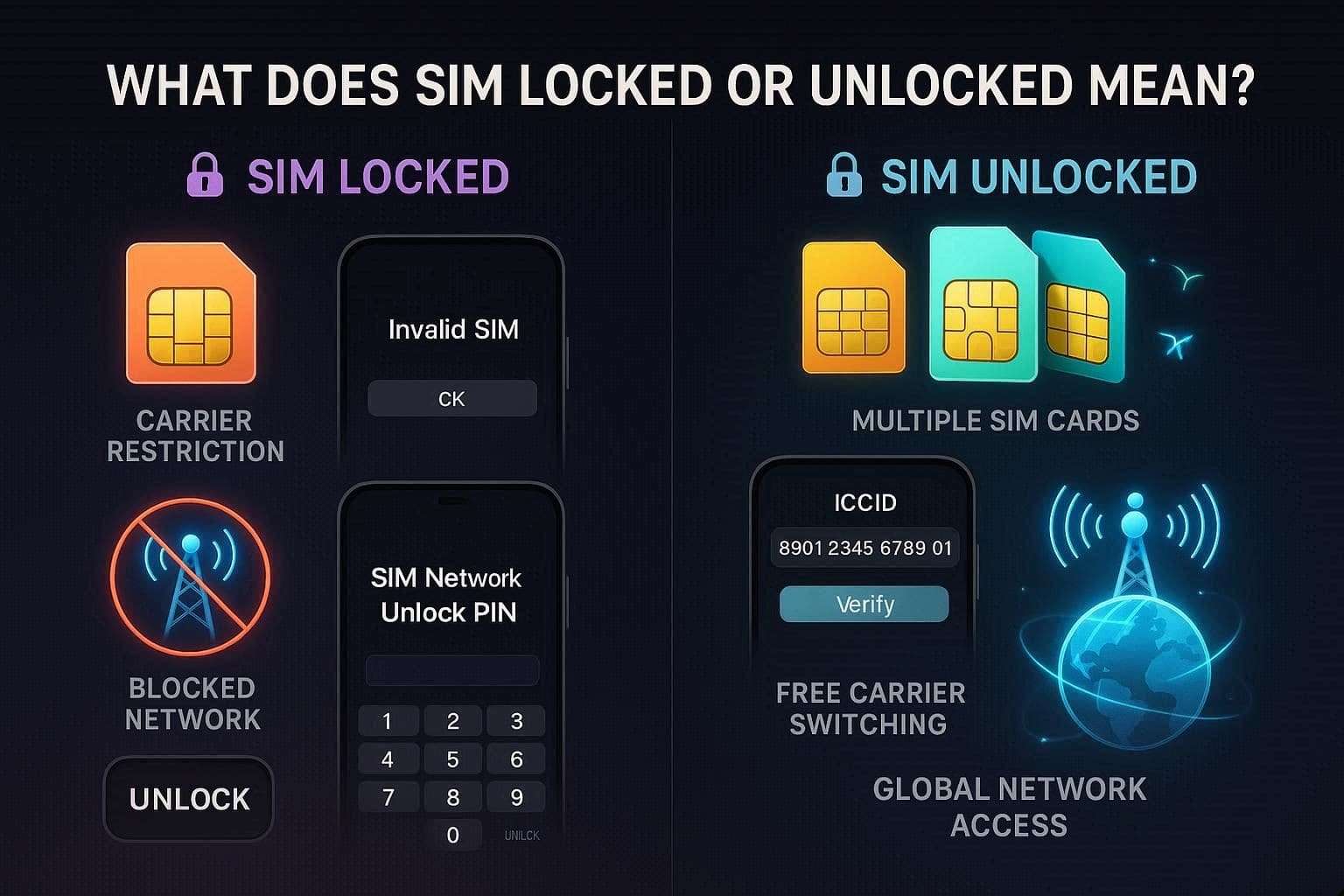
Ideally, a SIM lock is a software restriction built into your phone’s firmware by the service provider. When you enter the SIM, the software checks the ICCID, and if the card is from an authorized carrier, the phone works perfectly.
On the contrary, if the card is from a different network, the software prevents the phone from registering with local towers. This effectively disabled calls, texts, and mobile data, displaying a “SIM Network Unlock PIN” or “Invalid SIM” error.
Difference Between Locked and Unlocked Phones
To further know the difference between a SIM-locked and an unlocked phone, review the given table and continue with the SIM lock check:
| Feature | Locked Phone | Unlocked Phone |
|---|---|---|
| Network Flexibility | Restricted to one specific carrier (e.g., AT&T only). | Works with any compatible carrier worldwide. |
| Travel Utility | Limited to expensive international roaming plans. | Accept local SIMs/eSIMs abroad for domestic rates. |
| Software & Apps | Often pre-loaded with carrier bloatware you can't delete. | Clean software directly from the manufacturer. |
| Resale Value | Lower; harder to sell because buyers must use your carrier. | 20-30% higher value due to universal appeal. |
| Updates | Software updates are often delayed by carrier testing. | Receives updates directly from the manufacturer instantly. |
| Purchasing | Usually bought on 24-36 month payment plans. | Typically purchased at full price upfront with no contracts. |
Part 2. Why You Should Check Your Phone’s SIM Lock Status
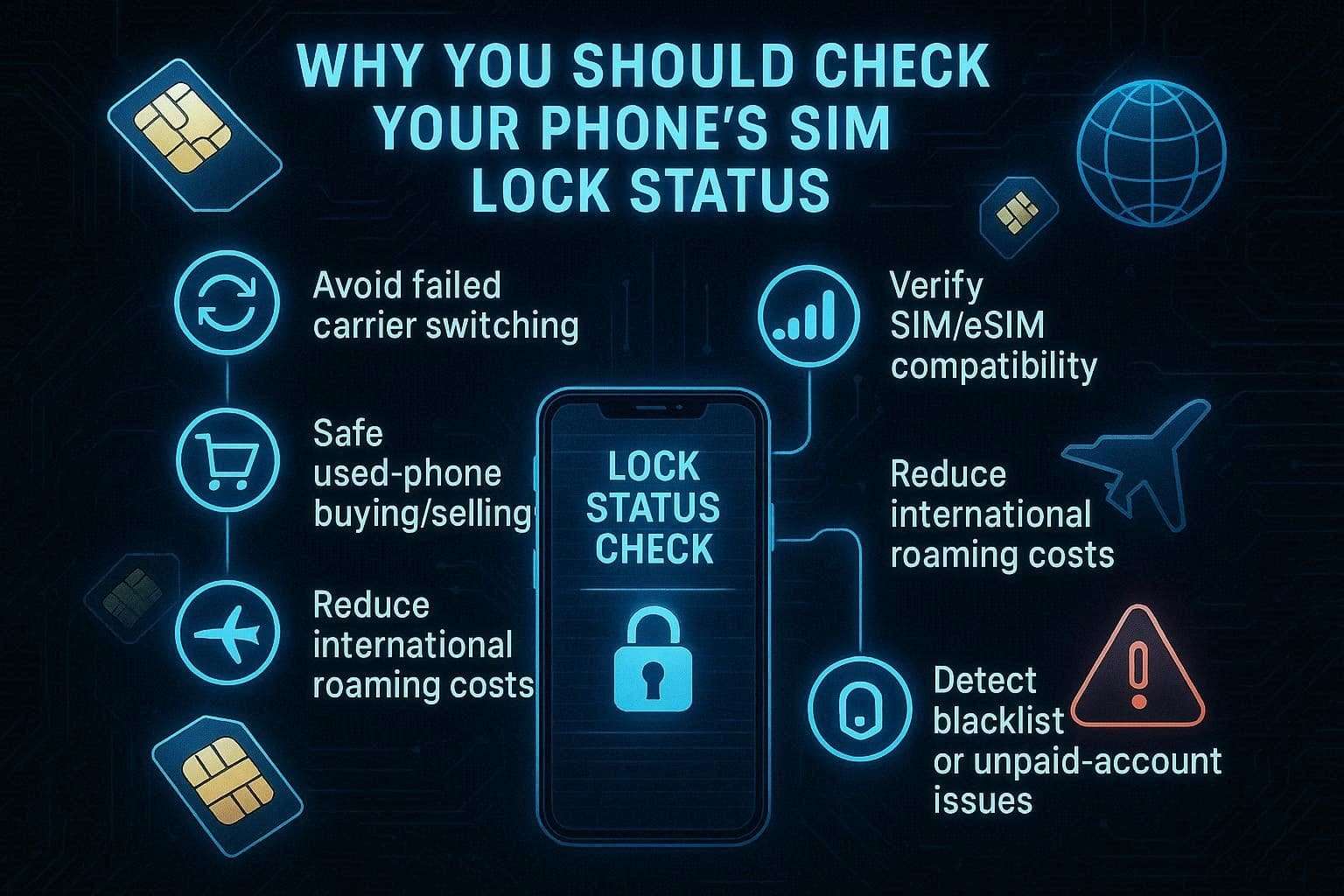
If you think your phone is locked, the following reasons highlight why you need to check the SIM lock status:
-
Step 1 Avoid Network Switching Surprises
Knowing your lock status lets you know upfront whether a new SIM will work, preventing failed activations during a carrier switch. This ensures you aren’t left without service or spending time on a transition that your current hardware can’t support.
-
Step 2 Verify SIM/eSIM Compatibility First
Checking the lock status ensures your phone isn’t restricted to one network before you purchase a travel eSIM or data plan. Hence, this prevents you from spending money on local SIM cards or digital plans that your phone is technically unable to use.
-
Step 3 Ensure Safe Phone Transactions
Verifying the lock status helps buyers avoid purchasing devices that are locked or tied to another user’s unpaid carrier account. For sellers, it allows for an accurate “Unlocked” advertisement, significantly increasing buyers' trust and the resale price.
-
Step 4 Control International Travel Expenses
You will be able to check the lock status prior to the trip and know if you can avoid the high roaming costs with a low-cost local SIM. This will help you plan your finances and avoid expensive data packages while traveling.
-
Step 5 Check for Hidden Account/Blacklist Issues
A status check can instantly show if a device has been reported lost, stolen, or blacklisted for unpaid account balances. Early detection of these issues can alert you to potential limitations that might prevent SIM activation, despite its authenticity.
Part 3. Check If Your Phone Is SIM Locked: Easy & Accurate Methods [Android/iPhone]
After knowing the hyper for the locked status, if your question is whether my phone is locked, here are 3 methods you can try:
Method 1. Insert a Different SIM Card to Test Lock Status
All you have to do is put a different carrier's SIM in it, and test whether it connects to their network. If it's successful, your phone is unlocked; if you see messages such as “SIM not supported” or “Network locked,” your phone is locked. This approach is suitable for both Android and iPhone, and it will save you from purchasing a SIM plan that isn't compatible with your smartphone.
Method 2. Check SIM Lock Status in Phone Settings
Regarding the SIM lock check, the phone’s Settings app makes it easy without changing SIM cards or using extra tools. In addition, this method is helpful for sharing screenshots with support agents or buyers if needed. Since it works on most Android phones and iPhones, and is safe to use, here is how it's done:
For Android
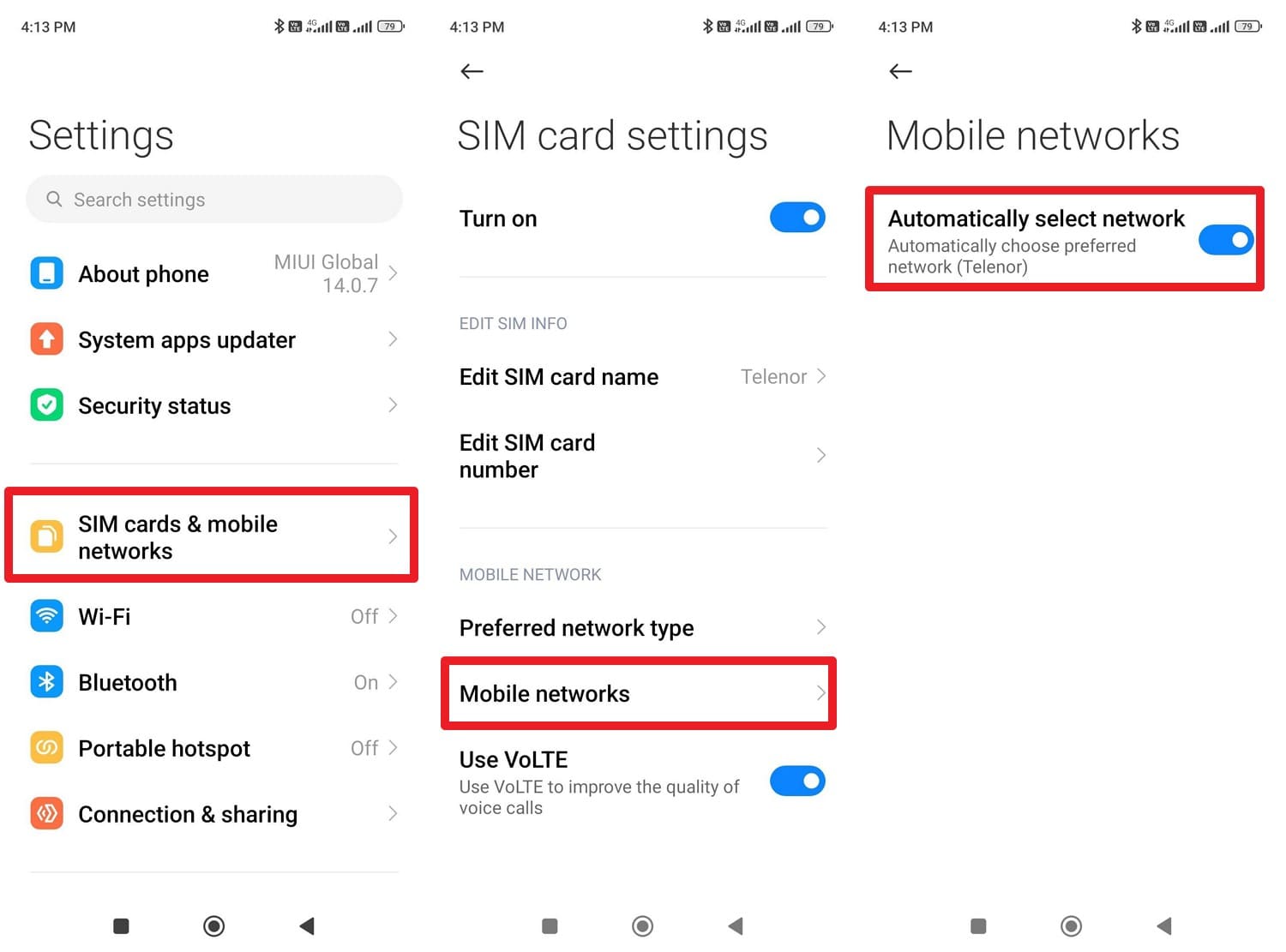
Choose the “SIM Cards & Mobile Networks” option in the settings, then select “Mobile Networks” after choosing the SIM you want to view the status for. Here, enable the “Automatically Select Network” option; if it doesn’t show carrier options, it's locked.
For iPhone
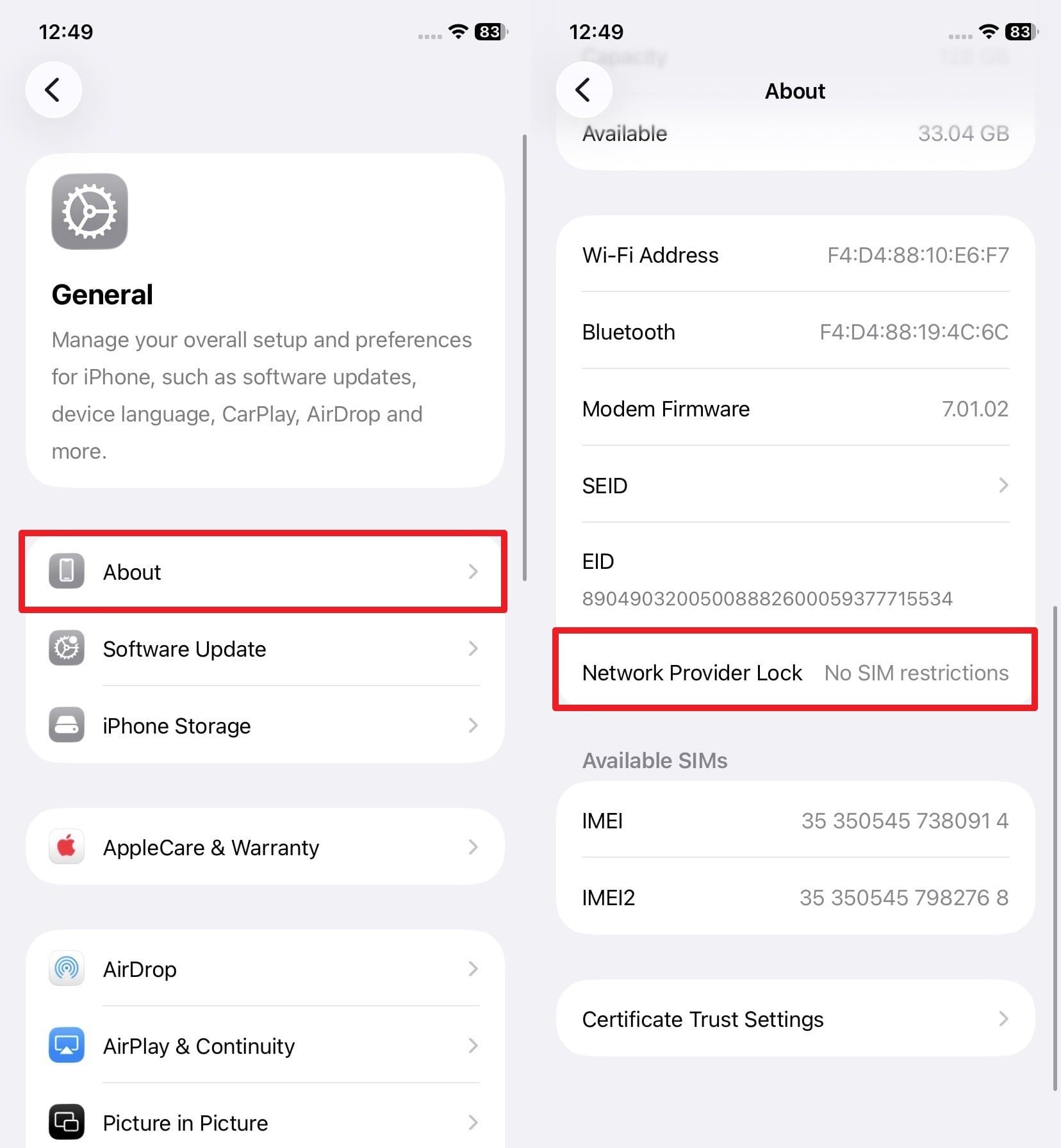
In the “General” settings, choose the “About” option and locate the “Network Provider Lock” option. If you see the “No SIM Restrictions” option, the phone is unlocked; if not, it's locked.
Method 3: Use IMEI Checker to Verify Lock Status Online
You can also use IMEI-based online tools to check SIM lock status, and a few options are given below:
1. Dr.Fone Online Unlock
With Dr.Fone Online Unlock, you can access 20 types of device verification for Android and iOS. From carrier lock to Apple Activation Lock, iCloud account status, or Blacklist Check, Xiaomi Activation Lock Check, the tool handles all. Additionally, the tool only requires IMEI details and provides a guide for users who don’t have them. Since it takes only 2 simple steps, users can also save the detailed report for later if they want to contact support.
Guide to Check the Carrier Lock Status via Dr.Fone Online Unlock
-
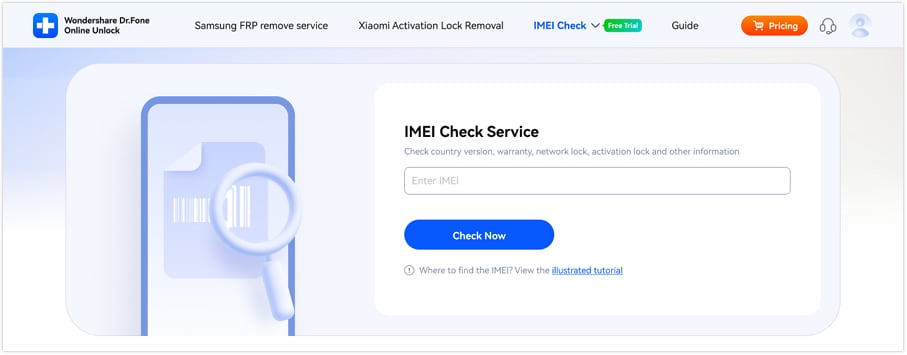
Step 1 Locate the IMEI Check Online Tool
Tap the “IMEI Check” menu and choose the carrier lock check option for Android or iOS. After that, enter the device's IMEI details and press the “Check Now” button.
-
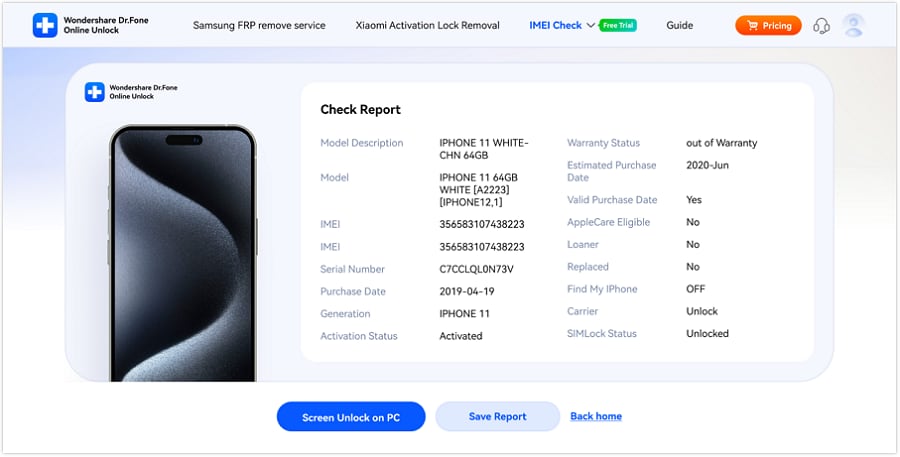
Step 2 See Carrier Status and Save the Report
As the tool displays the device details, check whether the “Carrier” option shows “Locked” or “Unlocked.” There, you can also export the results by picking the “Save Report” button.
2. IMEI.ORG
For users who wonder if my phone is locked, use this tool to get the FMI, carrier, and SIM lock status report that you can copy later. Additionally, the tool can identify the device's original network operator and the country of origin. This platform also offers API access for businesses, such as repair shops, and can be used in 2 steps, as follows:
-
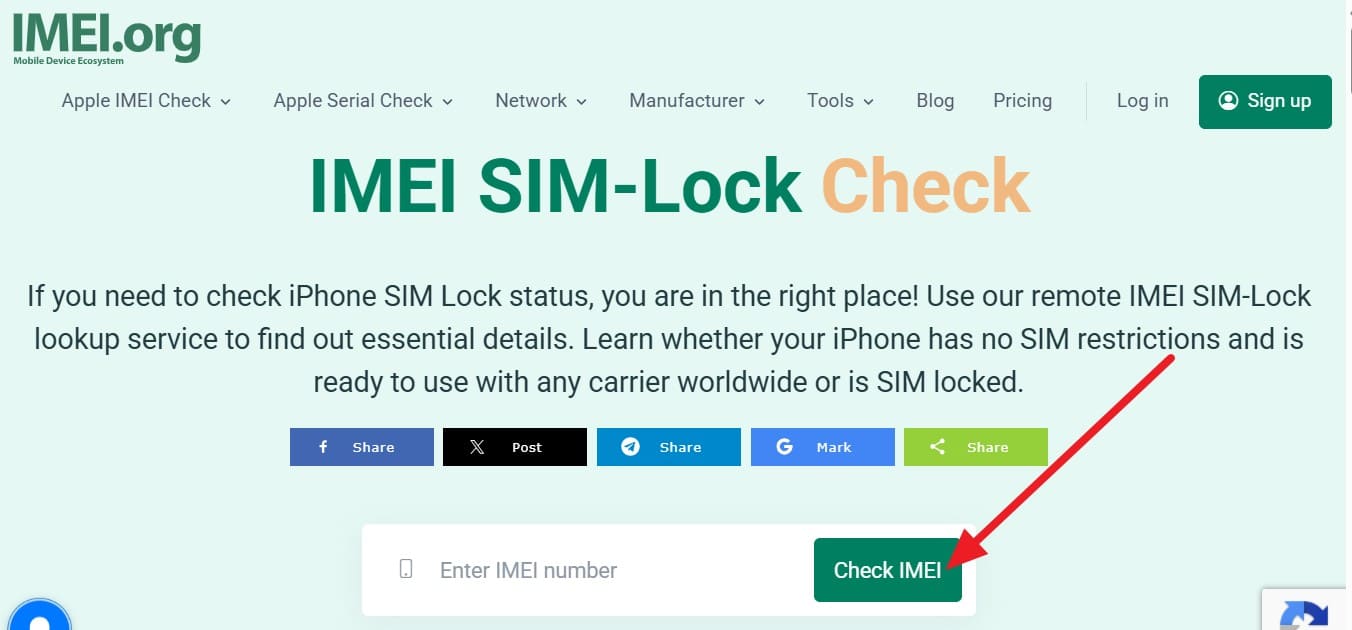
Step 1 Add the IMEI details in the given textbox and press the “Check IMEI” button.
-
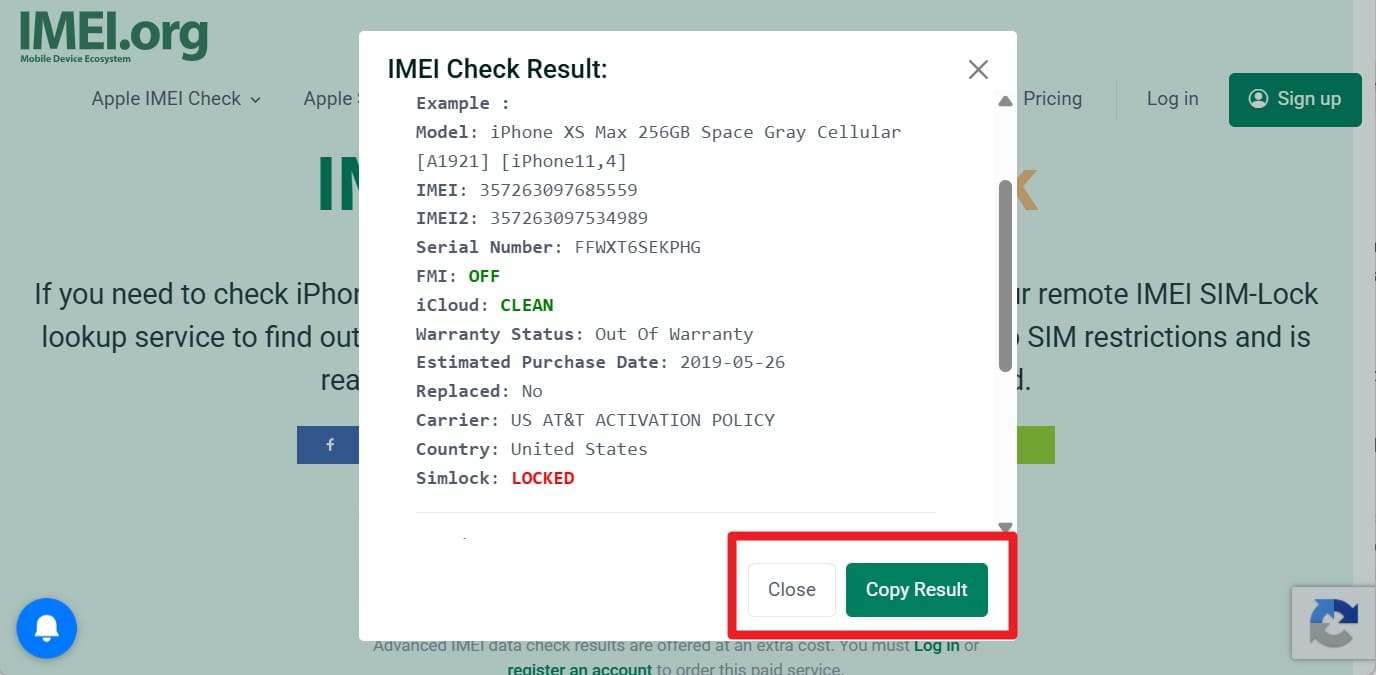
Step 2 As you get the SIM lock status details, "Close" the pop-up menu or "Copy Results."
3. IMEI24
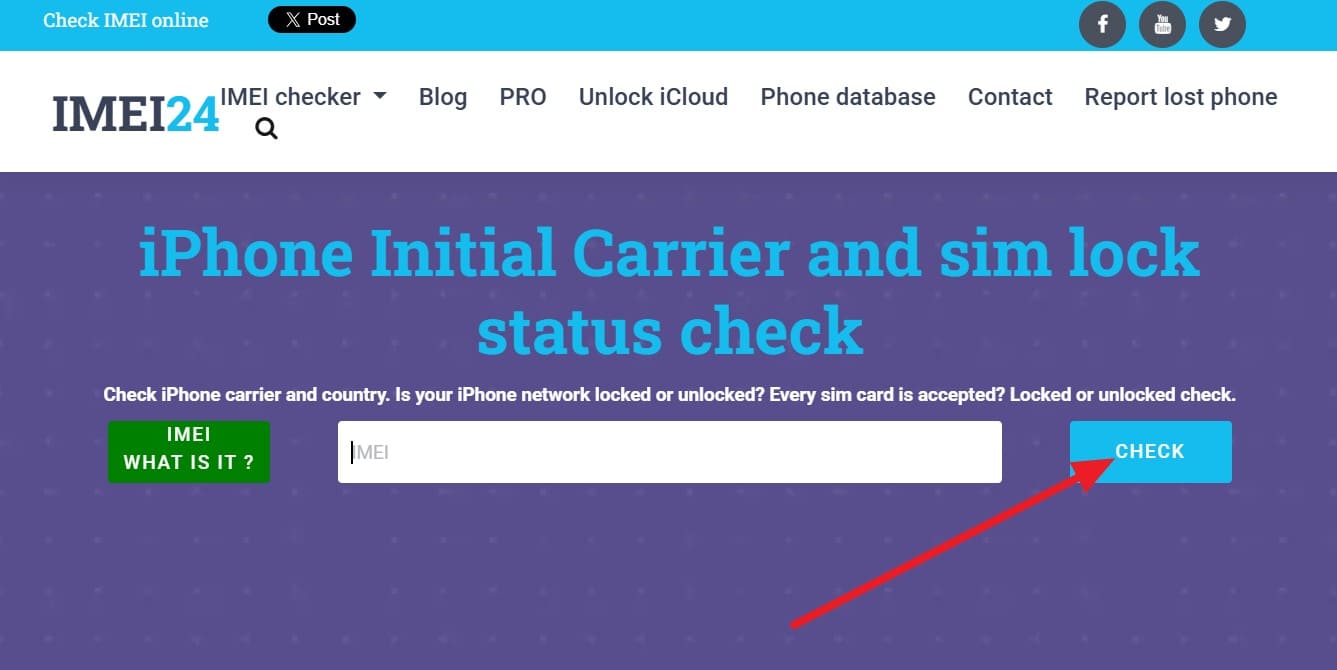
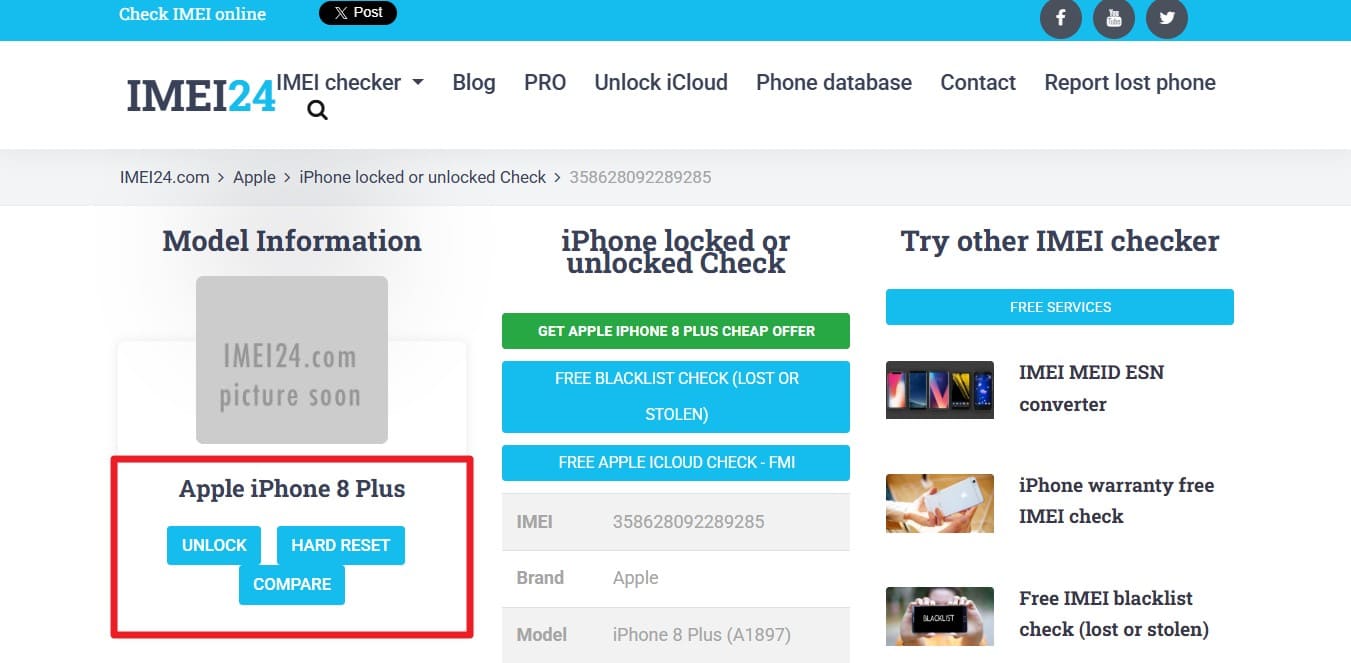
You can also check the SIM lock status with this tool, which provides details on the device's initial carrier and the specific country where it was originally sold. Through this, you can also get details on the Activation Policy assigned to the device, to understand the rules governing the device's network restrictions. Upon verification, the tool displays the SIM lock details that you can later compare or hard reset, as guided:
-
Step 1 On the site, add the IMEI details and tap the “Check” button.
-
Step 2 When you receive the status report, choose “Hard Reset” or “Compare” as you prefer. Moreover, you can scroll down to check and confirm the SIM status of your smartphone.
4. iUnlocker
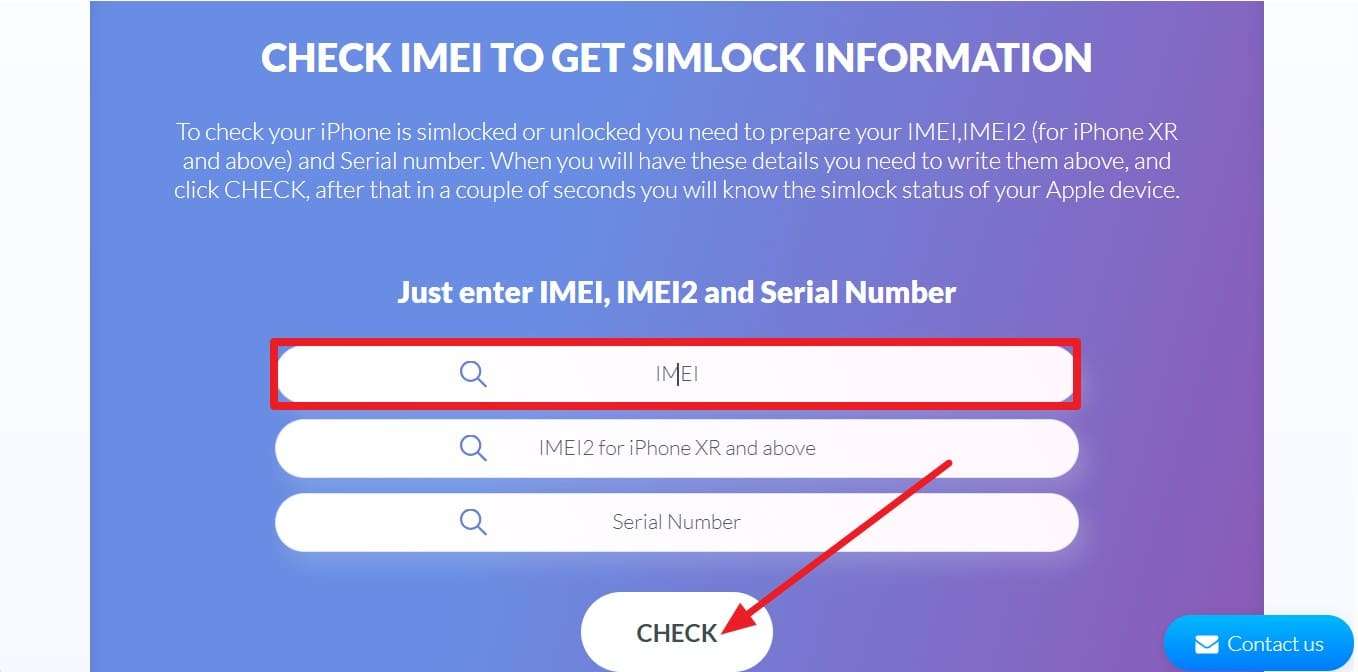
For the SIM lock check, it can perform IMEI and IMEI 2 checks for iPhone XR and above. Upon detection, it provides the network provider with the iPhone's original lock status at the time of sale and the country of purchase. Users can also access the Next Tether Activation Policy and the device's basic hardware information details, as demonstrated:
In the “IMEI” section, enter the details, then press the “Check” button. Later, after accessing the advertisement, you can get the SIM lock and other details.
To check SIM lock status, if you want to know which tool is the right, quick option, review the mentioned table:
| Feature | Dr.Fone Online Unlock | IMEI.ORG | IMEI24 | iUnlocker |
|---|---|---|---|---|
| Best For | Complete device verification and SIM unlock support | Bulk IMEI checks and API integration | Carrier details and comparison tools | iPhone activation and policy checks |
| Lock Status Details | Carrier lock, blacklist, FMI, and MDM details | SIM lock and carrier information | SIM lock and activation policy details | Carrier lock and tether policy details |
| Speed | Instant results in a few steps | Fast verification process | Moderate response time | Fast status detection |
| Data Depth | Detailed reports with 20+ metrics | Standard carrier and lock details | Carrier and activation policy details | Activation policy and tether information |
| Blacklist Check | Supported | Supported | Supported | Limited support |
| Report Export | Save downloadable reports | Copy result summaries | Not available | Not available |
| Additional Tools | iCloud/FMI, MDM, Samsung FRP, SIM unlock utilities | Carrier ID lookup and API access | Device comparison and hard reset guides | Next Tether activation policy details |

Method 4. Contact Your Carrier for SIM Lock Status
As a last option, contact support to check the SIM lock status, as they have official device records tied to your IMEI. They can confirm whether the phone is locked or unlocked and let you know whether you qualify for an unlock by submitting a request.
Part 4. SIM Lock on Your Phone? How Can Dr.Fone Unlock It?
Now that you know if my phone is locked and if it shows “Locked,” unlocking tools like Dr.Fone Online Unlock can bypass the network restrictions in 3 simple steps. The tool is designed to support multiple carriers, including AT&T, T-Mobile, and Sprint, with others added in its weekly updates. From older Android and iPhone devices to the latest, it can remove the SIM lock by submitting a cloud request.
Unlike other options, the tool only requires the IMEI details and guarantees the unlock is permanent. Additionally, it requires no jailbreaking or rooting and bypasses network restrictions without a learning curve. Upon submitting the request, you can track the progress via email and Unlock History, which will take 0-24 hours only.
Guide to Remove the SIM Lock via Dr.Fone Online Unlock
-
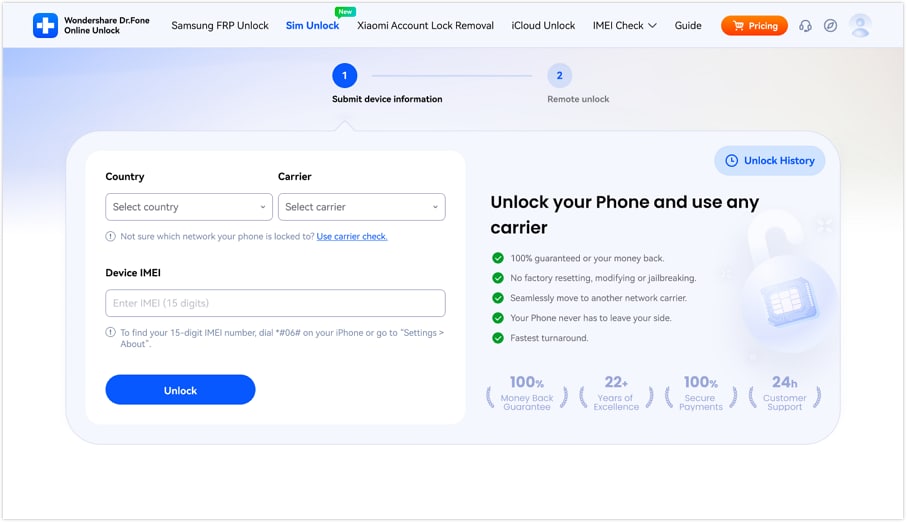
Step 1 Add the Details on the Dr.Fone Online Unlock
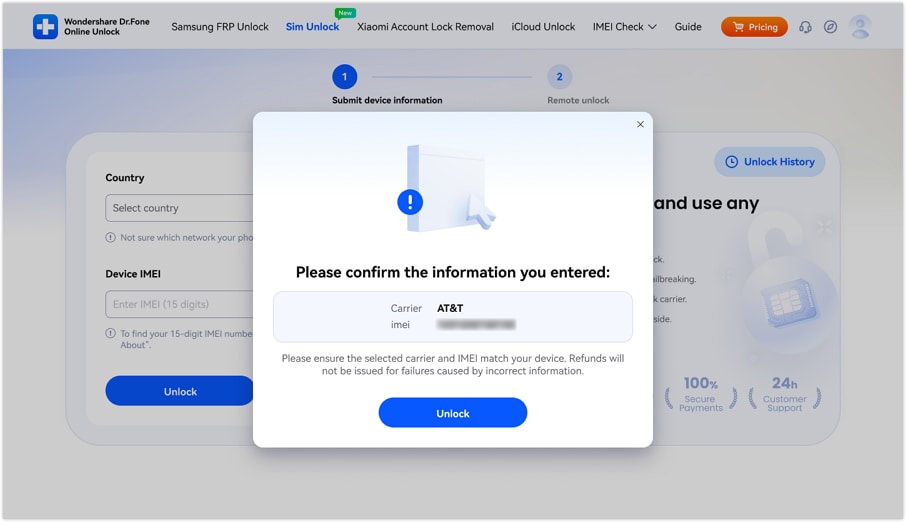
Add the carrier, country, and IMEI details on the “SIM Unlock” tool and tap the “Unlock” button.
-
Step 2 Confirm the Details and Proceed with Unlocking
When the pop-up menu appears, confirm the details and press the "Unlock” button again.
-
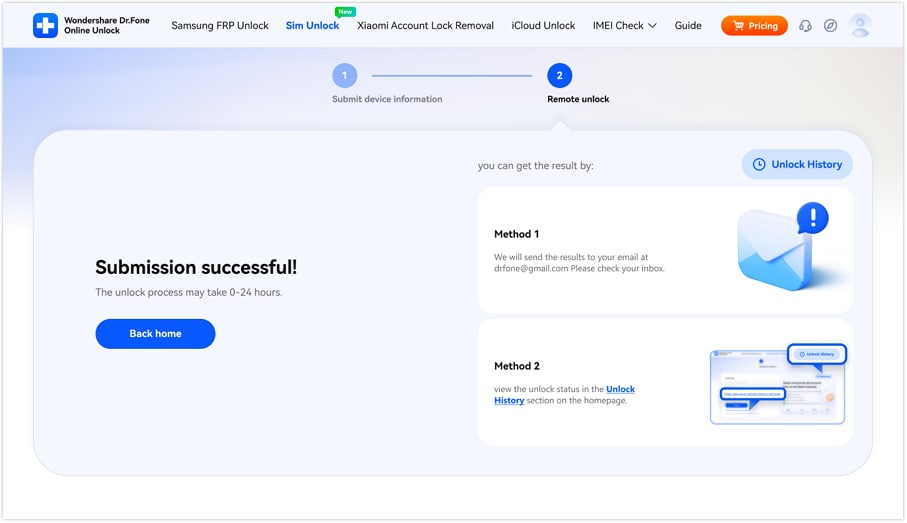
Step 3 Track the Progress on Dr.Fone Online Unlock
This will submit the request to the cloud and will take 0-24 hours to process. On the new interface, you can choose the 2 listed methods to track the SIM unlocking progress.
Conclusion
One needs to check the SIM lock status for switching carriers, traveling abroad, or increasing resale value. Whether accessing manual settings or physical SIM swap, this guide has explained how IMEI Checkers like Dr.Fone Online Unlock are the best choice. Since other tools come with advertisements and limited device details, you can get 20+ details and can later unlock network restrictions via cloud requests.
FAQ
-
1. What is the difference between a SIM lock and an iCloud/Activation lock?
A SIM lock restricts the phone to a specific carrier, such as AT&T. However, iCloud Lock (Activation Lock) is a security feature that ties a device to a specific Apple ID to prevent unauthorized use if the device is lost or stolen. -
2. Can a blacklisted phone be SIM unlocked?
Yes, but it won’t help, as even if you successfully remove the SIM lock on a blacklisted device, it still won’t connect to most cellular networks. This is because the IMEI is itself banned globally when it is reported lost, stolen, or associated with unpaid bills. -
3. Does 5G support depend on my SIM lock status?
Not directly; however, if your phone is locked to a carrier that does not support 5G in your area, you won't get 5G speeds. Once unlocked, you can switch to any 5G-enabled provider to use your hardware’s full speed.