ChatGPT
 Perplexity
 Gemini
 Claude
 Grok
Grok
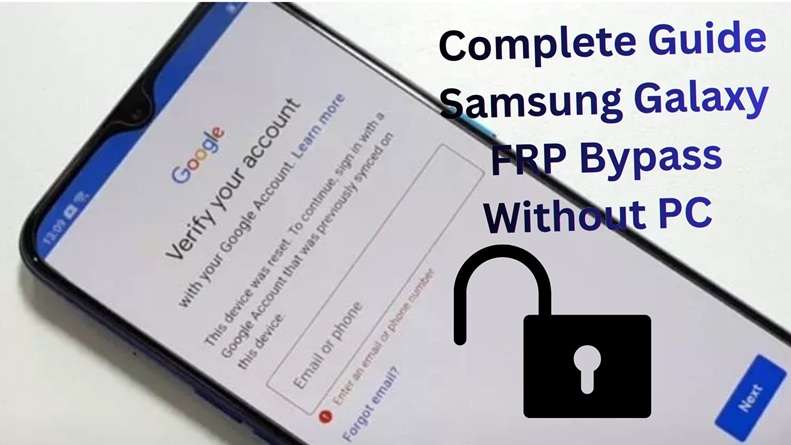
A Samsung phone can look ready to use, but one Google verification screen can stop the whole setup. This often happens after a factory reset when FRP is still active. For real owners, used-phone buyers, and repair users, the next question is simple: which tool is safe, clear, and current enough for newer Samsung models?
This Dr.Fone FRP review looks at Dr.Fone Online Unlock as the main choice, then compares it with the desktop version and major rivals. You will see what it supports, where it works best, what it costs, and how to use it without getting lost in risky shortcuts.
In this article
What is Dr.Fone and what is its reputation in the mobile software space?
Dr.Fone is a phone toolkit made by Wondershare. It is not only an FRP tool. It also helps users unlock, recover, repair, transfer, back up, and manage phone data. Wondershare Dr.Fone is a “one-stop solution” for iOS and Android phone management.
Here is the quick picture:
| Point | Simple Meaning |
|---|---|
| Brand behind it | Wondershare |
| Product name | Dr.Fone |
| Main use | Phone unlock, repair, recovery, transfer, backup, and management |
| Samsung FRP use | Helps remove Google FRP lock from supported Samsung phones |
| Best-known option for this article | Dr.Fone Online Unlock |
| Other option | Dr.Fone Desktop – Screen Unlock Android |
Wondershare Dr.Fone has 22+ years of experience in software and has served 50 million+ users. This gives the tool more trust than random FRP files or unknown APK links.
For Samsung users, the name appears often because Dr.Fone offers a direct FRP solution. Its Online Unlock service is made for Samsung FRP removal and supports newer Android and One UI versions. It supports Samsung FRP removal through a web-based process and also points users to the desktop version for other models.
Why Samsung Users Notice Dr.Fone
- It works as a full phone toolkit, not just a single unlock page.
- It has a Samsung-focused online FRP service.
- It also has a desktop unlock tool for deeper cases.
- It supports screen lock removal, including PIN, pattern, password, fingerprint, and face lock.
- It lists support for Android 16 and newer Samsung models like Galaxy S25/S26 on its Screen Unlock page.
- Its Online Unlock service is useful for users who do not want a complex PC setup.
Quick Trust Check
Dr.Fone gives two routes. The online route is easier for Samsung FRP. The desktop route is better when you also need screen lock removal or wider Android support. That is why many Dr.Fone Samsung tutorial articles place it as a safer paid option after official account recovery methods fail.
What specific Samsung FRP removal features does Dr.Fone offer?
Dr.Fone does not offer just one FRP method. It gives users two clear choices:
| Dr.Fone Version | Best For | Main Feature |
|---|---|---|
| Dr.Fone Online Unlock | Samsung FRP only | Browser-based Samsung FRP removal |
| Dr.Fone Desktop – Screen Unlock Android | FRP + screen locks + wider Android use | Desktop-based unlock toolkit |
The Main Star: Dr.Fone Online Unlock for Samsung FRP
Dr.Fone Online Unlock is the main focus of this Wondershare FRP guide. It is built for Samsung users who are stuck on Google verification after a factory reset.
The online route keeps the process simple. Users enter their Samsung details, submit the request, and follow guided steps from the browser. Wondershare’s official Online Unlock page lists support for Android 14, Android 15, Android 16, Android 17, and One UI 5.0 to One UI 8.5 and beyond.
Quick Feature Snapshot
| Feature | Details |
|---|---|
| Online FRP removal | Starts from the browser |
| Samsung-focused support | Made for Samsung Google lock cases |
| Android 14–17 coverage | Useful for newer Samsung phones |
| One UI 5.0–8.5+ support | Covers many recent Samsung software versions |
| IMEI/SN check | Helps match the device with the unlock route |
| 24-hour support | Help is available during the process |
When Dr.Fone Online Unlock Makes Sense
This option fits users who want a guided Samsung FRP process without testing random shortcuts.
| User Situation | Why It Fits |
|---|---|
| A used Samsung phone asks for the old Google account | It targets Samsung FRP removal |
| The owner forgot the synced Google account | It gives a paid route after official recovery fails |
| The phone was reset too early | It helps with post-reset Google verification |
| The user does not want desktop software | The online process is easier to start |
| Old manual tricks no longer work | It supports newer Android and One UI versions |
Best Supported Samsung Devices
Dr.Fone Online Unlock is mainly designed for Samsung phones and tablets. Wondershare lists support for Galaxy models, including S, Z, C, and W series. Its newer Samsung FRP content also mentions A, M, F, S, Z, Fold, and Flip series support.
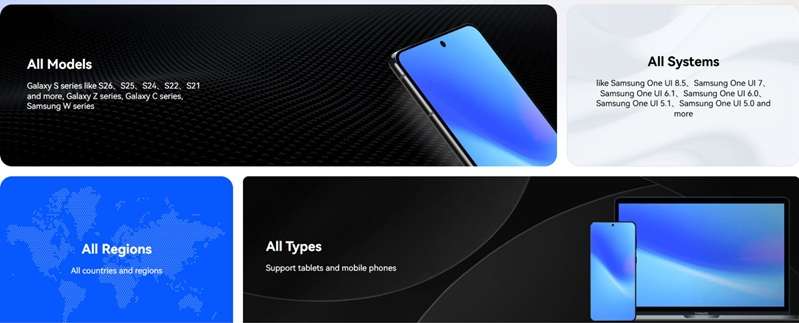
Support may still vary by exact model number, Android version, One UI version, region, firmware, and security patch. So users should check their device inside the Dr.Fone Online Unlock flow before payment.
Pricing and Refund Notes
Dr.Fone Online Unlock is a paid Samsung FRP service. Its main page says plans start from US$0.99, but actual FRP pricing changes by device type and Android version.
| Plan | Best For | Weekly Price |
|---|---|---|
| FRP Unlock – Android 14 or earlier | Samsung devices on Android 14 or below | $59.95/week |
| FRP Unlock – A/M/F Series | Galaxy A, M, F series on Android 15/16/17 or later | $85.95/week |
| FRP Unlock – S/Z Series | Galaxy S and Z Fold/Flip on Android 15/16/17 or later | $115.95/week |
Each plan includes 1 device unlock per week, an 80% faster unlock queue, VIP support, higher success rate technology, and a full refund for unsuccessful unlocking, based on the plan screen.
Users are eligible for a full refund when the unlock fails.
Users must still retain their order ID, device IMEI/SN, screenshots, and reply messages. Refunds can be approved based on whether the details of your device were correct and if you attempted the steps.
A detailed step-by-step tutorial for Dr.Fone Online Unlock
-
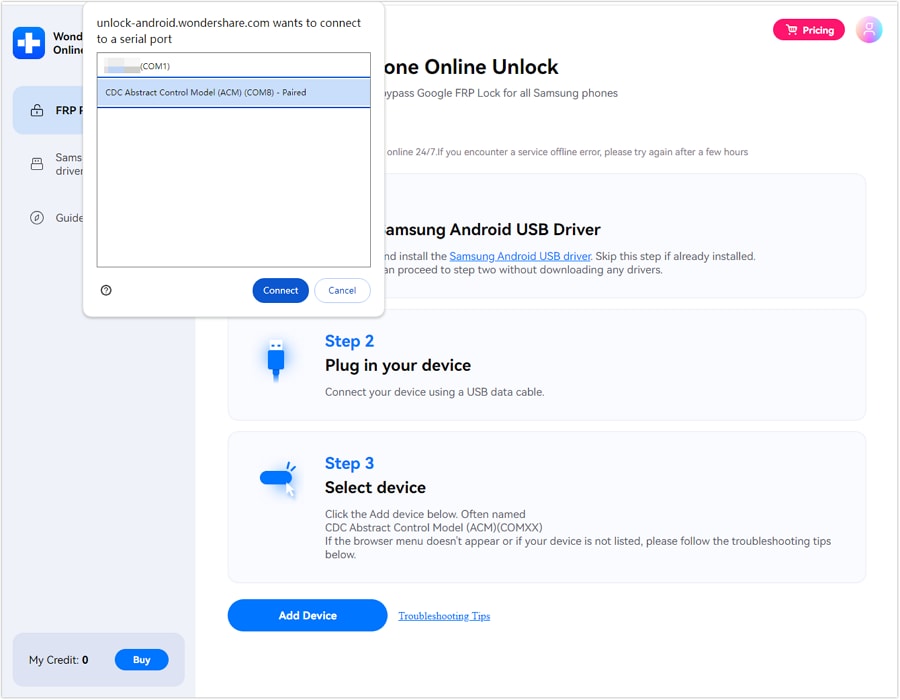
Step 1 Access Dr.Fone Online Unlock from any Samsung device.
-
Step 2 Insert the IMEI of your locked Samsung Mobile so the service is able to verify your device.
-
Step 3 Proceed by submitting your unlock request and go on with on screen instructions.
-
Step 4 You need to keep your Samsung mobile on and connected to Wi-Fi or mobile data while Dr. Fone performs the mobile FRP removal.
Pros of Using Dr.Fone Online Unlock
- Wide Android support: Works with 27+ brands and 2,000+ Android models.
- Strong Samsung FRP support: Supports Samsung FRP removal for Android 16, 15, 14, 13, and earlier versions.
- Online unlock option: Dr.Fone Samsung FRP online method can remove FRP without APK installation.
- No-data-loss option: Unlock some Samsung or LG devices without a factory reset and without losing data.
- Extra repair tools: Desktop Dr.Fone also offers data recovery, backup, and system repair tools.
- Windows/macOS support: Supports Windows 7+ and lists macOS 10.8+ support.
2. Dr.Fone Desktop – Screen Unlock Android: The Power User Option
Dr.Fone - Screen Unlock (Android) is the stronger option when the case is bigger than a simple Samsung FRP. It needs a computer, but it gives more unlock tools in one place.
This section of the Dr.Fone Samsung tutorial fits users who need FRP removal, screen lock removal, or wider Android support.
 Unlock an Android phone in seconds.
- Remove PIN, pattern, password, and fingerprint.
- Bypass Google FRP lock easily.
- Works on all Android brands & models.
- No tech skills required – user-friendly.

Dr. Fone Screen Unlock Android Description Snapshot
| Aspects | Details |
|---|---|
| Product name | Dr.Fone – Screen Unlock Android |
| Made by | Wondershare |
| Main purpose | Remove Android screen locks and bypass Google FRP |
| Best for | Samsung FRP, forgotten PIN, pattern, password, fingerprint, or face lock |
| Platform | Windows and Mac are listed on the Wondershare pages |
| Device use | 1–5 mobile devices with 2 PCs/Macs, based on the current pricing page |
| Main difference from Online Unlock | Desktop version gives more unlock tools, not only Samsung online FRP |
What Features Does Dr.Fone Desktop Offer?
Dr.Fone Desktop is not only an FRP tool. It works more like a full unlock module.
| Feature | What It Means for Users |
|---|---|
| Samsung FRP removal | Helps remove the Google verification lock on supported Samsung phones |
| Screen lock removal | Removes PIN, pattern, password, fingerprint, and face lock |
| Android 16 support | Wondershare lists AI-powered FRP support for Android 16 and Samsung S25/S26 devices |
| Samsung Snapdragon FRP support | Wondershare claims strong FRP support for Samsung Snapdragon devices |
| Wider Android brand support | Supports major brands like Samsung, Huawei, Xiaomi, OPPO, Vivo, LG, and OnePlus |
| Older Samsung/LG no-data-loss unlock | Some older Samsung and LG models may be unlocked without data loss |
| Technical support | Paid plans include technical support and software updates |
When Should Users Choose Dr.Fone Desktop Instead of Online Unlock?
Dr.Fone Online Unlock is better for simple Samsung FRP cases. Dr.Fone Desktop is better when users need more control.
| User Situation | Better Choice |
|---|---|
| Only Samsung and Google FRP lock after reset | Dr.Fone Online Unlock |
| Forgot PIN, pattern, password, fingerprint, or face lock | Dr.Fone Desktop |
| Need FRP plus screen lock removal | Dr.Fone Desktop |
| Working with non-Samsung Android phones | Dr.Fone Desktop |
| Need a toolkit for more than one phone issue | Dr.Fone Desktop |
| Do not want to install software | Dr.Fone Online Unlock |
Pricing: How Much Does Dr.Fone Desktop Cost?
Wondershare’s official pricing page lists these Screen Unlock Android plans:
| Plan | Current Listed Price | Notes |
|---|---|---|
| Monthly Plan | $29.95/month | Auto-renewal, cancel anytime |
| Annual Plan | $39.95/year | Auto-renewal, cancel anytime |
| Perpetual Plan | $49.95 | One-time fee |
A detailed step-by-step tutorial for Desktop version
-
Step 1 Install Dr.Fone on Your Computer
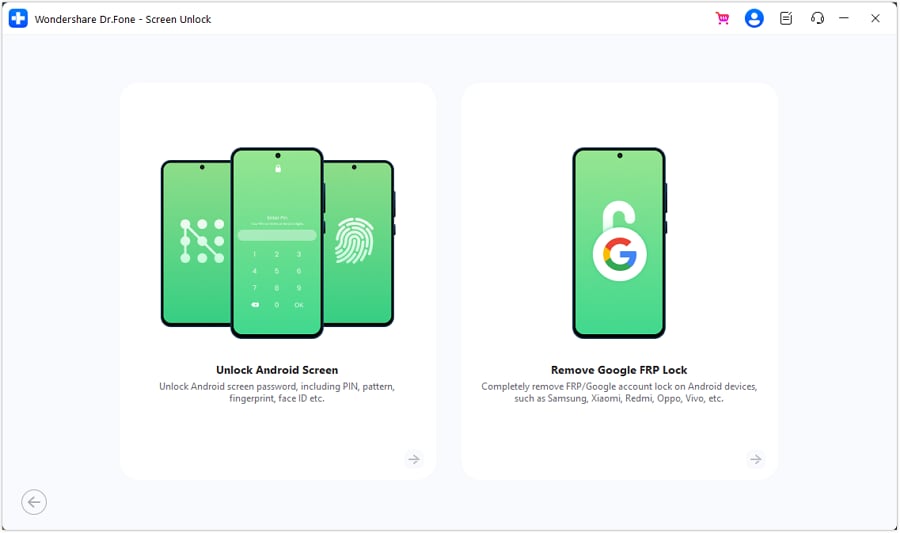
Download and install Dr.Fone from the official Wondershare site. Open the program and choose Screen Unlock.
-
Step 2 Choose Android Unlock
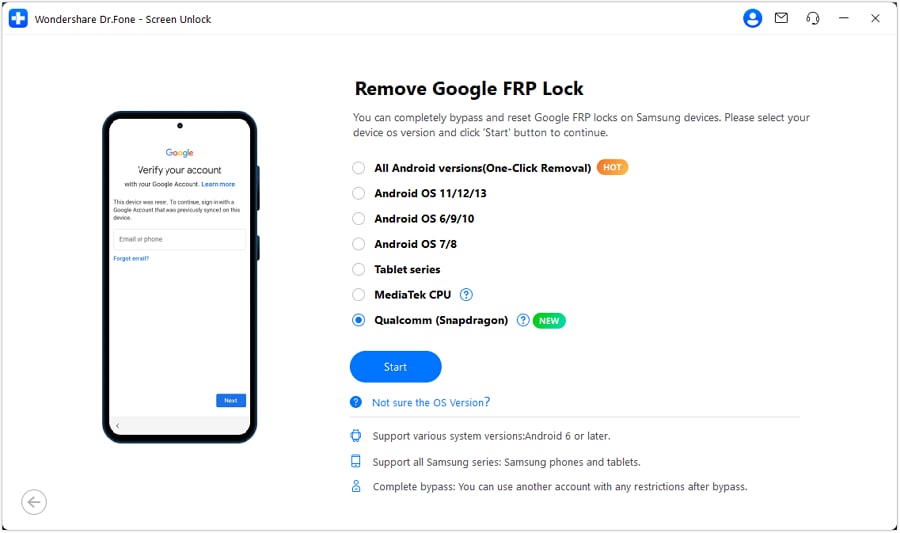
Select the Android option. Then choose the relevant function, such as Remove Google FRP Lock or Remove Screen Lock.
-
Step 3 Connect Your Samsung Phone
Use a good USB cable. Keep the phone charged. Wait for the software to detect the device.
-
Step 4 Select Device Brand and Android Version
Pick Samsung and choose the Android version shown on your device. This matters because FRP workflows change between Android versions.
-
Step 5 Follow the Prompts
The software will show on-screen instructions. Follow them in order. Keep the cable connected until the process ends.
-
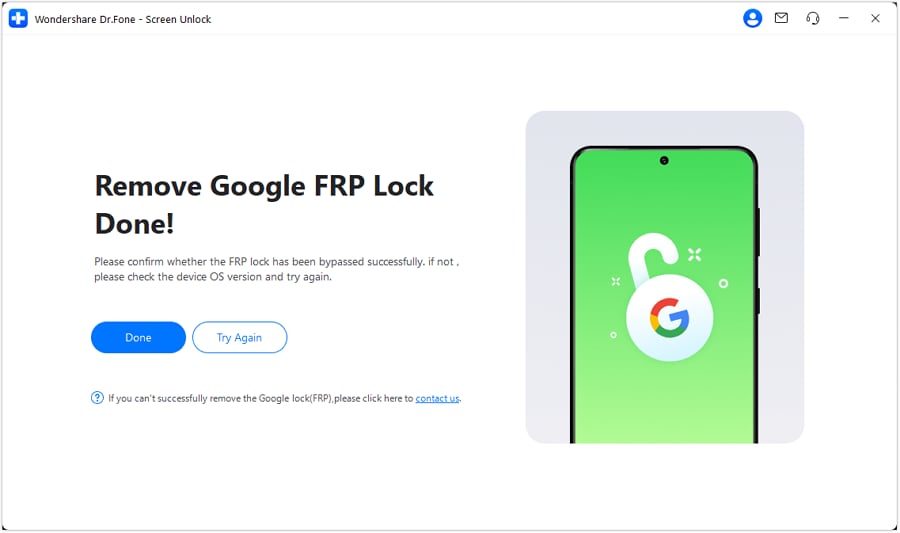
Step 6 Restart and Set Up the Phone
Once the process finishes, restart the phone. Add your own Google account and a new screen lock.




How does Dr.Fone compare to its main competitors?
Dr.Fone has two Samsung FRP routes: Online Unlock and Desktop Screen Unlock. The online version is more direct for Samsung FRP. The desktop version is better when users also need screen lock removal.
For a fair Dr.Fone FRP review, it is better to compare it with iMobie’s Android tool, MagFone Android Unlocker, and Tenorshare 4uKey for Android.

Quick Market View
| Tool | Best Use | Main Point |
|---|---|---|
| Dr.Fone Online Unlock | Samsung FRP without full desktop setup | Best for Samsung-only FRP cases |
| Dr.Fone Desktop | FRP + Android screen locks | Better for wider unlock needs |
| iMobie DroidKit | Android FRP and repair toolkit | Strong all-in-one Android suite |
| MagFone Android Unlocker | Android screen lock + FRP | Simple desktop unlock tool |
| Tenorshare 4uKey Android | Android screen lock + Samsung FRP | Budget-friendly monthly option |
Competitive Comparison Table
| Tool | Starting Price* | Android Version Support | PC Required | Samsung / Model Support | Ease of Use | Success / Support Claim | Money-Back Policy |
|---|---|---|---|---|---|---|---|
| Dr.Fone Online Unlock | Price shown in the online flow | Android 14, 15, 16, 17; One UI 5.0–8.5+ | No full desktop app needed | Samsung Galaxy models and systems; A/M/F/S/Z/Fold/Flip listed in Samsung FRP guide | Very easy; browser-based guided process | Wondershare states fast operation, technical help, and a full refund if the unlock fails | Full refund if unlocking fails |
| Dr.Fone Desktop – Screen Unlock Android | $29.95/month; $39.95/year; $49.95 perpetual | Android 16 support listed; also supports Android screen lock removal | Yes | 27+ brands and 2,000+ Android models; Samsung FRP included | Easy, but needs USB setup | Wondershare lists FRP removal, screen lock removal, updates, and technical support | Refund handled through Wondershare support; check terms before purchase |
| iMobie DroidKit FRP Bypass | $39.99 for FRP Bypass module | Android 6 to Android 16 | Yes | Samsung, Xiaomi, Redmi, and more; 20,000+ Android devices listed on the DroidKit page | Guided desktop process | iMobie says each solution is matched to the device and Android version | 60-day money-back guarantee listed by iMobie |
| MagFone Android Unlocker | $29.95/month; $39.95/year; $59.95 lifetime | Android 16 support is listed on product/store pages | Yes | Samsung, Vivo, OPPO, and many Android models; 6,000+ models claimed on the product page | Simple desktop flow | Claims screen lock and Google FRP removal with guided steps | 5-day refund for monthly; 30-day refund for yearly/single license |
| Tenorshare 4uKey for Android | $24.95/month; $49.95 lifetime | Android 16 support appears on the Tenorshare site; Samsung FRP support is listed | Yes | Many Samsung models are listed, including S, A, M, and Tab examples | Simple desktop process | Lists Android unlock, Google FRP bypass, and early Samsung no-data-loss unlock | 30-day money-back guarantee under eligible refund cases |
Choose Dr.Fone Online Unlock if the issue is only Samsung FRP and the user wants the simplest route.
Choose Dr.Fone Desktop if the phone also has a PIN, pattern, password, fingerprint, or face lock issue.
Choose iMobie DroidKit if the user wants a wider Android repair suite with FRP support.
Choose MagFone Android Unlocker if the user wants a simple desktop unlock tool at a similar price.
Choose Tenorshare 4uKey if the user wants a lower starting monthly price and Samsung FRP support.
For this Wondershare FRP guide, Dr.Fone Online Unlock still feels like the most focused Samsung FRP option. The desktop version is better when the user needs more than FRP removal.
Conclusion
Samsung FRP removal is easier when the tool matches the case. Dr.Fone Online Unlock is best for users who only need Samsung Google lock removal without a full PC setup. Dr.Fone Desktop fits users who also need PIN, pattern, password, fingerprint, or face lock removal. iMobie DroidKit suits broader Android repair needs, while MagFone and Tenorshare work for users who want simple desktop unlock tools.
Still, this Dr.Fone FRP review shows Dr.Fone has a stronger Samsung focus. Its online route, newer One UI support, desktop backup option, and refund path make it a more balanced choice for many Samsung users.
FAQ
-
1. What’s the difference between Dr.Fone Online and Dr.Fone Desktop for FRP removal?
Dr.Fone Online is the easiest Samsung FRP option. It works through a browser-based process and does not need a full desktop setup. Dr.Fone Desktop needs a PC, but it also removes screen locks like PIN, pattern, password, fingerprint, and face lock. Use Online for Samsung FRP only. Use the desktop for FRP plus screen lock issues. -
2. Does Dr.Fone work on Samsung Galaxy S25?
Yes. Wondershare lists Dr.Fone support for Samsung S25 and Android 16 FRP cases. It also has a Samsung S25/S24 Android 16 FRP guide. Still, users should check their exact model and Android version before payment. -
3. Is Dr.Fone FRP removal permanent or temporary?
Dr.Fone presents FRP removal as a full unlock, not a temporary session. After removal, the user can regain access and add a new Google account. But FRP can activate again if the phone is reset later while a Google account is still linked. -
4. How long does Dr.Fone take to remove Samsung FRP?
It depends on the model, Android version, and method used. Wondershare says its newer Android 16 FRP flow can take about 2–3 minutes in typical cases. Samsung FRP without PC guide also mentions an online method that can take around 10 minutes.