ChatGPT
 Perplexity
 Gemini
 Claude
 Grok
Grok
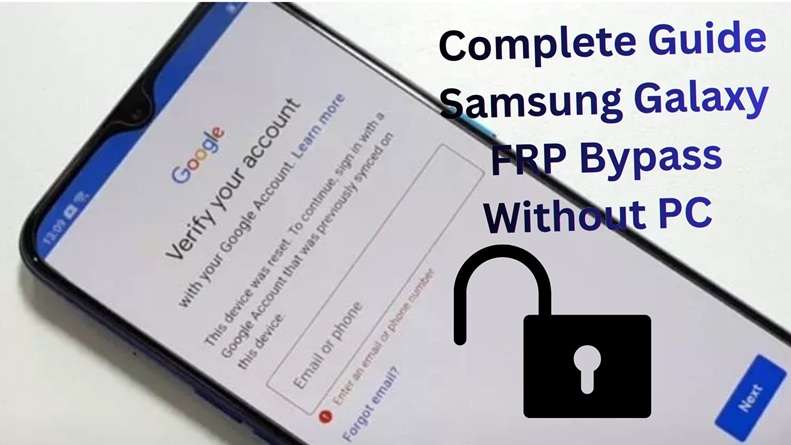
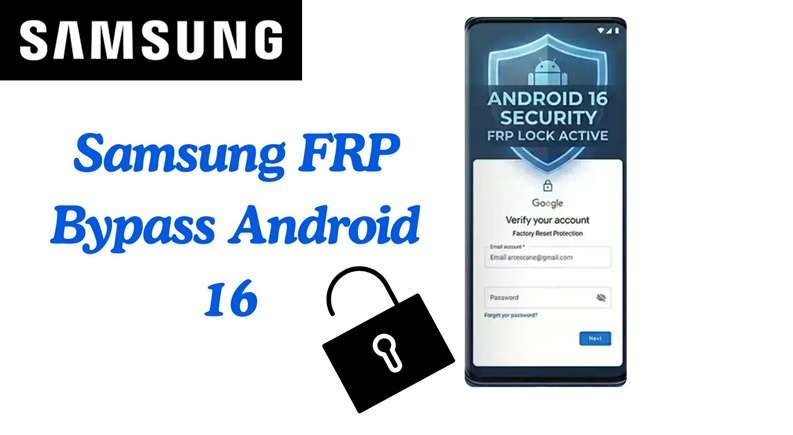
Google Factory Reset Protection (FRP) is built into every modern Samsung phone. It turns on the moment you add a Google account. Its job is simple. It keeps strangers out if your device is reset without permission. After a reset, the phone asks for the same Google login before it can be used again.
This works well for security. But it can also block real owners. You may forget your login. You may buy a used phone still linked to another account. Or you may reset your device without removing your account first. In all these cases, the phone stops at verification.
If you are facing this issue, this guide explains safe Samsung FRP bypass methods, simple recovery options, and when a tool can help.
In this article
What is Samsung FRP (Factory Reset Protection)?
Samsung FRP is a safety feature offered by Google. It runs Android 5.1 and supports the latest models. Its core purpose is to protect your mobile phone after a reset. FRP is active when you log in to your Google account and create a screen lock like pattern, PIN, or password, etc. If your device has been reset without deleting that account, Samsung will require the same Google login credentials.
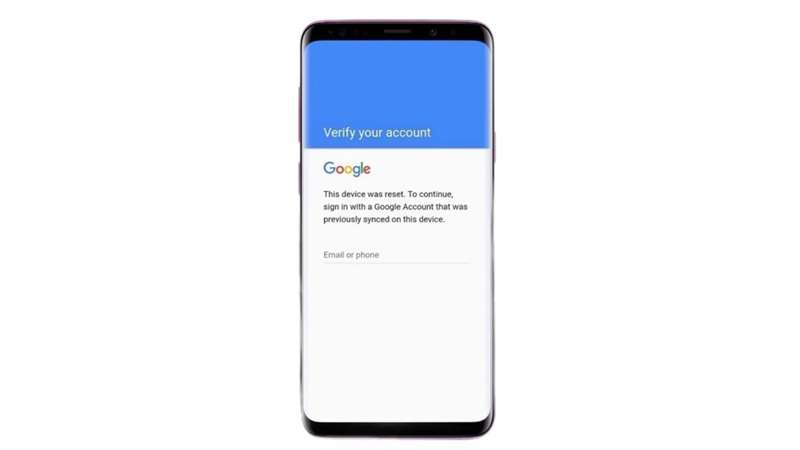
This means a stolen phone cannot be easily wiped and reused. But it can also block the real owner. This often happens after a hard reset, forgotten login, or used phone purchase. If no Google account was added before the reset, FRP will not appear. So, factory reset FRP only happens when the phone was linked to a Google account first.
Why does the FRP lock trigger after a factory reset?
FRP is triggered when the system detects a reset without proper sign-out. Here are the three main scenarios:
- Reset via Settings
This is the normal method. If you reset your phone from Settings without removing your Google account first, FRP will activate. The system assumes the device may not be in safe hands. - Reset via Recovery Mode
This uses hardware buttons. Many people use it when the phone is locked. But this method skips account removal. So, FRP lock triggers right after reboot. - Remote Reset via Google Find My Device
You can reset your phone online if it is lost. But once reset, the phone will still ask for the original account. This ensures security even from remote actions.
Each case requires account verification. If you cannot provide it, you will need a Samsung FRP bypass method.
What are the common Samsung FRP bypass methods?
Once FRP appears, the phone will not proceed until ownership is verified. The safest option is to enter the original Google account. But if you are the real owner and cannot access that login, other recovery methods may help.
The suitable way relies on the model of your Samsung mobile, the version of Android, and the security patch. Traditional methods work with older firmware; on the other hand, the latest models often require a PC or a reliable unlock tool. The following are the methods for Samsung FRP bypass, and when they work.
Method 1: Using ADB (Android Debug Bridge) commands via PC
The ADB method permits your PC to deliver commands to your Samsung mobile. A few of the users use this method for FRP Lock Removal when their mobile is compatible with ADB access. It is best used for older Android OS running from 5.1 to 10.
-
Step 1 Download the ADB setup file or Android SDK Platform Tools on your PC. Extract the files into a folder.
-
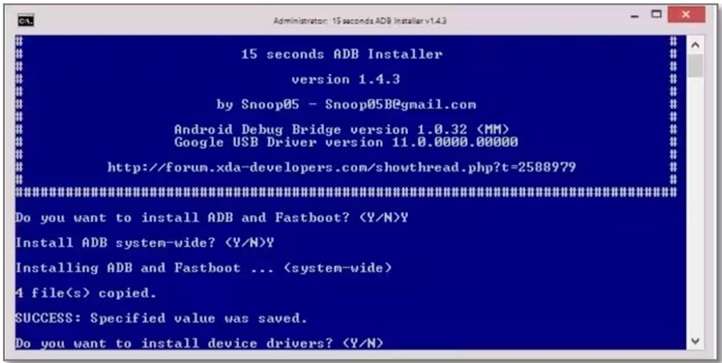
Step 2 Open the extracted folder -> adb setup. exe.
-
Step 3 Type Y and press Enter when the command window opens to install ADB. Again enter Y and then install device drivers.
-
Step 4 Power on your Samsung phone and connect it to the PC with a USB cable. Make sure USB debugging is enabled.
-
Step 5 Go back to the ADB folder on your PC. Hold the Shift key, right-click on an empty area, and choose Open command window here or Open PowerShell window here.
-
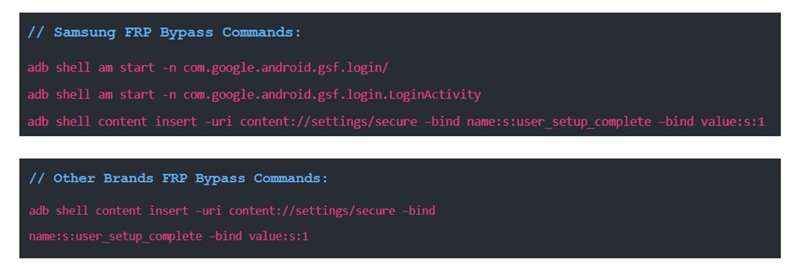
Step 6 Enter the required Samsung ADB commands one by one. Press Enter after each line.
-
Step 7 Wait until the commands finish running. Then restart your Samsung phone.
If the process is completed successfully, Google verification should be out of your way. Still, it is useless to affect newer Samsung phones because ADB-based routes are often closed by recent security updates; thus, this Samsung FRP bypass method has a very limited use.
Method 2: Using the Emergency Call Dialer Shortcut (#0#)
The Emergency Call method is a no-PC entry trick for older Samsung phones. It uses the setup screen to open a hidden test menu. But it does not work on most new devices. This route has been patched on numerous One UI 5.0+ phones and from Android 12 to Android 15 phones by Samsung.
This technique is better suited for older Samsung devices, especially Galaxy A50, S10, or some Galaxy A12 running Android 11.
-
Step 1 Turn on your Samsung mobile and complete the process to the Wi-Fi screen.
-
Step 2 On the first Welcome screen again
-
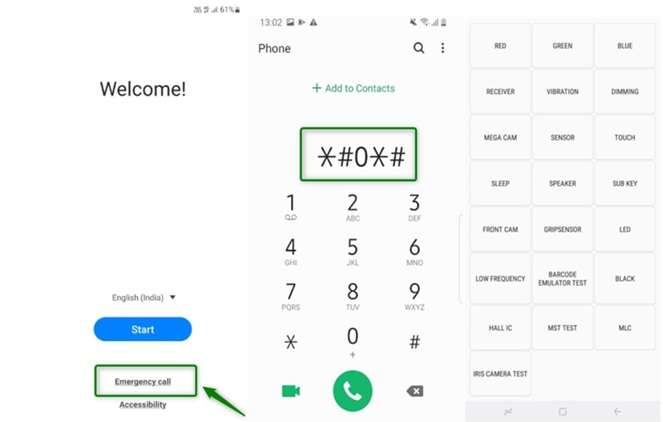
Step 3 At the bottom of the screen, tap on Emergency Call.
-
Step 4 Dial #0# on the keypad
-
Step 5 Wait until the Samsung test mode menu is opened.
-
Step 6 As the Reset Starts, Once You See Test Menu Phone Can Come to the next bypass steps.
-
Step 7 In most cases, you need a PC tool so that you can easily complete the Samsung FRP bypass process.
This method only helps open access to hidden settings. It does not always complete a full FRP lock removal by itself.
Method 3: Using a third-party bypass tool/online service
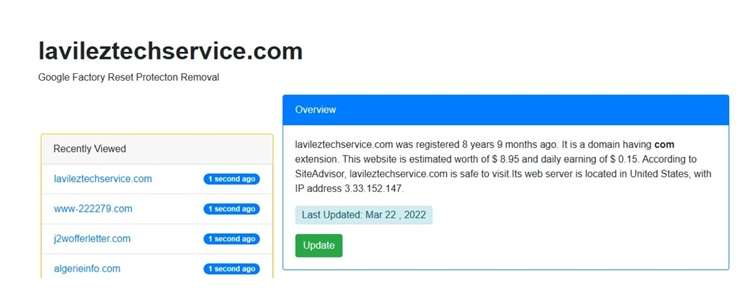
Some users use third-party tools or online services for FRP lock removal. These services often provide APK files or browser steps for Google account bypass. LavilezTechService is one known example.
This is not a Google or Samsung tool. It might function on an older Samsung phone but it can fail when using newer Android versions. Only use it with care on your own device.
-
Step 1 Tip 1: Boot your Samsung device and wait until it reaches the Welcome interface. Then connect it to Wi-Fi.
-
Step 2 Run the browser and call on the third-party FRP service portal from the locked phone.
-
Step 3 Search for the necessary FRP APK or launcher APK, then download it according to the prompt shown in the page.
-
Step 4 Installation is blocked. Give permission for unknown source installation from settings
-
Step 5 Now, install the APK and follow the on-screen steps. Some tools will ask you to open the system settings and/or change some Google-related services.
-
Step 6 In case the account menu opens then tap on Add another Google account and proceed.
-
Step 7 Restart the phone, and see if you still get the old verification screen

The Easiest Method: Use a Professional Tool
If the methods above feel too complex or risky, a professional tool is a better choice. Many users want a quick and safe solution without trial and error.
Recommended: Wondershare Dr.Fone - Online Unlock for Samsung FRP Removal
If manual methods feel risky or too technical, Dr.Fone Online Unlock is a simpler option. It is made for users who want Samsung FRP bypass without ADB commands, APK downloads, or hidden dialer tricks.
Dr.Fone Online Unlock works through a browser. It supports Samsung phones and tablets across Galaxy A, M, F, S, Z, Fold, and Flip models. It also supports major One UI and Android versions. Since the process is guided online, you do not need advanced phone repair skills.
-
Step 1 Open the official DrFone Online Unlock platform in your browser. Sign in to the dashboard and select FRP Removal.
-
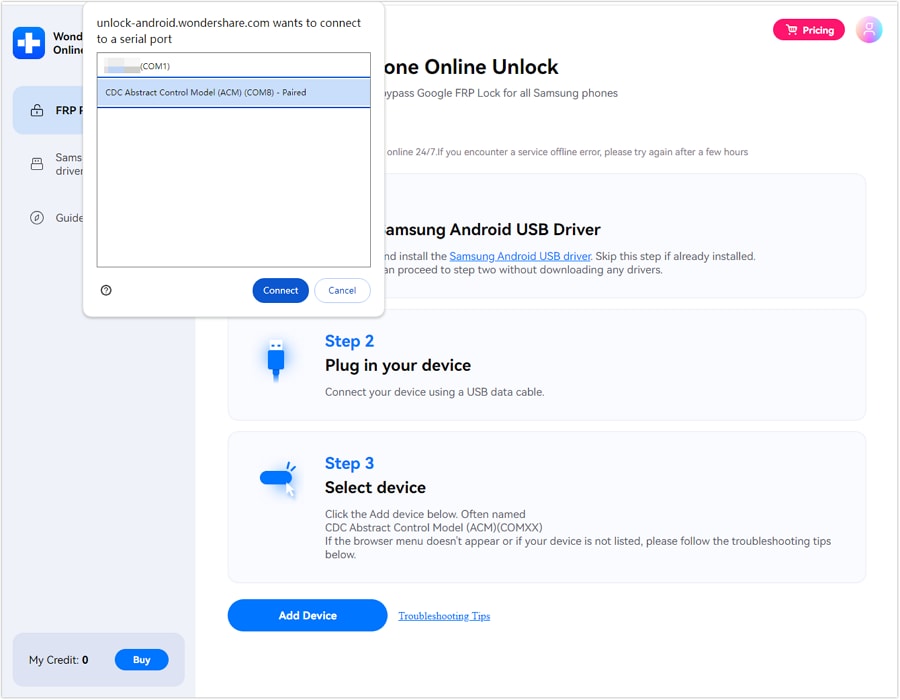
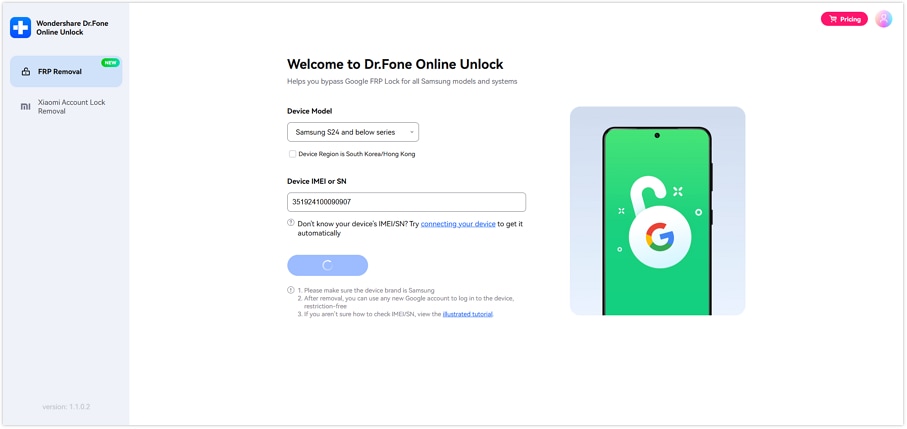
Step 2 Choose the mode for your Samsung devices. Then, you can type the device IMEI or serial number. You can obtain from the box, SIM tray, device label or plug to a PC for auto-detect.
-
Step 3 Verify the device info that is displayed on the screen. When every detail is correct, click Unlock and the FRP lock removal process will begin.
-
Step 4 Wait while your device is being unlocked via the internet by Dr.Fone. Cloud-based, the process simply follows the prompts on your screen.
-
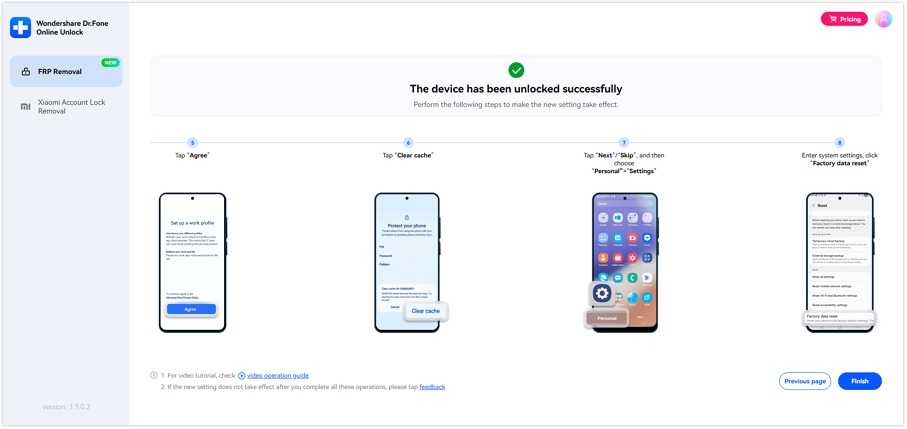
Step 5 Once unlocked, do the Samsung setup steps on your phone and activate it.
It is helpful for non-technical people who want a simplified Google account bypassing experience after a reset. This should only be used on a Samsung device that you own or have permission to unlock.
Secondary Recommendation: Dr.Fone Desktop – Screen Unlock (Android)
The online way is the simpler option for many people since it uses a browser and requires fewer steps. The desktop program also comes in handy if you need more control from a PC, or even if you also have to remove a screen lock like PIN, pattern, or password.
In that case, Dr.Fone - Screen Unlock (Android) is the secondary option. It gives you a software-based path for Samsung FRP bypass and can also help with other Android lock (Snapdragon/MTK) issues beyond FRP.
 Unlock Android phone in seconds.
- Remove PIN, pattern, password, fingerprint.
- Bypass Google FRP lock easily.
- Works on all Android brands & models.
- No tech skills required – user-friendly.

Key features include:
- Remove existing Android screen locks, including PIN, pattern, password, fingerprint & face lock.
- Samsung FRP bypass for users locked out after completing a reset
- Compatible with all major Android brands, including Samsung, as well as Huawei, Xiaomi, OPPO, Vivo, LG Electronics Inc., OnePlus, Nokia, Moto, Lenovo, and Honor
- Compatible with many Android phones & tablets — Covers 30 brands and over 2000 models.
- On the official page, it supports new versions of Android, including Android 16.
- Enables FRP bypass on some Samsung Snapdragon devices & newer Samsung models listed on the page.
- Does not require advanced technical skills, so it can suit users who want a guided desktop process.




What Happens to Data After FRP Bypass?
In the case of an FRP bypass, all personal data, photos, apps, messages, and accounts have already disappeared for good during the factory reset that preceded it. Due to this procedure, the bypass only activates the user interface for setting up a new account on an empty device and all previously stored data cannot be restored.
A comparison table of the methods
Before choosing a method, compare the basics first. Each Samsung FRP bypass option has different risks, device support, and skill requirements, so the table below helps you make a safe decision.
| Method | Difficulty Level | Requires PC? | Android / One UI Support | Data Loss Risk | Best For |
|---|---|---|---|---|---|
| ADB Commands | High | Yes | Mostly older Android versions, where ADB access and USB debugging are already enabled. ADB is part of Google’s Android SDK Platform Tools, but newer Samsung security patches often block this route. | High | Technical users with older Samsung phones who have enabled USB debugging |
| Emergency Call Dialer *#0*# | Medium | Usually No, but often needs PC later | Best chance on older Samsung models and older firmware, such as Android 9–11. Many newer One UI and Android versions may block this test-menu path. | High | Users with older Galaxy models like A50, S10, or some A12 Android 11 devices |
| Third-Party APK / Online Service | Medium | Depends on tool | Mixed support. Some APK methods may work on selected older Samsung phones, but results vary by model, Android version, and security patch. | High | Users who know the risk and only use trusted sources |
| Dr.Fone Online Unlock – Samsung FRP Removal | Low | No full desktop software needed | Supports Samsung phones and tablets across major models and systems, including recent Android versions listed on the official page. | Medium | Non-technical users who want a guided browser-based Samsung FRP bypass method |
| Dr.Fone Desktop – Screen Unlock (Android) | Low to Medium | Yes | Supports Android screen lock removal and FRP features, with coverage for many Android brands and models listed on the official page. | Medium to High | Users who prefer desktop software or also need to remove PIN, pattern, password, fingerprint, or face lock |
Conclusion
Samsung FRP (Factory Reset Protection) has a positive side, but it can also block real owners after the device reset. But ADB is best for phones that are quite old and have USB debugging enabled as well. Older Samsung firmware may be improved by the Emergency Call approach, but newer models hardly ever step. While third-party APK tools can work in many cases, it also carries safety and malware dangers. Dr.Fone Online Unlock fits users who want a guided Samsung FRP bypass without commands or risky downloads. Dr.Fone Desktop is better if you also need help with screen lock. For most non-technical users, Dr.Fone offers the clearest path for safe FRP lock removal.
FAQ
-
1. Will bypassing FRP erase my data?
In general, the data will already be erased with the factory reset. Google also states the factory reset erases data from the phone but synced data might come back when you sign in again. So, FRP lock removal typically only unlocks access. It does not recover deleted files. -
2. Does FRP bypass work on the latest Android version?
Yes, but all these methods will not work. Using old tricks such as ADB, SIM shortcuts, APKs or Emergency Call menus often fail on new Samsung security patches. A comparatively easier option is a guided tool such as Dr.Fone Online Unlock which supports the latest Samsung phones and crucial Android/One UI versions. -
3. Is it legal to bypass FRP on your own device?
Yes, if the phone is yours or you have permission to unlock it. FRP is meant to stop unauthorized use after a reset. It is not legal or ethical to bypass FRP on a stolen, found, or someone else’s device. For used phones, ask the seller to remove the old Google account before you buy.