ChatGPT
 Perplexity
 Gemini
 Claude
 Grok
Grok
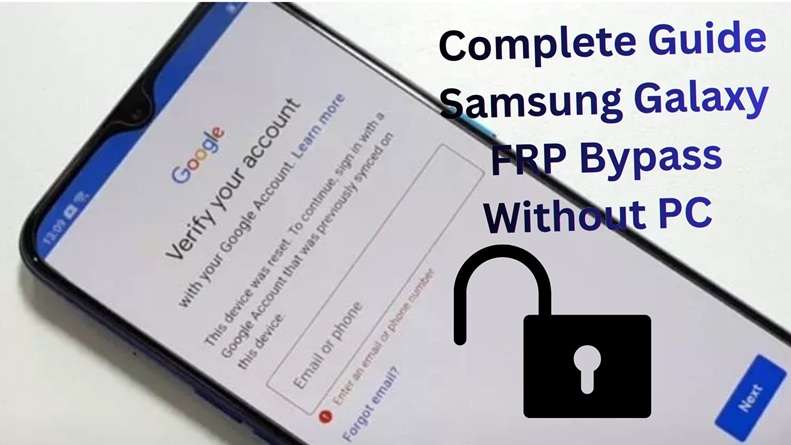
A Samsung device stuck on Google verification might appear to be dead, but it has a functional battery. You power on the phone after the reset and connect to WiFi, then Android asks for your old Google account. That is FRP. It is useful for preventing theft, but it can also block real owners, used-phone buyers, and people who have forgotten their old login details. Google and Samsung both explain that a protected Galaxy device may ask for the last synced Google account after a reset.
This Dr.Fone FRP bypass review looks at Dr.Fone Online Unlock, a browser-based Samsung FRP removal service from Wondershare. The focus is simple: how it works, who should use it, what it costs, and when the desktop version makes more sense.
In this article
- Part 1. What Is Dr.Fone Online Unlock?
- Part 2. Dr.Fone Online Unlock: Review Snapshot
- Part 3. How does the Dr.Fone Online FRP removal process work?
- Part 4. Pricing, Plans, and Refund Policy
- Part 5. User Experience: What It Feels Like to Use
- Part 6. Customer Support: Helpful, but Keep Records
- Part 7. Dr.Fone Online Unlock vs Manual Samsung FRP Bypass
- Part 8. Dr.Fone Online Unlock vs Dr.Fone Desktop Screen Unlock
- Part 9. The Honest Dr.Fone Check: Strong Features and Real Limits
- Part 10. Who Should Use Dr.Fone Online Unlock?
- Part 11. Is Dr.Fone Online Unlock Safe?
What Is Dr.Fone Online Unlock?
Dr.Fone Online Unlock is Wondershare’s web-based unlock platform for mobile lock issues. Samsung's FRP Removal service is made for users who want to remove Google FRP lock without installing an Android app or using complex manual tricks. Wondershare presents it as an online service that can remove Google FRP lock for Samsung Galaxy models through a simple online workflow.
The main appeal is clear. You do not need to flash firmware. You do not need to download random APK files. You do not need to follow a long hidden settings shortcut that may fail after the next security patch. Wondershare says the online method works through a dashboard where users select FRP Removal, enter the Samsung device IMEI or serial number, and start the unlock process.
This makes Dr.Fone Samsung FRP useful for:
- Samsung owners are locked out after a factory reset
- People who bought a second-hand Galaxy phone with FRP still active
- Users who do not have a PC nearby
- Beginners who do not understand ADB, firmware, APK files, or Odin
- Repair shops that want a cleaner FRP workflow
- Users whose manual bypass method no longer works after a One UI update
1-1. Why Samsung FRP Is Harder Now
Here's the reason the Samsung FRP has become more complex to bypass in 2026:
- Frequent security patches: Samsung keeps closing FRP loopholes through regular updates. So older tricks often stop working after a new Android or One UI patch.
- Different model restrictions: FRP does not behave the same on every Galaxy phone. S and Z series usually have tighter security, while A series support can vary by model and Android version.
- Samsung Knox protection: Knox adds hardware and firmware-level security. It helps protect the system areas where FRP data is stored.
- Region and firmware limits: Samsung firmware can differ by region and carrier. A bypass method that works in one country may fail in another version.
- Newer Android controls: With Android 12, a range of old tricks have been blocked. Browser tricks to access pinned tabs won’t work. And, emergency dialer routes have been blocked. Even hidden menu tricks that launch certain diagnostic services don’t work.
That is why Dr.Fone Samsung FRP Online Unlock is useful for many users. It gives a guided route when manual bypass methods become unreliable.
Dr.Fone Online Unlock: Review Snapshot
Dr.Fone Online Unlock is best understood as a paid, guided, browser-based Wondershare FRP service. It is not a free trick. It is not a factory reset tool. It is also not the same as the Dr.Fone desktop program, though both come from Wondershare.
Wondershare’s online unlock page currently claims support for Samsung FRP on Android 14, 15, 16, and 17. It also states that the service supports Samsung Galaxy models and offers a refund if unlocking fails.
Wondershare also highlights 22+ years of experience, secure payments, 24-hour support, and a money-back guarantee on its online unlock pages.
Here is the honest view:
| Review Area | Rating | Notes |
|---|---|---|
| Ease of use | 4.8/5 | Browser-based flow. No APK or technical steps for most users. |
| Compatibility | 4.5/5 | Strong Samsung focus, but users should still check the model and region before paying. |
| Speed | 4.4/5 | Wondershare markets it as fast, but timing can vary by model and service status. |
| Price | 4.0/5 | Easier than manual methods, but not free. Pricing should be checked at checkout. |
| Support | 4.3/5 | Wondershare lists 24-hour support and technical assistance. User feedback is mixed but generally notes clear guidance. |
Overall score: 4.4/5
This score is based on Wondershare’s published claims, listed features, support promise, and available review signals from platforms like Trustpilot and G2. G2 lists Dr.Fone Online Unlock as a tool for Samsung FRP, Xiaomi account lock, and IMEI checks.
2-1. What Makes Dr.Fone Online Unlock Different?
-
1. Browser-based access
Dr.Fone Online Unlock works through a web page. It does not require APK installation, a PC, or a data cable for the online Samsung FRP workflow.
-
2. IMEI-based process
Users can enter the Samsung IMEI or serial number, select the device mode, and start the online unlock request.
-
3. No Google login needed
The tool is made for users who cannot access the previously synced Google account after a factory reset.
-
4. Better than patched tricks
Manual FRP shortcuts often fail after Android or One UI updates. Dr.Fone Samsung FRP gives a more guided route instead of relying on hidden menus or browser tricks.
-
5. Refund support
Wondershare mentions a refund option if unlocking fails. Still, users should check the exact refund terms before payment.
How does the Dr.Fone Online FRP removal process work?
Dr.Fone Online Unlock is a powerful FRP bypass tool that provides quick online processing for supported Samsung phones. Users only have to provide their device information, model, or IMEI, while bypassing it. Follow the steps given in order to finish the FRP bypass process.
-
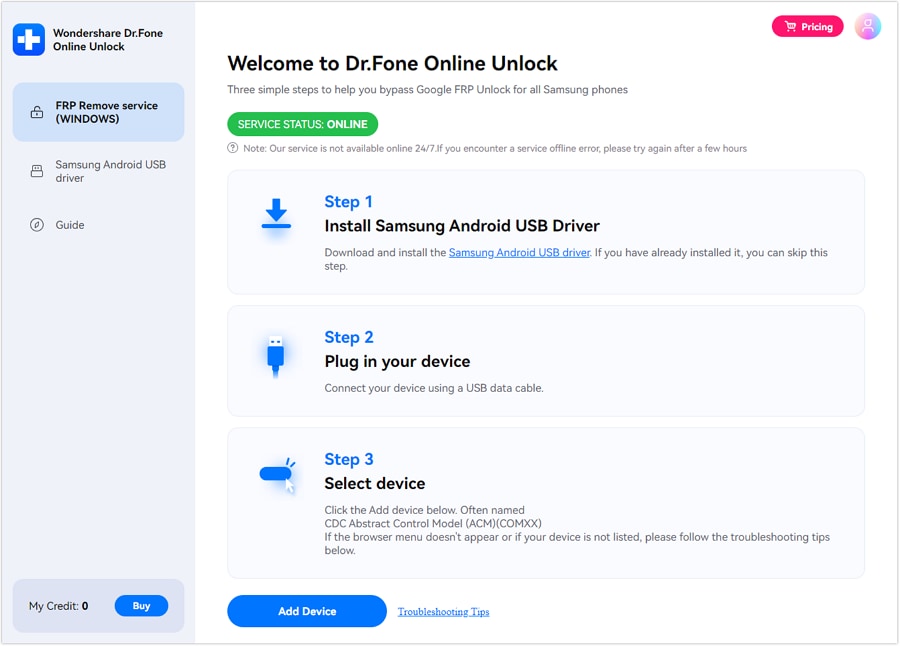
Step 1 Access the FRP Unlock Tool Online
Upon accessing the “Dr.Fone Online Unlock” website, sign in to your account. Select the feature “FRP Removal”, then enter your device IMEI or serial number. Either you may enter the information yourself or connect the device to your PC so that the system can detect it automatically.
-
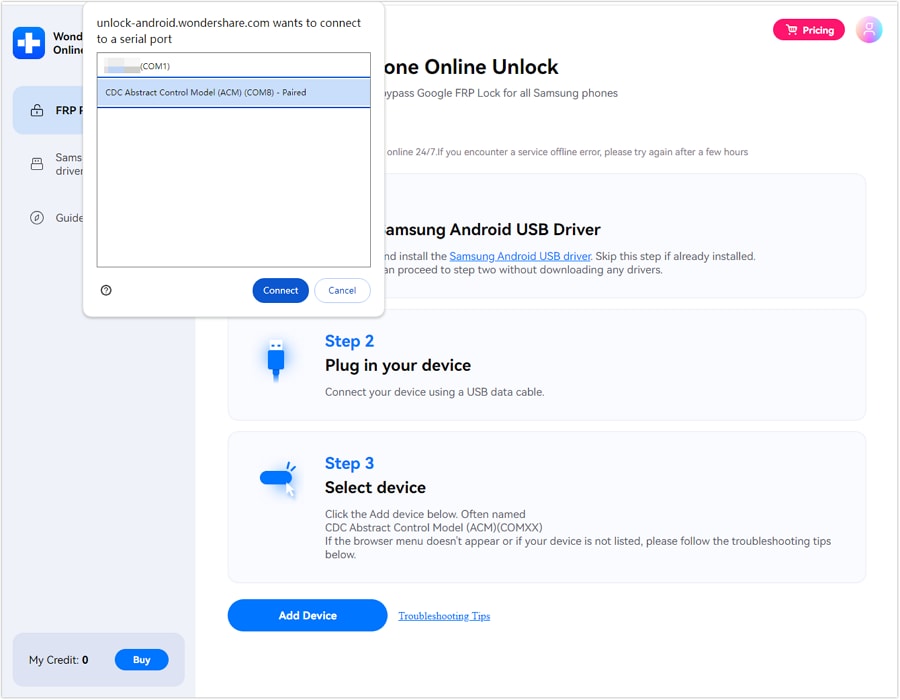
Step 2 Confirm Details and Complete FRP Removal
As your device’s required details are added, review them and click the “Unlock” button. After the online FRP removal begins, follow the visual guide to complete the process.
Supported Samsung Models and Android Versions
- Compatible Models: All Samsung phones and tablets, including Galaxy A/M/F/S/Z/Fold/Flip models and the latest Galaxy S26 series.
- Supported Android Versions: Android 15, Android 16, Android 17 Beta and earlier.
Pricing, Plans, and Refund Policy
Dr.Fone Online Unlock is a paid Samsung FRP service. Its main page says plans start from US$0.99, but actual FRP pricing changes by device type and Android version.
| Plan | Best For | Weekly Price |
|---|---|---|
| FRP Unlock – Android 14 or earlier | Samsung devices on Android 14 or below | $59.95/week |
| FRP Unlock – A/M/F Series | Galaxy A, M, F series on Android 15/16/17 or later | $85.95/week |
| FRP Unlock – S/Z Series | Galaxy S and Z Fold/Flip on Android 15/16/17 or later | $115.95/week |
Each plan includes:
- 1 device unlock per week
- 80% faster unlock queue
- VIP support
- Higher success rate technology
- Full refund for unsuccessful unlocking (based on the plan screen)
Refund policy:
Users are eligible for a full refund when the unlock fails. Users must still retain their order ID, device IMEI/SN, screenshots, and reply messages. Refunds can be approved based on whether the details of your device were correct and if you attempted the steps.
User Experience: What It Feels Like to Use
Dr.Fone Online Unlock is built for people who do not want technical work. The page flow is closer to buying an online service than using a repair tool. You select the service, enter device details, pay, and follow the dashboard.
The best part is the low learning curve. A beginner can understand IMEI entry more easily than ADB commands, Odin flashing, firmware matching, or APK sideloading. This is where Dr.Fone Samsung FRP has its strongest use case.
The possible weak point is control. Since the online method depends on remote processing, the user cannot manually adjust much if the first attempt fails.
Customer Support: Helpful, but Keep Records
Wondershare’s online unlock page highlights 24-hour customer support and professional technical guidance.
For most users, that is important. FRP is not always a one-click issue. Device status, wrong IMEI, unsupported firmware, carrier variants, or recent security patches can affect the outcome.
To get faster help, send support:
- Samsung model number
- IMEI or SN
- Android/One UI version, if known
- Screenshot of the FRP screen
- Order ID
- Exact error message

Dr.Fone Online Unlock vs Manual Samsung FRP Bypass
| Aspects | Dr.Fone Online Unlock | Manual FRP Bypass |
|---|---|---|
| Process | Online dashboard, FRP Removal, IMEI/SN entry | Hidden menus, TalkBack, browser tricks, APK routes |
| PC needed | No PC required for the online FRP service | Some methods need a PC, APKs, or extra tools |
| Skill level | Beginner-friendly | Can be confusing for non-technical users |
| Update risk | Built for newer Samsung FRP cases | Often fails after Android or One UI patches |
| Supported range | Wondershare lists support for Samsung FRP on Android 14/15/16/17 | Depends on model, patch level, and loopholes |
| Support | Includes technical guidance and 24-hour support | No official support |
| Refund | A full refund is stated if unlocking fails | No refund, because most manual tricks are free or unofficial |
| Best for | Users who want a guided, no-app, no-PC option | Users with older phones and enough technical confidence |
Dr.Fone Online Unlock vs Dr.Fone Desktop Screen Unlock
Dr.Fone Online Unlock is strongly recommended, but it is not the only Wondershare route.
Dr.Fone - Screen Unlock (Android) is the installed software option for Windows or Mac users who want a broader Android unlock toolkit. Wondershare’s official pricing page lists Screen Unlock (Android) plans and says it can remove Android screen locks and remove Google FRP lock. The listed plans include monthly, annual, and perpetual options.
 Unlock Android phone in seconds.
- Remove PIN, pattern, password, fingerprint.
- Bypass Google FRP lock easily.
- Works on all Android brands & models.
- No tech skills required – user-friendly.

| Product | Choose Dr.Fone Online Unlock if: | Choose Dr.Fone Desktop – Screen Unlock if: |
|---|---|---|
| Features |
|
|




The Honest Dr.Fone Check: Strong Features and Real Limits
- Wide Android support: Works with 27+ brands and 2,000+ Android models.
- Strong Samsung FRP support: Supports Samsung FRP removal for Android 16, 15, 14, 13, and earlier versions.
- Online unlock option: Dr.Fone Samsung FRP online method can remove FRP without APK installation.
- No-data-loss option: Unlock some Samsung or LG devices without a factory reset and without losing data.
- Extra repair tools: Desktop Dr.Fone also offers data recovery, backup, and system repair tools.
- Windows/macOS support: Supports Windows 7+ and lists macOS 10.8+ support.
- PC may be needed: Many desktop features need Windows, USB, or an EDL cable.
- Best for select models: Advanced FRP success is stronger on Samsung Snapdragon devices.
- Not all features are online: Screen unlock and repair tools may need the desktop app.
- Check compatibility first: Model, chipset, firmware, and Android version can influence outcomes.
- Paid tool: Users should review pricing and refund terms before buying.
- Manual tricks may work on old phones: Older models may not need a paid tool.
Who Should Use Dr.Fone Online Unlock?
Dr.Fone Online Unlock is best for Samsung users stuck on Google verification after a reset. Wondershare says it works online, uses IMEI/SN details, and supports Samsung FRP removal for newer Android versions.
- No-PC users: It works through a browser, with no data cable needed for the online FRP route.
- Samsung FRP cases: Best for Galaxy A/M/F/S/Z/Fold/Flip users locked after a reset.
- Newer Android users: Wondershare lists support for Android 14/15/16/17.
- Non-technical users: Useful when manual tricks, APKs, or hidden menus feel risky.
Is Dr.Fone Online Unlock Safe?
Dr.Fone Online Unlock is safer when used through Wondershare’s official site only. The official page mentions secure payments, customer support, and refund support if unlocking fails.
- No Google password needed: The online flow uses IMEI/SN, not Google login details.
- Official support: Wondershare lists 24-hour support and technical guidance.
- Refund protection: The page states a full refund if unlocking fails.
- Important check: Use it only on a phone you own or have permission to unlock.
Conclusion
Dr. Fone's FRP bypass review shows one clear point: each method has its place. Manual bypass can suit older Samsung phones, but it is risky on new Android versions. Dr.Fone - Screen Unlock (Android) is better for users who want screen lock removal, repair tools, and deeper Android support.
Dr.Fone Online Unlock is suitable for users who want to get Samsung FRP removal without the need for a PC, APK, or complex steps. Dr.Fone Samsung FRP’s IMEI-based flow, Samsung model coverage, 24-hour support, and refund guarantee make the tool a superior choice when patched tricks fail.
FAQ
-
1. Is Dr.Fone Online Unlock a one-time payment?
Not exactly. Dr.Fone Online Unlock uses paid FRP plans, and the price depends on the Samsung model and Android version. The plan screen shows weekly FRP options, so users should check the live checkout page before paying. -
2. What Samsung models does Dr.Fone Online support?
Dr.Fone Online Unlock supports Samsung FRP removal for all Samsung Galaxy models and systems, including Android 14/15/16/17. Its guides also mention Samsung A, M, F, S, Z, Fold, and Flip series. -
3. What happens if Dr.Fone fails to unlock my device?
If the Samsung FRP unlock fails, users will receive a full refund, Wondershare writes. To request a refund, have your order ID, IMEI/SN, screenshots and messages handy.