ChatGPT
 Perplexity
 Gemini
 Claude
 Grok
Grok
Discovering that your phone displays "No Service" or "SIM Closed" on your Jio number can be quite a bummer, particularly when you depend on it for OTPs, banking, and everyday communication. If you are wondering how to unblock Jio SIM online, then it is most probable that you are in a desperate situation where your SIM abruptly stopped working without any prior indication.
A Jio SIM may be block Jio SIM online or deactivated due to numerous reasons, including prolonged inactivity, not submitting KYC for verification, having outstanding payments, or also raising security concerns. Sometimes, the problem might be related to network or device limitations rather than complete deactivation.
This article is a step-by-step guide of instructions helping you to unblock your Jio SIM online. Besides, you will find information on which documents you probably need and in the quickest ways that will enable you to get your number reactivated without any unnecessary difficulties.
In this article

Part 1. Why Is Your Jio SIM Blocked or Closed?
Before learning how to unblock Jio SIM online, it helps to know the common reasons your SIM might be blocked or closed in the first place.
1.1 Inactivity or long non-usage
If you have not used your Jio SIM for a considerable period (that means no calls, no SMS, and no data), the network could temporarily suspend or deactivate your SIM number.
1.2 KYC verification pending
Jio mandates through KYC for all user accounts. If your KYC submission is partial or somehow does not pass, your SIM will be locked until you provide the required details.
1.3 Postpaid billing issues
In case of postpaid accounts, failure to pay the bills or not settling the dues may result in cutting off the service or delaying the resumption of SIM.
1.4 Security lock (PIN/PUK)
Suppose a user is attempting to unblock the SIM by entering the PIN code but gives the wrong one a few times. In that case, the SIM will be blocked. The SIM can only be unlocked by inputting a PUK code in such cases.
1.5 Device-related restrictions
On a few occasions, the problem may not be the SIM itself but the handset. Phones that have network locks or are not compatible can cause the SIM to malfunction.
Part 2. How to Unlock Jio SIM Online and Offline
What if your Jio SIM closed online or no service shows? Don't worry, there is still a good chance you can reactivate it easily. Jio provides reactivation of numbers through online as well as offline channels, depending on the reason for the deactivation of your number. However, before going to the store, make sure you try the fastest solutions listed below.
Method 1 — Unblock Jio SIM Online by Recharging (Fastest Fix)
Usually, the main reason for a Jio SIM to be blocked is when the prepaid plan expires, or there is not sufficient balance. In fact, the SIM is generally not closed permanently and can be restored easily by just recharging it.
Step by Step Guide
Launch the MyJio app → sign in with your number → navigate to Recharge or My Vouchers → pick a suitable plan → proceed with the payment. After the process, restart your phone and verify the service.
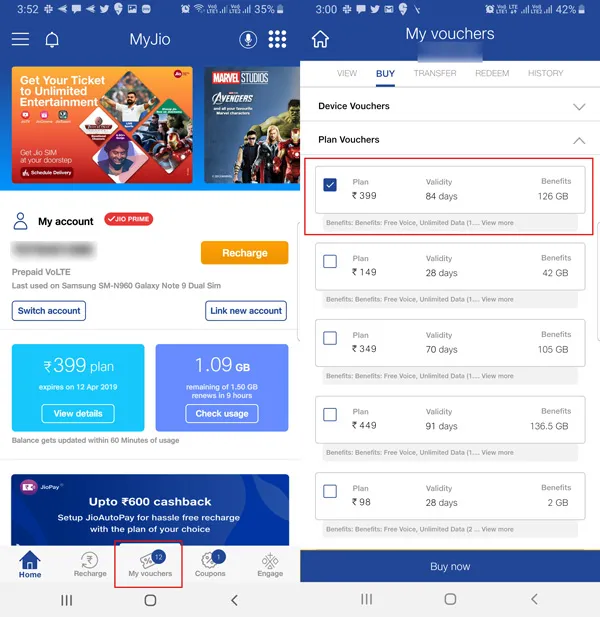
Other recharge methods:
You can recharge also by using Paytm, PhonePe, Google Pay, Amazon Pay, or BHIM UPI. Any successful top-up generally leads to SIM reactivation.

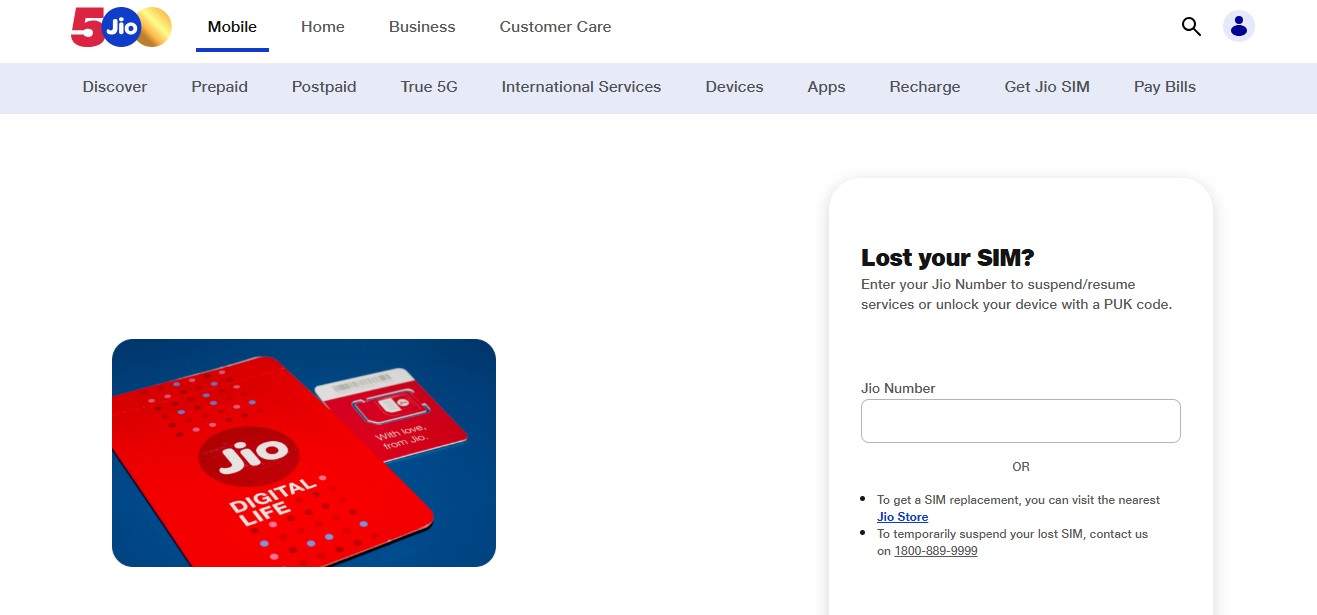
Method 2 — Unblock Jio SIM via Jio Self-Care Portal (jio.com)
If you want to use the browser instead of the MyJio app, then you can unblock your SIM through the Jio self-care portal, especially if your SIM is blocked due to KYC issues, account suspension, or postpaid billing problems.
Step 1 Open the Jio self-care portal: https://www.jio.com/selfcare/lost-login/
Step 2 Log in via your Jio number and OTP verification.
Step 3 Check to see if your account has any alerts, such as KYC pending, SIM inactive, or service suspension.
Step 4 If KYC or verification is needed, proceed with updating your details by following the instructions set forth. Submit and wait for the reactivation confirmation.
Step 5 Reboot your device and check the network status after the processing.
The "SIM closed" or "suspended" label on the portal means that the number has not been deleted permanently. In fact, in lots of cases, it can even be reactivated if measures are taken during the grace period. Jio generally keeps inactive or closed numbers for a brief period of time (usually 15 to 90 days) before they are permanently recycled, so if your SIM status shows such, a fast response is the secret.
Method 3 — Unblock Jio SIM via Customer Care
In case none of the self-service alternatives work for you, or if your SIM gets locked due to security, fraud, or regulatory related issues, then you will have to contact Jio customer care for manual assistance. This way is mostly useful when the MyJio app or self-care portal do not offer any reactivation option, or the SIM status is displayed as permanently suspended.
To get support, have your Jio number, registered name, ID details, and latest recharge or bill info ready to prove your identity. Upon communicating with the support team, just let them know your Jio SIM got blocked/closed, and you are looking for reactivation.
The representative will initially verify your identity and find out the cause of the SIM blocking. Normally, the issue will be resolved in a few hours; however, it can take a maximum of 24 or 48 hours if the case is complicated.
Jio customer care helpline:
198 (Jio support from your Jio number – free)
1800 88 99999 (toll-free from other networks)
Method 4 — Visit a Jio Store or Jio Point
When all online options fail, going to a Jio store or Jio Point is your most reliable choice. Physical KYC verification is generally the reason for it, permanent blocking of the SIM, or replacement SIM due to technical issues or damage.
The original government-issued photo ID (preferably Aadhaar) should be brought along with you, and if you have one, the receipt of the SIM purchase. It is best if the registered SIM owner visits the store in person. Otherwise, if someone is acting on their behalf, they will need a notarized authorization letter.
You may locate the closest Jio Point or Jio store by using the MyJio app "Help & Support" or visiting the store locator on jio.com. If your SIM was blocked due to a billing dispute, along with payment receipts, you will be able to resolve the issue much faster.
Bonus Tip — Instantly Check Your Device's Lock Status Free with IMEI Check
Sometimes your Jio SIM showing "No service" is not necessarily a SIM issue only. It may be that the device itself is restricted at the level of a carrier lock or a blacklisted IMEI. These types of errors usually appear to be a SIM block, but the solution is completely different, so if you find the root cause first, you may save yourself a lot of time and effort in the end.
One of the best options for this purpose is Dr.Fone Online Unlock, which can give you 20+ instant device verification reports for both Android and iOS. It can discover whether a device has been blacklisted, carrier locked, MDM locked, or Apple Activation Locked. Besides, it can check iCloud status, Samsung KNOX Guard, Xiaomi activation lock, and warranty details for major brands including Apple, Samsung, Huawei, OPPO, and Vivo. Your job gets significantly less difficult to decide whether your device is really restricted or it is just a SIM issue.
How to Remove SIM Lock online using Wondershare Dr.Fone
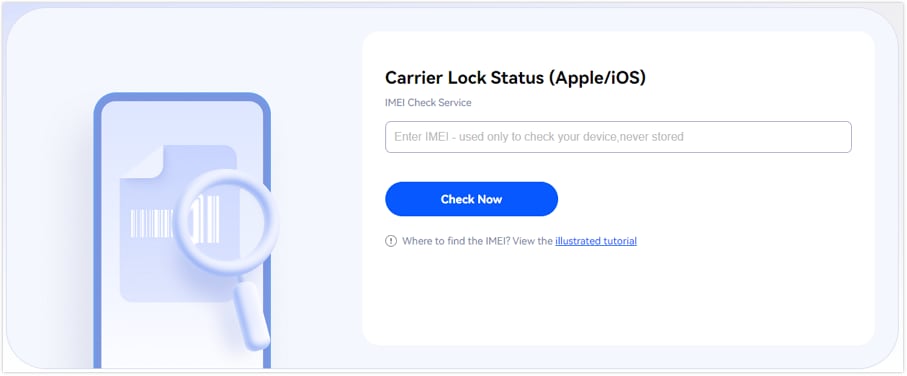
Step 1 Navigate to the Dr.Fone SIM Unlock page. Find "IMEI Check" section, type your IMEI number, and press "Check Now" to find out if your phone is locked to a carrier.
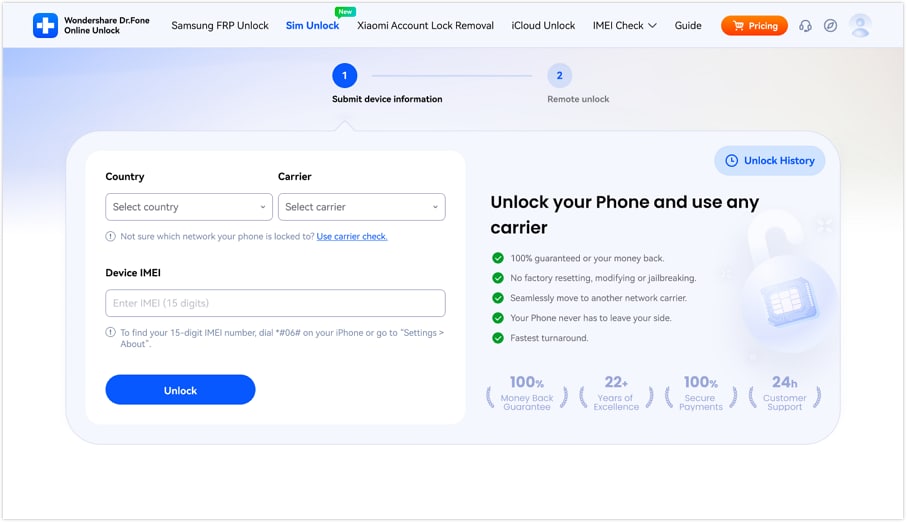
Step 2 Select your country from the "Country" drop-down menu, then pick your network from the "Carrier" drop-down. Enter your 15-digit IMEI number into the "Device IMEI" box and click the "Unlock" button.
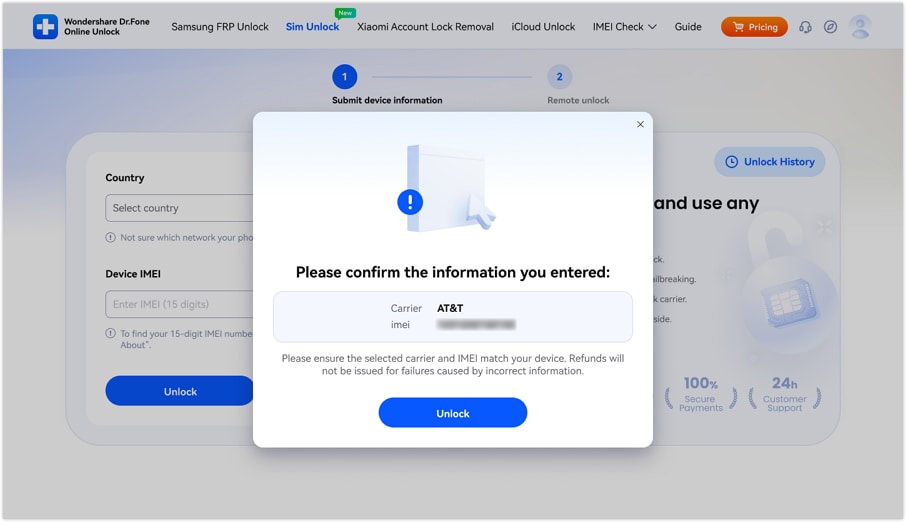
Step 3 You'll get a pop-up window asking for confirmation. Double-check your IMEI and carrier info before clicking the "Confirm" button to move on with the process.
Part 3. How to Block a Jio SIM Online (Voluntary Self-Block)
When you lose your phone or it gets stolen, on top of your list should be blocking your Jio SIM immediately.
- Open MyJio app, with your registered number, log in. Select Help or Support option, find SIM-related services, and opt for a block SIM.
- You can also access the Jio self-care portal through your login by number and OTP.
- If you wish, you could also call Jio customer care for SIM blocking. Once your identity is confirmed, the customer care will deactivate your SIM right away for the safety of your number.
Part 4. Troubleshooting: SIM Still Not Working After Unblock?
- Be patient and reboot: Unblock orders can take up to 4 hours for the changes to reflect across Jio network. After that, turn off your device, take out the SIM, then put it back and turn it on for the updated connection.
- Change airplane mode setting: The quickest way to get a new network connection is by turning airplane mode on and off again.
- Verify APN configuration: Head to Mobile Network settings and verify that APN is properly configured (data: jionet, voice: default).
- Use a different phone: Put the SIM into another device to check whether it is the handset that is creating the problem.
- Find out if device is locked or not: Get information about carrier lock or blacklisting by using Dr.Fone Online Unlock IMEI check.
- Recharge not showing up: Initially, reach out to your payment gateway. If the payment is successful, provide the transaction ID to Jio support.
- KYC not done yet: Sign in at jio.com and check your account for any unsubmitted documents or verification requests.
- Number deactivated permanently: The number must have been assigned to someone else because the grace period (15 to 90 days) has been over. If you want, you may visit the Jio store to know details of the situation and if required, buy a new SIM.
Conclusion
Blocked or suspended Jio SIM may seem like a mishap. It can be resolved by simple online steps such as recharging, completing KYC, or using the MyJio app and self-care portal. If these ways fail, customer care and Jio stores serve as reliable options to retrieve your number.
In fact, instead of directly blaming SIM, it is a good idea to determine whether it is the device that is causing the problem. Portable diagnostics like Dr.Fone Online Unlock's IMEI Check can assist you in recognizing any carrier locks, blacklist status or other restrictions imposed on the phone which may be causing your network issues. So, by properly diagnosing the problem first, you will be able to opt for the quickest solution that allows your Jio SIM to function again without any delay.

Wondershare
Dr.Fone
Wondershare Dr.Fone
Need More Phone Tools? Discover More on Dr.Fone — One Toolkit for All Your Phone Solutions.


 Try It Free
 Try It Free
 100% Clean & Safe
FAQs
-
How long does it take to unblock a Jio SIM online?
Mostly Jio SIM gets unblocked within few minutes to 4 hours after recharge, KYC update or support request but, at times cases may be taken 24-48 hours depending on the verification. -
How do I block my Jio SIM if my phone is lost?
To block your SIM, you may either MyJio app, Jio self-care portal, or call customer care directly to block your SIM and prevent the number from being misused. -
Is there a charge to unblock a Jio SIM?
Unblocking SIM Jio is free of cost. However, if you are blocked due to non-payment, you may have to recharge/clear the dues for unblocking.