ChatGPT
 Perplexity
 Gemini
 Claude
 Grok
Grok
Feeling restricted by a carrier contract or experiencing SIM Network Unlock PIN issues? A locked Android can be a hurdle, whether you're traveling abroad to avoid roaming charges or you've discovered a better data deal. The SIM unlock Android process is streamlined even more in 2026, but there are still certain steps and requirements to undergo.
Thus, this guide provides a comprehensive walkthrough on how to safely and legally unlock the Android SIM. Learn how online tools like Dr.Fone Online Unlock can help you switch networks effortlessly and maximize your phone's resale value.
In this article
Part 1. Is SIM Unlocking Legal and Safe in 2026?
As you research carrier unlock, it is important to keep in mind that this is both legal and safe when done by the right methods. The Unlocking Consumer Choice and Wireless Competition Act, along with the CTIA Consumer Code, requires eligible carriers to unlock devices for consumers in good standing.
This is usually completed within 2-3 business days; however, you run the risk of having your data stolen, being scammed, or your device being bricked by a free site online.
Why You Might Need to SIM Unlock Your Android Phone
Since it's legal, review the mentioned reasons to know what raises the need for network unlock Android methods:
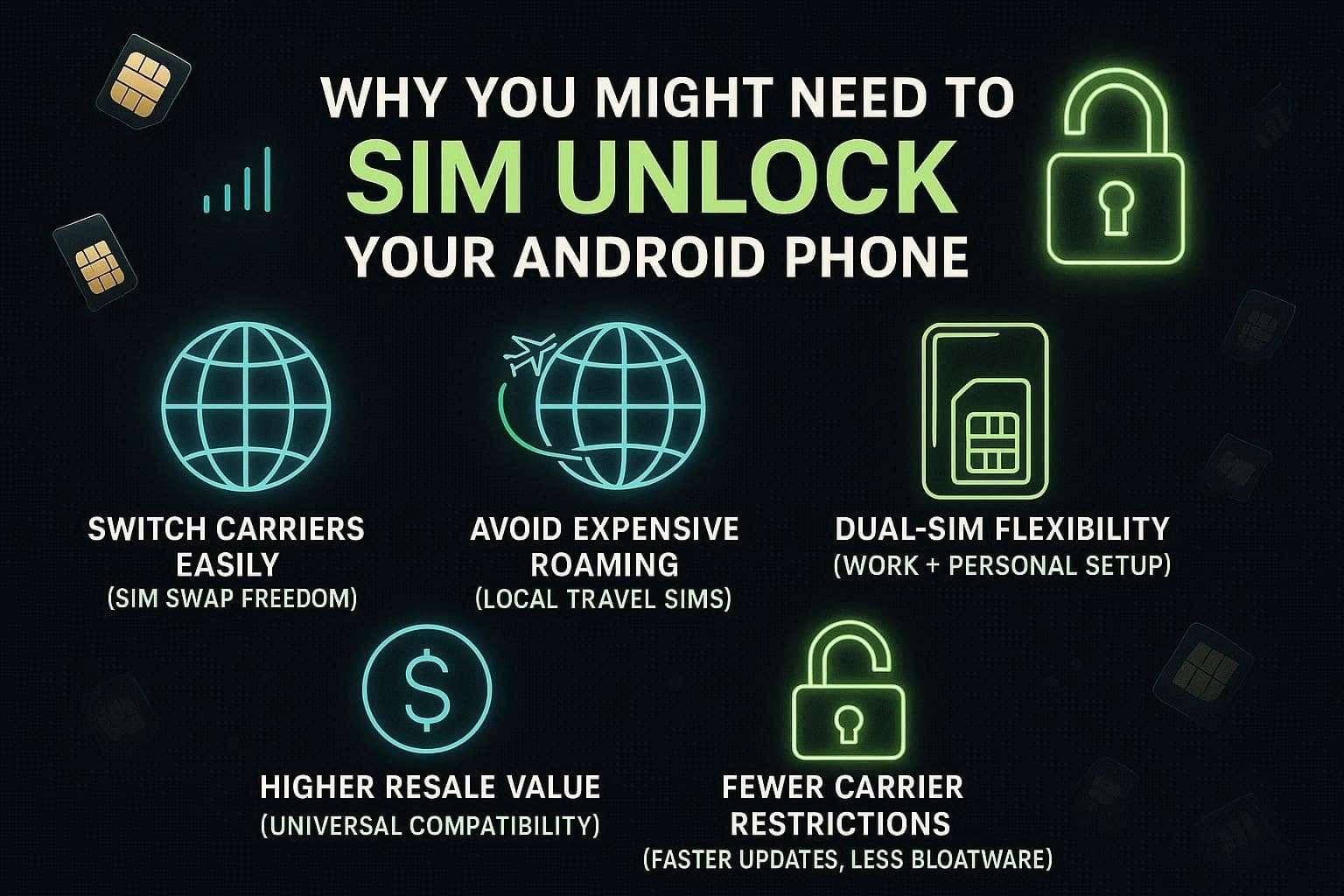
- Switch Carriers with Ease: Unlocking gives you the freedom to switch to a lower cost provider or to a network with better coverage without the expense of a new device. You can easily switch to another carrier's best offers for data plans and signals with SIM swapping.
- Unlocked Phones: Unlocked phones can be used with local SIM cards abroad for data and calls at local rates to avoid High International Roaming. This means you won't have to pay expensive international roaming charges from your home carrier, and you will save huge amounts of money for each outbound call.
- Optimize Dual-SIM Functionality: If your Android device supports dual SIM or eSIM, unlocking it is essential to mix and match different providers on a single handset. So, this setup is perfect for managing work and personal numbers simultaneously or combining a cheap data plan with a reliable calling plan.
- Boost Resale Value and Appeal: Unlocked smartphones are highly sought after in the secondary market because they are compatible with almost any network available. This increased versatility makes your device easier to sell and allows you to demand a much higher price compared to carrier-locked models.
- Remove Network Restrictions: Carrier-locked phones may have outdated software and come preloaded with junkware that restricts control. Once unlocked, you can get updates directly from the manufacturer and enjoy app freedom that isn't limited by the network.
Part 2. How to SIM Unlock Your Android Phone: Easy Step-by-Step Guide
Regarding the SIM unlock Android, this section highlights the key requirements and 2 common methods to bypass the network restrictions:
2-1. Check If Your Android Phone Is SIM Locked or Unlocked
Way 1. The SIM Card Test (Most Reliable)
As the most definitive way to check, simply swap the SIM card as you power off the Android. Get a SIM card from a different carrier, such as Mobile, and use it on the phone, or use a Verizon or AT&T SIM card and restart the phone.
The phone is unlocked if you see the bars on the signal strength indicator and the phone connects to the new network. If the popup appears asking for a “SIM Network Unlock PIN” or the alert “Invalid SIM Card,” then the phone is locked.
Way 2. Check via Android Settings
If you don’t have a spare SIM card, find the unlocking clues from your Android settings to continue with carrier unlock.
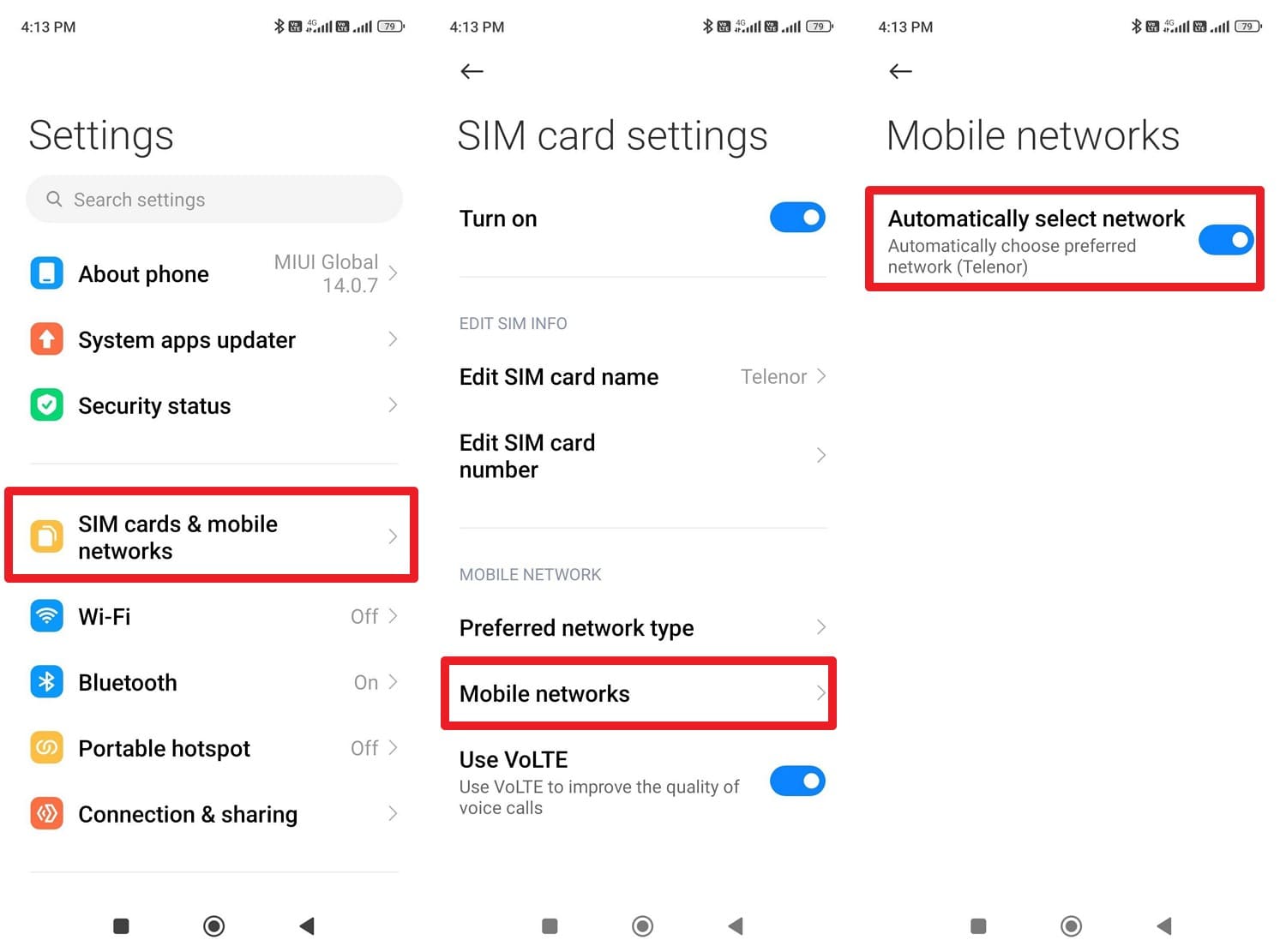
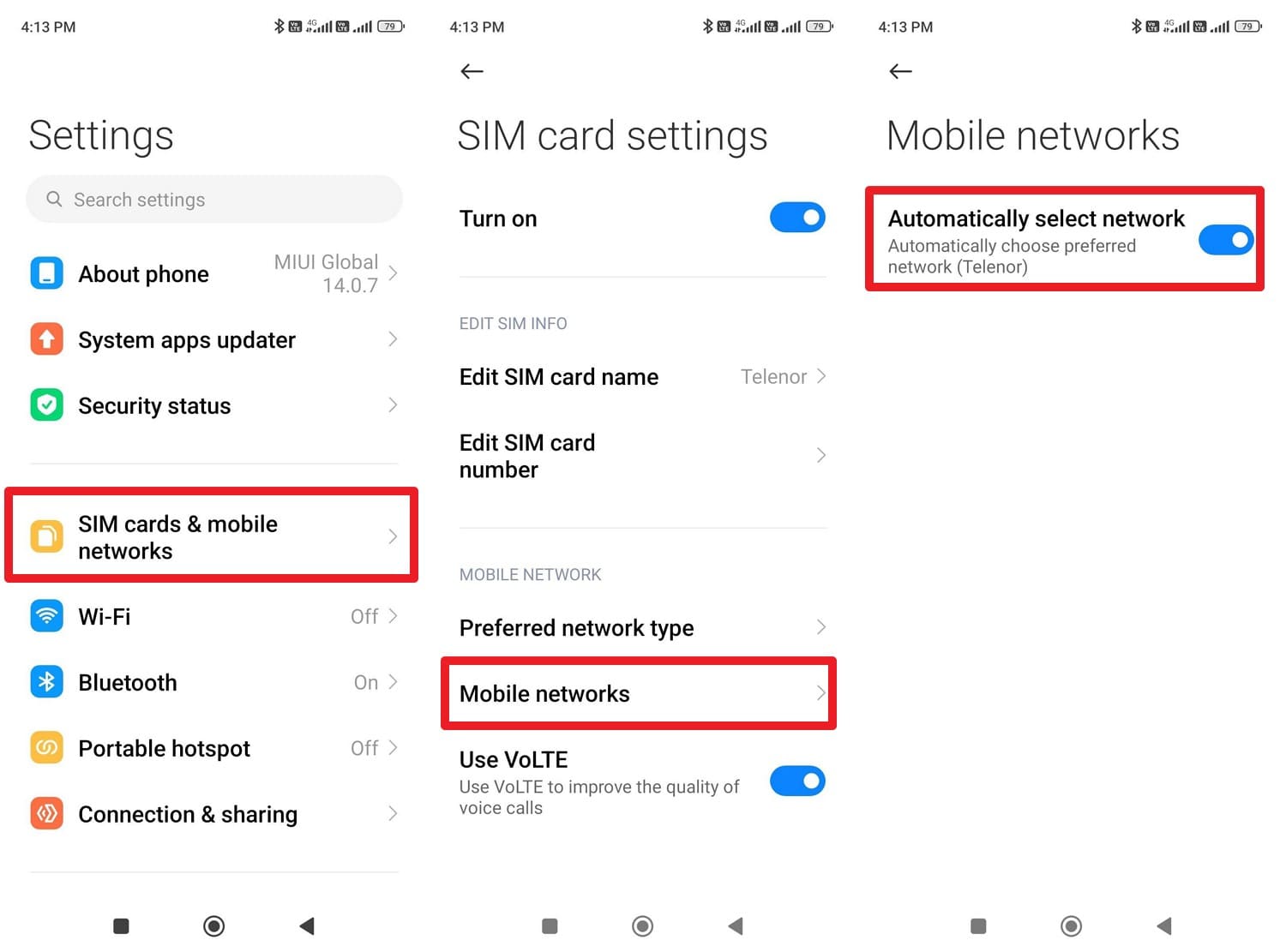
Instructions. Go to Settings and choose the “SIM Cards & Mobile Networks” option to select the SIM, then choose the “Mobile networks” option. There, enable the “Automatically Select Network” option, and if another carrier SIM connects, the phone is unlocked.
Way 3. Check via IMEI Number
Users can also use the device's unique ID to verify the status through the manufacturer or carrier. Simply dial “*#06#” on your keypad to display your IMEI number. Then contact the carrier's customer support and provide the IMEI to request the lock status.
2-2. Key Requirements Before You Start SIM Unlocking
When dealing with the network unlock Android, it's important that you meet the basic carrier unlocking requirements. According to the FCC Act, the unlocking requirement would require wireless carriers to unlock phones within 60 days of activation, unless the device is suspected of fraud. Other than this, the carrier comes with multiple conditions, and some of them are given below:
- The device must be fully paid off; if you are on an active installment plan or lease, the remaining balance must be zero before unlocking.
- Your account must be in good standing, with no flagged or fraudulent activity records.
- In a report by UnlockUnit, it's said that most services require a minimum duration of active services on their network:
- Verizon & Verizon Value (Visible, Straight Talk, etc.): As of January 27, 2026, the device must have 365 days of paid active service (Previously 60 days).
- AT&T: Postpaid devices typically require 60 days of active service, while prepaid devices require 6 months of active service.
- T-Mobile: Generally requires 40 days for postpaid accounts and 365 days for prepaid accounts, unless a specific dollar amount in refill has been met.
2-3. Method 1. Request SIM Unlock from Your Carrier
If you need all the main SIM unlock Android conditions, request the SIM unlock from the carrier. This safe and reliable method follows the carrier rules and is often free if your phone is paid off and your account is in good standing. Since the unlock is directed by the carrier, you just have to fill in the basic details, as guided below with AT&T as an example:
What to Gather Before You Start:
- You will need the account holder’s name, account number, and the account PIN or passcode.
- For many modern Androids, the unlock is pushed over the air, so you must be connected to Wi-Fi to complete the process.
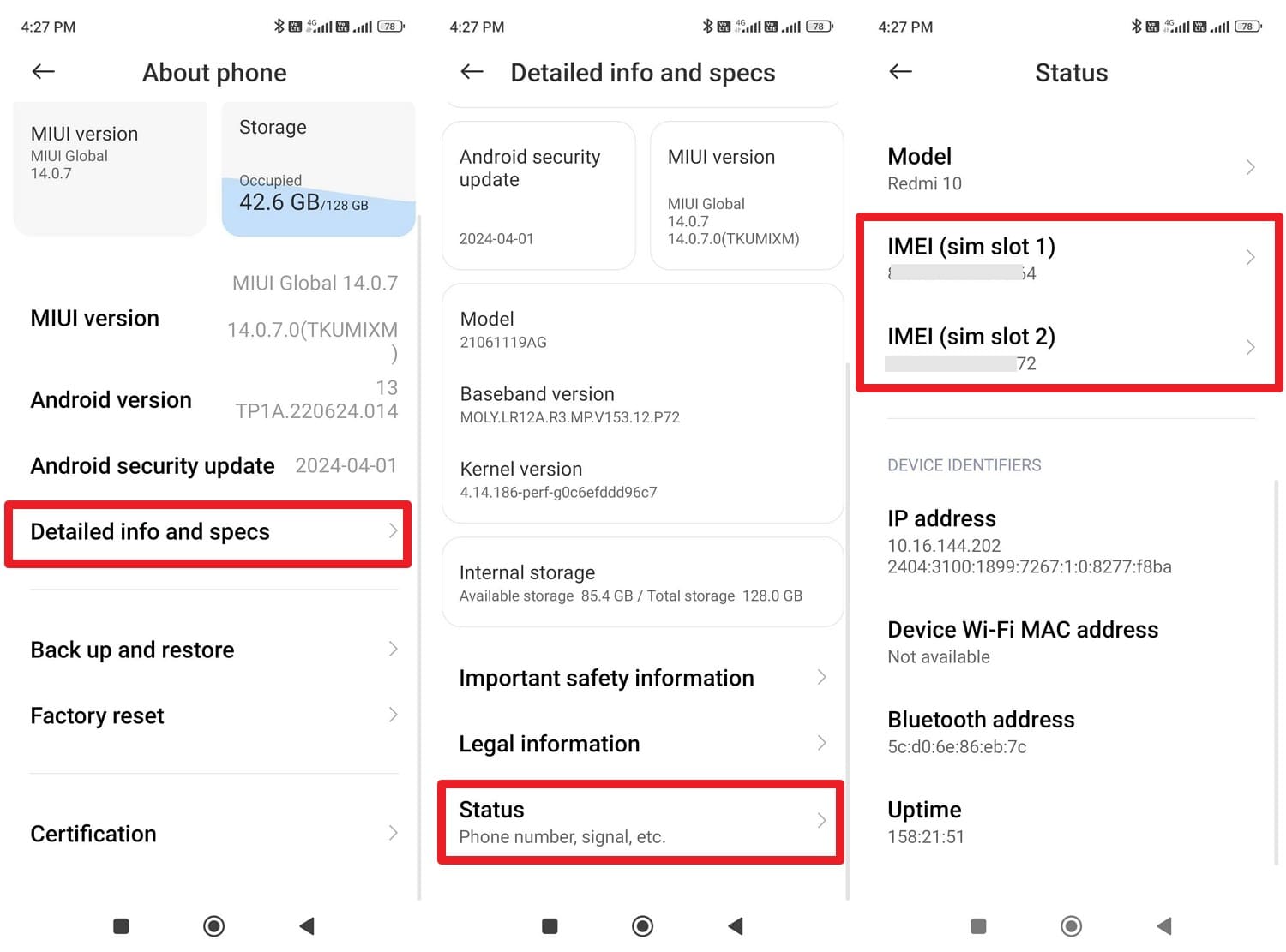
- Dial *#06# on your phone to get this 15-digit code. Otherwise, in the About settings, choose the “Detailed Info and Specs” option to pick the “Status” option. In the “Device Identifiers” section, note the IMEI details, as your carrier will need them for the unlock request.
-
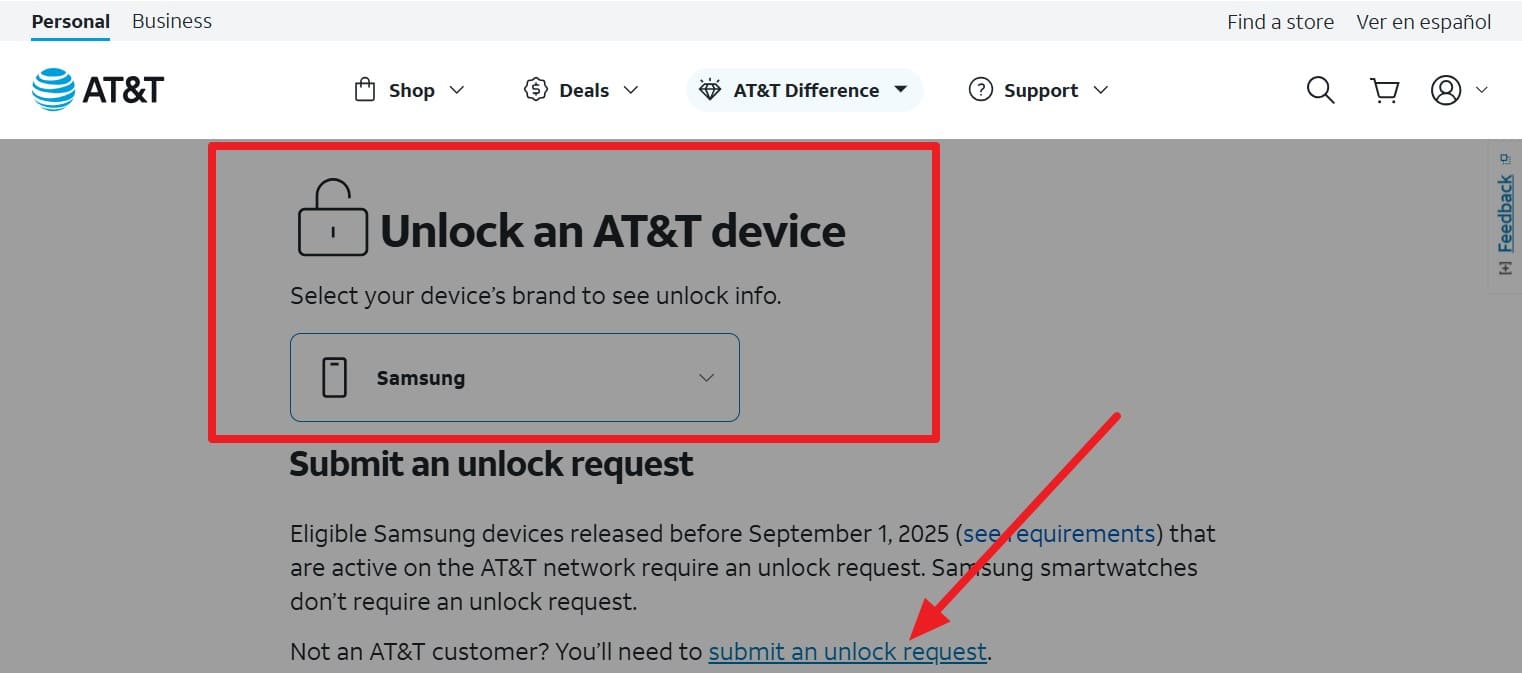
Step 1 Go to the AT&T SIM unlock site and choose the Android device under the “Unlock an AT&T Device” section. After that, press the “Submit an Unlock Request” option and continue with the SIM unlock request.
-
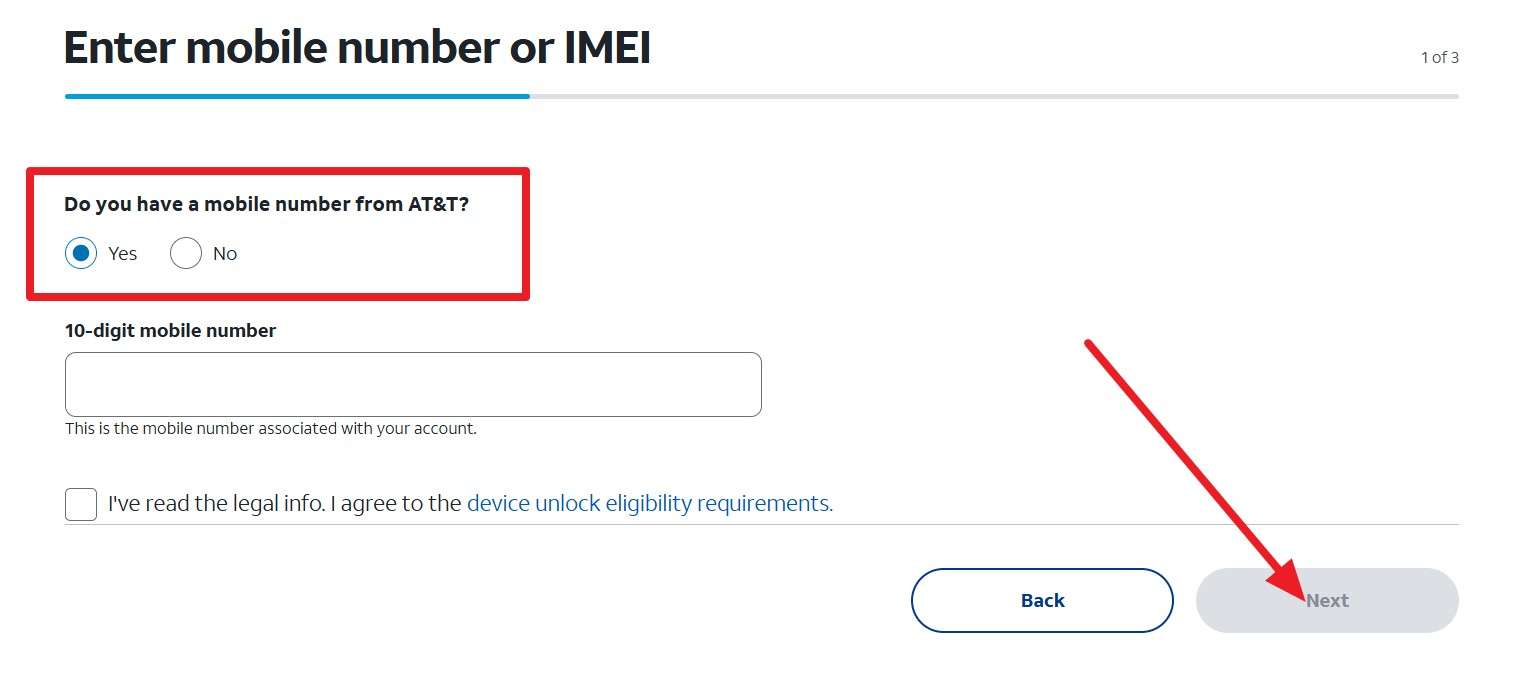
Step 2 Choose between yes and no for the “Do You Have a Mobile Number from AT&T?” option. Add the mobile number, agree to the terms, give your email details, and press the “Next” button. When AT&T sends you the confirmation link, open it and follow the instructions. Now, wait for the unlocking approval, as this can take up to 48 hours.
2-4. Method 2: Use an IMEI Unlock Service Online
1. Dr.Fone Online Unlock
To remove the SIM lock, this online tool supports all Android and iOS phone brands. Additionally, it is compatible with multiple carriers like AT&T, Sprint, and T-Mobile. Moreover, it claims to update weekly, so support for other carriers is expected with this SIM unlock tool. Regarding unlocking, it sends the request to the cloud, which ensures safe network restrictions while maintaining the device warranty.
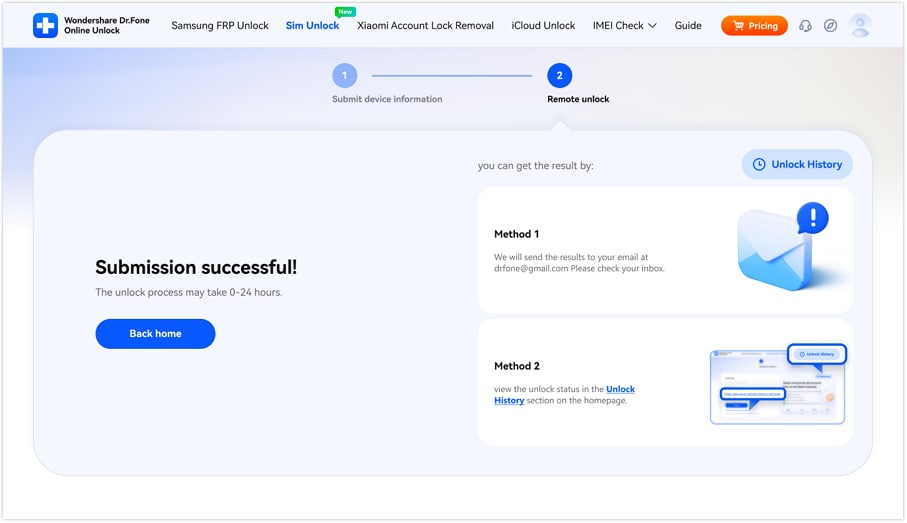
Unlike carrier contact options, it takes 0-24 hours and offers a detailed report via email or the Unlock History option. With separate tabs, novices can easily use this tool, and it needs no jailbreaking, rooting, or factory resetting. Simply using the IMEI details and the standard industry method for permanent solutions, the tool is designed to be safe and intuitive.
Guide to Use Dr.Fone Online Unlock for Unlocking Your Android SIM Lock
For a network unlock Android within 24 hours, let’s test whether this online SIM unlocker offers what it claims.
-
Step 1 Access the SIM Unlock Tool and Add Details
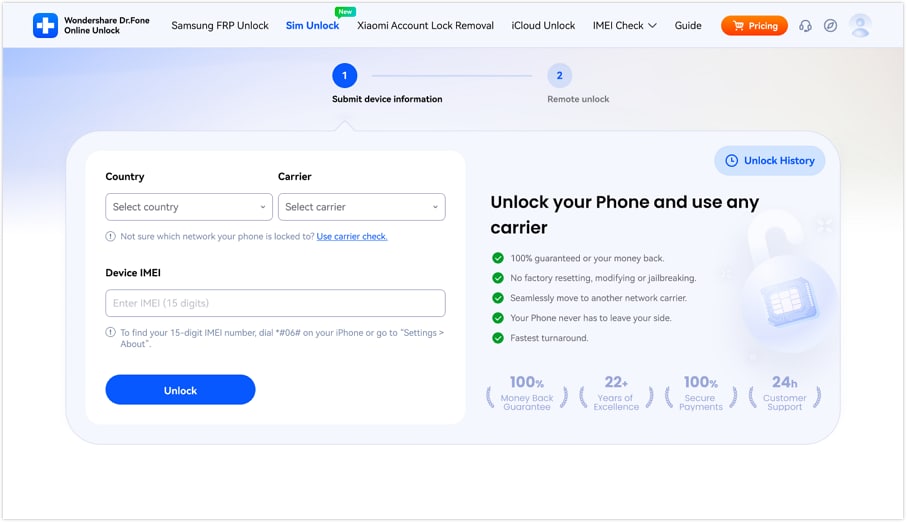
On the “SIM Unlock” tool page of Dr.Fone Online Unlock, enter the “Country, Carrier, and IMEI” details and click the “Unlock” button.
-
Step 2 Submit the Request to the Cloud
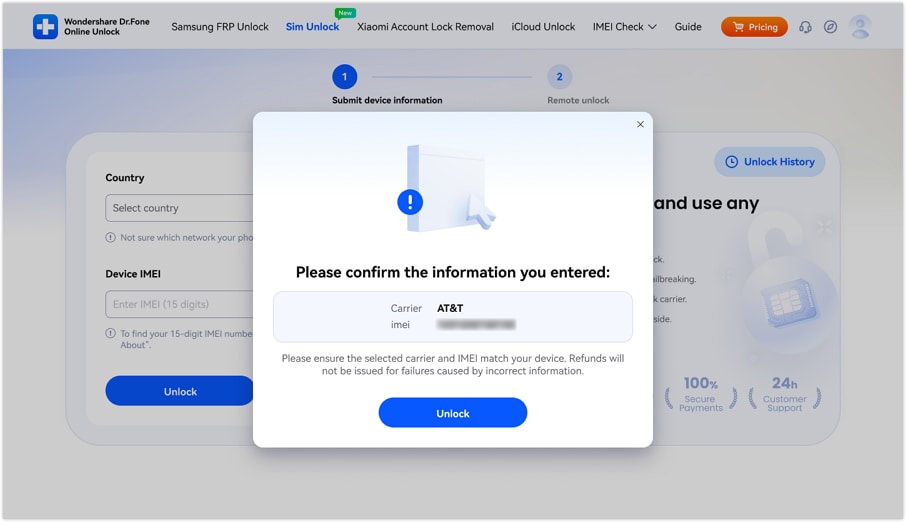
When asked, confirm the details from the pop-up menu and choose the “Unlock” button to submit the request to the cloud.
-
Step 3 Wait for 0-24 Hours and Monitor the Progress
Now, wait for 0-24 hours for Dr.Fone Online Unlock to process the request, and select the given method to monitor the progress.
2. Official SIMUnlock
As another carrier unlock option, the tool uses the IMEI and claims the unlock is permanent. The service aims for quick turnaround times, with many unlock codes or statuses processed within 15 minutes to 24 hours. Additionally, its device support can vary from Apple, Samsung, Motorola, and Huawei, and is guided below to bypass the SIM lock:
-
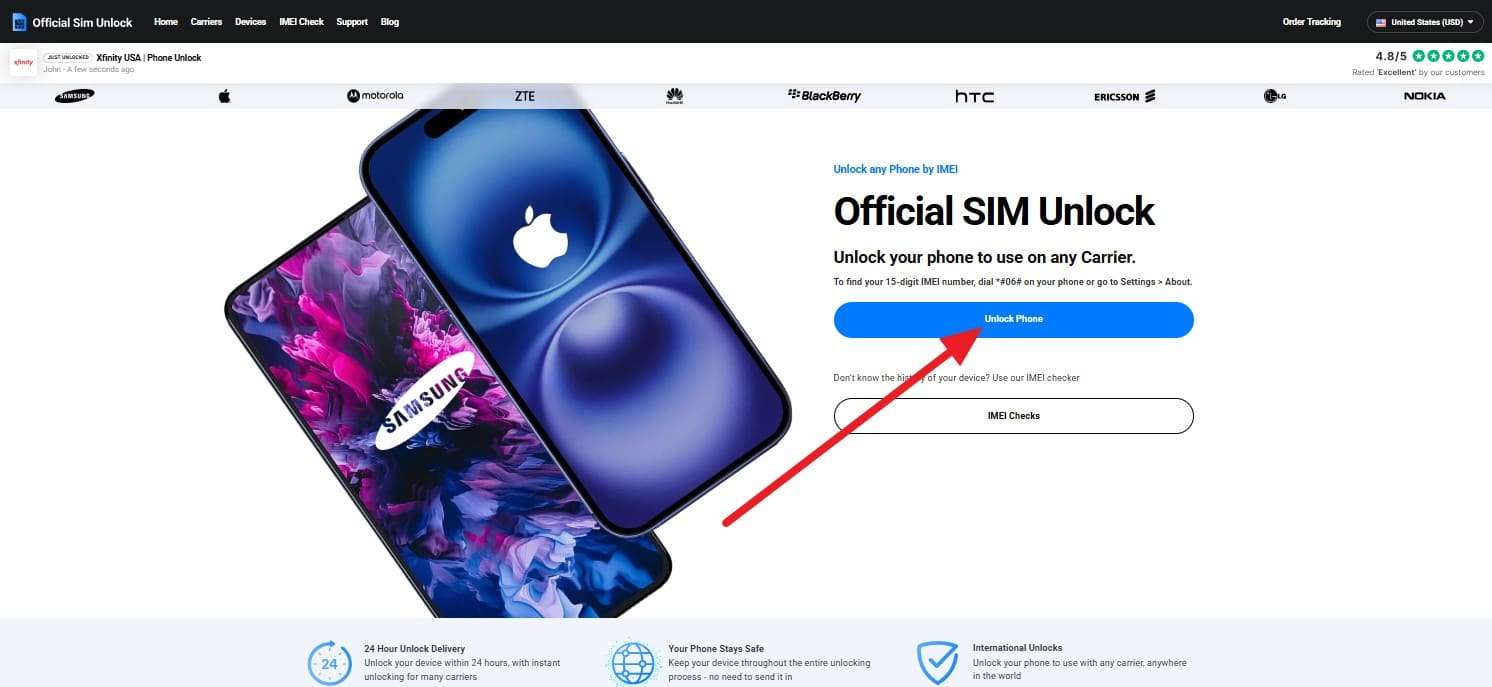
Step 1 Locate and note the phone's IMEI details, then press the “Unlock Phone” option on the main interface.
-
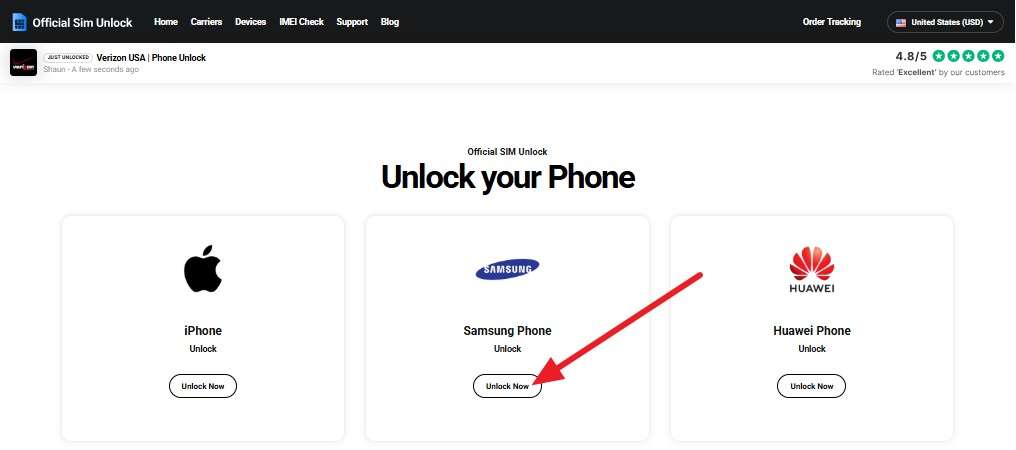
Step 2 After that, pick the Android device from the list and press the “Unlock now” button.
-
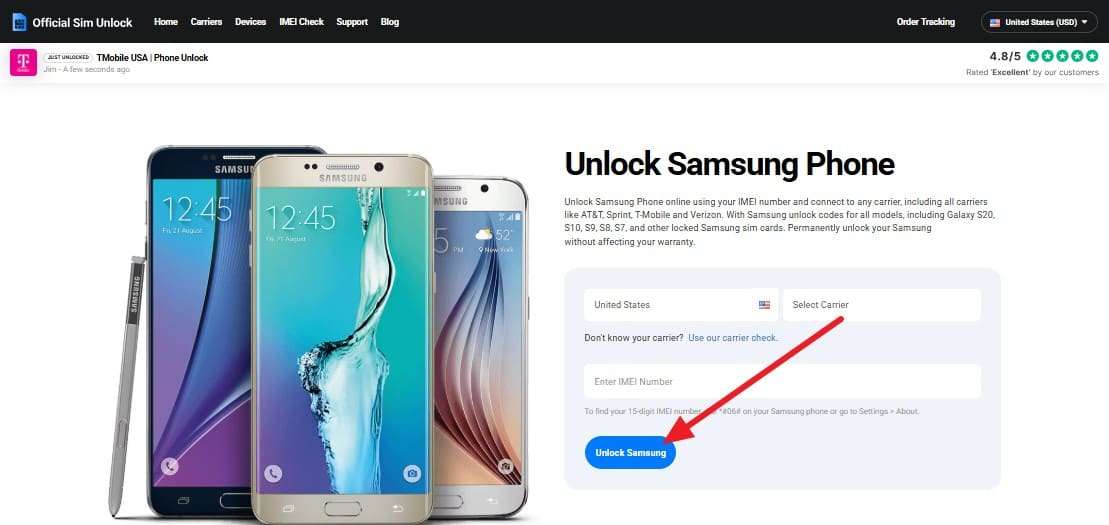
Step 3 Enter the “Country, Carrier, and IMEI” information and select the “Unlock (Device Name)” option. Select the payment type you'd like to use, follow the instructions to process the payment, and wait for the email confirming the payment. Finally, wait for the request to be approved, which may take a few days or up to 2 weeks.
3. UnlockRiver
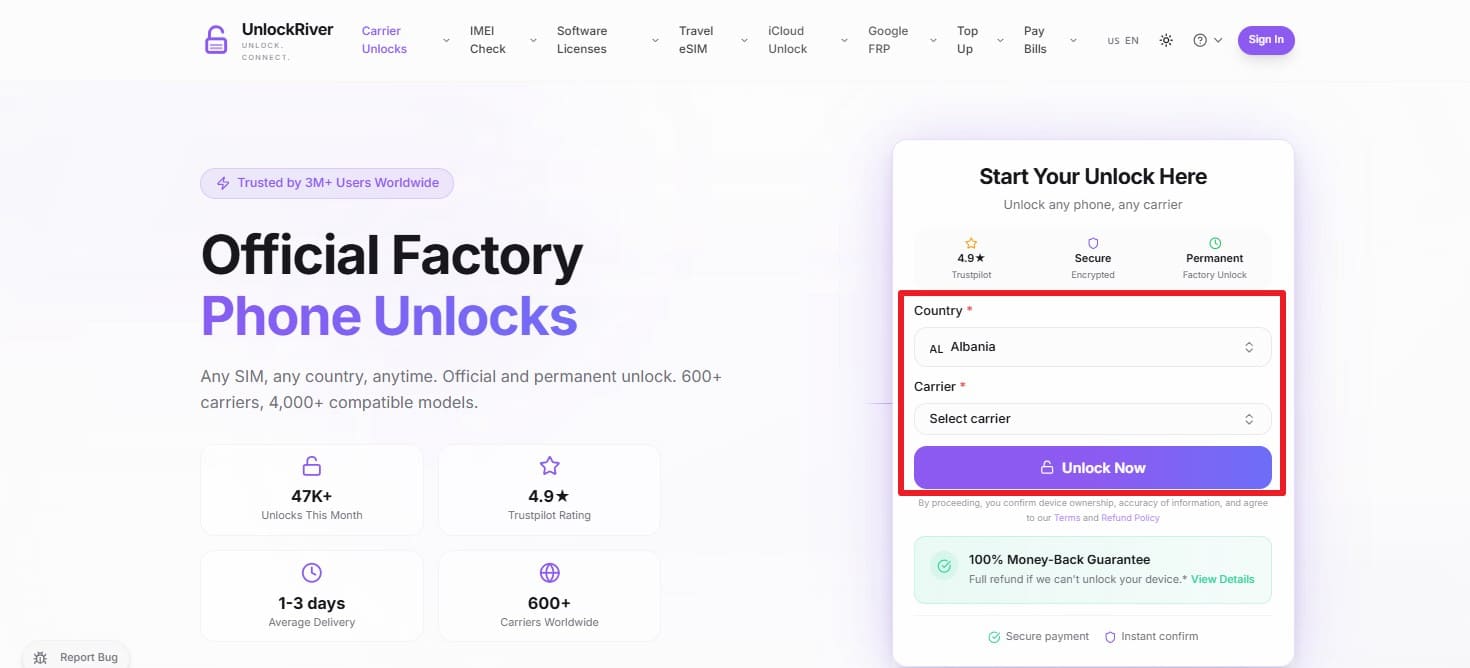
You can also use this online tool to have a network unlock Android, as this covers major brands like Apple, Samsung, and Google, across more than 600 carriers worldwide. After the device is unlocked, the status is permanent, and you can also use this tool to perform IMEI blacklist checks, verify iCloud activation status, and bypass FRP. In addition, you can track the SIM unlock process progress, once done, via the mentioned steps:
Instructions: On the site, enter the “Country, Carrier, and IMEI” details, then press the “Unlock Now” button. You will receive the email with the unlock code; wait for it, then follow the instructions to bypass the network lock.
| Metrics | Dr.Fone Online Unlock | Official SIMUnlock | UnlockRiver |
|---|---|---|---|
| Speed | 0-24 Hours | 15 min - 2 weeks | 1-24 Hours |
| Success Rate | Highest (99.8%) | Variable | High |
| Data Safety | Safe (No Data Loss) | Standard | Safe |
| Tech Skill | Zero | Low | Low |
| Carrier Support | Global (AT&T, T-Mobile, etc.) | Major US/UK Carriers | 600+ Global Carriers |
| Verdict | Best Choice for all types of users and phone brands | Good alternative | Best for Niche Networks |

Part 3. How to Check if Your Phone is Already Unlocked?
If you have used online tools like Dr.Fone for carrier unlock in a limited time, check if it is unlocked via the mentioned ways:
- Test with a Different Carrier’s SIM: Turn off the phone, detach the SIM card, and put in a SIM card from another network. If your phone has instant reception bars and the carrier name, your phone is unlocked.
- Check Network Settings and Status Messages: Go to “SIM Cards & Mobile Networks > Mobile networks > Pick SIM > enable Automatically Select Network” option. If you get a carrier option and can choose it, it's unlocked.
Conclusion
Having a SIM-unlocked Android phone is a must for carrier freedom and travel, and this guide has explained how to make it possible legally and safely. While official methods are standard, they can take days and weeks to process the request.
On the contrary, most common online tools only give the unlock code after 48 hours, and the rest require human intervention. To get fast, automated SIM unlocking, Dr.Fone Online Unlock makes the unlocking quick, under 0-24 hours.
Frequently Asked Questions
-
1. Is SIM unlocking the same as bootloader unlocking?
No, SIM unlocking just allows you to change your network to a different carrier. On the other hand, Bootloader unlocking enables you to change the phone's functioning framework, which may wipe your information and invalidate the warranty. -
2. Does a factory reset remove the SIM lock?
No, SIM lock is not connected with the operating system. A locked phone will stay locked to the carrier until an official unlocking is performed through the IMEI, even if the phone is factory reset or the IMEI is updated. -
3. Will SIM unlocking my phone remove the Google FRP lock?
No, FRP is a security feature tied to your Google account to prevent unauthorized use after a reset. SIM unlocking only deals with network connectivity and does not bypass account-based security locks.