ChatGPT
 Perplexity
 Gemini
 Claude
 Grok
Grok
Many iPhone users feel trapped when they try to switch plans or travel abroad and realize their phone is locked to one specific carrier. The “SIM Not Supported” alert can be frustrating, especially if you’ve already paid off your service. Being stuck with high monthly bills or roaming fees feels unfair, and this guide will make it justifiable.
Here, you will learn how to SIM unlock an iPhone using official and third-party online methods. Regardless of the unlocking need, learn how tools like Dr.Fone Online Unlock can be helpful when you don’t meet the carrier requirements.
In this article
Part 1. Check If Your iPhone Is SIM Locked or Unlocked
To start with, the iPhone carrier unlock method, it's important to know your device's lock status. Therefore, this section highlights 2 simple ways, as reports from Airalo and Holasim say that it's essential for travelers to avoid the extra roaming fees. Since it also ensures higher resale value and lets you switch to budget-friendly MVNO carriers, here is how it's done:
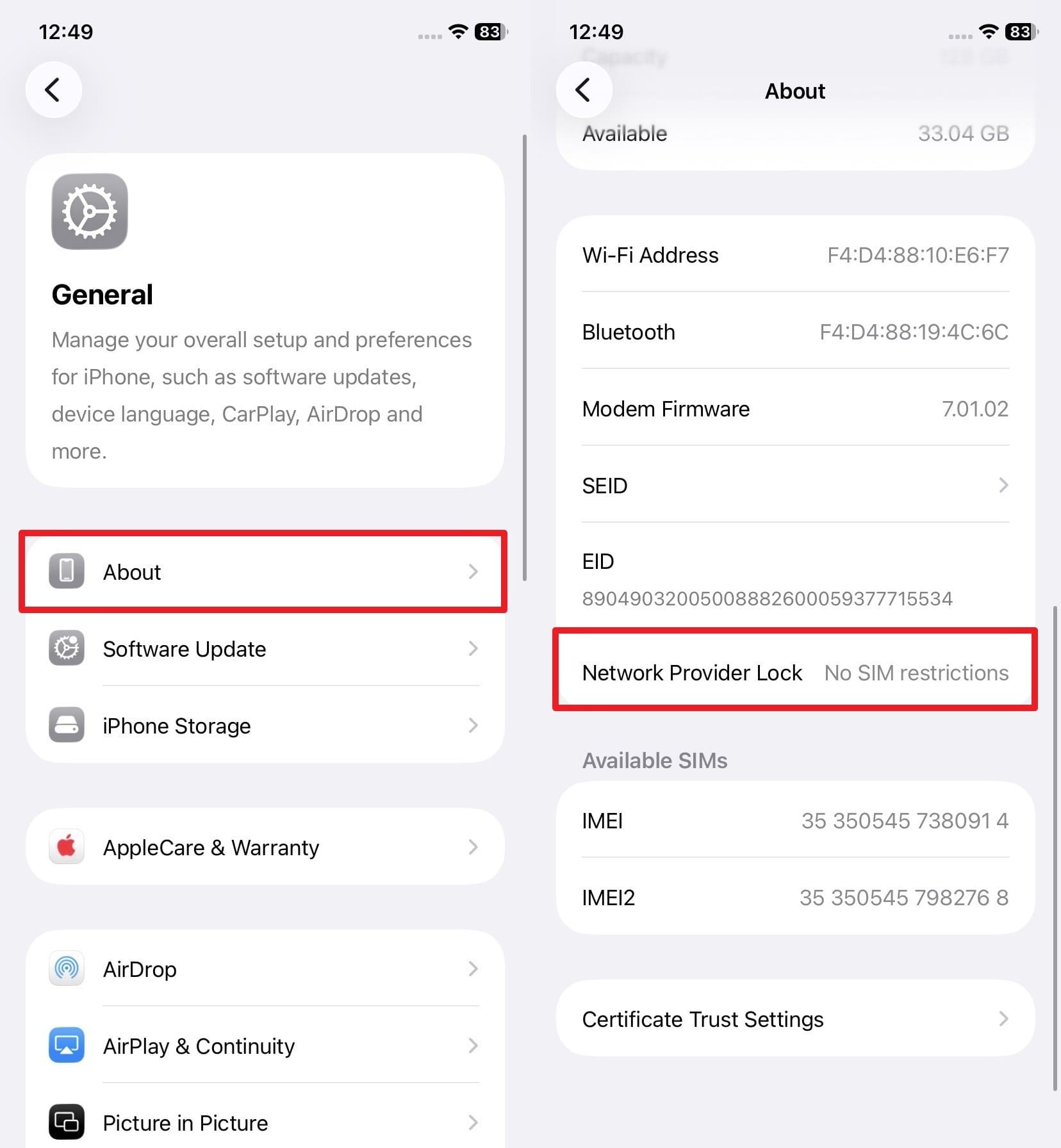
Check SIM Lock Status in Settings (“No SIM Restrictions”)
To save the time of contacting the carrier, head to the settings and check the unlock status via the mentioned steps:
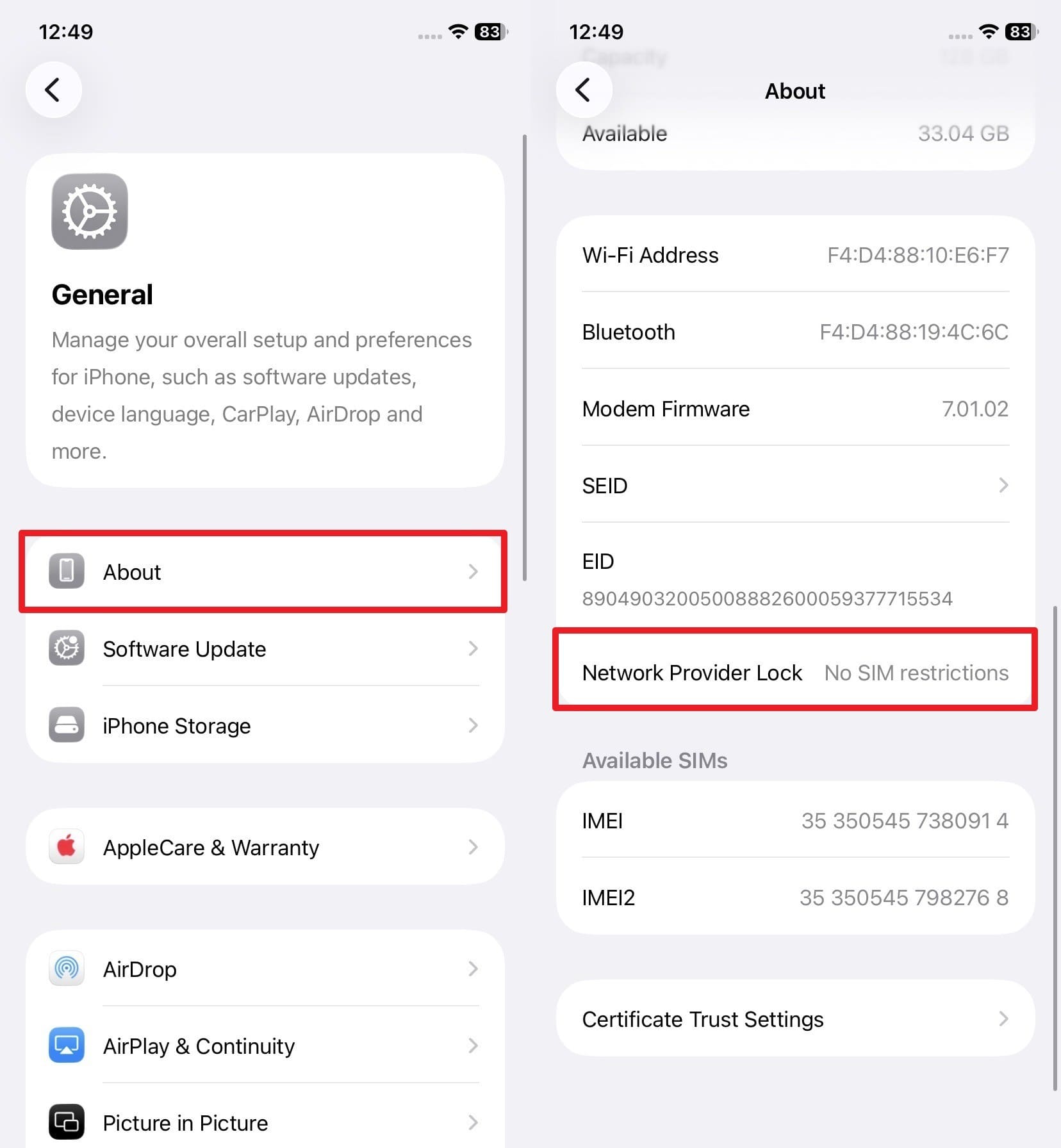
Instructions. In the General settings, go to the “About” and choose the “Network Provider Lock” option. There, if it says “No SIM Restrictions,” your device is unlocked. If it doesn’t, the phone is locked, and you need to contact the carrier to switch it to a different carrier.
Check Using Another Carrier’s SIM (e.g., “SIM Not Supported”)
To unlock the iPhone SIM, you can also check the lock status by inserting a SIM from another carrier. If the phone connects and the services like calls and data work, the phone is unlocked. On the contrary, if you see the “SIM Not Supported” alert, the phone is carrier locked.
Part 2. Requirements Before You SIM Unlock Your iPhone
In 2026, many carriers have made the network lock bypass seamless, but they are strict towards the financial and security requirements. To know what they can be and if you meet them, review the mentioned points and choose the SIM unlocking method:
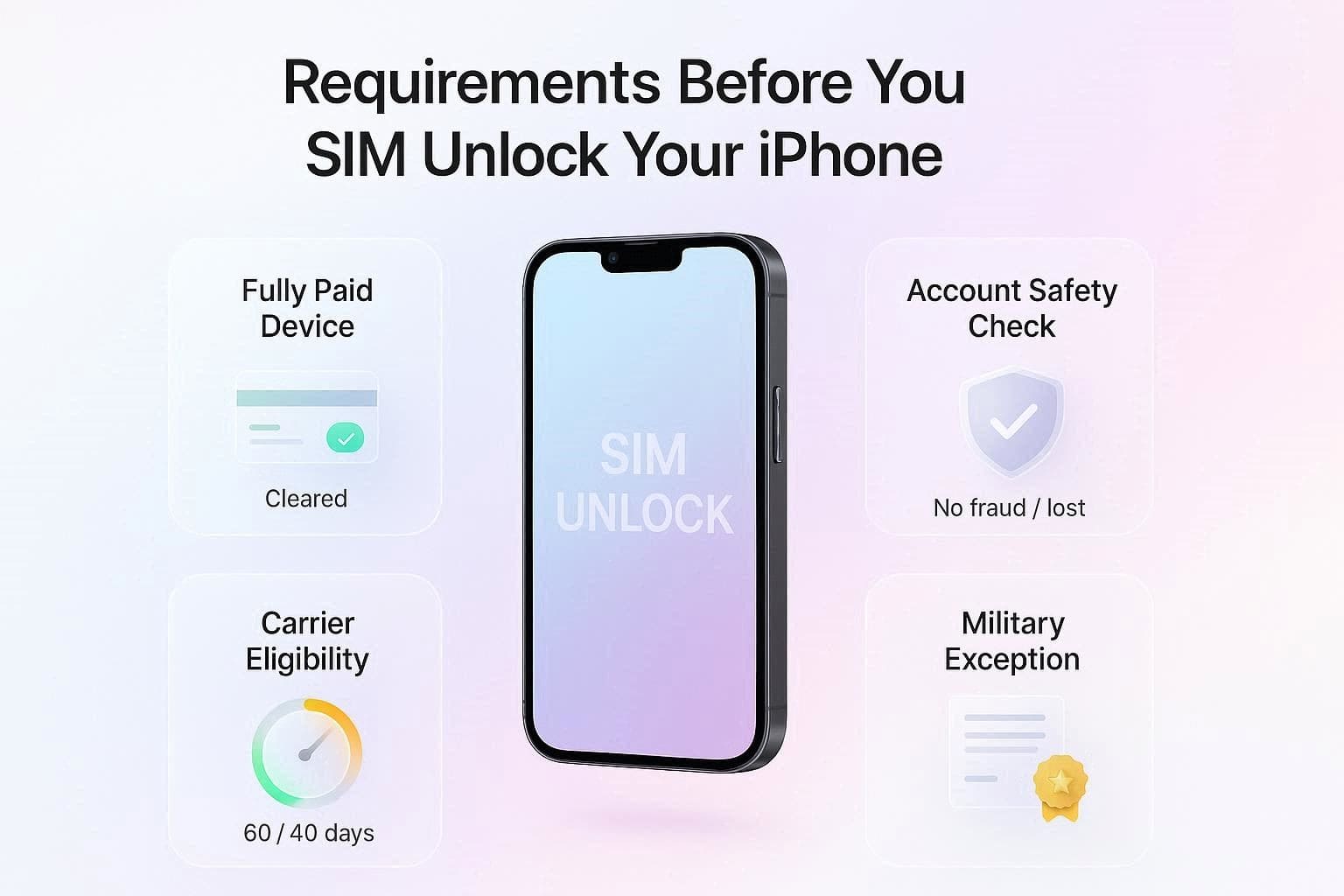
- The phone must be paid off; any installment plans or outstanding balance will cancel the request.
- Your account must not have a history of fraud, and the device must not be reported as lost or stolen.
- Most carriers require the device to stay active on their network for a specific time. For example, 60 days for AT&T/Verizon and 40 days for T-Mobile.
- If you are a military member with deployment orders, most carriers will remove the waiting period once you show the official documents.
What You Need Ready:
- Dial *#06# or go to Settings > General > About to note the IMEI details.
- The original phone number is tied to the device.
- Have the account number, the account holder's name, and the last 4 digits of the SSN associated with the line.
Method 1. Request SIM Unlock from Your Carrier
This is the safe and official method and can work with any SIM or eSIM. Only the carrier can unlock the SIM, and the change will be permanent after approval, Apple says. So, this allows you to move from one network to another without any restrictions, utilize cheaper plans, and save money as you travel. So, to know how to do this by contacting AT&T, here is the detailed guide:
-
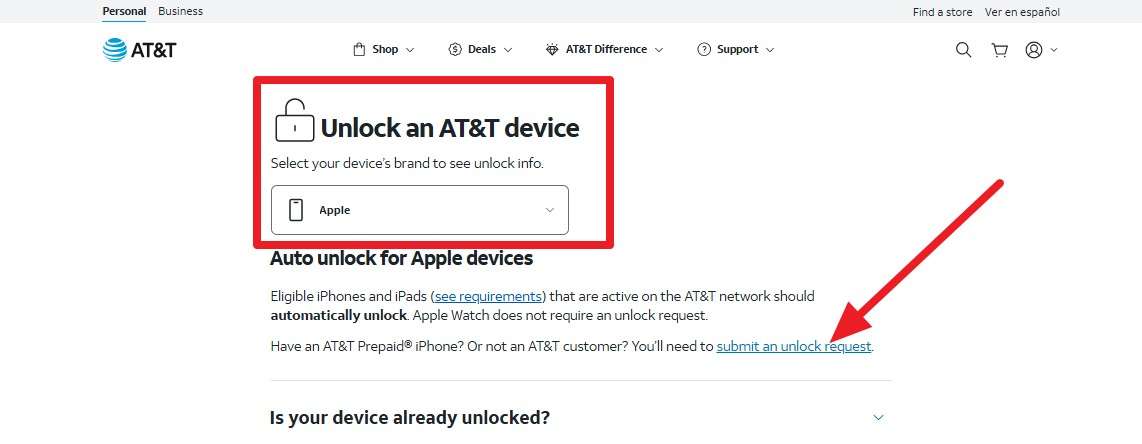
Step 1 On the AT&T Device Unlock site, choose “Apple” under the “Unlock an AT&T Device” section to SIM unlock an iPhone. After that, read the given description and tap on the “Submit an Unlock Request” link.
-
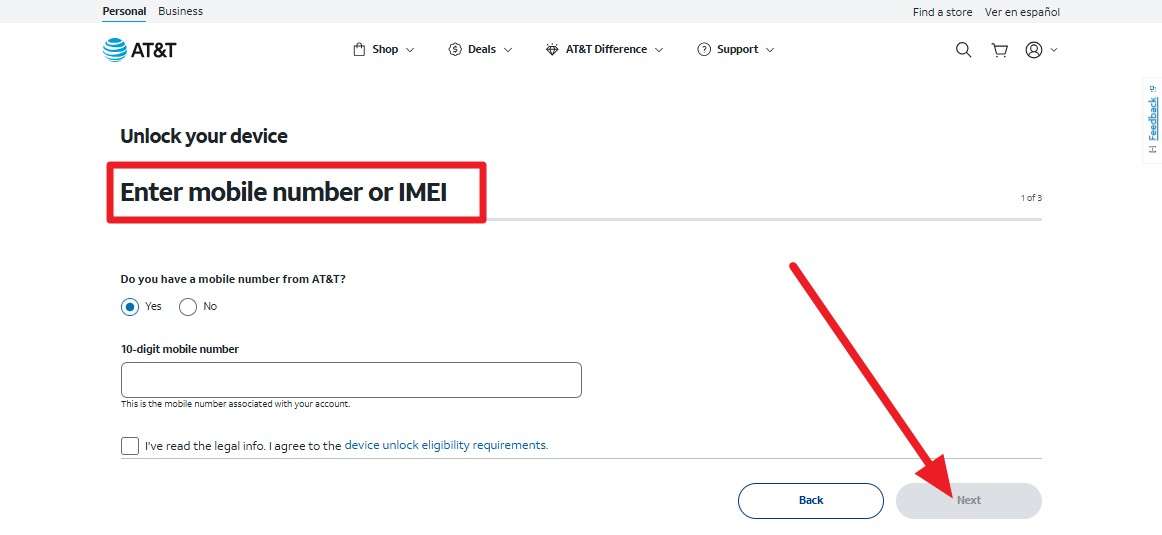
Step 2 Fill in the details asked under the “Enter Mobile Number or IMEI” section. Agree to the terms, and click the “Next” button to add the email details and submit the request. Open the link within 24 hours and check the eligibility and unlock status. If it gets approved, the carrier will send the signal to Apple to unlock your device.
Method 2. Use a SIM Unlock Service Online
If you don’t meet the requirements for the iPhone carrier unlock, use the IMEI-based tools like Dr.Fone Online Unlock. This online unlocker supports SIM lock removal for all the new and old iPhone and Android models. Additionally, it processes SIM lock requests remotely in the cloud and claims that the lock removal is permanent.
You can easily update your iOS version or perform a factory reset, as the tool uses legal methods to bypass the network lock. In addition, all the users' data remains intact since the process is performed on the server side, and separate tabs make navigation seamless. Above all, you get 2 options to monitor the unlock process, which takes 0-24 hours.
1. Permanent Unlock via IMEI
Dr.Fone Online Unlock uses the device’s IMEI to request a permanent unlock from Apple’s activation servers, supporting all iPhone models.
2. Fast & Secure Process
The unlock is processed remotely in 0–24 hours. No data loss or technical skills required.
Detailed Guide to Unlock the SIM of Your iPhone via Dr.Fone Online Unlock
To unlock the iPhone SIM, let’s perform a real-world test to see if it actually delivers what it claims. Here, iPhone 16 is used for testing, and the detailed guide is mentioned below:
-
Step 1 Locate the SIM Unlock Page and Add Details
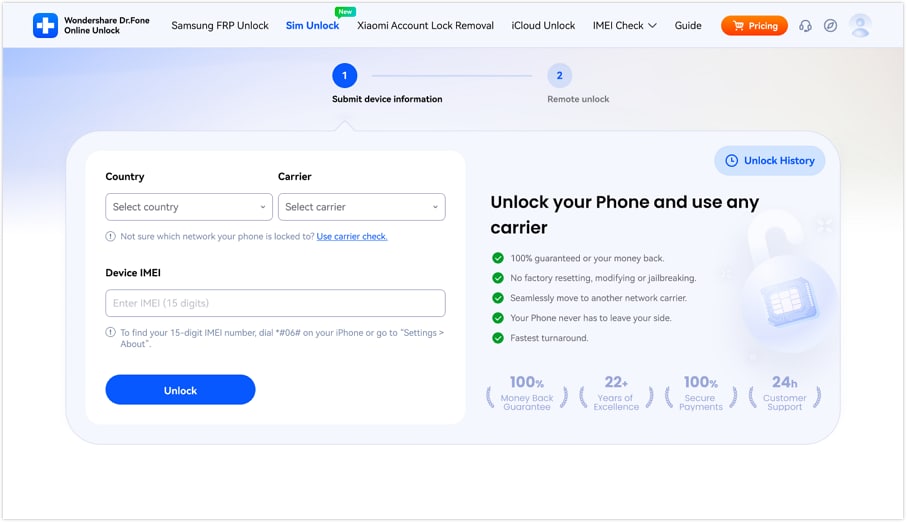
Access the Dr.Fone SIM Unlock page on the tool and type the “Country, Carrier, and IMEI” details to pick “Unlock.”
-
Step 2 Confirm the Added iPhone Details
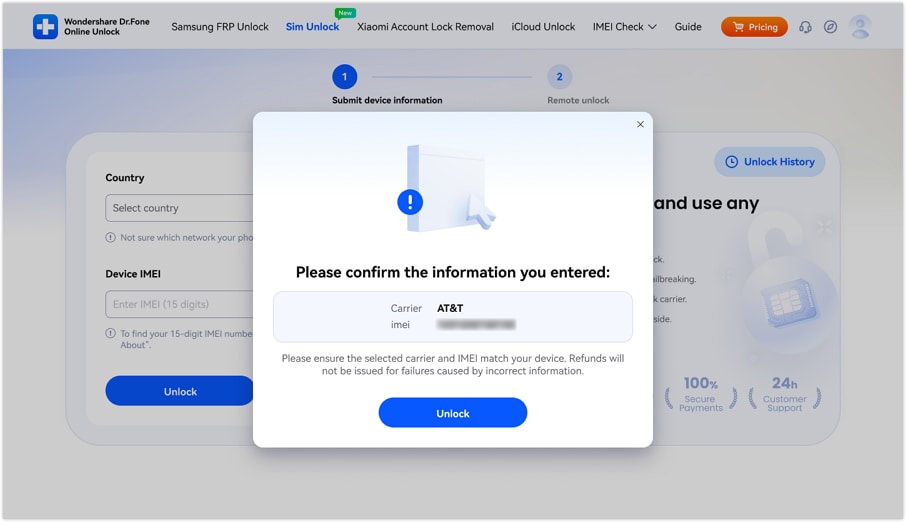
When prompted, confirm the added details for iPhone 16 in the popup menu and tap “Unlock” again.
-
Step 3 Submit the Cloud Request and Monitor the Progress
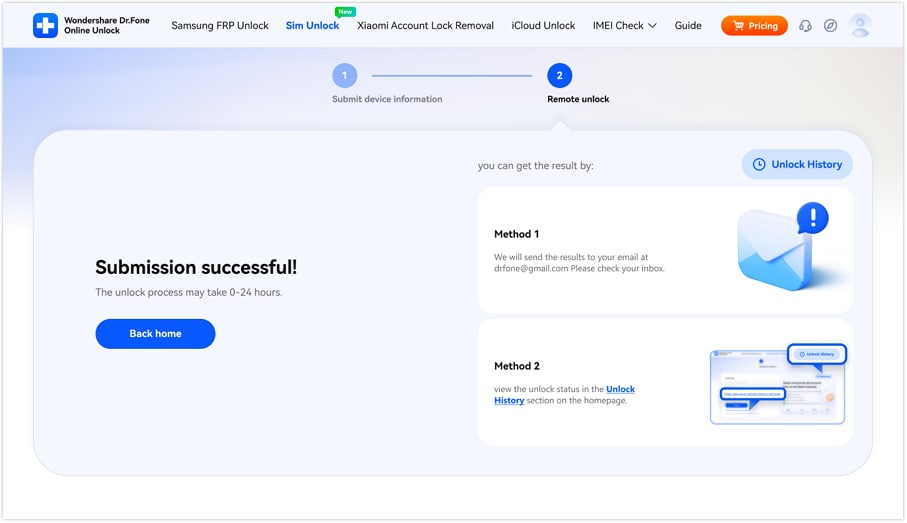
The tool will submit the request to the cloud, which will take 0-24 hours to process. So, choose from the given methods to monitor the unlocking report.
What SIM Unlock Services Actually Do
According to the FTC, such IMEI-based offers a quick, permanent SIM unlock iPhone solution to update the device status in the Apple Activation Database. They process requests on the cloud servers within 24 hours and need no requirements to fulfill. Nonetheless, experts at TAG Mobile warn users to verify the service's legitimacy to avoid malware and scams.
In this case, experts suggest using online SIM Unlock services like Dr.Fone Online Unlock. This is because many users and reviewers describe the tool as secure, easy to use, and suitable for beginners. While using the tool, experts have also suggested verifying device compatibility, as the tool offers extensive brand support.
Part 3. Complete Your iPhone Unlock: What to Do After Approval
Now that you have performed the listed ways for iPhone carrier unlock, it's time to complete the process. Whether you have a SIM from another carrier or not, this section caters to both situations.
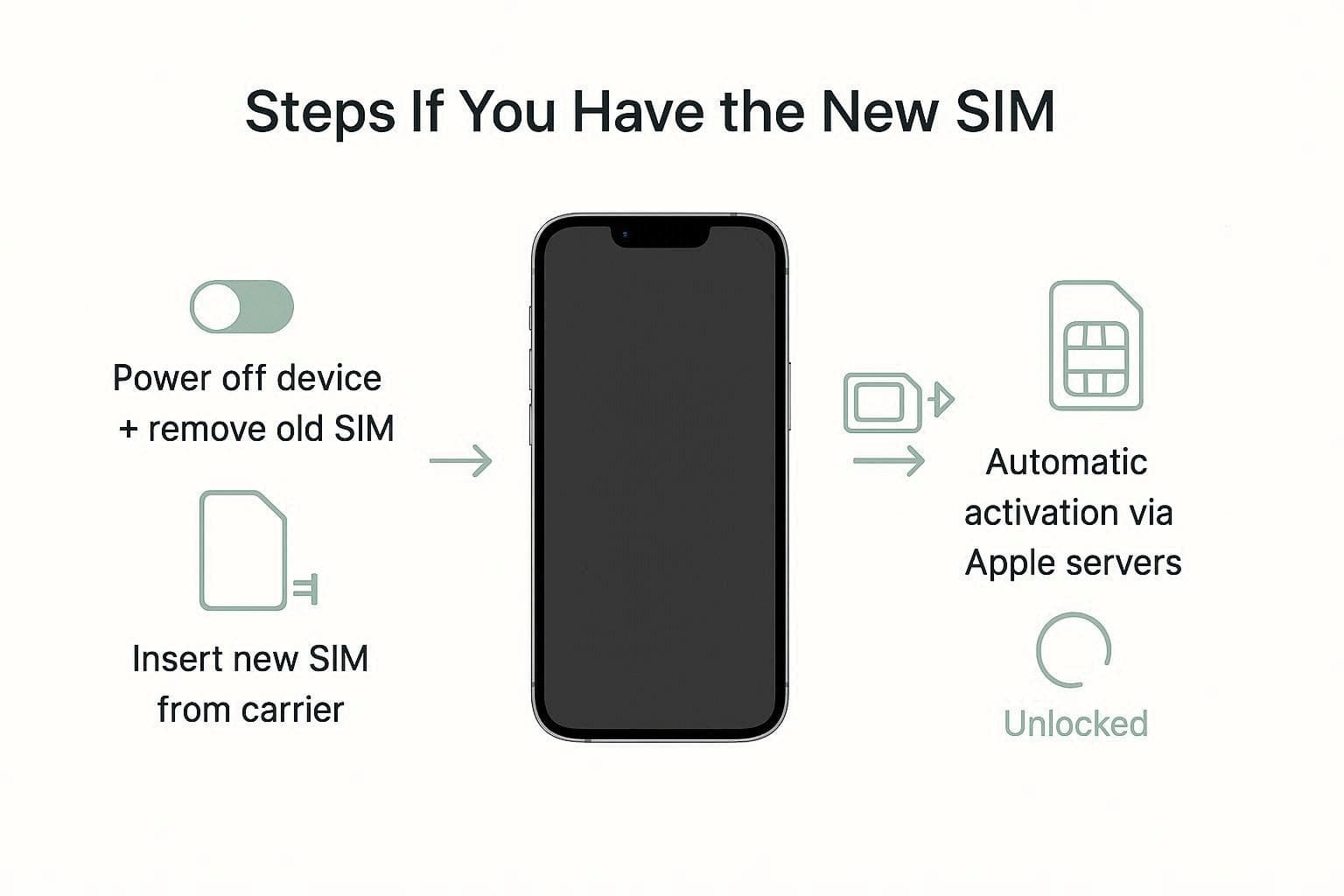
Steps If You Have the New SIM
As it's the fastest way to finalize the process, power off the device and remove the old SIM. Then, put in the new SIM from the other provider and activate it. It will automatically reconnect to Apple's activation servers, and the lock status will be changed.
Steps If You Don’t Have the New SIM Yet
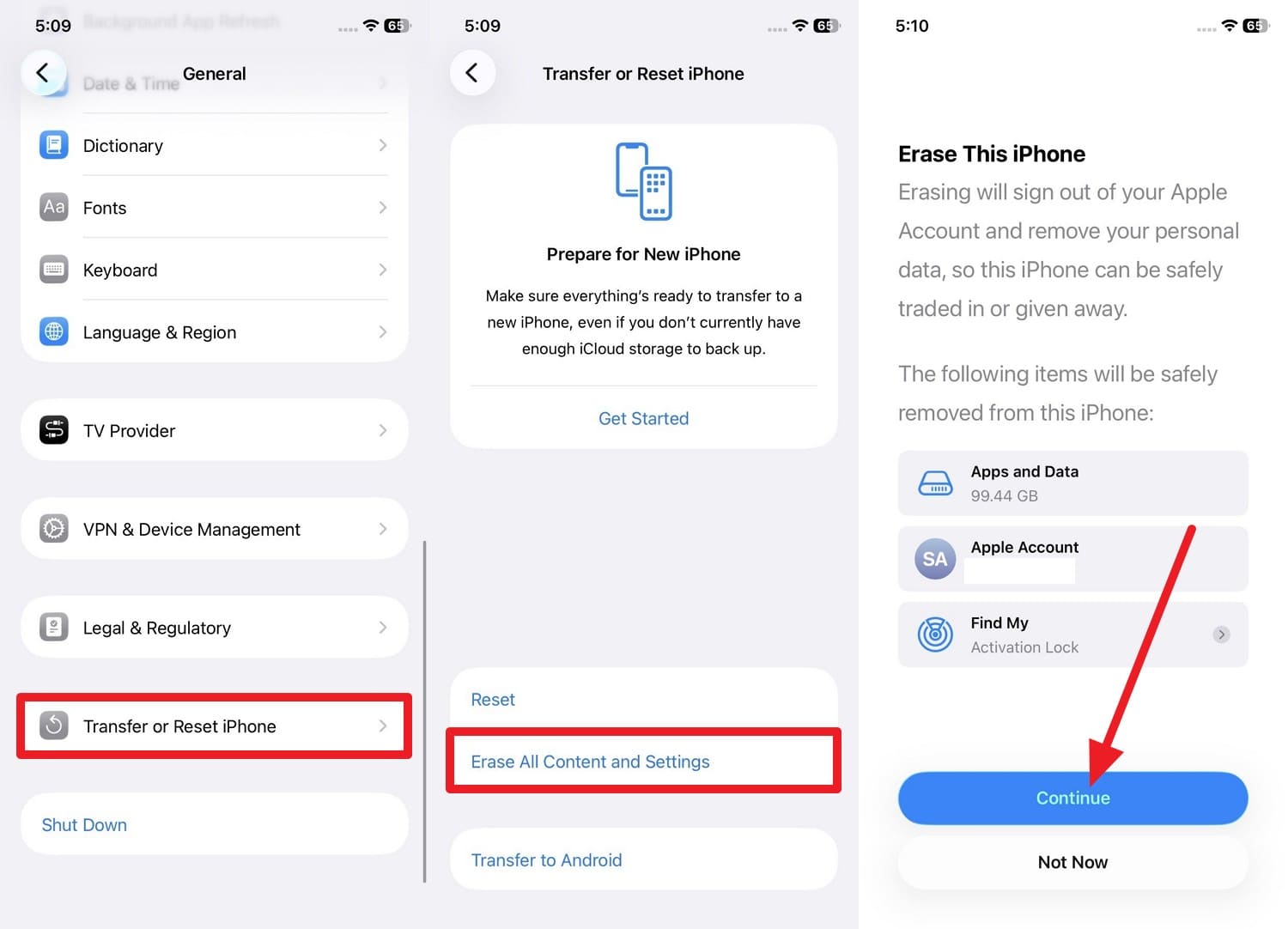
If you don’t have the new SIM, perform a full backup of your iPhone using iCloud or iTunes/Finder. In this regard, you have to erase the device via the mentioned steps and later restore it by picking the “Restore from Backup” option during setup:
Erase the Device (Instructions): From the General settings, choose “Transfer or Reset iPhone” then tap “Erase All Content and Settings.” Then click the “Continue” button, enter the Apple account information, and confirm.

How to Confirm Unlock
After you unlock the iPhone SIM, here is how you can check whether the device is unlocked or not:
- Option 1: Add the friend’s SIM card; if it catches a signal, the device is unlocked.
- Option 2: In the General settings, locate the “Network Provider Lock” option. If it says, “No SIM Restrictions,” your SIM unlock process was successful.
Conclusion
Having a SIM-unlocked iPhone offers freedom to switch to an affordable carrier or save on international roaming fees. Thus, this detailed guide has explained official and IMEI-based online ways to remove the network unlock. If you fail to meet the carrier requirements, use reliable tools like Dr.Fone Online Unlock to remove the SIM lock within 24 hours.
FAQ
-
1. Does SIM unlocking my iPhone delete my data?
No, all the official carrier unlock and IMEI-based services do not affect your personal files and make the request on the server. Nevertheless, if you don't have the SIM, you need to erase the device and restore the backup, which will erase the data. -
2. What is the difference between Jailbreaking and SIM Unlocking?
Jailbreaking is the technique of modifying the software to install unauthorized applications and typically renders the warranty void. On the contrary, SIM unlocking only removes carrier restrictions so that you can use other networks, and it is safe and legal. -
3. Can a blacklisted iPhone be SIM-unlocked?
No, if a phone is blacklisted, then all the carriers will refuse to unlock it. Some services say they can clean the IMEI, but they're not reliable and not legal. Thus, it is best to contact the original owner or carrier to resolve the blacklist issues first.