ChatGPT
 Perplexity
 Gemini
 Claude
 Grok
Grok
A locked Samsung Galaxy may cause issues if you require another network. It might be for increased security or just more freedom in your cell phone. That is why many users search for ways to SIM unlock a Samsung Galaxy without carrier approval. This guide explains when SIM unlocking is possible and what can cause failure.
You will also learn the requirements and the main unlocking methods available. Additionally, understand how online SIM unlocking tools like Dr.Fone Online Unlock can help in bypassing network lock.
In this article
Part 1. Can You SIM Unlock Samsung Without Carrier Approval?
You can SIM unlock Samsung devices without carrier approval in specific situations. This is possible when the device is fully paid for, and contract obligations are completed. In such cases, external services can process a Samsung carrier unlock using IMEI data.
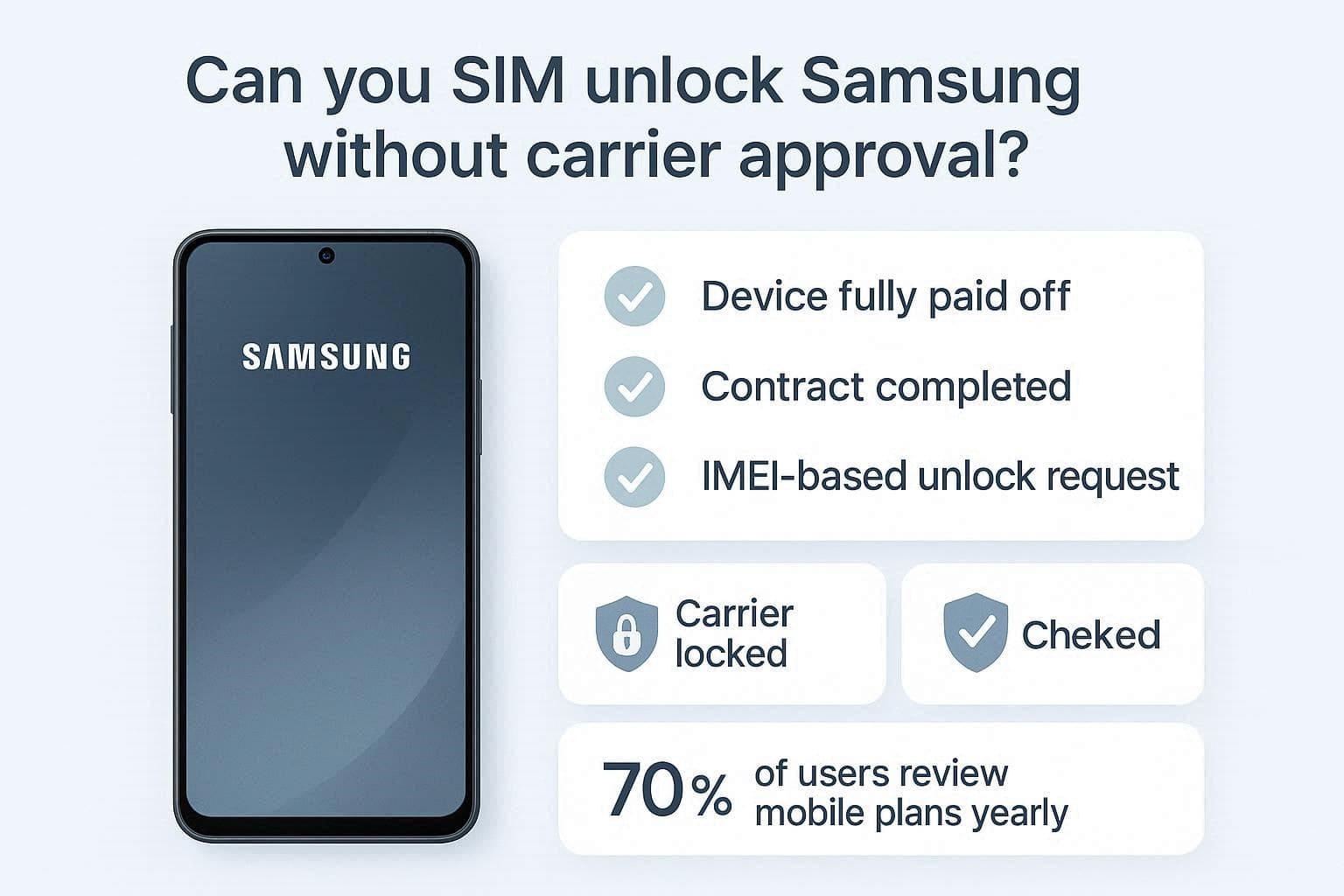
According to the OXIO survey, 70% of consumers review their mobile plans at least annually. Yet, the table below shows common situations where unlocking may still fail:
| Situation | Reason for Failure |
|---|---|
| Active Carrier Contract | Carrier restrictions remain until contract terms are completed. |
| Blacklisted Device | Reported lost or stolen phones cannot be unlocked legally. |
| Unpaid Installments | Financial obligations prevent unlocking approval or processing. |
| Unsupported Model | Some regional models are not supported by unlocking services. |
| Incorrect IMEI | Wrong details lead to failed or rejected unlock requests. |
Apart from that, here are some legal and policy questions to consider before trying any method:
- The Unlocking Consumer Choice Act states that unlocking a paid smartphone is legal.
- Users are required to make sure that their device isn't currently reported as lost or stolen.
- Digital Millennium Copyright Act rules allow consumers to modify their own hardware.
- Most manufacturers will void your warranty after you bypass the network lock.

Part 2. How to SIM Unlock Samsung Galaxy Without Carrier Restrictions
You can now follow specific methods to SIM unlock Samsung Galaxy devices. Explore the sections below to understand the costs and technical requirements involved:
How Much Does It Cost to SIM Unlock a Samsung Galaxy?
The total price for a professional service depends on your specific mobile model. Standard costs for older devices usually range from $3 to $5. Modern flagship smartphones require a payment of between $15 and $30 in total.
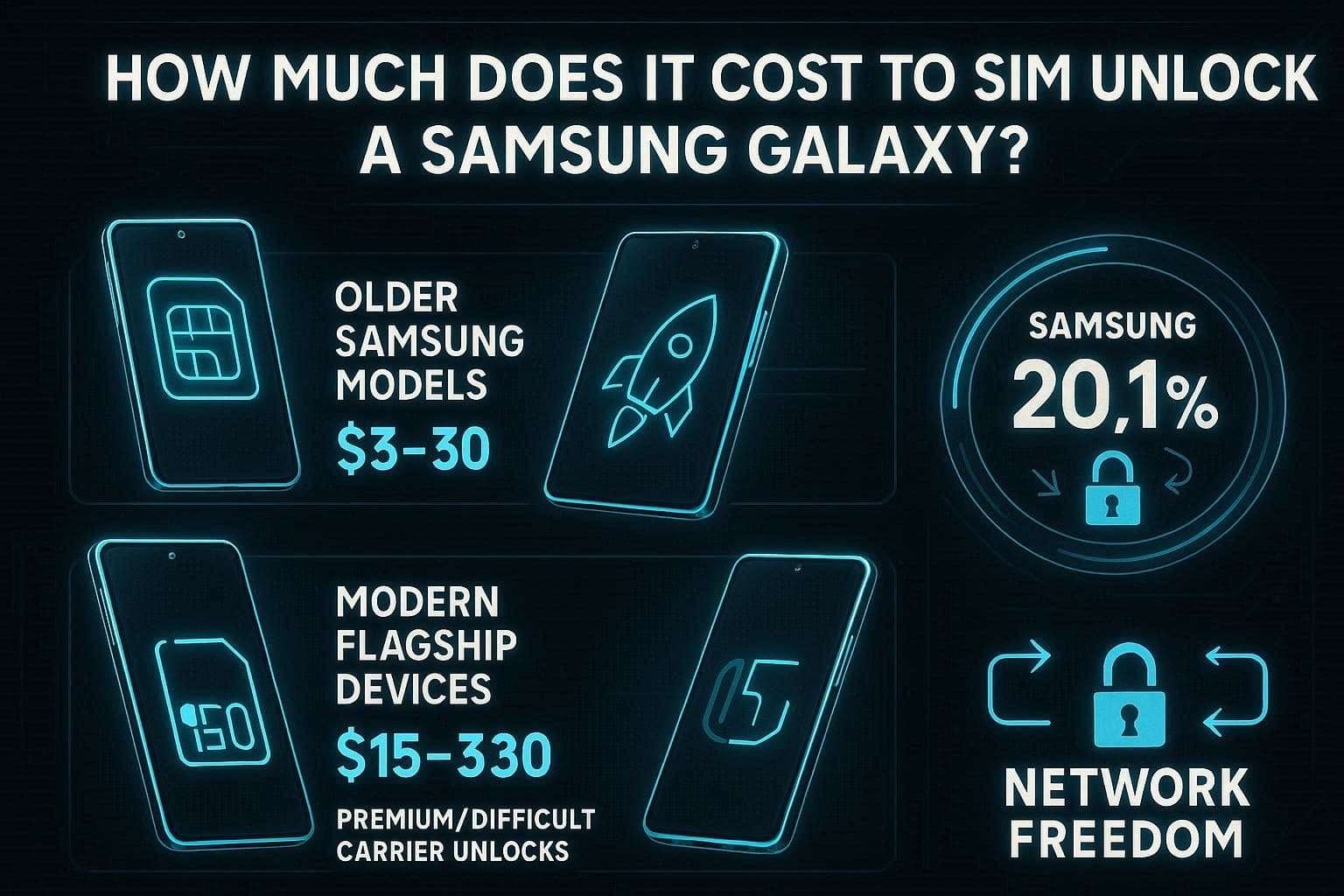
Premium cases or difficult networks might cost over $80 for a code. Statista reports that Samsung held a 20.1% share of the global smartphone market in 2024. Hence, a Samsung carrier unlock remains a valuable investment for your long-term freedom.
Requirements Before Unlocking Samsung Galaxy
Before starting, ensure your device meets all conditions for a Samsung carrier unlock. The table below outlines common requirements most carriers expect:
| Requirement | Description |
|---|---|
| Fully Paid Device | All installments or contract payments must be completed. |
| Clean IMEI Status | The device must not be reported lost, stolen, or blacklisted. |
| Active Account Status | No unpaid bills or account issues should exist. |
| Minimum Usage Period | The device must be active for the required days on the network. |
| Proof of Ownership | IMEI details and purchase proof may be required. |
Nonetheless, these requirements can vary depending on your mobile carrier's policies and conditions. Review these specific network examples to understand how different providers manage the process:
AT&T Unlock Criteria
-
1 Device Age
Your device must be active on the network for 60 days.
-
2 Payment Status
All installment plans must be fully paid before starting the process.
-
3 Clean Record
The smartphone cannot be linked to any active fraudulent activity reports.
-
4 Official Request
You should submit your request through the official online portal directly.
T-Mobile Unlock Criteria
-
1 Brand Origin
The mobile device must be originally sold by the T-Mobile brand.
-
2 Usage Period
Your phone must stay active on the network for 40 days.
-
3 Account Standing
Canceled accounts must have a total balance of $0.
-
4 Status Check
Users can check their eligibility status within the official mobile app.
Method 1. Use IMEI Unlock Service for Samsung Galaxy
You can utilize reliable external tools to perform a permanent Galaxy network unlock. Thus, go through the following top services to find the best option for your device:
1. Dr.Fone Online Unlock
IMEI tools like Dr.Fone Online Unlock provide a reliable way to SIM unlock Samsung Galaxy devices quickly. Users can unlock various models from major providers like Sprint or T-Mobile. This online tool receives weekly updates to support the newest flagship mobile devices. While unlocking, you just need to provide your IMEI number to initiate the cloud request.
Along with that, users can unlock both older and newer Samsung models using the same process. You can even track your request progress through automated real-time email status updates. Moreover, most unlock requests are completed within 0 to 24 hours. This professional utility maintains your device warranty while delivering high success rate results.
Simple Guide to SIM Unlock Samsung via Dr.Fone Online Unlock
-
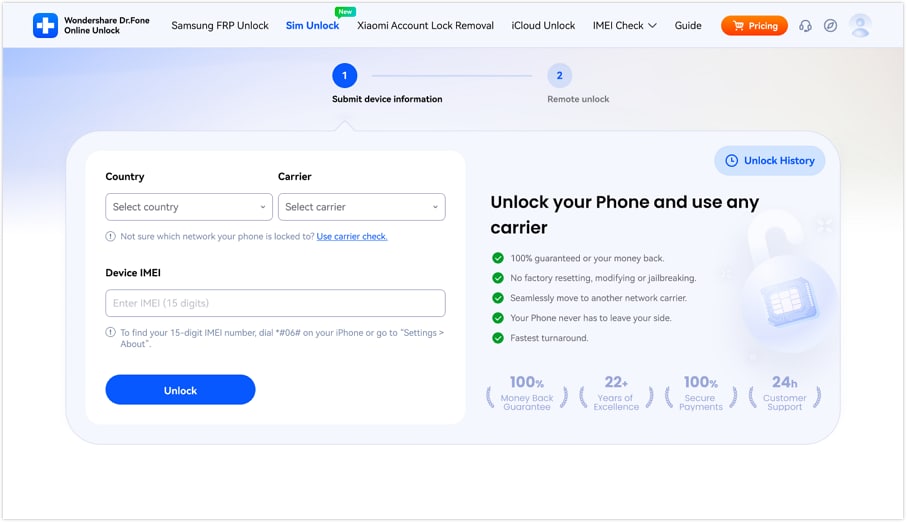
Step 1 Add the Required Information
Access the “SIM Unlock” tool of Dr.Fone Online Unlock and enter details, including carrier and IMEI number. Then, press the “Unlock” button to submit the entered details for verification processing.
-
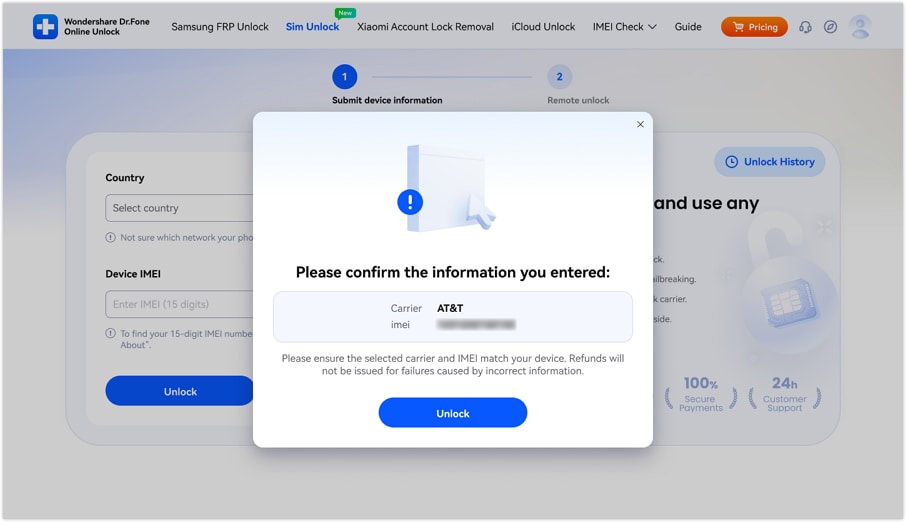
Step 2 Verify and Confirm the Details
Review the displayed information when the confirmation popup menu appears. Click the “Unlock” button after confirming everything matches your submitted information.
-
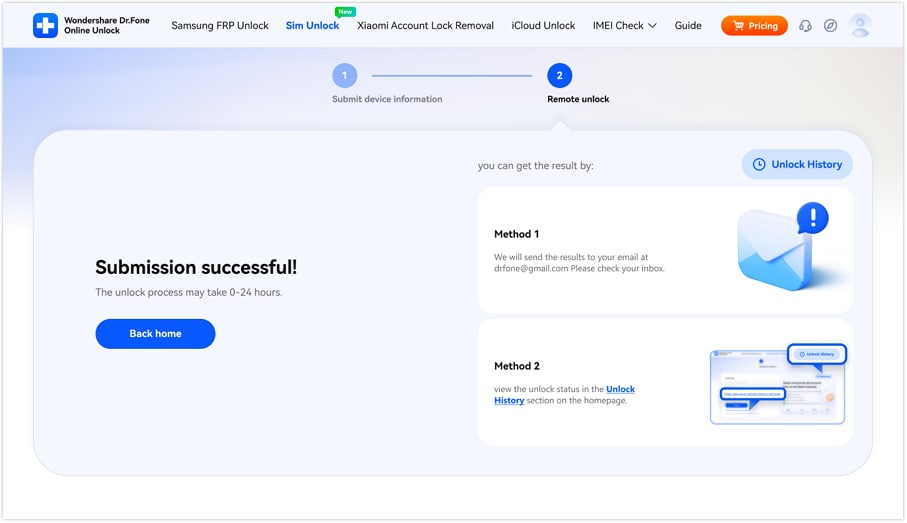
Step 3 Monitor the Unlocking Progress
The unlocking request uploads to cloud servers for automated background processing. Later on, track the current SIM unlocking progress anytime using both available monitoring methods.
2. DirectUnlocks
This tool also lets users request a Galaxy network unlock using IMEI details. The platform detects device models after users enter basic information. Most unlocks finish within 15 minutes, which supports fast turnaround times. Confirmation arrives via email and push notifications once the device is officially free. Thus, take guidance from the following steps to use DirectUnlocks for SIM network unlocking:
-
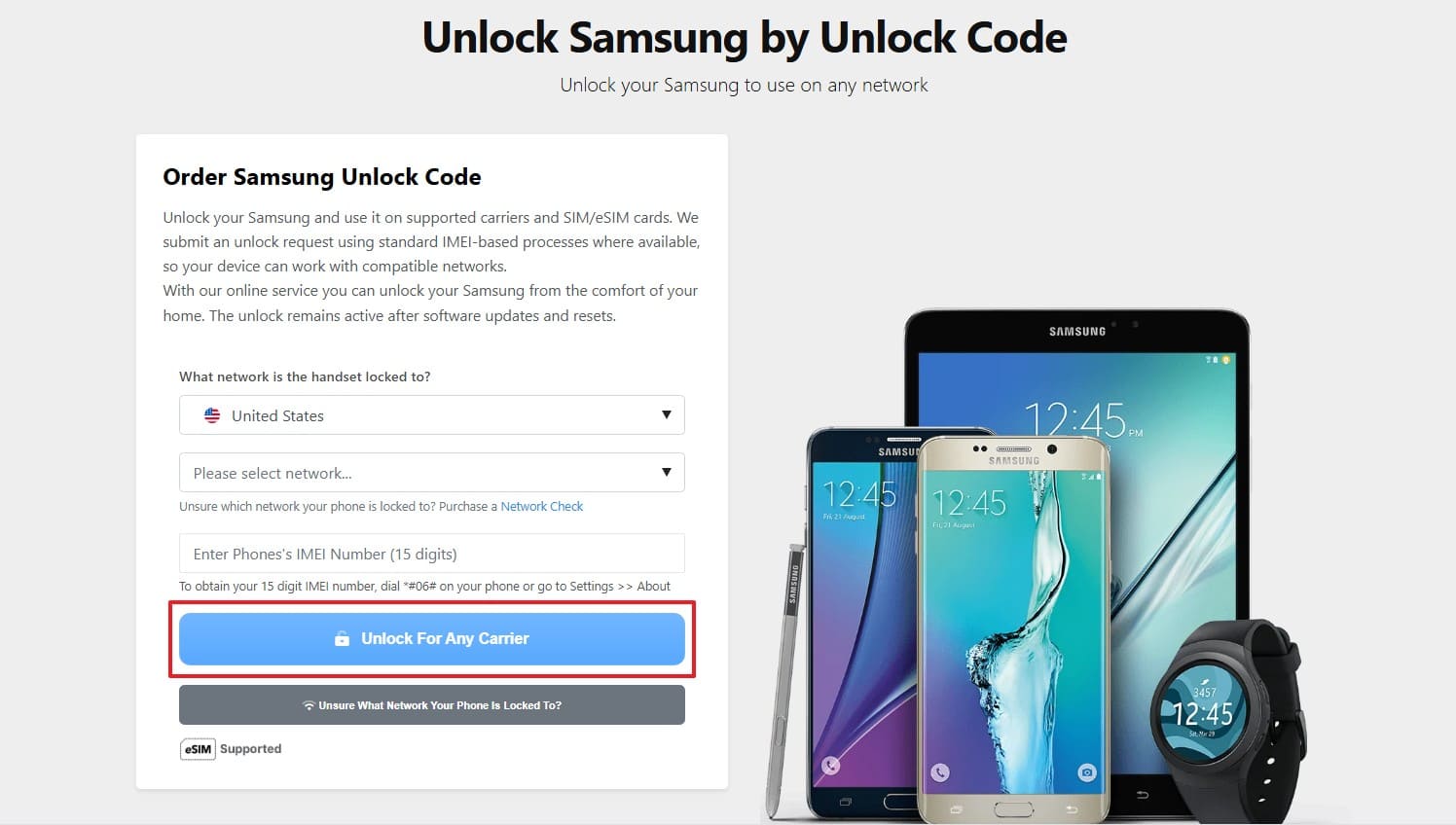
Step 1 From the initial screen, select your “Country” and enter the details like “Network” and “IMEI.” Once your device’s model is detected, click the “Unlock for Any Carrier” button.
-
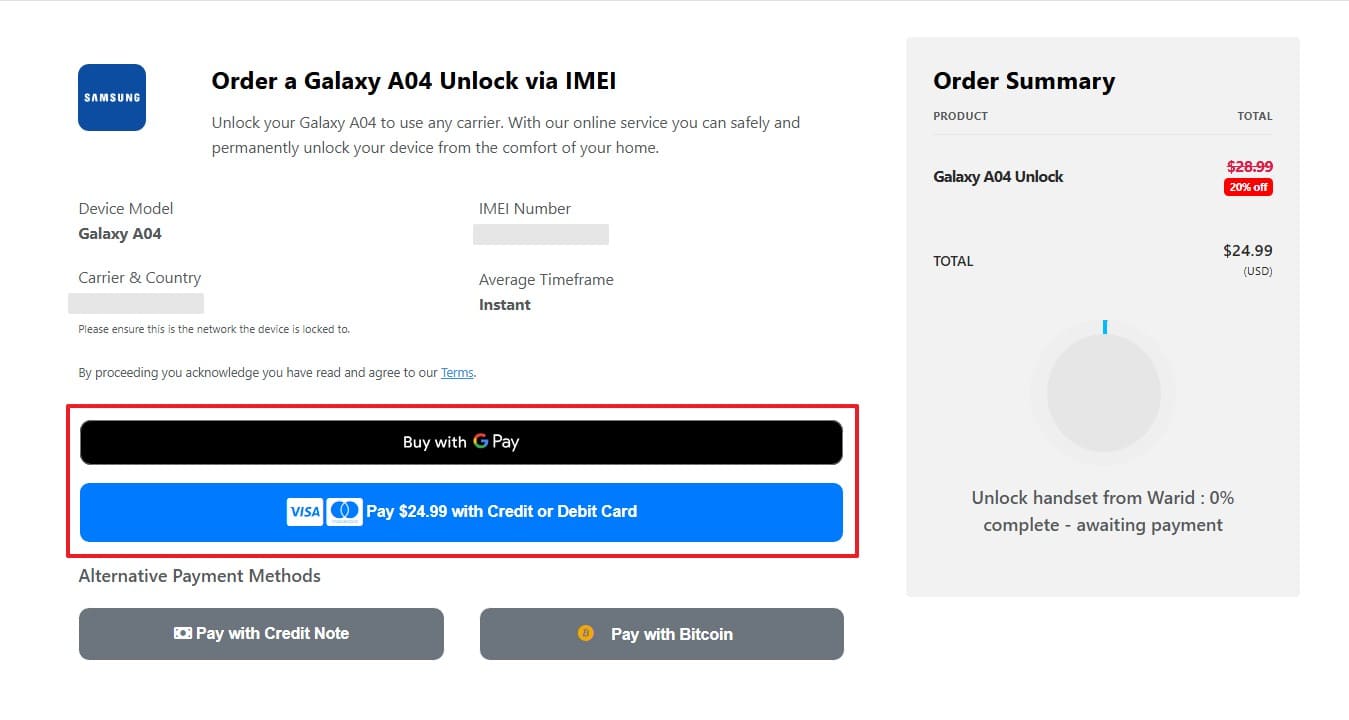
Step 2 Go ahead and press the preferred button to pay for the service and unlock the carrier.
3. Official SIM Unlock
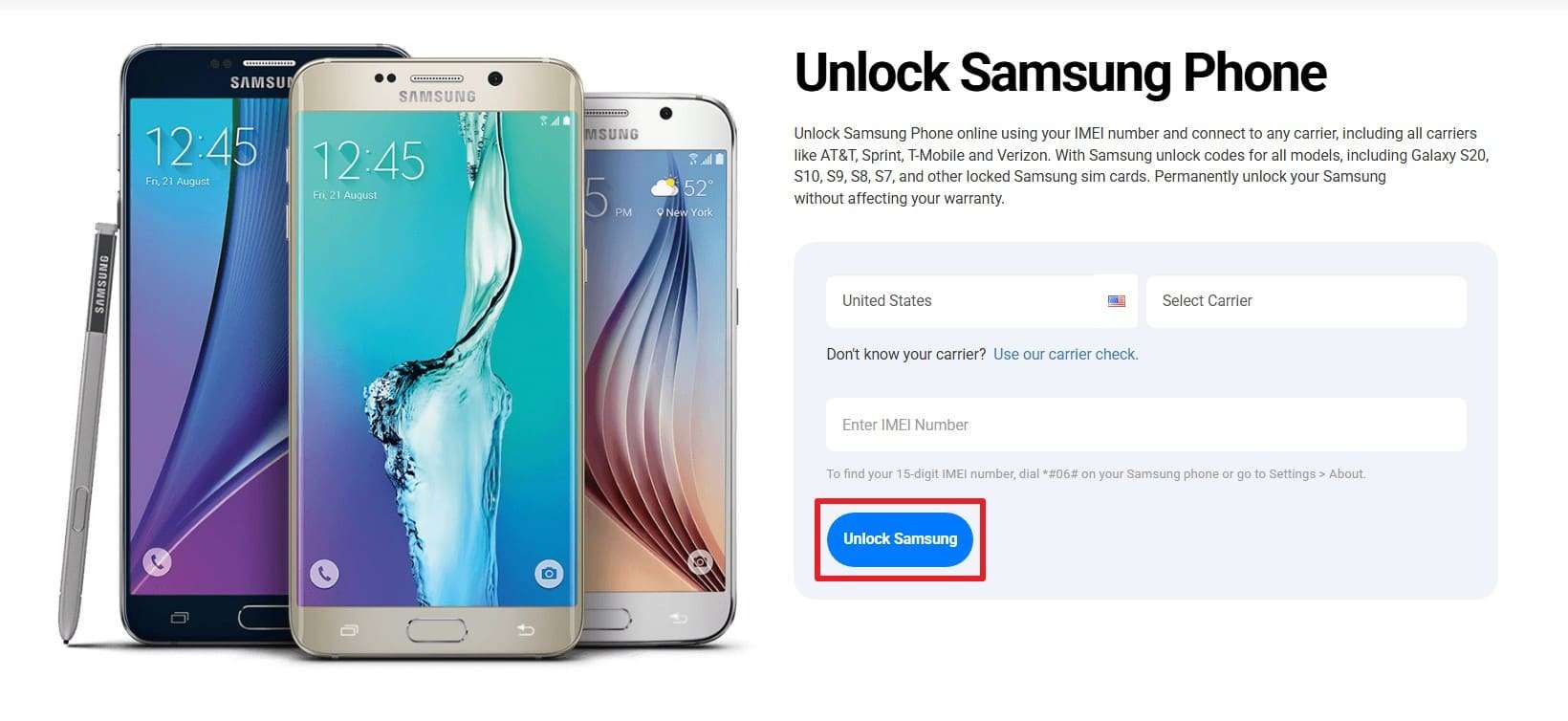
It also provides a versatile online solution for a permanent Samsung carrier unlock. The platform supports many different network providers, including Verizon and T-Mobile. You can free various Samsung models from the Galaxy S7 to newer ones. Its global service covers hundreds of countries, such as the United States and Canada. So, adhere to the given steps to learn how to use the Official SIM Unlock tool:
-
Step 1 As you access the main screen, choose your “Country” and “Carrier.” After that, enter your device’s IMEI number and click the “Unlock Samsung” button.
-
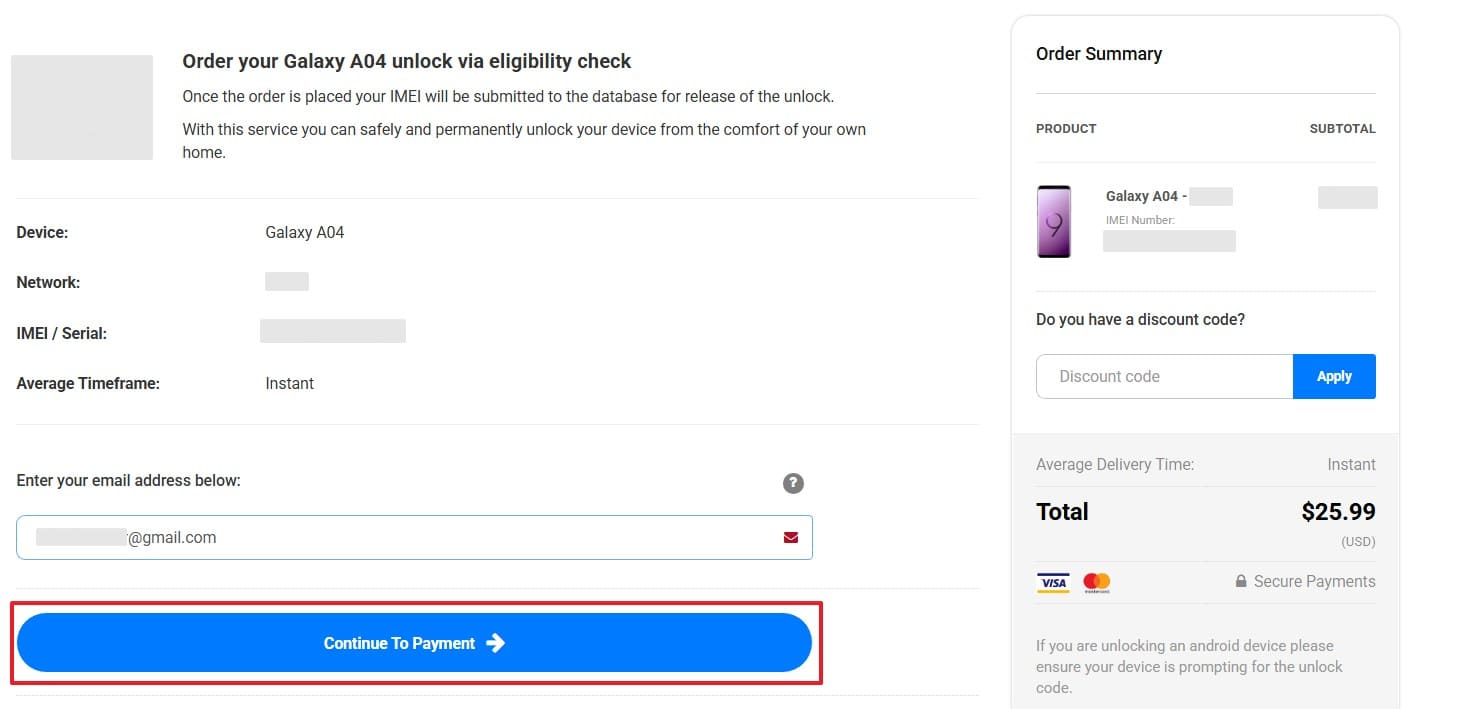
Step 2 Upon detecting your device, enter your email address and press “Continue to Payment.” Once you add the payment, the tool initiates processing the unlocking task.
After following the steps for each platform, explore the table below to review these services:
| Feature | Dr.Fone Online Unlock | DirectUnlocks | Official SIM Unlock |
|---|---|---|---|
| Primary Method | Cloud-based IMEI | Carrier Contact | Network Unlock Code |
| Success Rate | Extremely High | High | Moderate to High |
| Processing Time | 0 to 24 Hours | 24 Hours to 2 Days | Variable by Region |
| Update Frequency | Weekly Updates | As Needed | Periodic Updates |
| Warranty Status | Fully Maintained | Usually Maintained | Warranty Safe |
Method 2. Unlock Samsung Galaxy Using Unlock Code
Regarding the network lock, Samsung says that the company itself does not lock the device. Thus, you need to contact the original carrier or retailer to request an unlock code. It's also said that how you get the code depends on the phone and carrier.
Most modern phones are locked using an NCK provided by the carrier or an IMEI-based service. However, old models also support various Samsung unlock codes, but these legacy methods must be used carefully. Nonetheless, if you want to know the Samsung carrier unlock method for old and new models, review the mentioned guide:
For Samsung Carrier Unlock (Old Models):
If you are using a Samsung J600, here is how you can unlock the SIM lock:
Instructions: On the phone dialer, type the code “#0111*UNLOCK# or #0149*UNFREEZE#.”
For Samsung Carrier Unlock (New Models):
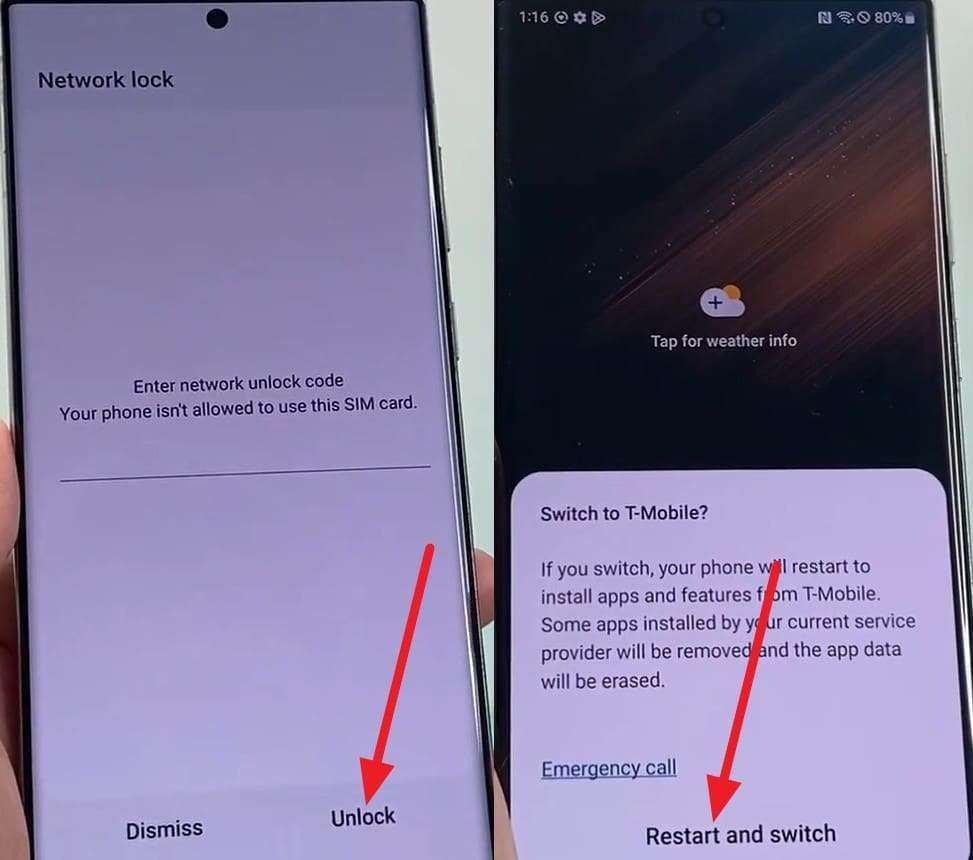
For the new models like the Samsung Galaxy S22 Ultra, here is how you can contact your carrier to get the code:
-
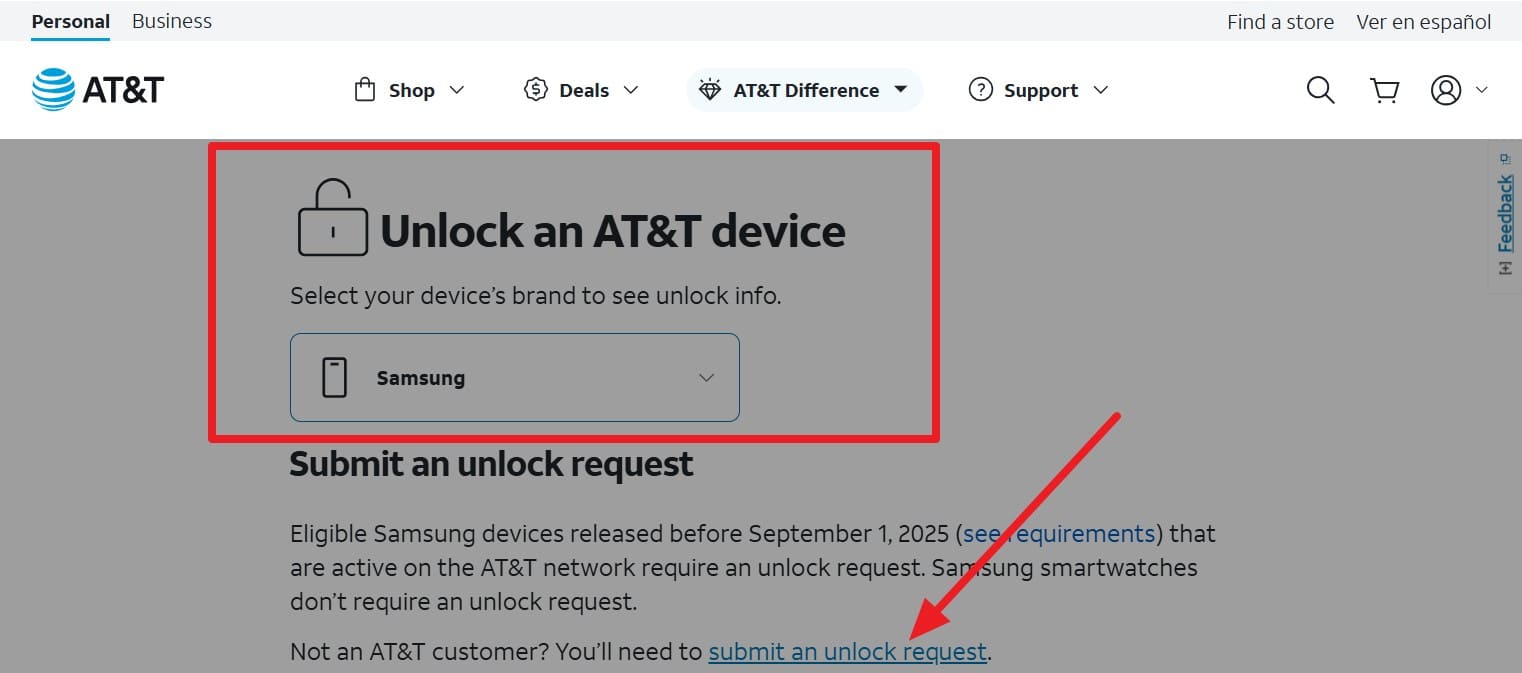
Step 1 On the AT&T SIM unlock site, choose Samsung from the “Unlock an AT&T Device” option. Then, check eligibility if you want to, or tap the “Submit an Unlock Request” option.
-
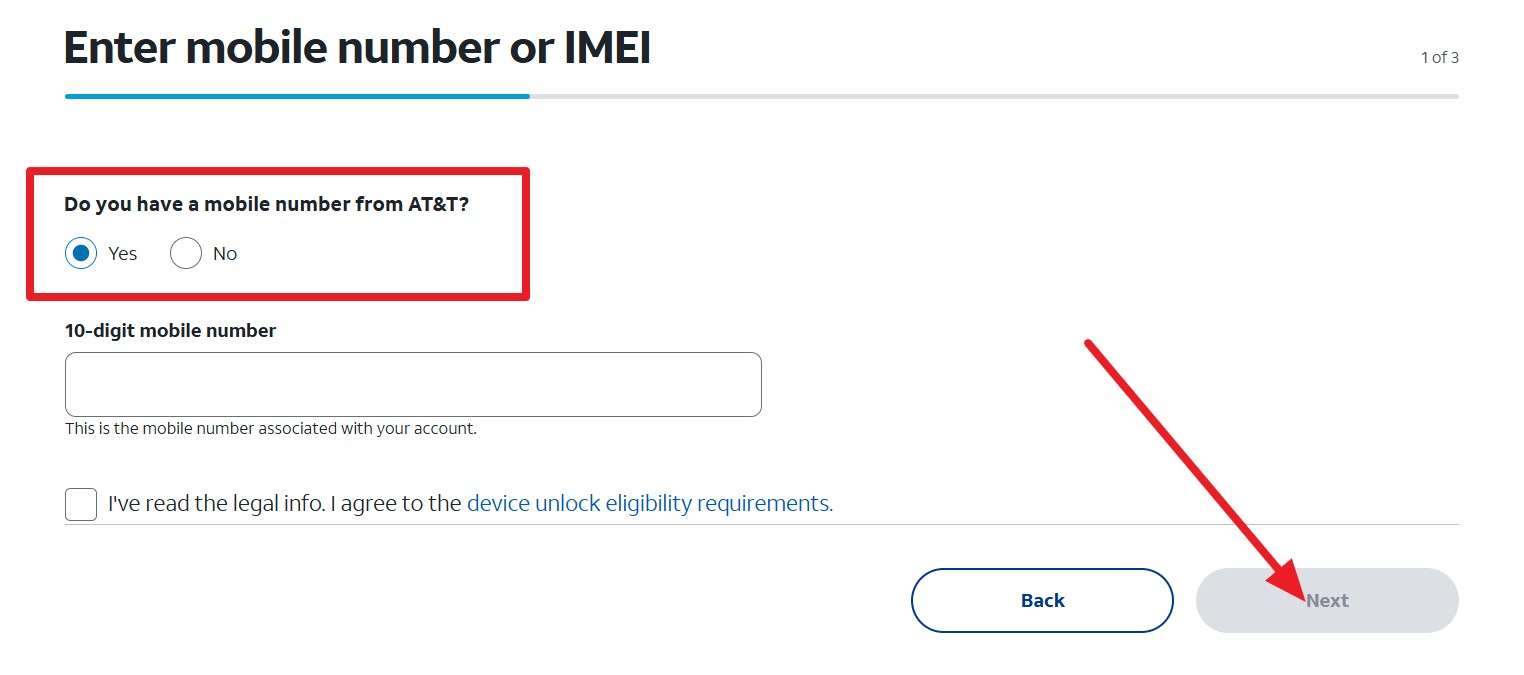
Step 2 Choose the options for “Do You Have a Mobile Number From AT&T?” and add the phone number. After that, agree to the listed terms, insert the email details, and press the “Next” button. When AT&T sends you the confirmation link, open it and follow the instructions to access the code.
-
Step 3 Now, add the SIM you want to switch to, and open the dialer. Then, enter the received code and tap the “Unlock” button. As the unlock request is processed, click the “Restart and Switch” button to use another SIM card.
Part 3. Tips to Successfully SIM Unlock Samsung Galaxy
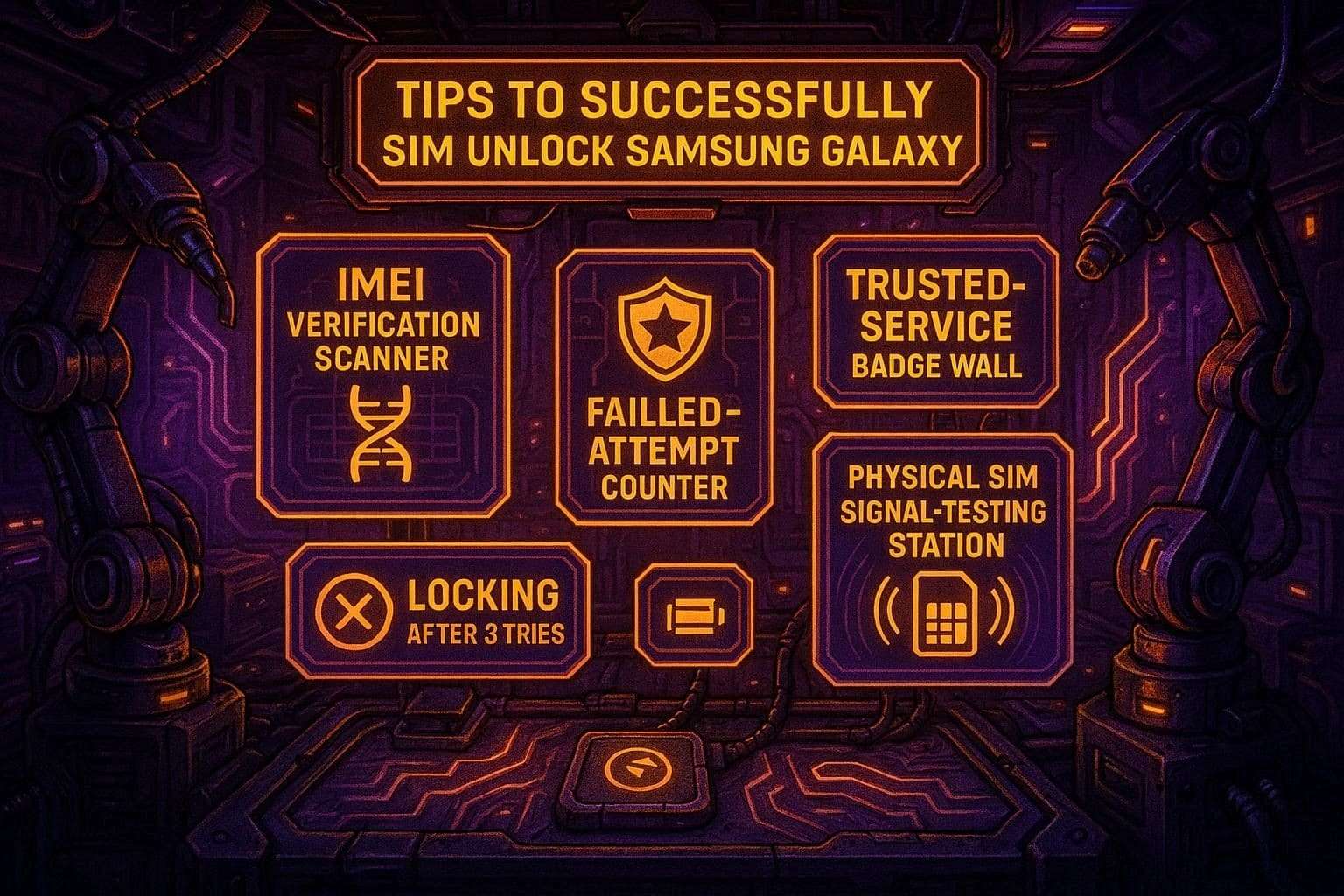
You should follow proven strategies to ensure a successful Samsung carrier unlock. Review these essential guidelines to avoid common mistakes and achieve network freedom:
-
1 Verify IMEI
Double-check your unique identification number by dialing *#06#. A single typing error will cause the service to generate an invalid code.
-
2 Reputable Service
Choose a trusted unlocking platform with verified positive customer reviews. Researching the provider's history prevents you from wasting time and money.
-
3 Limit Attempts
Never enter an uncertain code more than 3 times into your device. Too many wrong attempts will permanently freeze the network lock on the Samsung.
-
4 Physical SIM
Use a physical card from the new provider to test the connection. Digital activation often causes confusion during the final verification of your network status.
-
5 Battery Level
Maintain a battery charge above 50% before starting the process. A power failure might interrupt the cloud request and damage your system files.
Conclusion
To summarize, gaining mobile freedom is very simple when you follow the right process. You can now SIM unlock Samsung Galaxy devices to use any global network. So, choose a reliable service like Dr.Fone Online Unlock to keep your smartphone safe and fully functional. Furthermore, make sure to check your unique number carefully before starting the unlocking process.
FAQ
-
1. Is a factory reset enough to remove a carrier network lock?
A standard factory reset only deletes your personal data and basic system settings. It cannot remove the deep network restrictions placed by your original mobile provider. You must use a professional service to achieve a permanent and official unlock. -
2. Does SIM unlocking affect the future software updates on my phone?
An official IMEI unlock will never interfere with your regular Android system updates. Your device will continue to receive the latest security patches from Samsung. The core software remains original and untouched throughout unlocking. -
3. What happens if my carrier refuses to give me an unlock code?
Many carriers have strict rules that prevent them from approving your unlock request. In such cases, using an external service like Dr.Fone Online Unlock is another way to bypass restrictions. This tool handles the process without needing any carrier network approval.